Key takeaways
- Find the best gaming mouse DPI for Valorant with three mice built for low-sensitivity aim, clean tracking, and steady flicks.
Choosing the best gaming mouse DPI for Valorant is less about picking the highest number on the box and more about finding a sensor, weight, and shape that let you hold a steady crosshair, clear angles, and flick cleanly. Many players use 400 or 800 DPI with a low in-game sensitivity, because that combination gives fine control for small adjustments while still allowing a fast turn. The wrong mouse can make that setup feel twitchy, heavy, or inconsistent, even when the DPI number itself looks right.


This guide is for Valorant players who want a reliable low-sensitivity setup, for competitive players who need consistent tracking in long sessions, and for casual players who want a comfortable mouse that still responds precisely in ranked matches. The products below were chosen from the names and specifications listed on their Amazon product pages, with attention to sensor range, weight, shape, and wireless performance, so you can match a mouse to your grip, your desk space, and the DPI range you actually plan to use.
Quick Picks
As an Amazon Associate we earn from qualifying purchases.
| Product | Best for | Key spec from title |
|---|---|---|
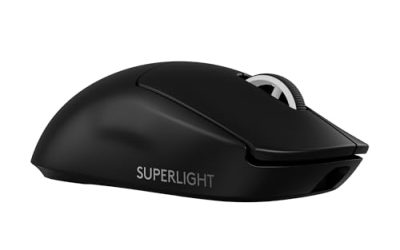
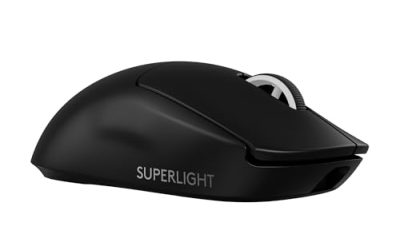
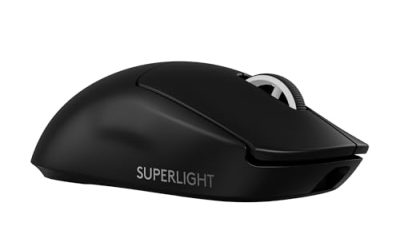
| Logitech G PRO X Superlight 2 Wireless Gaming Mouse | Low-sensitivity aim with a very light mouse | HERO 2 sensor with up to 44,000 DPI |
| Logitech G502 HERO High Performance Gaming Mouse | Players who want extra buttons and an adjustable feel | HERO 25K sensor with up to 25,600 DPI |
| Logitech G Pro Wireless Gaming Mouse | A balanced wireless mouse for ranked play | HERO 16K sensor with up to 16,000 DPI |
How to Choose
Start With 400 or 800 DPI
Most Valorant players settle on 400 or 800 DPI because those values give small, predictable steps when you move the mouse a short distance. At 800 DPI, a small wrist movement moves the crosshair a short distance on screen, which helps when you are holding a tight angle or making a micro-adjustment after a spray. At 400 DPI, the same movement is even finer, but you need more desk space and a larger arm movement to turn quickly. Try 800 DPI first with an in-game sensitivity around 0.35 to 0.5, then move to 400 DPI only if you have enough mousepad space and your arm aim feels more stable than your wrist aim.
Match the Sensor Range to Your Sensitivity
A high maximum DPI does not mean you should use it, but a modern sensor with a wide range usually tracks more cleanly at low DPI as well. Look for a sensor that lists a clear maximum DPI and a high tracking speed on the Amazon product page, then check that the mouse software lets you set DPI in small steps. That matters because Valorant aim depends on repeatable movement, not on a single headline number. A mouse that lets you set exactly 400, 800, or 1600 DPI, and switch between those values with a button, is more useful than one that jumps between fixed presets you cannot change.
Choose a Weight You Can Stop Quickly
Weight affects how easily you can start a flick and, just as importantly, how easily you can stop it on a target. A light mouse under 70 grams suits fast flicks and long sessions, because it needs less force to move and less effort to stop. A heavier mouse can feel steadier for players who hold angles and make slow, deliberate movements, but it can also tire your wrist during a long ranked session. If you play with a low sensitivity and move your arm across a large pad, a lighter mouse is usually the safer choice, while players who mainly use wrist aim may prefer a little more weight for control.
Pick a Shape That Fits Your Grip
Grip style decides whether a mouse feels natural at low DPI, because you will be moving it across a wide area rather than making tiny movements in one place. Palm-grip players need a longer body that supports the hand, claw-grip players need a shape that leaves the palm slightly raised, and fingertip players need a shorter, lighter body they can lift easily. Check the length, width, and height listed on the Amazon product page and compare them with a mouse you already own. A shape that forces your fingers into an awkward position will hurt your aim more than any DPI setting can help.
The 3 Best Options
Logitech G PRO X Superlight 2 Wireless Gaming Mouse
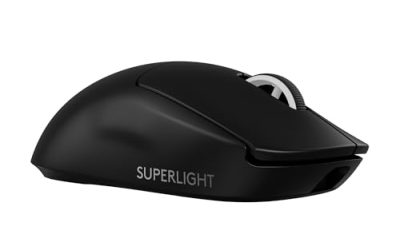
The Logitech G PRO X Superlight 2 suits Valorant players who want a very light wireless mouse for low-sensitivity aim and fast, repeatable flicks. Its low weight makes it easy to move across a large mousepad, and its shape works well for players who use a claw or fingertip grip and lift the mouse often to reset their position. If you play at 400 or 800 DPI and want the mouse to feel almost invisible during a long match, this is the most direct choice in this guide.
Specs
- HERO 2 sensor with up to 44,000 DPI
- Weight 60 grams
- LIGHTSPEED wireless connection up to 8 kHz polling
- Battery life up to 95 hours
- Zero-additive PTFE feet
- Five programmable buttons
Best for: Low-sensitivity Valorant players who want a very light wireless mouse for fast flicks and long sessions.
Watch out for: Check the exact colour and wireless receiver included in the listing before ordering, because variants can differ in what is in the box.
Logitech G502 HERO High Performance Gaming Mouse
The Logitech G502 HERO suits Valorant players who want more control options and a heavier, more planted feel than a very light esports mouse. Its extra buttons can hold useful actions without forcing your left hand to move, and its adjustable weight system lets you tune the balance to your grip. If you like a fuller shape, use a palm grip, and want a mouse that also works well for other games and everyday use, this is the most flexible option here.
Specs
- HERO 25K sensor with up to 25,600 DPI
- 11 programmable buttons
- Adjustable weight system with five weights
- Weight 121 grams
- DPI shift button for quick sensitivity changes
- Onboard memory for DPI profiles
Best for: Palm-grip players who want extra buttons, adjustable weight, and a steady feel for holding angles in Valorant.
Watch out for: Check whether the listing is the wired or wireless version before ordering, because the connection type and weight differ between versions.
Logitech G Pro Wireless Gaming Mouse
The Logitech G Pro Wireless suits Valorant players who want a balanced wireless mouse without going to the lightest possible weight. Its ambidextrous shape works for right- and left-handed players, and its sensor range covers the 400 to 1600 DPI settings most Valorant players use. If you want a reliable ranked-play mouse that feels stable, comfortable, and easy to move, and you do not need a large number of extra buttons, this is a strong middle ground.
Specs
- HERO 16K sensor with up to 16,000 DPI
- Weight 80 grams
- LIGHTSPEED wireless connection
- Battery life up to 48 hours with lighting on and up to 60 hours with lighting off
- Eight programmable buttons
- Ambidextrous design
Best for: Ranked Valorant players who want a balanced, ambidextrous wireless mouse for 400 to 800 DPI play.
Watch out for: Check the exact model and receiver in the listing before ordering, because older and newer G Pro listings can look similar.
Which One Fits Your Situation
You Play at 400 DPI With a Large Mousepad
Choose the Logitech G PRO X Superlight 2. Its very low weight makes large arm movements easier to start and stop, which matters when 400 DPI forces you to move the mouse a long way to turn. The light body also reduces fatigue in long matches, so your aim stays steadier in later rounds than it would with a heavier mouse.
You Hold Angles and Want Extra Buttons
Choose the Logitech G502 HERO. Its heavier, fuller shape feels planted when you are holding a tight angle, and its extra buttons let you keep useful actions on the mouse. The adjustable weights also let you fine-tune the balance until the mouse feels steady without feeling slow. That tuning helps during long holds.
You Want a Balanced Wireless Mouse for Ranked Play
Choose the Logitech G Pro Wireless. Its 80-gram weight sits between the very light Superlight and the heavier G502 HERO, so it suits players who switch between wrist and arm aim during ranked sessions. Its ambidextrous shape also works well if you share the mouse or play with your left hand.
You Are New to Low-Sensitivity Valorant Aim
Choose the Logitech G Pro Wireless and start at 800 DPI. Its balanced weight and familiar shape make the move from a high DPI to a lower DPI easier, because the mouse does not feel too light or too heavy while you are learning. Once your arm aim is consistent, you can try 400 DPI or move to the lighter Superlight 2 if you want faster flicks.
Common Mistakes
- Choosing the highest DPI available instead of a stable 400 or 800 DPI setting that gives finer control for small adjustments.
- Copying a professional player’s exact DPI and sensitivity without checking whether you have enough mousepad space for that low-sensitivity setup.
- Picking a mouse only for its weight and ignoring the shape, which decides whether your grip stays comfortable during long matches.
- Setting a DPI value in the mouse software and forgetting to match it with a sensible in-game sensitivity, which makes the aim feel either too fast or too slow.
- Using a small mousepad with a low DPI, which forces you to lift and reset the mouse constantly instead of aiming smoothly.
Frequently Asked Questions
What is the best DPI for Valorant?
Most Valorant players use 400 or 800 DPI with a low in-game sensitivity, because those settings give fine control for holding angles and making small corrections. A common starting point is 800 DPI with an in-game sensitivity around 0.35 to 0.5. Try that for several matches, then adjust the in-game sensitivity in small steps rather than changing DPI often.
Is a higher DPI better for Valorant?
No, a higher DPI is not better for Valorant. A very high DPI makes the crosshair move a long way for a small hand movement, which makes it harder to stop precisely on a target. A modern mouse with a high maximum DPI can still be a good choice, but you should use it at 400, 800, or 1600 DPI and let the sensor’s clean tracking do the work.
Should I use 400 or 800 DPI in Valorant?
Use 800 DPI if you have a medium-sized mousepad and use a mix of wrist and arm aim, because it needs less desk space to turn quickly. Use 400 DPI if you have a large mousepad and mainly use arm aim, because it gives even finer control for small adjustments. Both can work well, so choose the one that feels steadier after a few matches.
Does mouse weight matter for Valorant aim?
Yes, weight matters because it affects how easily you can start and stop a flick. A lighter mouse is easier to move quickly and causes less fatigue, while a heavier mouse can feel steadier for slow angle-holding. Most players who use a low sensitivity prefer a lighter mouse, but the shape and your grip style matter just as much as the weight.
FAQ
What is the best DPI for Valorant?
Is a higher DPI better for Valorant?
Should I use 400 or 800 DPI in Valorant?
Does mouse weight matter for Valorant aim?
More from Amazon
Programs that pair well with the guide above. Offers and eligibility are set by Amazon and may change.
Free shipping on eligible items, Prime Video and more. Eligible new members can start with a free trial.
Start a Prime free trialA Prime membership for ages 18-24 with a trial period. Eligibility is set by Amazon.
See Prime for Young AdultsAudiobooks and podcasts to listen to on the go. Eligible new members can start with a free trial.
Try Audible freeAd-free music streaming. Eligible new subscribers can start with a free trial.
Try Music Unlimited freeAs an Amazon Associate we earn from qualifying purchases.