Key takeaways
- Compare the best wireless gaming mouse with side buttons for MMO, MOBA and FPS play, from 12-button grids to simple two-button layouts and battery life.
Side buttons change what a mouse can do. Two well-placed thumb buttons are enough to move melee, push-to-talk, or a favourite ability off the keyboard and under the finger already resting there. A full 12-button grid goes much further, putting an entire MMO rotation, a MOBA item bar, or a set of building binds within reach of one thumb. The best wireless gaming mouse with side buttons is therefore not simply the mouse with the most buttons. It is the one whose layout matches the games you play, whose shape lets you reach those buttons without shifting your grip, and whose wireless link stays responsive when the extra inputs matter.


That range is wide here on purpose. At one end are MMO mice with 12 side buttons, swappable plates, and sliding panels. At the other is a compact mouse with just two side buttons and very long battery life. In between are versatile models for shooters, action RPGs, and everyday play. Reading the layout first, and the sensor second, beats chasing the highest DPI number.
As an Amazon Associate we earn from qualifying purchases.
Quick Picks
Start with how many thumb inputs you use, then narrow by weight and grip.
| Product | ASIN | Best For |
|---|---|---|
| Logitech G502 X PLUS Lightspeed | B0B5L7DSQX | Versatile play with a few strong thumb controls |
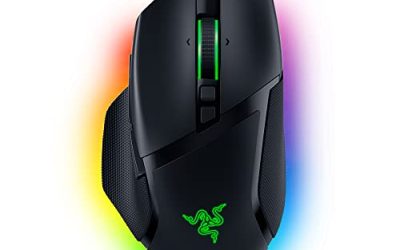
| Razer Naga V2 Pro | B0B6BR9N9F | MMO players who want swappable side plates |
| SteelSeries Aerox 9 Wireless | B09ZLR96S2 | A 12-button grid in a lighter wireless body |
| Corsair Scimitar Elite Wireless | B0CCVYHZ9N | MMO players who want an adjustable side panel |
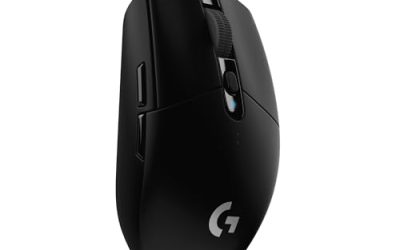
| Logitech G305 Lightspeed | B07CMS5Q6P | Simple two-button play and very long battery life |
How to Choose
Choosing one starts with an honest count of the commands you want under your thumb, because every extra button adds learning time, accidental-press risk, and weight.
How Many Side Buttons You Actually Need
Two side buttons suit most shooter players. They cover repeated actions without forcing you to memorise a grid, and leave room for a thumb rest. If you regularly run out of easy keyboard binds, play MMOs with large ability bars, or use MOBA item actives on a short cooldown, a 12-button side panel becomes more useful. Those grids reward practice: at first you will mis-press, and only after building muscle memory do they feel faster than the keyboard. A middle option with three to five thumb controls, sometimes expanded by a shift function, can be the sweet spot for hybrid players who switch genres. Count the binds in your main game before you shop, not the binds you imagine using one day.
Side Button Placement, Shape, and Grip
A button you cannot reach cleanly is not really an extra button. On grid mice, check whether the rows are textured or differently shaped so your thumb can tell them apart by feel, and whether the panel can slide or swap to suit your hand size. Palm-grip players tend to prefer a wider, sculpted shell with a thumb rest, because their thumb stays planted and presses from a stable position. Claw and fingertip players often prefer a shorter, lighter shell and fewer, larger side buttons they can hit while still moving the mouse quickly.
Weight and How It Affects Aim and Endurance
Weight shapes both aim and comfort. Heavier mice in this category, often well above 100 grams because of their extra buttons, batteries, and lighting, can feel planted and deliberate, which some palm-grip and MMO players like. Lighter models are easier to lift, stop, and flick, and they tend to be kinder during fast, repeated swipes in shooters and MOBAs. If you play a mix of genres, consider which sessions last longest, because endurance usually matters more than a single fast flick.
Wireless Connection and Polling Rate
For gaming, a dedicated 2.4 GHz dongle connection is the option to prioritise. The models in this guide list polling rates of 1,000 Hz over that link, with the Corsair model listing up to 2,000 Hz, which describes how often the mouse reports its position. Bluetooth is valuable as a second mode for a laptop or work machine, and it often stretches battery life, but it is not the mode to choose for a ranked match. A wired USB-C fallback is also worth having, since it lets you keep playing while charging.
Sensor, DPI, and Switch Feel
Modern optical sensors in this class are more than accurate enough for most players, so treat the maximum DPI figure as headroom rather than a score. Ranges from 12,000 DPI up to 30,000 DPI all cover the settings real players use, and tracking speed figures matter mainly as confirmation that the sensor will not spin out during a fast swipe. Switch type deserves equal attention. Optical and hybrid optical-mechanical switches, used on several picks here, are designed for fast actuation, while traditional mechanical switches offer a familiar feel on the simpler models.
5 Best Options
Each pick below solves a different problem, from full MMO grids to a minimal two-button layout.
Logitech G502 X PLUS Lightspeed
Specs
- Sensor: HERO 25K optical sensor, up to 25,600 DPI
- Connectivity: LIGHTSPEED 2.4 GHz wireless and USB-C wired
- Polling rate: 1,000 Hz
- Controls: 13 programmable controls, including thumb buttons and a dual-mode scroll wheel
- Switches: LIGHTFORCE hybrid optical-mechanical switches
- Weight: 106 g, with LIGHTSYNC RGB lighting
- ASIN: B0B5L7DSQX
Best for: Players who want more than two side buttons without committing to a full 12-button grid. The G502 X PLUS pairs its thumb controls with a removable DPI-shift button and a G-Shift function that can give buttons a second layer of commands, which suits shooters, action RPGs, and general play where a handful of well-placed binds matters more than a keypad. Its sculpted shape also suits sessions that mix gaming with desktop work.
Watch out for: There is no Bluetooth, so it is a gaming-desk mouse rather than a multi-device travel mouse, and at 106 g it is heavier than ultralight FPS models. Battery life also depends heavily on lighting, dropping substantially with RGB on, so the longest runtimes assume you keep the effects subdued.
Razer Naga V2 Pro
Specs
- Sensor: Razer Focus Pro 30K optical sensor, up to 30,000 DPI, 750 IPS, 70G acceleration
- Connectivity: Razer HyperSpeed 2.4 GHz wireless, Bluetooth, and USB-C wired
- Polling rate: 1,000 Hz
- Side layout: Three swappable side plates with 2, 6, and 12-button options, up to 20 programmable buttons depending on plate
- Switches: Razer Optical Mouse Switches Gen-3, rated for 90 million clicks
- Weight: 134 g; size 119.5 x 75.5 x 43.5 mm
- ASIN: B0B6BR9N9F
Best for: MMO and multi-genre players who are not sure how many side buttons they want, because the Naga V2 Pro lets you change your mind. Fit the 12-button plate for a raid night, the 6-button plate for a MOBA layout, or the 2-button plate for a shooter, all on the same mouse. Its long listed battery life and customisable scroll wheel make it the most adaptable option here.
Watch out for: At 134 g it is the heaviest pick here by a clear margin, which can feel sluggish in fast shooters and tiring for fingertip-grip players. The swappable system also means more parts to keep track of, and getting the most from the plates depends on spending real time in Razer’s software rather than using it as a plug-and-play mouse.
SteelSeries Aerox 9 Wireless
Specs
- Sensor: SteelSeries TrueMove Air optical sensor, up to 18,000 DPI, 400 IPS, 40G acceleration
- Connectivity: 2.4 GHz wireless, Bluetooth 5.0, and USB-C wired
- Polling rate: 1,000 Hz
- Controls: 18 programmable buttons, including a 12-button side panel
- Switches: SteelSeries mechanical switches, rated for 80 million clicks
- Weight: 89 g; size 128.8 x 62.8 x 42.1 mm, with an IP54-rated AquaBarrier design
- ASIN: B09ZLR96S2
Best for: MMO and MOBA players who want a full 12-button side grid without the usual weight penalty. At 89 g, the Aerox 9 is strikingly light for a mouse carrying this many inputs, which helps during long sessions that still involve plenty of camera movement and quick repositioning. Its perforated shell and dual wireless modes make it a strong fit for players who found traditional MMO mice too heavy but still need an entire rotation under the thumb.
Watch out for: The honeycomb shell is a matter of taste: some players dislike the texture under the palm and worry about dust getting inside, even with the protective design. The listed battery life over 2.4 GHz, up to 80 hours, is also shorter than its Bluetooth figure of up to 180 hours, so competitive players should expect to charge more often than the headline number suggests.
Corsair Scimitar Elite Wireless
Specs
- Sensor: Corsair Marksman optical sensor, up to 26,000 DPI, 650 IPS, 50G acceleration
- Connectivity: Slipstream 2.4 GHz wireless, Bluetooth, and USB-C wired
- Polling rate: Up to 2,000 Hz
- Controls: 16 programmable buttons, including a 12-button side panel on an adjustable Key Slider
- Switches: Optical main switches, rated for 100 million clicks
- Weight: 114 g; size 119.23 x 73.48 x 42.17 mm, with 3 onboard profiles
- ASIN: B0CCVYHZ9N
Best for: MMO players who like a 12-button grid but worry about reaching it comfortably. The Scimitar Elite Wireless lets you slide its side panel forward or back and lock it in place, so the grid sits where your thumb naturally rests instead of where a fixed design assumes it should. That adjustability, a palm-grip shell, up to 120 hours of listed battery life over 2.4 GHz with lighting off, and onboard profiles make it a strong choice for long raid sessions.
Watch out for: It is a large, heavy mouse at 114 g, and its shape is firmly right-handed and palm-oriented, so smaller hands and claw-grip players may find the grid harder to use despite the sliding panel. Full configuration runs through Corsair’s iCUE software, which is powerful but a bigger commitment if you prefer to set a mouse up once and forget the software exists.
Logitech G305 Lightspeed
Specs
- Sensor: Logitech HERO optical sensor, 200 to 12,000 DPI, 400 IPS, 40G acceleration
- Connectivity: LIGHTSPEED 2.4 GHz wireless via a USB receiver stored inside the mouse
- Polling rate: 1,000 Hz in Performance mode
- Controls: 6 programmable buttons, including two side buttons
- Battery: One AA battery, up to 250 hours in Performance mode
- Weight: 99 g with battery; size 116.6 x 62.15 x 38.2 mm
- ASIN: B07CMS5Q6P
Best for: Players who want the core benefit of side buttons — two reliable thumb inputs for melee, voice chat, or a key ability — without a grid to learn or a charging cable to manage. The G305’s compact shape suits claw and fingertip grips and smaller to medium hands, its receiver stores inside the body for travel, and a single AA battery lasting up to 250 hours means it is almost always ready to play.
Watch out for: Two side buttons is the whole offer, so MMO and MOBA players who need a rotation under the thumb will outgrow it quickly, and there is no Bluetooth or wired mode if the receiver is lost. The compact shell can feel cramped for large hands using a palm grip, and the AA design means keeping a spare battery around rather than plugging in a cable.
Which One Fits You
- MMO raiders with a full rotation to map: Choose the Razer Naga V2 Pro for its swappable 12-button plate, or the Corsair Scimitar Elite Wireless if you would rather slide a fixed grid into the exact position your thumb prefers.
- MMO and MOBA players who hate heavy mice: Pick the SteelSeries Aerox 9 Wireless, which keeps a 12-button side panel while staying at 89 g for faster, less tiring movement.
- Shooter and action RPG players who play several genres: Go with the Logitech G502 X PLUS Lightspeed, whose thumb controls, DPI-shift button, and second-layer G-Shift commands cover a lot of ground without a keypad.
- Players who only need two dependable side buttons: Take the Logitech G305 Lightspeed for its simple layout, compact shape, and AA battery that lasts for months of regular play.
- Players who switch between PC and laptop: Favour the Naga V2 Pro, Aerox 9, or Scimitar Elite Wireless, each with Bluetooth alongside 2.4 GHz.
Common Mistakes
- Buying a 12-button grid for a two-button game: Extra side buttons add weight and accidental presses, so match the layout to the binds your main game actually uses rather than the largest number available.
- Ignoring thumb reach and grip style: A grid that sits too far forward for your hand or a shell that fights your claw grip will stay unused, so check size, shape, and whether the panel adjusts or swaps before anything else.
- Gaming over Bluetooth because it was already paired: Bluetooth is convenient and battery-friendly, but the 2.4 GHz dongle mode is the responsive connection these mice are designed around for play.
- Leaving every side button on its default mapping: Defaults rarely match your keybinds, so spend one session assigning and simplifying your layout in the software, then give your thumb time to learn it.
- Judging a mouse by maximum DPI alone: Every sensor here offers far more sensitivity than most players use, while shape, weight, button feel, and battery habits will decide how the mouse feels after a week.
FAQ
How many side buttons do most gamers actually need?
Most shooter, action, and adventure players need only two, which cover the actions repeated often enough to deserve a thumb shortcut. MMO and MOBA players are the exception, since a 6- or 12-button layout can hold abilities and items that would otherwise spread across hard-to-reach keyboard keys. If you are unsure, start with fewer buttons and a shift function rather than a full grid.
Are wireless gaming mice fast enough for competitive play?
Yes, over their dedicated 2.4 GHz connections, the mice in this guide report at 1,000 Hz or higher, which is the same headline rate as most wired gaming mice. Keep the dongle close and unobstructed for the most stable link, and use Bluetooth for convenience tasks rather than ranked matches. A wired mode, where offered, remains a useful fallback for charging while you play.
How long does it take to learn a 12-button side grid?
Expect several sessions of adjustment, with wrong presses at first. Textured buttons, a sliding panel, and mapping only your most-used abilities first will shorten that curve. Players who stick with one main game usually find the layout becomes automatic.
Can I use side buttons for work as well as games?
Yes, side buttons can be mapped to browser navigation, copy and paste, media controls, or shortcuts through the software or onboard profiles. Several onboard profiles let you keep a work layout and a game layout on the same device. Just check which profile is active before a session.
A good wireless gaming mouse with side buttons should disappear into your hand while putting your most-used commands where your thumb already rests. Decide your button count from your main game, pick the shape and weight that suit your grip, and let the sensor support that choice rather than drive it.
FAQ
How many side buttons do most gamers actually need?
Are wireless gaming mice fast enough for competitive play?
How long does it take to learn a 12-button side grid?
Can I use side buttons for work as well as games?
More from Amazon
Programs that pair well with the guide above. Offers and eligibility are set by Amazon and may change.
Free shipping on eligible items, Prime Video and more. Eligible new members can start with a free trial.
Start a Prime free trialA Prime membership for ages 18-24 with a trial period. Eligibility is set by Amazon.
See Prime for Young AdultsAudiobooks and podcasts to listen to on the go. Eligible new members can start with a free trial.
Try Audible freeAd-free music streaming. Eligible new subscribers can start with a free trial.
Try Music Unlimited freeAs an Amazon Associate we earn from qualifying purchases.