Our Short List of 3


All 4 Picks at a Glance
| Product | Specs | Action |
|---|---|---|
 1. Logitech G305 LIGHTSPEED — Best All-Round Choice | Check price on Amazon | |
| 2. Razer Basilisk V3 X HyperSpeed — Best for Buttons and Battery Life | Check price on Amazon | |
| 4. Corsair Harpoon RGB Wireless — Best for Multi-Device and Console Flexibility | Check price on Amazon | |
 5. HyperX Pulsefire Haste Wireless — Best Ultralight Option | Check price on Amazon |
Key takeaways
- Compare the best wireless mouse for gaming under 50 by sensor, battery life, weight and grip, with five proven picks for PC and console players.
Cutting the cord used to mean paying a premium. That is no longer true. The best wireless mouse for gaming under 50 now comes from the same brands that build far more expensive esports gear, and the gap between a budget wireless mouse and a flagship one is mostly about extras — fancier charging docks, exotic materials, ultra-high polling rates — rather than about whether the mouse tracks accurately or responds quickly enough for competitive play.
As an Amazon Associate we earn from qualifying purchases.
This guide compares five wireless gaming mice that sit in the under-50 budget class: the Logitech G305 LIGHTSPEED, the Razer Basilisk V3 X HyperSpeed, the SteelSeries Rival 3 Wireless, the Corsair Harpoon RGB Wireless, and the HyperX Pulsefire Haste Wireless. Each one uses a proper gaming-grade 2.4 GHz wireless connection, each one comes from a manufacturer with real support and software behind it, and each one suits a slightly different kind of player. The sections below explain what actually matters at this budget, then walk through each mouse in turn.
What to Look for in a Budget Wireless Gaming Mouse
The wireless connection matters more than the sensor headline
Every mouse in this guide offers a 2.4 GHz connection through a USB receiver, and that is the connection to use for gaming. These proprietary links — Logitech calls its version LIGHTSPEED, Razer calls its HyperSpeed, Corsair calls its SLIPSTREAM, and SteelSeries calls its Quantum 2.0 — are built to deliver a 1 ms report rate, which puts them on par with a wired mouse for practical purposes. Bluetooth, where it is offered, is a useful second mode for a laptop or a second computer, but it polls more slowly and is better kept for desktop work and casual play.
Sensor numbers: DPI is not the whole story
Manufacturers advertise maximum DPI or CPI figures prominently, and at this budget those figures range from 10,000 to 18,000 across the mice below. In practice, most players game somewhere between 400 and 3,200 DPI, so the headline number is the least important part of the specification. What matters more is that the sensor tracks without acceleration, smoothing, or spin-outs at the speeds a hand actually moves. All five sensors here — Logitech’s HERO, Razer’s 5G Advanced, SteelSeries’ TrueMove Air, Corsair’s 10,000 DPI optical sensor, and the sensor in the HyperX Pulsefire Haste — are optical gaming sensors designed for exactly that kind of consistent, one-to-one tracking.
Battery strategy: replaceable cells versus rechargeable
Budget wireless mice split into two camps. The Logitech G305, Razer Basilisk V3 X, and SteelSeries Rival 3 run on replaceable AA or AAA batteries and last for hundreds of hours per set, which means a dead battery is a thirty-second swap rather than a charging session. The Corsair Harpoon and HyperX Pulsefire Haste use built-in rechargeable batteries with shorter rated runtimes, but they can be plugged in and used as wired mice while they charge. Neither approach is wrong; the choice depends on whether you would rather keep spare batteries in a drawer or keep a cable within reach.
Weight and shape decide comfort
Weight in this group runs from about 61 grams for the honeycomb-shelled HyperX up to around 106 grams for the SteelSeries with both of its batteries fitted. Lighter mice favor fast, low-sensitivity flicks in shooters; heavier mice can feel steadier for tracking and for players with larger hands. Shape matters just as much. The G305, Rival 3, and Pulsefire Haste use symmetrical shells that suit claw and fingertip grips, while the Basilisk V3 X and the Harpoon use right-handed ergonomic shapes with a thumb rest that suit palm grips and longer, more relaxed sessions.
Buttons and software
Six buttons is the standard layout in this class — two main clicks, a clickable wheel, a DPI button, and two thumb buttons — and it covers shooters, action games, and everyday shortcuts comfortably. The Razer Basilisk V3 X is the exception, with nine programmable controls for players who map abilities, macros, or media keys. Each brand’s software (Logitech G HUB, Razer Synapse, SteelSeries Engine, Corsair iCUE, and HyperX NGENUITY) handles DPI stages, button remapping, and, where fitted, RGB lighting. Check that the software supports your operating system before buying, especially on Mac and Linux.
The Five Picks Compared
| Mouse | Sensor | Max sensitivity | Battery | Weight | Buttons | Wireless modes |
|---|---|---|---|---|---|---|
| Logitech G305 LIGHTSPEED | HERO | 12,000 DPI | 1 AA, up to 250 hours | 99 g | 6 | 2.4 GHz |
| Razer Basilisk V3 X HyperSpeed | Razer 5G Advanced 18K | 18,000 DPI | 1 AA, up to 285 hours on HyperSpeed | About 110 g with battery | 9 controls | 2.4 GHz, Bluetooth |
| SteelSeries Rival 3 Wireless | TrueMove Air | 18,000 CPI | 2 AAA, up to 400+ hours | 106 g with 2 AAA, 95 g with 1 AAA | 6 | 2.4 GHz, Bluetooth 5.0 |
| Corsair Harpoon RGB Wireless | Optical | 10,000 DPI | Rechargeable, up to 60 hours | 99 g | 6 | SLIPSTREAM 2.4 GHz, Bluetooth, wired |
| HyperX Pulsefire Haste Wireless | Optical | 16,000 DPI | Rechargeable, up to 100 hours | 61 g | 6 | 2.4 GHz |
1. Logitech G305 LIGHTSPEED — Best All-Round Choice
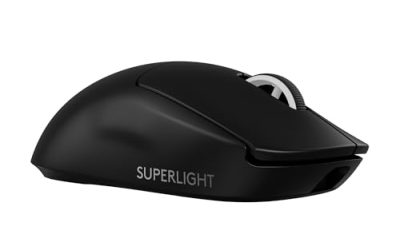
The Logitech G305 LIGHTSPEED is the mouse most players should look at first, because it gets the fundamentals right with no weak point. Its HERO optical sensor tracks at up to 400 IPS with sensitivity adjustable up to 12,000 DPI, and the LIGHTSPEED wireless link reports at 1 ms, so the connection never becomes the limiting factor in a fast game.
Battery life is the G305’s signature strength. Logitech rates it for up to 250 hours of continuous play at the 1 ms report rate on a single AA battery, and an Endurance mode, set through the software, stretches that to as long as nine months at a reduced report rate for desktop use. A small indicator light warns when the battery drops to 15 percent, and the USB receiver stores inside the mouse body, which makes the G305 easy to throw in a laptop bag without losing the dongle.
The shell is a compact, symmetrical shape weighing 99 grams with the battery fitted. It suits small to medium hands and claw or fingertip grips well; committed palm grippers with large hands may find it short. Six programmable buttons cover the essentials, onboard memory holds your settings, and Logitech G HUB handles DPI stages and remapping. There is no Bluetooth and no RGB lighting, which is exactly why the battery lasts as long as it does.
View it on Amazon: https://www.amazon.com/dp/B07CMS5Q6P
2. Razer Basilisk V3 X HyperSpeed — Best for Buttons and Battery Life
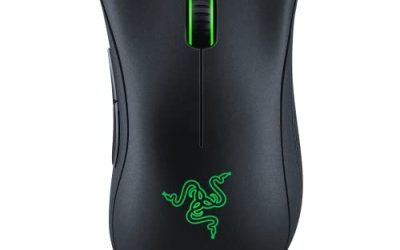
The Razer Basilisk V3 X HyperSpeed is the pick for players who want an ergonomic shape and more controls than the standard six-button layout. Its right-handed shell includes a thumb rest and nine programmable controls, including a multi-function trigger, and Razer’s Hypershift function can assign a second layer of commands to those controls for MOBA, MMO, and strategy games where extra binds earn their keep.
Inside is Razer’s 5G Advanced optical sensor with up to 18,000 DPI and a stated 99.4 percent tracking accuracy. Connectivity is dual-mode: Razer HyperSpeed Wireless over 2.4 GHz for gaming, and Bluetooth for a second device such as a work laptop, with multi-device support so one mouse can serve both machines. Battery life leads this group on paper — up to 285 hours on HyperSpeed and up to 535 hours on Bluetooth, from a single AA battery.
The trade-offs are size and weight. At roughly 110 grams with a battery installed, the Basilisk V3 X is the heaviest mouse here, and its sculpted shape is built for right-handed palm and claw grips rather than fingertip play. It also adds Chroma RGB lighting, which the other AA-powered mice in this guide skip. For players who want one mouse for long sessions across two computers, with buttons to spare, it is the most feature-complete option in the budget class.
View it on Amazon: https://www.amazon.com/dp/B0BXBC26X8
3. SteelSeries Rival 3 Wireless — Best Battery Endurance per Charge Cycle
The SteelSeries Rival 3 Wireless takes the endurance idea furthest. Its Quantum 2.0 dual wireless system pairs a 2.4 GHz gaming connection with Bluetooth 5.0, and SteelSeries rates the battery life at more than 400 hours in its high-efficiency gaming mode. Power comes from two AAA batteries, and the mouse can run on a single AAA instead, which drops the weight from 106 grams to 95 grams for players who prefer a lighter feel and accept shorter intervals between battery changes.
The TrueMove Air optical sensor, developed with PixArt, offers up to 18,000 CPI with 400 IPS tracking and 40G acceleration, and the main switches are mechanical units rated for 60 million clicks. The shape is a right-handed ergonomic shell sized for claw and fingertip grips, with six buttons and onboard settings through SteelSeries Engine. Compatibility is broad, covering Windows, Mac, Linux, and Xbox according to the listing.
What the Rival 3 Wireless gives up is a rechargeable battery and lighting — there is no RGB here, and the finish is plain matte black ABS. In return it offers the longest rated runtime in this guide and the flexibility of Bluetooth for a second device. For a player who hates thinking about charging and plays across a PC and a laptop, it is a very practical mouse.
View it on Amazon: https://www.amazon.com/dp/B08GB2PF71
4. Corsair Harpoon RGB Wireless — Best for Multi-Device and Console Flexibility
The Corsair Harpoon RGB Wireless is the most connection-flexible mouse in this group. Corsair’s SLIPSTREAM wireless technology provides a sub-1 ms 2.4 GHz link, Bluetooth covers low-latency pairing to other devices, and a USB cable turns it into a wired mouse while the built-in battery recharges. That three-way flexibility, plus listed compatibility with PC, Mac, PlayStation, and Xbox, makes it a sensible single mouse for a mixed desk and console setup.
The sensor is a 10,000 DPI optical unit, the lowest headline figure here but still far above the sensitivity settings most players actually use, and the main switches are Omron units rated for more than 50 million clicks. Six buttons are fully programmable through Corsair iCUE, which also controls the dynamic RGB lighting and can sync effects with other iCUE devices. Battery life is rated at up to 60 hours of continuous wireless play, after which the cable keeps a session going while it charges.
The contoured, right-handed shape weighs 99 grams and includes rubber side grips, which help during long sessions. The Harpoon is the natural pick for Corsair users already running iCUE, and for anyone who wants RGB and wired fallback in the budget class — two features the AA-powered mice above do not offer.
View it on Amazon: https://www.amazon.com/dp/B07KQWR72Z
5. HyperX Pulsefire Haste Wireless — Best Ultralight Option
The HyperX Pulsefire Haste Wireless is built around one idea: minimum weight. Its honeycomb hex shell brings it down to 61 grams, far lighter than anything else in this guide, which reduces the effort needed to start and stop fast flicks and can ease wrist strain over long sessions of low-sensitivity shooter play. The open shell is also why it feels so different in the hand — players who dislike perforated designs should know that is the trade made for the weight.
Specifications stay competitive despite the diet. The optical sensor reaches up to 16,000 DPI, the 2.4 GHz wireless connection is the gaming link, and the built-in battery is rated for up to 100 hours — the longest runtime of the two rechargeable mice here. Six programmable buttons handle the standard layout, configured through HyperX’s software.
The Pulsefire Haste Wireless suits fingertip and claw grippers who play fast-paced shooters and have decided that weight is their top priority. Palm grippers and players who want Bluetooth or extra buttons will be better served by the Razer or SteelSeries above, but for pure agility in the under-50 class, nothing else here comes close to 61 grams.
View it on Amazon: https://www.amazon.com/dp/B09TLCRGMN
How to Choose Between These Five
Start with grip and hand size, because a mouse that fits is worth more than a spec advantage. Palm grippers and players with larger hands should look first at the Razer Basilisk V3 X or the Corsair Harpoon. Claw and fingertip players, and anyone with smaller hands, will find the Logitech G305, SteelSeries Rival 3 Wireless, and HyperX Pulsefire Haste easier to control.
Next, decide how you want to handle power. If the idea of plugging in a mouse bothers you, the three AA and AAA models run for hundreds of hours and ask only for an occasional battery swap; the G305 and Basilisk V3 X are especially frugal. If you prefer not to buy batteries at all, the Harpoon and the Pulsefire Haste recharge over USB and keep working while plugged in.
Then consider your second device. The Basilisk V3 X, Rival 3 Wireless, and Harpoon all offer Bluetooth alongside their 2.4 GHz gaming links, so one mouse can cover a gaming PC and a laptop. The G305 and Pulsefire Haste are single-connection mice, which keeps them simple and, in the G305’s case, exceptionally efficient.
Finally, count your buttons. Six is enough for shooters, battle royale titles, and most action games. If you play MMOs or strategy games and regularly wish for more binds, the Basilisk V3 X and its nine programmable controls are the clear answer in this price class.
Frequently Asked Questions
Is a wireless mouse under 50 good enough for competitive gaming?
For most players, yes. The 2.4 GHz connections on the mice above report at 1 ms, the same rate as a typical wired gaming mouse, and their optical sensors track without the acceleration or smoothing that used to plague budget hardware. Higher-priced mice add features such as higher polling rates, lighter exotic materials, and optical switches, but the mice in this class do not impose a meaningful handicap in ranked play.
Should I use Bluetooth or 2.4 GHz for gaming?
Use the 2.4 GHz receiver for gaming. It is the low-latency mode every mouse here is designed around. Bluetooth is convenient for a laptop, a tablet, or office work, and it extends battery life on the mice that offer it, but its slower polling makes it a poor choice for fast games.
How long do the batteries really last?
Rated figures assume the manufacturer’s stated mode and settings. The AA and AAA mice are rated in the hundreds of hours — up to 250 hours for the G305, up to 285 hours on HyperSpeed for the Basilisk V3 X, and over 400 hours for the Rival 3 Wireless in its high-efficiency mode — so at a few hours of play a day, a set of batteries can last weeks to months. The rechargeable Harpoon (up to 60 hours) and Pulsefire Haste (up to 100 hours) need a cable far more often, but both can be used while charging.
Does a lighter mouse actually help?
A lighter mouse reduces the force needed for quick direction changes, which many shooter players prefer at low sensitivity settings. It is a preference, not a universal advantage: some players find a heavier mouse steadier for smooth tracking. The range in this guide, from 61 grams to about 110 grams, lets you pick the feel you want without leaving the budget class.
Can these mice work on consoles?
Compatibility varies by model. The Corsair Harpoon listing includes PC, Mac, PlayStation, and Xbox, and the SteelSeries Rival 3 Wireless listing includes Xbox among its supported platforms. Console mouse support also depends on the individual game, so check the specific title as well as the mouse.
Conclusion
The under-50 wireless class is no longer a compromise tier. The Logitech G305 LIGHTSPEED is the safest all-round recommendation, with a proven sensor, a 1 ms wireless link, and months of battery life from a single AA cell. The Razer Basilisk V3 X HyperSpeed adds an ergonomic shape, nine controls, and Bluetooth for players who want more from one mouse. The SteelSeries Rival 3 Wireless maximizes battery endurance, the Corsair Harpoon RGB Wireless maximizes connection flexibility and adds RGB with a wired fallback, and the HyperX Pulsefire Haste Wireless delivers genuine ultralight handling at 61 grams. Match the mouse to your grip, your power preference, and your games, and any of the five will serve well within this budget.
FAQ
Is a wireless mouse under 50 good enough for competitive gaming?
Should I use Bluetooth or 2.4 GHz for gaming?
How long do the batteries really last?
Does a lighter mouse actually help?
Can these mice work on consoles?
More from Amazon
Programs that pair well with the guide above. Offers and eligibility are set by Amazon and may change.
Free shipping on eligible items, Prime Video and more. Eligible new members can start with a free trial.
Start a Prime free trialA Prime membership for ages 18-24 with a trial period. Eligibility is set by Amazon.
See Prime for Young AdultsAudiobooks and podcasts to listen to on the go. Eligible new members can start with a free trial.
Try Audible freeAd-free music streaming. Eligible new subscribers can start with a free trial.
Try Music Unlimited freeAs an Amazon Associate we earn from qualifying purchases.