Our Short List of 3

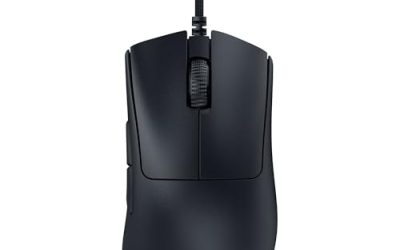
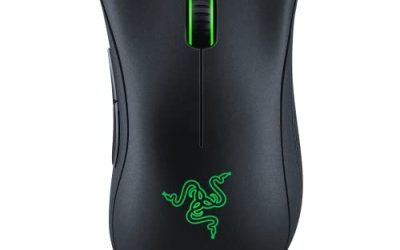
- Best for: Palm players who want a full ergonomic shell without the fatigue of a heavy mouse. The DeathAdder shape is long and high enough to support the palm, yet at 59 g it moves with little effort, making it strong for FPS and action games at low sensitivity. If you like palm comfort but worry a supportive mouse will feel slow, this model answers that concern most directly.
- Sensor: Razer Focus Pro 30K optical sensor, up to 30,000 DPI
- Weight: 59 g
- Connectivity: Wired, Speedflex cable
- Polling rate: Up to 8K Hz HyperPolling

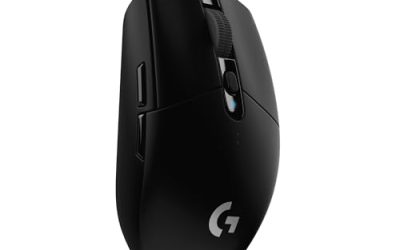
- Best for: Palm players who want a substantial, planted mouse and many controls. The tall, sculpted shell fills the palm, the thumb area gives a relaxed hand a place to rest, and eleven buttons plus the dual-mode wheel suit MMO, MOBA, action RPG, and mixed gaming and work use. The tuning weights help if you prefer a heavier feel.
- Sensor: Logitech HERO 25K optical sensor, 100 to 25,600 DPI
- Weight: 121 g, with up to five 3.6 g tuning weights included
- Connectivity: Wired USB
- Buttons: 11 programmable buttons, dual-mode hyper-fast scroll wheel

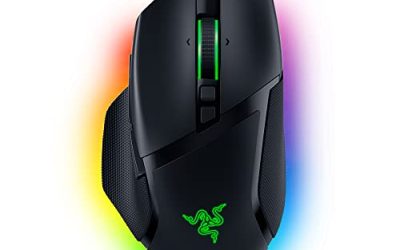
- Best for: Palm players who want support and versatility together. The Basilisk V3 combines a palm-filling shell and a proper thumb rest with a tilt wheel useful in games and everyday scrolling alike. Eleven programmable buttons suit players who bind abilities or communication controls to the mouse, while the optical switches and 26K sensor cover competitive needs without forcing an ultralight design.
- Sensor: Razer Focus+ 26K optical sensor, up to 26,000 DPI
- Connectivity: Wired
- Buttons: 11 programmable buttons
- Scroll wheel: HyperScroll tilt wheel with free-spin and tactile modes
All 4 Picks at a Glance
| Product | Specs | Action |
|---|---|---|
| Razer DeathAdder V3 Wired |
| Check price on Amazon |
| Logitech G502 HERO |
| Check price on Amazon |
| Razer Basilisk V3 |
| Check price on Amazon |
 Corsair IRONCLAW RGB Wired |
| Check price on Amazon |
Key takeaways
- Find the best palm grip gaming mouse for long sessions, with ergonomic shapes, sensors, weight and buttons compared for medium and large hands.
Palm grip is the most relaxed way to hold a gaming mouse. Your whole hand rests on the shell, your fingers lie flat along the main buttons, and movement comes more from the arm and wrist than from curled fingertips. Done well, it spreads contact across the palm, reduces the need to pinch the sides, and makes long sessions in shooters, action games, and strategy titles far less tiring.
That is why the best palm grip gaming mouse is not simply the mouse with the highest sensor numbers. Shape comes first: length to support the fingers, height at the back to fill the centre of the palm, and a right side that lets the ring and little fingers rest instead of dragging on the pad. Only after that fit is right do weight, connectivity, buttons, and polling rate matter.
The five mice below are all right-handed ergonomic gaming mice sold on Amazon, but they serve palm grip differently: one large shell for bigger hands, two lighter esports shapes, and two button-rich designs with a thumb rest.
As an Amazon Associate we earn from qualifying purchases.
Quick Picks
These five mice cover the main palm grip needs, from lightweight competitive play to large hands and extra buttons.
| Product | ASIN | Best For |
|---|---|---|
| Razer DeathAdder V3 Wired | B0B6XTDJS1 | Lightweight palm grip for FPS play |
| Razer DeathAdder V3 Pro + HyperPolling Wireless Dongle | B0D27M5JSY | Wireless palm grip with higher polling |
| Logitech G502 HERO | B07GBZ4Q68 | Palm grip with many buttons and added weight |
| Razer Basilisk V3 | B09C13PZX7 | Palm grip with a thumb rest and tilt wheel |
| Corsair IRONCLAW RGB Wired | B07YP94K9Y | Large hands that need a bigger shell |
How to Choose
Start with your hand and how fully you rest it on the mouse, then work through size, shape, weight, and controls in that order.
Shell Length, Height, and Hand Size
Palm grip needs a shell long enough under your fingers and high enough under your palm. If it is too short, your fingertips hang past the main buttons. If it is too low, the centre of your hand bridges over the top, defeating the point of the grip. Medium hands usually suit a mid-to-large shell, while large hands should look first at the longest, tallest options here, such as the IRONCLAW and DeathAdder V3 shapes. Small hands need care: many palm mice are deliberately large, and an oversized shell can push the main buttons out of reach. Compare your hand length with the listed dimensions.
Right-Handed Shape and Side Support
Almost every strong palm grip mouse is right-handed and asymmetrical, intentionally. The left side is sculpted for the thumb, the top slopes down to the right, and the right edge supports the ring finger instead of forcing it against a vertical wall. That contour lets your hand relax; a symmetrical shell can be palmed, but rarely supports the outer fingers as well. A shaped thumb rest, as on the Basilisk V3 and G502 HERO, also gives a relaxed hand somewhere to settle, and textured sides help if your hand slips.
Weight and Balance
A lighter mouse, such as the 59 gram DeathAdder V3 Wired, is easier to start, stop, and lift, and kinder over a long evening of low-sensitivity aiming. Because your whole hand is in contact, you do not need a heavy shell to feel in control, and excess weight can make a relaxed grip feel sluggish. A heavier mouse is not wrong, though: the G502 HERO and IRONCLAW feel planted and steady, which some palm users prefer for slower tracking and strategy games. Choose light for speed, heavier for steadiness.
Sensor, DPI, and Polling Rate
Every mouse here has an optical sensor with more maximum DPI than most players will use. Settings in the hundreds or low thousands are typical, so treat the headline figure as headroom, not a ranking. More useful are clean tracking and lift-off behaviour that suits a grip that sometimes tilts during swipes. Polling rate is how often the mouse reports position: 1,000 Hz is already responsive for most players. Higher rates, such as the 8K HyperPolling on the DeathAdder V3 models, reduce the interval further but need a compatible system and the correct dongle or wired connection. For single-player, MOBA, or strategy play, shape will affect you far more.
Wired, Wireless, and Battery Life
Wired models such as the DeathAdder V3, Basilisk V3, G502 HERO, and IRONCLAW remove charging and keep weight down by omitting a battery. A flexible cable matters, because a stiff cable tugging at a large shell is noticeable when your hand is relaxed. Wireless gives a cleaner desk and freer arm movement, suiting the larger motions palm players make. The DeathAdder V3 Pro bundle lists up to 90 hours of battery life, but higher polling can reduce runtime generally. Check whether high polling needs a separate dongle.
Buttons, Scroll Wheel, and Software
Count buttons by reach, not total. Under a full palm grip your thumb rests lower and further back than in claw grip, so a side button that looks convenient in a photo may sit too far forward in use. Eleven-button designs such as the G502 HERO and Basilisk V3 suit players who map abilities or push-to-talk to the mouse, while the six-button DeathAdder layout suits players who want only the essentials. A tilt wheel and free-spin mode, offered on the Basilisk V3 and G502 families, also help with weapon cycling, zoom, and long documents.
Surface, Feet, and Your Mousepad
Palm grip involves broader, lower-pressure movements, so glide is shaped by the feet and pad together. Large feet on a control cloth pad give a steady, damped feel many palm players like; a faster pad makes a heavier mouse easier to move but can make corrections feel loose. Desk space matters too: a relaxed, arm-driven style needs room, and a large mouse on a small pad leads to constant lifting and recentring.
5 Best Options
Each pick is a palm-friendly ergonomic gaming mouse, but the right one depends on hand size, preferred weight, and how many controls you use.
Razer DeathAdder V3 Wired
- Best for: Palm players who want a full ergonomic shell without the fatigue of a heavy mouse. The DeathAdder shape is long and high enough to support the palm, yet at 59 g it moves with little effort, making it strong for FPS and action games at low sensitivity. If you like palm comfort but worry a supportive mouse will feel slow, this model answers that concern most directly.
- Sensor: Razer Focus Pro 30K optical sensor, up to 30,000 DPI
- Weight: 59 g
- Connectivity: Wired, Speedflex cable
- Polling rate: Up to 8K Hz HyperPolling
Palm players who want a full ergonomic shell without the fatigue of a heavy mouse. The DeathAdder shape is long and high enough to support the palm, yet at 59 g it moves with little effort, making it strong for FPS and action games at low sensitivity. If you like palm comfort but worry a supportive mouse will feel slow, this model answers that concern most directly.
It is wired only, has just six buttons, and has no thumb rest wing like the Basilisk or G502 designs. Smaller right hands may also find the shell long. Players wanting wireless freedom or extensive macros should check the other picks first.
Watch out for: It is wired only, has just six buttons, and has no thumb rest wing like the Basilisk or G502 designs. Smaller right hands may also find the shell long. Players wanting wireless freedom or extensive macros should check the other picks first.
Razer DeathAdder V3 Pro + HyperPolling Wireless Dongle
Specs
- Sensor: Razer Focus Pro 30K optical sensor, up to 30,000 DPI
- Weight: 63 g ultra-lightweight design
- Connectivity: Razer HyperSpeed Wireless, HyperPolling Wireless Dongle included in this listing
- Polling rate: 8K polling with the HyperPolling dongle configuration
- Switches and buttons: Razer Optical Switches Gen-3, 6 programmable buttons listed for this bundle
- Battery: Up to 90 hours, USB-C charging
- ASIN: B0D27M5JSY
Best for: Palm players who want the DeathAdder shape without a cable. At 63 g it stays close to the wired version in feel, keeping a light glide while allowing wide arm movements without cable drag. The included dongle makes it the natural choice here for competitive players who want higher polling wireless.
Watch out for: This is a specific bundle listing, so check that the dongle version is in your basket, not the standard receiver-only version. Higher polling can increase system load and reduce battery life, and the button count remains modest.
Logitech G502 HERO
- Best for: Palm players who want a substantial, planted mouse and many controls. The tall, sculpted shell fills the palm, the thumb area gives a relaxed hand a place to rest, and eleven buttons plus the dual-mode wheel suit MMO, MOBA, action RPG, and mixed gaming and work use. The tuning weights help if you prefer a heavier feel.
- Sensor: Logitech HERO 25K optical sensor, 100 to 25,600 DPI
- Weight: 121 g, with up to five 3.6 g tuning weights included
- Connectivity: Wired USB
- Buttons: 11 programmable buttons, dual-mode hyper-fast scroll wheel
Palm players who want a substantial, planted mouse and many controls. The tall, sculpted shell fills the palm, the thumb area gives a relaxed hand a place to rest, and eleven buttons plus the dual-mode wheel suit MMO, MOBA, action RPG, and mixed gaming and work use. The tuning weights help if you prefer a heavier feel.
At 121 g before added weights, it is far heavier than the DeathAdder V3 models, and that mass shows during fast lifts. This version is wired only, despite the many wireless G502 variants, so confirm the exact model name.
Watch out for: At 121 g before added weights, it is far heavier than the DeathAdder V3 models, and that mass shows during fast lifts. This version is wired only, despite the many wireless G502 variants, so confirm the exact model name.
Razer Basilisk V3
- Best for: Palm players who want support and versatility together. The Basilisk V3 combines a palm-filling shell and a proper thumb rest with a tilt wheel useful in games and everyday scrolling alike. Eleven programmable buttons suit players who bind abilities or communication controls to the mouse, while the optical switches and 26K sensor cover competitive needs without forcing an ultralight design.
- Sensor: Razer Focus+ 26K optical sensor, up to 26,000 DPI
- Connectivity: Wired
- Buttons: 11 programmable buttons
- Scroll wheel: HyperScroll tilt wheel with free-spin and tactile modes
Palm players who want support and versatility together. The Basilisk V3 combines a palm-filling shell and a proper thumb rest with a tilt wheel useful in games and everyday scrolling alike. Eleven programmable buttons suit players who bind abilities or communication controls to the mouse, while the optical switches and 26K sensor cover competitive needs without forcing an ultralight design.
It is wired and feature-dense, so it will not feel as nimble as the DeathAdder V3 Wired. The thumb rest can feel confining if you like to shift your thumb often, and smaller hands should check dimensions carefully.
Watch out for: It is wired and feature-dense, so it will not feel as nimble as the DeathAdder V3 Wired. The thumb rest can feel confining if you like to shift your thumb often, and smaller hands should check dimensions carefully.
Corsair IRONCLAW RGB Wired
- Best for: Large-handed palm players who find most ergonomic mice too small. Corsair describes the IRONCLAW shape as sculpted specifically for palm grips and larger hands, and its broad, tall shell gives the whole hand somewhere to rest. At 105 g it feels steady and controlled, suiting players who prefer a planted mouse, while seven buttons cover the essentials without crowding the side.
- Sensor: Custom PixArt PMW3391 optical sensor, up to 18,000 DPI in 1 DPI steps
- Weight: 105 g
- Connectivity: Wired USB
- Buttons: 7 programmable buttons
Large-handed palm players who find most ergonomic mice too small. Corsair describes the IRONCLAW shape as sculpted specifically for palm grips and larger hands, and its broad, tall shell gives the whole hand somewhere to rest. At 105 g it feels steady and controlled, suiting players who prefer a planted mouse, while seven buttons cover the essentials without crowding the side.
That size is also the limitation. Medium and small hands may struggle to reach the forward buttons in a true palm hold, and 105 g will feel slow coming from a lightweight mouse. This version is wired only; a separate wireless IRONCLAW exists under a different listing.
Watch out for: That size is also the limitation. Medium and small hands may struggle to reach the forward buttons in a true palm hold, and 105 g will feel slow coming from a lightweight mouse. This version is wired only; a separate wireless IRONCLAW exists under a different listing.
Which One Fits You
Use your hand size and the games you play most to narrow this list quickly.
- Competitive FPS player who palms the mouse: Choose the Razer DeathAdder V3 Wired for its 59 g weight, palm support, and 8K HyperPolling without a battery to manage.
- Wireless player who wants higher polling: Choose the Razer DeathAdder V3 Pro + HyperPolling Wireless Dongle bundle, which keeps the shape light while adding cable-free movement.
- MMO, MOBA, or action RPG player who uses many binds: Choose the Logitech G502 HERO or Razer Basilisk V3, both with eleven programmable buttons and relaxed-hand shapes.
- Player who also works at the same desk: Choose the Razer Basilisk V3 for its thumb rest and HyperScroll tilt wheel, which help in long documents as well as games.
- Large-handed player who feels cramped: Choose the Corsair IRONCLAW RGB Wired, the shell here designed most explicitly for bigger hands and a full palm hold.
- Player who likes a heavy, steady feel: Choose the Logitech G502 HERO, and use its tuning weights to set the balance rather than adapting to a fixed light shell.
Common Mistakes
Avoiding a poor fit matters more than chasing a headline specification with this grip style.
- Buying by DPI alone: Every mouse here offers far more maximum DPI than most players use, while shell height and length decide whether palm grip works at all.
- Choosing a shell that is too small: A short or low mouse forces your palm to hover and your fingers to curl, turning a relaxed grip into a tiring claw hold.
- Ignoring the right side: Palm users rest their ring and little fingers on that edge, and a poorly shaped side causes dragging, slipping, or constant repositioning.
- Assuming heavier means more control: Added weight can feel steady, but it also makes lifts and corrections harder, especially for low-sensitivity players who move the mouse constantly.
- Confusing similar model names: DeathAdder V3, DeathAdder V3 Pro, G502 HERO, and G502 X variants differ in connectivity, weight, and buttons, so match the full name and ASIN to the version you intend to buy.
FAQ
Is palm grip good for FPS games?
Yes, especially for players who aim with a mix of arm and wrist movement and value comfort over a long session. A light palm-friendly mouse such as the DeathAdder V3 keeps that comfort without adding much weight to flicks. Players who make constant tiny fingertip adjustments may prefer a smaller mouse, but that is preference, not a limitation.
How do I know if a palm grip mouse is the right size?
Your fingers should reach the main buttons without stretching, the back of the shell should contact the centre of your palm, and your ring finger should rest on the right side rather than the pad. If your fingertips extend well past the buttons, the shell is likely too small or too low. If you cannot reach the side buttons without shifting your whole hand, it is likely too large.
Are heavier mice better for palm grip?
Not necessarily. A heavier mouse can feel planted and may suit slower tracking, which is why the G502 HERO remains popular. But because palm grip already gives a large contact area for control, many players find a lighter shell less tiring and easier to lift. Choose weight by how you move, not by assuming mass equals stability.
Should I choose wired or wireless for palm grip?
Choose wired for the lowest weight in a given shape, no charging, and a simple setup, and wireless if cable drag bothers you during wide arm movements. Modern gaming wireless is responsive enough for competitive play, but check battery life and whether higher polling needs a specific dongle.
A good palm grip mouse should disappear under your hand, leaving you thinking about the game rather than cramp or slipping. Start with the shell that matches your hand, then pick weight, connection, and buttons to match how you play.
FAQ
Is palm grip good for FPS games?
How do I know if a palm grip mouse is the right size?
Are heavier mice better for palm grip?
Should I choose wired or wireless for palm grip?
More from Amazon
Programs that pair well with the guide above. Offers and eligibility are set by Amazon and may change.
Free shipping on eligible items, Prime Video and more. Eligible new members can start with a free trial.
Start a Prime free trialA Prime membership for ages 18-24 with a trial period. Eligibility is set by Amazon.
See Prime for Young AdultsAudiobooks and podcasts to listen to on the go. Eligible new members can start with a free trial.
Try Audible freeAd-free music streaming. Eligible new subscribers can start with a free trial.
Try Music Unlimited freeAs an Amazon Associate we earn from qualifying purchases.