Our Short List of 3

- Best for: Competitive players who want wired 8000Hz polling in a proven ambidextrous shape with no battery to manage.
- Polling rate: true 8000Hz HyperPolling, with a 0.125ms response interval
- Sensor: Razer Focus+ 20K optical sensor, up to 20,000 DPI
- Tracking speed: up to 650 IPS and 50 G acceleration
- Weight: 71g

- Best for: Players who want a 53g wired mouse with 8000Hz polling and a flexible cable for fast, low-drag swipes.
- Polling rate: up to 8000Hz
- Sensor: HyperX 26K sensor, up to 26,000 DPI
- Tracking speed: up to 650 IPS
- Weight: 53g

- Best for: Right-handed players who want wireless 8000Hz polling in an ergonomic shell with a long battery life.
- Polling rate: up to 8 kHz over LIGHTSPEED wireless
- Sensor: HERO 2 sensor, up to 44,000 DPI, 888 IPS tracking speed, 88 G acceleration
- Weight: 60g
- Buttons: 5 programmable buttons
All 4 Picks at a Glance
| Product | Specs | Action |
|---|---|---|
| Razer Viper 8KHz |
| Check price on Amazon |
| HyperX Pulsefire Haste 2 |
| Check price on Amazon |
| Logitech G PRO X Superlight 2 DEX |
| Check price on Amazon |
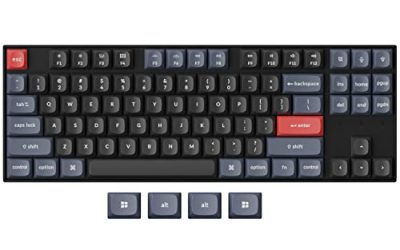
 RK ROYAL KLUDGE M3 |
| Check price on Amazon |
Key takeaways
- The 5 best high polling rate gaming mice for November 2026, all with 8000Hz polling, compared by sensor, weight, shape, and connection so you can pick the right one.
A high polling rate mouse changes how often your computer hears from your mouse. A standard mouse reports its position 1,000 times per second, while an 8000Hz mouse reports 8,000 times per second, cutting the gap between each update from one millisecond to one eighth of a millisecond. That difference matters most in fast competitive shooters, where a flick and a click can land milliseconds apart. The real question is whether your monitor and processor make that extra speed useful instead of wasted.
This guide is for competitive shooter players, high refresh rate monitor owners, and anyone upgrading from a standard 1000Hz mouse who wants smoother tracking without giving up accuracy or comfort. Every mouse below was chosen from the name and specifications shown on its Amazon product page, and every one lists a polling rate of up to 8000Hz there. The picks cover wired and wireless designs in symmetrical and right-handed ergonomic shapes, so the right choice depends on how you hold a mouse and how you play.
Quick Picks
As an Amazon Associate we earn from qualifying purchases.
| Product | Best for | Key spec from title |
|---|---|---|
| Razer Viper 8KHz | Competitive players who want wired 8000Hz polling at a proven ambidextrous shape | 8000Hz HyperPolling, 20K DPI optical sensor |
| HyperX Pulsefire Haste 2 | Players who want a light wired mouse with 8000Hz polling and a flexible cable | 8000Hz polling rate, 53g ultralightweight design |
| Logitech G PRO X Superlight 2 DEX | Right-handed players who want wireless 8000Hz polling in an ergonomic shell | Up to 8 kHz polling, 44K DPI HERO 2 sensor |
| Razer Viper V3 Pro | Wireless esports players who want 8000Hz polling with a flagship sensor | 8K polling, 35K DPI optical sensor, 54g |
| RK ROYAL KLUDGE M3 | Players who want 8000Hz polling, tri-mode connection, and a very light shell | 8000Hz polling rate, PAW3950 42K DPI sensor |
How to Choose
Match the polling rate to your monitor and processor
A polling rate of 8000Hz sends eight times as many position reports as a 1000Hz mouse, and that extra data only turns into visibly smoother tracking when the rest of the system can keep up. On a 144Hz or higher refresh rate monitor, the cursor updates line up more closely with each frame, so fast swipes look steadier and micro-corrections feel more direct. On a 60Hz display, much of that advantage disappears because the screen refreshes far less often than the mouse reports. A strong processor also matters, since handling 8,000 reports per second adds work for the system. If you play on a high refresh rate monitor with a capable CPU, 8000Hz is worth paying for.
Decide between wired and wireless first
Wired high polling rate mice deliver their top rate through the cable with nothing to charge and no dongle to lose, which suits players who sit at one desk and want the simplest setup. Wireless models at 8000Hz need a dedicated high polling rate dongle, usually included in the box, and they trade battery life for speed: a mouse that lasts for days at 1000Hz may last for roughly a day of play at 8000Hz. That trade is fine if you charge nightly, but it frustrates players who forget to plug in. A wired mouse removes battery anxiety entirely, while a wireless mouse removes cable drag, and both can hit 8000Hz when the model is built for it.
Let your grip choose the shape
Polling rate does not fix a shape that fights your hand. Palm grip players need a taller shell with a filled-out hump that supports the whole hand, while claw grip players need a shorter body with a defined hump further back so the fingers can arch over the buttons. Fingertip players need a short, narrow, light mouse they can control with the fingertips alone. Ambidextrous symmetrical mice suit fingertip and claw grips and left-handed players, while right-handed ergonomic mice suit palm and relaxed claw grips. Check the length, width, and hump position of each mouse against the one you already use, because a comfortable shape improves aim more reliably than a higher number on the box.
Check the sensor, switches, and software together
The polling rate is only one part of the tracking chain. The sensor sets the maximum DPI, the tracking speed in inches per second, and the acceleration the mouse can follow without losing track, so look for a modern optical sensor with headroom above the DPI you actually use. The main switches decide click feel and durability, and optical switches avoid the double-click faults that can appear on older mechanical switches. Software matters too, because several mice in this guide only unlock their top polling rate after you install the companion app and change a setting. Confirm that the software runs on your operating system and that the high polling rate dongle is included rather than sold separately.
The 5 Best Options
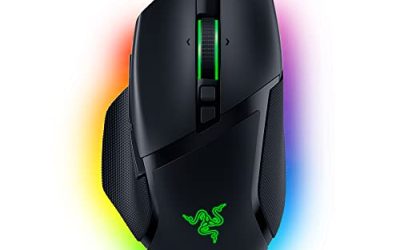
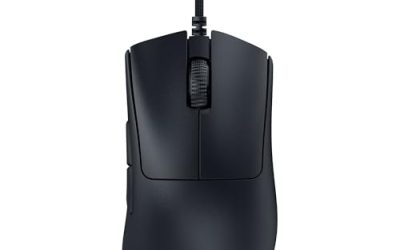
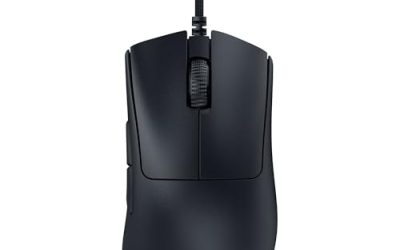
Razer Viper 8KHz
- Best for: Competitive players who want wired 8000Hz polling in a proven ambidextrous shape with no battery to manage.
- Polling rate: true 8000Hz HyperPolling, with a 0.125ms response interval
- Sensor: Razer Focus+ 20K optical sensor, up to 20,000 DPI
- Tracking speed: up to 650 IPS and 50 G acceleration
- Weight: 71g
Competitive players who want wired 8000Hz polling in a proven ambidextrous shape with no battery to manage.
Razer recommends a capable processor and a high refresh rate monitor to get the most from 8000Hz polling, so check your system against the guidance on the product page before buying.
The Razer Viper 8KHz is the straightforward pick for a player who wants true 8000Hz polling without moving to wireless or learning a new shape. Its ambidextrous symmetrical body suits left- and right-handed players, and the low weight keeps fast flicks easy to control during long competitive sessions. Because it is wired, there is no battery to manage and no dongle to keep track of, so it fits a player who sits at one desk and wants the mouse to work at its top rate every time it is plugged in.
Watch out for: Razer recommends a capable processor and a high refresh rate monitor to get the most from 8000Hz polling, so check your system against the guidance on the product page before buying.
HyperX Pulsefire Haste 2
- Best for: Players who want a 53g wired mouse with 8000Hz polling and a flexible cable for fast, low-drag swipes.
- Polling rate: up to 8000Hz
- Sensor: HyperX 26K sensor, up to 26,000 DPI
- Tracking speed: up to 650 IPS
- Weight: 53g
Players who want a 53g wired mouse with 8000Hz polling and a flexible cable for fast, low-drag swipes.
This model is wired only, with no wireless or Bluetooth connection, so confirm you are happy with a cable on your desk before buying.
The HyperX Pulsefire Haste 2 is the pick for a player who wants a very light wired mouse that still reaches 8000Hz. At 53g it is one of the lightest mice in this guide, and the solid shell avoids the open honeycomb holes that collect dust on some ultralight designs. The flexible HyperFlex 2 cable is meant to behave more like a wireless connection, with less drag pulling against the mouse during wide swipes. It suits a player who likes a light, nimble feel and plays with a cable but does not want the cable to fight back.
Watch out for: This model is wired only, with no wireless or Bluetooth connection, so confirm you are happy with a cable on your desk before buying.
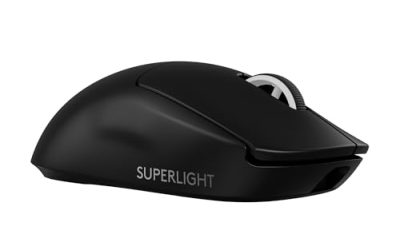
Logitech G PRO X Superlight 2 DEX
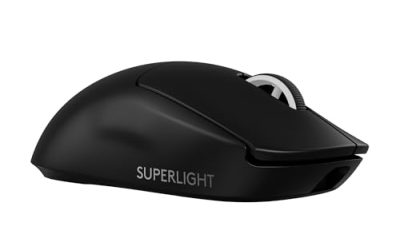
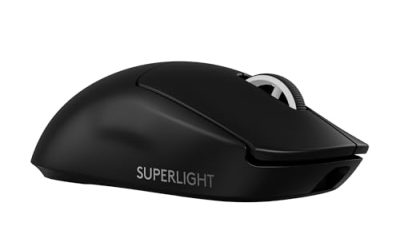
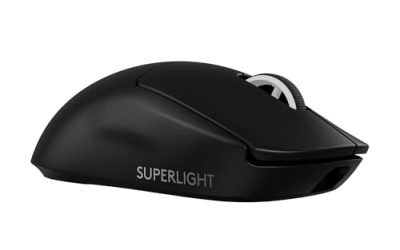
- Best for: Right-handed players who want wireless 8000Hz polling in an ergonomic shell with a long battery life.
- Polling rate: up to 8 kHz over LIGHTSPEED wireless
- Sensor: HERO 2 sensor, up to 44,000 DPI, 888 IPS tracking speed, 88 G acceleration
- Weight: 60g
- Buttons: 5 programmable buttons
Right-handed players who want wireless 8000Hz polling in an ergonomic shell with a long battery life.
The top polling rates are enabled through Logitech G HUB software, and battery life drops sharply at 8000Hz, so install the software and plan to charge more often when you run the highest rate.
The Logitech G PRO X Superlight 2 DEX is the pick for a right-handed player who wants wireless 8000Hz polling in a shape built around one hand. Its taller hump and deeper thumb scoop support a palm or relaxed claw grip far better than a flat symmetrical shell, and the 60g body keeps the mouse easy to lift and reposition. The HERO 2 sensor and LIGHTSPEED wireless connection are aimed squarely at competitive play, and the long battery life at the standard polling rate gives plenty of room for long sessions between charges.
Watch out for: The top polling rates are enabled through Logitech G HUB software, and battery life drops sharply at 8000Hz, so install the software and plan to charge more often when you run the highest rate.
Razer Viper V3 Pro
The Razer Viper V3 Pro is the pick for a wireless esports player who wants the lightest flagship option in this guide. Its symmetrical 54g body suits claw and fingertip grips, and the Focus Pro 35K sensor is built for precise tracking on a wide range of surfaces, including glass. The included HyperPolling wireless dongle delivers a true 8000Hz wireless polling rate, so there is no need to buy a separate receiver to reach the top speed. It is the mouse to choose when wireless freedom matters as much as raw reporting speed.
Specs
- Polling rate: true 8000Hz wireless polling with Razer HyperPolling Technology
- Sensor: Focus Pro 35K Optical Sensor Gen-2, up to 35,000 DPI
- Weight: 54g
- Buttons: 8 programmable controls
- Switches: Gen-3 optical switches
- Battery life: up to 95 hours
- Connection: Razer HyperSpeed Wireless, with included HyperPolling Wireless Dongle
- Design: symmetrical, ultralightweight
Best for: Wireless esports players who want 8000Hz polling, a flagship sensor, and a 54g symmetrical shell.
Watch out for: Battery life is rated at the standard polling rate, so expect far shorter runtime at 8000Hz, and confirm the HyperPolling Wireless Dongle is included in the box for the exact listing you buy.
RK ROYAL KLUDGE M3
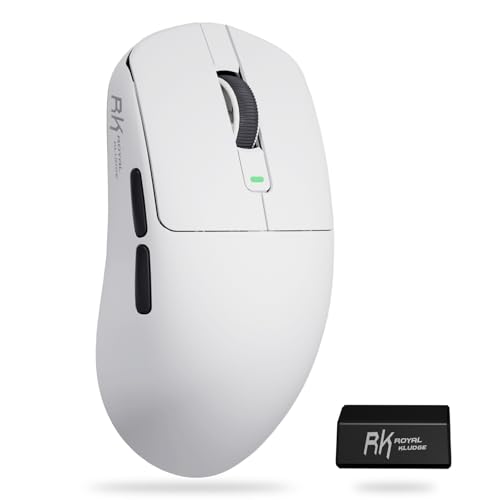
- Best for: Players who want 8000Hz polling, tri-mode connection, and a 47g shell that works for gaming and everyday use.
- Polling rate: up to 8000Hz in 2.4GHz wireless or wired mode
- Sensor: PixArt PAW3950 optical sensor, up to 42,000 DPI
- Tracking speed: up to 750 IPS and 50 G acceleration
- Weight: 47g
Players who want 8000Hz polling, tri-mode connection, and a 47g shell that works for gaming and everyday use.
The 8000Hz rate needs the external wireless dongle in 2.4GHz mode or a wired connection, so check which mode you plan to use and where the dongle sits in your setup before buying.
The RK ROYAL KLUDGE M3 is the pick for a player who wants 8000Hz polling and flexible connectivity without a flagship-sized outlay. Its 47g shell is the lightest in this guide, and the tri-mode design covers 2.4GHz wireless, Bluetooth, and wired play, so one mouse can move between a gaming desktop and a laptop. The PAW3950 sensor reaches 42,000 DPI with fast tracking, and the long Bluetooth battery life makes it a practical choice for players who also use the mouse away from games.
Watch out for: The 8000Hz rate needs the external wireless dongle in 2.4GHz mode or a wired connection, so check which mode you plan to use and where the dongle sits in your setup before buying.
Which One Fits Your Situation
You play competitive shooters on a high refresh rate monitor
Choose the Razer Viper V3 Pro if you want wireless, or the Razer Viper 8KHz if you want wired. Both deliver a true 8000Hz polling rate, and both pair it with a proven sensor and a light symmetrical shell that suits fast flicks. The Viper V3 Pro adds wireless freedom and a newer sensor, while the Viper 8KHz removes battery and dongle worries entirely.
You want wireless freedom and a right-handed ergonomic shape
Choose the Logitech G PRO X Superlight 2 DEX. Its taller hump and thumb scoop support a palm or relaxed claw grip, and its LIGHTSPEED wireless connection reaches up to 8 kHz with the HERO 2 sensor. It is the most comfortable wireless option here for right-handed players who rest their whole hand on the mouse.
You want the lightest mouse possible on a smaller outlay
Choose the RK ROYAL KLUDGE M3. At 47g it is the lightest mouse in this guide, it reaches 8000Hz in 2.4GHz wireless or wired mode, and its tri-mode connection covers gaming and everyday use. The HyperX Pulsefire Haste 2 is the wired alternative if you prefer a cable and a 53g solid shell.
You play on more than one computer or switch between gaming and work
Choose the RK ROYAL KLUDGE M3 for its tri-mode connection, or the Logitech G PRO X Superlight 2 DEX if you stay on one desktop and want long battery life. The M3 moves between a desktop and a laptop over Bluetooth, 2.4GHz wireless, or a cable, while the Superlight 2 DEX suits a single-desk setup with its USB-C charging and companion software.
Common Mistakes
- Buying an 8000Hz mouse for a 60Hz monitor, where the screen refreshes far less often than the mouse reports and most of the advantage is lost.
- Assuming every wireless mouse reaches 8000Hz out of the box, when many need a dedicated high polling rate dongle or a software setting to unlock the top rate.
- Choosing a mouse by polling rate alone and ending up with a shape that cramps a palm grip or slips under a fingertip grip.
- Running 8000Hz polling all day and being surprised when the battery drains far faster than the headline battery figure, which is usually rated at 1000Hz.
- Ignoring the sensor and switches, so a mouse with a fast report rate still tracks poorly at high DPI or develops click problems sooner than a better-built alternative.
Frequently Asked Questions
What does a high polling rate actually do?
A polling rate is how often a mouse reports its position to the computer. At 1000Hz it reports 1,000 times per second, and at 8000Hz it reports 8,000 times per second, cutting the gap between reports from one millisecond to one eighth of a millisecond. The result is smoother cursor movement and faster registration of small adjustments, which is most noticeable in fast shooters on a high refresh rate monitor.
Is 8000Hz worth it over 1000Hz?
It is worth it for competitive players on a 144Hz or higher refresh rate monitor with a capable processor, where the extra reports line up with faster frames and quicker flicks. For casual play, slower games, or a 60Hz display, the difference is hard to notice, and a comfortable shape or a better sensor matters more.
Does 8000Hz polling drain the battery faster on a wireless mouse?
Yes. A wireless mouse that lasts for days at 1000Hz can last for roughly a day of play at 8000Hz, because it sends eight times as many reports. Most wireless mice in this guide let you lower the polling rate in software when you want longer battery life. If you play at 8000Hz, charge nightly so the mouse is ready for the next session.
Do I need special software to use 8000Hz polling?
Often, yes. Several mice in this guide unlock their top polling rate only through the maker’s companion software, and some need a dedicated high polling rate dongle included in the box. Check the product page for the exact listing you buy, confirm the dongle is included, and install the software before judging the mouse, since the default rate may be 1000Hz.
FAQ
What does a high polling rate actually do?
Is 8000Hz worth it over 1000Hz?
Does 8000Hz polling drain the battery faster on a wireless mouse?
Do I need special software to use 8000Hz polling?
More from Amazon
Programs that pair well with the guide above. Offers and eligibility are set by Amazon and may change.
Free shipping on eligible items, Prime Video and more. Eligible new members can start with a free trial.
Start a Prime free trialA Prime membership for ages 18-24 with a trial period. Eligibility is set by Amazon.
See Prime for Young AdultsAudiobooks and podcasts to listen to on the go. Eligible new members can start with a free trial.
Try Audible freeAd-free music streaming. Eligible new subscribers can start with a free trial.
Try Music Unlimited freeAs an Amazon Associate we earn from qualifying purchases.