Our Short List of 3

- Best for: Esports players who want a light, symmetrical wireless mouse with a proven sensor and a long battery life.
- HERO 2 Sensor, up to 32,000 DPI in the product description
- Tracking over 500 IPS, with zero smoothing, acceleration or filtering
- LIGHTSPEED wireless
- 60 g lightweight design

- Best for: Palm and claw players with medium to large hands who want an ergonomic shape with reliable tracking on many surfaces.
- Focus Pro 30K Optical Sensor, up to 30,000 DPI
- Tracking speed up to 750 IPS and acceleration up to 70G
- 63 g ultra-lightweight ergonomic design
- Gen-3 Optical Switches

- Best for: Players who want a versatile mouse for shooters and other games, with many programmable controls and a heavier, more planted feel.
- HERO 25K gaming sensor, 100 to 25,600 DPI
- Sub-micron precision with zero smoothing, filtering or acceleration
- LIGHTSPEED wireless with a 68 percent faster response rate than the previous version
- 102 g weight
All 4 Picks at a Glance
| Product | Specs | Action |
|---|---|---|
| Logitech G PRO X Superlight 2 Wireless Gaming Mouse |
| Check price on Amazon |
| Razer DeathAdder V3 Pro Wireless Gaming Mouse |
| Check price on Amazon |
| Logitech G502 X LIGHTSPEED Wireless Gaming Mouse |
| Check price on Amazon |
 Logitech G305 LIGHTSPEED Wireless Gaming Mouse |
| Check price on Amazon |
Key takeaways
- Find the best gaming mouse for tracking, from flagship 35K and HERO 2 sensors to a long-battery budget pick, with sensor, polling and glide guidance.
Tracking is the part of a gaming mouse you feel in every flick, every small correction and every long spray. A sensor that holds its line when you move fast, lift and reset, or track a target across a pad makes aiming feel predictable instead of random, and that predictability matters far more than a headline sensitivity number. The wrong mouse can still feel fine on a desktop, then lose its composure exactly when a match gets fast.
This guide is for competitive shooter players who want steadier aim, for claw and fingertip players who make constant micro-adjustments, for palm players who want an ergonomic shape that still tracks cleanly, and for buyers who want a capable wireless mouse without giving up sensor quality. The mice below were chosen from the names and specifications shown on their Amazon product pages, with attention to sensor generation, maximum sensitivity, tracking speed, polling rate, weight and glide.
Quick Picks
As an Amazon Associate we earn from qualifying purchases
| Product | Best for | Key spec from title |
|---|---|---|
| Razer Viper V3 Pro Wireless Esports Gaming Mouse | Competitive claw and fingertip players who want the fastest polling | 35K DPI Optical Sensor, 8K Polling |
| Logitech G PRO X Superlight 2 Wireless Gaming Mouse | Esports players who want a proven lightweight symmetrical shape | HERO 2 Sensor, 44K DPI Sensor, 8kHz Report Rate |
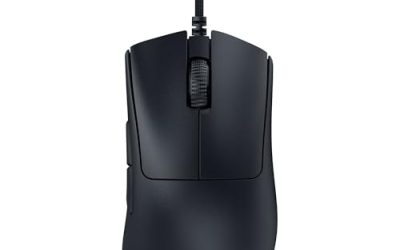
| Razer DeathAdder V3 Pro Wireless Gaming Mouse | Palm and claw players who want an ergonomic shape with glass-surface tracking | Focus Pro 30K Optical Sensor |
| Logitech G502 X LIGHTSPEED Wireless Gaming Mouse | Players who want many buttons and a heavier, planted feel | HERO 25K Gaming Sensor |
| Logitech G305 LIGHTSPEED Wireless Gaming Mouse | Budget-minded players who want long battery life and a compact shape | Hero 12K Sensor, 12,000 DPI |
How to Choose
Start with the sensor, not the sensitivity number
A modern flagship sensor is defined by how it behaves at speed, not only by its maximum DPI. Look for a sensor that lists high tracking speed and acceleration figures, along with a claim of no smoothing, filtering or acceleration, because those are the traits that keep crosshair movement consistent when you flick hard or slow down for a precise shot. Most players use far less than the maximum DPI on the box, so a sensor rated for 25,000 DPI or more is already ample headroom. What matters in daily play is whether the cursor goes exactly where your hand goes, in both directions, at low and high speeds.
Match polling rate to your monitor and your habits
Polling rate is how often the mouse reports its position to the computer, and a higher rate can make cursor movement feel smoother, especially on a high-refresh display. A 1,000 Hz rate is already responsive for most players, while 8,000 Hz polling can feel more immediate in fast shooters, although it can also shorten battery life noticeably. If you play mainly at 8,000 Hz, check the battery figure at that rate rather than the figure quoted at 1,000 Hz. If you play a mix of games and desktop work, a mouse that lets you switch polling rates easily is more useful than one locked into a single extreme setting.
Weight and shape decide whether tracking stays steady
A light mouse is easier to start, stop and flick, which is why many competitive mice now sit near 54 to 63 grams, while a heavier mouse can feel more planted for players who anchor their wrist and make deliberate movements. Shape matters just as much: a symmetrical mouse suits claw and fingertip grips and works for either hand in many cases, while a right-handed ergonomic shape supports the palm and thumb during long sessions. Before choosing, think about how your hand actually rests on the mouse, how large your hand is, and whether you lift the mouse often to re-centre it.
Check glide, lift-off and the surface you play on
Tracking does not happen in isolation. The feet under the mouse, the texture of your pad and the sensor’s lift-off behaviour all affect how clean a movement feels. Smooth PTFE feet reduce friction and help small adjustments feel even, while a sensor that tracks on glass or on a wide range of surfaces is useful if you switch pads or play on a desk. If you lift the mouse often, look for lift-off calibration or a low lift-off distance, so the cursor does not drift while the mouse is in the air. A good pad, clean feet and a sensible lift-off setting can make a capable sensor feel noticeably better.
The 5 Best Options
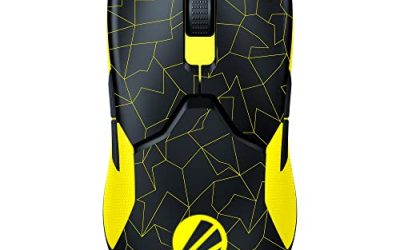
Razer Viper V3 Pro Wireless Esports Gaming Mouse
The Viper V3 Pro is the tracking-first pick in this guide, built around a symmetrical shape that suits claw and fingertip players who make fast, intentional movements. At 54 grams in black, it feels easy to flick and easy to stop, and the included HyperPolling dongle gives it true 8,000 Hz wireless polling without a separate accessory purchase. It is a focused mouse with no extra weight from decorative features, so players who want the sensor and the glide to do the talking will feel at home with it quickly.
Specs
- Focus Pro 35K Optical Sensor Gen-2, up to 35,000 DPI
- Tracking speed up to 750 IPS and acceleration up to 70G
- True 8000 Hz wireless polling with HyperPolling Wireless Dongle included
- 54 g ultra-lightweight symmetrical design in black
- Gen-3 Optical Switches
- 8 programmable buttons
- Up to 95 hours of battery life at 1,000 Hz polling
- HyperSpeed Wireless and USB Type-C charging
- Tracks on a wide variety of surfaces, including glass
Best for: Competitive shooter players with a claw or fingertip grip who want top-tier tracking and 8,000 Hz polling out of the box.
Watch out for: Battery life drops sharply at 8,000 Hz polling, so confirm the expected run time at your chosen polling rate before you commit to that setting.
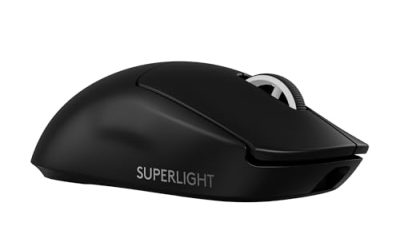
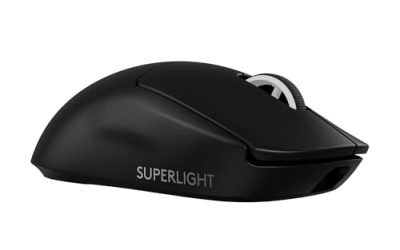
Logitech G PRO X Superlight 2 Wireless Gaming Mouse
- Best for: Esports players who want a light, symmetrical wireless mouse with a proven sensor and a long battery life.
- HERO 2 Sensor, up to 32,000 DPI in the product description
- Tracking over 500 IPS, with zero smoothing, acceleration or filtering
- LIGHTSPEED wireless
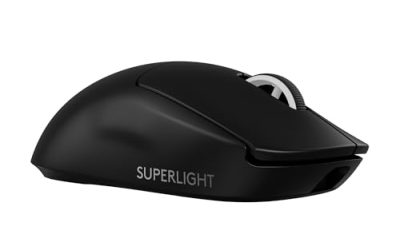
- 60 g lightweight design
Esports players who want a light, symmetrical wireless mouse with a proven sensor and a long battery life.
There is no dedicated DPI button on the mouse, so check how DPI changes are handled in software and whether that fits the way you switch sensitivity.
The Superlight 2 is the steady, proven option for players who want a light symmetrical mouse with a sensor that stays calm under fast movement. Its HERO 2 sensor is listed with tracking over 500 IPS and sensitivity up to 32,000 DPI in the original product description, while the current Amazon listing title also lists a 44K DPI sensor and an 8kHz report rate, so check the exact listing variant before buying. The 60-gram shape is familiar to many esports players, the LIGHTSPEED connection is built for low-latency wireless play, and the simple five-button layout keeps your hand focused on aiming rather than extra controls.
Watch out for: There is no dedicated DPI button on the mouse, so check how DPI changes are handled in software and whether that fits the way you switch sensitivity.
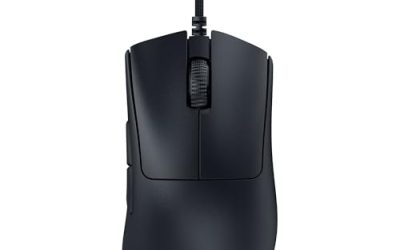
Razer DeathAdder V3 Pro Wireless Gaming Mouse
- Best for: Palm and claw players with medium to large hands who want an ergonomic shape with reliable tracking on many surfaces.
- Focus Pro 30K Optical Sensor, up to 30,000 DPI
- Tracking speed up to 750 IPS and acceleration up to 70G
- 63 g ultra-lightweight ergonomic design
- Gen-3 Optical Switches
Palm and claw players with medium to large hands who want an ergonomic shape with reliable tracking on many surfaces.
The shape is right-handed only, and the standard model runs at 1,000 Hz polling unless you add the HyperPolling dongle, so confirm which polling setup the listing you choose includes.
The DeathAdder V3 Pro is the ergonomic pick for tracking, with a right-handed shape that supports the palm through long matches while keeping the sensor work clean. Its Focus Pro 30K sensor tracks on a wider variety of surfaces, including glass, which is useful if you change pads or play on a smooth desk surface. At 63 grams it is still light for an ergonomic mouse, and the HyperSpeed wireless connection is designed to keep input feeling immediate without a cable dragging across the pad.
Watch out for: The shape is right-handed only, and the standard model runs at 1,000 Hz polling unless you add the HyperPolling dongle, so confirm which polling setup the listing you choose includes.
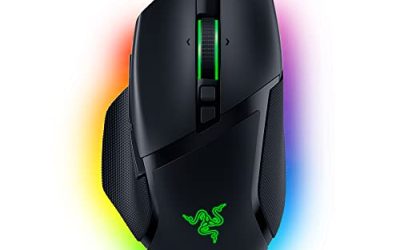
Logitech G502 X LIGHTSPEED Wireless Gaming Mouse
- Best for: Players who want a versatile mouse for shooters and other games, with many programmable controls and a heavier, more planted feel.
- HERO 25K gaming sensor, 100 to 25,600 DPI
- Sub-micron precision with zero smoothing, filtering or acceleration
- LIGHTSPEED wireless with a 68 percent faster response rate than the previous version
- 102 g weight
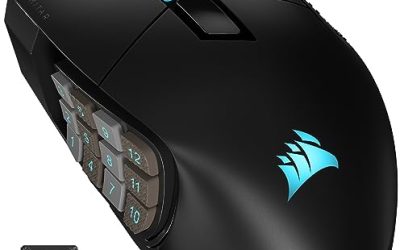
Players who want a versatile mouse for shooters and other games, with many programmable controls and a heavier, more planted feel.
The larger, heavier shape suits medium to large hands better than small hands, so check the dimensions and your grip before choosing it for fast flick-heavy play.
The G502 X LIGHTSPEED is the pick for players who want tracking quality plus a fuller set of controls and a more planted feel. Its HERO 25K sensor is listed with sub-micron precision and zero smoothing, filtering or acceleration, which keeps aim consistent even when you are also using side buttons, a DPI-shift button and a dual-mode scroll wheel. At 102 grams it is heavier than the flagship esports mice here, and that weight can help players who prefer a mouse that stays put during deliberate, controlled movements.
Watch out for: The larger, heavier shape suits medium to large hands better than small hands, so check the dimensions and your grip before choosing it for fast flick-heavy play.
Logitech G305 LIGHTSPEED Wireless Gaming Mouse
- Best for: Budget-minded players and travellers who want dependable tracking, a compact shape and very long battery life.
- HERO Sensor, up to 12,000 DPI
- 400 IPS precision, with zero acceleration or smoothing
- LIGHTSPEED Wireless with a 1 ms report rate
- 99 g lightweight design
Budget-minded players and travellers who want dependable tracking, a compact shape and very long battery life.
It uses a single AA battery rather than a rechargeable internal battery, and the polling rate is 1,000 Hz, so check whether that matches the responsiveness you expect from a newer flagship mouse.
The G305 is the sensible entry point in this guide, offering a genuine HERO sensor and a 1 ms LIGHTSPEED report rate in a compact, lightweight package. Its sensor reaches 12,000 DPI with 400 IPS precision, which is more than enough for most players who use a moderate sensitivity, and the mouse runs for up to 250 hours on a single AA battery. The compact shape suits smaller hands and players who travel with their mouse, and the built-in receiver storage keeps the dongle with the mouse when you pack it away.
Watch out for: It uses a single AA battery rather than a rechargeable internal battery, and the polling rate is 1,000 Hz, so check whether that matches the responsiveness you expect from a newer flagship mouse.
Which One Fits Your Situation
You play competitive shooters and want the sharpest tracking
Choose the Razer Viper V3 Pro. Its Focus Pro 35K Gen-2 sensor, 750 IPS tracking speed and included 8,000 Hz HyperPolling dongle give you the most responsive tracking setup in this guide, while the 54-gram symmetrical shape suits the claw and fingertip grips common in competitive shooters. It is the most single-minded pick here, so it works best when aiming performance is your first priority.
You want a light, proven mouse for long ranked sessions
Choose the Logitech G PRO X Superlight 2. The 60-gram symmetrical shape is easy to move for hours, the HERO 2 sensor stays consistent at speed, and the long battery life means you are not charging it every few days. It is a good fit if you already like a simple, symmetrical mouse and want a reliable wireless connection without extra buttons getting in the way.
You use a palm grip and want comfort without giving up tracking
Choose the Razer DeathAdder V3 Pro. Its right-handed ergonomic shape supports your palm and thumb during long matches, while the Focus Pro 30K sensor tracks cleanly on many surfaces, including glass. It is the best match in this guide for players who find symmetrical mice tiring over a long session but still want a light, fast sensor.
You want one mouse for games, work and many controls
Choose the Logitech G502 X LIGHTSPEED. Its HERO 25K sensor gives you precise tracking, while 13 programmable controls, a DPI-shift button and a dual-mode wheel let you set up shortcuts for different games and tasks. The heavier, planted feel also suits players who prefer a mouse that does not move at the lightest touch, and the long battery life helps if you use it all day.
Common Mistakes
- Choosing the highest DPI on the box instead of checking tracking speed, lift-off behaviour and how the sensor feels at your usual sensitivity.
- Setting polling to 8,000 Hz without checking the battery cost, then being surprised when a mouse needs charging far sooner than the headline battery figure suggests.
- Picking a shape that looks good in photos without considering grip style and hand size, which affects tracking steadiness far more than a small sensor difference.
- Using a worn or dirty pad and worn mouse feet, then blaming the sensor when small movements feel uneven or sticky.
- Buying a different colour or bundle variant and assuming it has the same polling rate, dongle or sensor as the main listing, when those details can differ between listings.
Frequently Asked Questions
What matters most for tracking in a gaming mouse?
The sensor’s behaviour at speed matters most, including tracking speed, acceleration, lift-off control and whether it applies smoothing or filtering. A high maximum DPI is useful headroom, but it does not tell you how steady the cursor will feel during a fast flick or a slow, precise correction. Weight, shape, polling rate and glide also affect tracking, because they decide how cleanly your hand movement reaches the sensor in the first place.
Is a higher DPI always better for aiming?
No. Most players aim well at a moderate DPI paired with a suitable in-game sensitivity, and raising DPI too far can make small movements feel twitchy and hard to control. A sensor with a high maximum DPI is still useful because it shows the sensor has headroom, but the best setting is the one that lets you turn comfortably, track smoothly and make fine adjustments without overshooting your target.
Does 8,000 Hz polling make a real difference?
It can make cursor movement feel smoother and more immediate, especially on a high-refresh display and in fast shooters, but the difference is smaller than the jump from a slow office mouse to a 1,000 Hz gaming mouse. It also shortens battery life, so it is worth using when you play competitively and switching to a lower polling rate for desktop work or casual play if your mouse allows it.
Should I choose a wired or wireless mouse for tracking?
A modern wireless gaming mouse with a dedicated 2.4 GHz connection can track as cleanly as a wired mouse for most players, and it removes cable drag that can disturb small movements. A wired connection is still a good choice if you never want to think about charging, while wireless is a good choice if you value freedom of movement and a clean desk. Either way, check the sensor, polling rate and feet before deciding.
FAQ
What matters most for tracking in a gaming mouse?
Is a higher DPI always better for aiming?
Does 8,000 Hz polling make a real difference?
Should I choose a wired or wireless mouse for tracking?
More from Amazon
Programs that pair well with the guide above. Offers and eligibility are set by Amazon and may change.
Free shipping on eligible items, Prime Video and more. Eligible new members can start with a free trial.
Start a Prime free trialA Prime membership for ages 18-24 with a trial period. Eligibility is set by Amazon.
See Prime for Young AdultsAudiobooks and podcasts to listen to on the go. Eligible new members can start with a free trial.
Try Audible freeAd-free music streaming. Eligible new subscribers can start with a free trial.
Try Music Unlimited freeAs an Amazon Associate we earn from qualifying purchases.