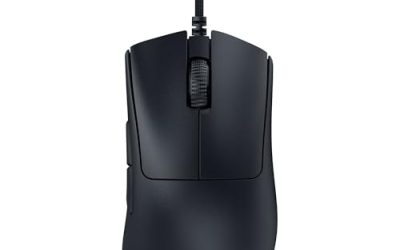
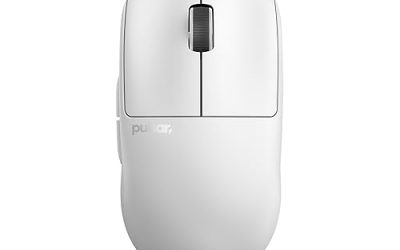
Our Short List of 3

- Best for: Tarkov players who want a proven 60g wireless mouse with a high report rate.
- 60g pro-grade lightweight design
- HERO 2 sensor with 44k DPI
- 8kHz report rate
- LIGHTSPEED wireless connection

- Best for: Palm-grip players who want a comfortable 63g ergonomic wireless mouse for long raids.
- 63g ultra-lightweight ergonomic design
- Focus Pro 30K optical sensor
- Gen-3 optical switches
- HyperSpeed wireless connection

- Best for: Tarkov players who want eleven programmable buttons and a thumb rest for long raids.
- 101g wired ergonomic design
- Focus+ 26K optical sensor
- 11 programmable buttons
- HyperScroll tilt wheel
All 4 Picks at a Glance
| Product | Specs | Action |
|---|---|---|
| Logitech G PRO X Superlight 2 |
| Check price on Amazon |
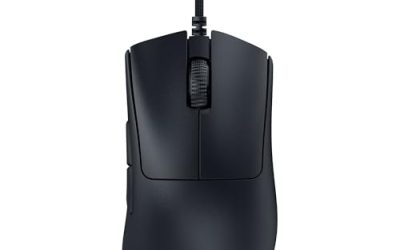
| Razer DeathAdder V3 Pro |
| Check price on Amazon |
| Razer Basilisk V3 |
| Check price on Amazon |
 Logitech G305 LIGHTSPEED |
| Check price on Amazon |
Key takeaways
- The 5 best gaming mice for Escape from Tarkov in November 2026, chosen from Amazon listings for sensor precision, comfort in long raids, and extra buttons for binds.
Escape from Tarkov punishes sloppy aim more than almost any other shooter. A raid can last forty minutes, end in a single headshot, and turn on whether your crosshair lands exactly where your hand intended it to. The mouse you bring into that matters: a sensor that tracks cleanly at high speed, a shape that stays comfortable through a long raid, and buttons placed where you can reach them without looking down. Choosing the wrong one does not just feel bad, it costs you gear you spent hours earning.
This guide is for Tarkov players who want steadier aim in long-range fights, for players who run many raids in a row and need a mouse that does not tire the hand, and for players who want extra buttons for leaning, healing and grenade binds. The five mice below were chosen from the names and specifications shown on their Amazon product pages, with sensor, weight, polling rate, button count, battery life and shape compared across the listings.
Quick Picks
As an Amazon Associate we earn from qualifying purchases.
| Product | Best for | Key spec from title |
|---|---|---|
| Logitech G PRO X Superlight 2 | Competitive Tarkov players who want a proven lightweight wireless shape | 60g with 44k DPI sensor and 8kHz report rate |
| Razer Viper V3 Pro | Claw and fingertip players who want the lightest flagship feel | 54g with 35K DPI optical sensor and 8K polling |
| Razer DeathAdder V3 Pro | Palm-grip players who want comfort through long raids | 63g with Focus Pro 30K optical sensor and 90 Hr battery |
| Razer Basilisk V3 | Players who want many buttons for Tarkov binds | 26K DPI optical sensor with 11 programmable buttons |
| Logitech G305 LIGHTSPEED | Players who want a simple wireless mouse with very long battery life | 99g with Hero 12K sensor, 12,000 DPI and 250h battery life |
How to Choose
Sensor precision and tracking
Tarkov fights often happen at long range, where a small aiming error becomes a miss by a wide margin, so the sensor is the first thing to judge. A modern optical sensor tracks cleanly at high speeds without smoothing or acceleration, which matters when you flick to a distant target and then make a correction to hold on a head. Check the sensor name and its tracking speed on the listing rather than judging by DPI alone, because the headline DPI number says little about how the mouse behaves during a fast swipe. Every mouse in this guide uses a sensor rated for fast, precise tracking, so the choice comes down to shape and buttons once that baseline is met.
Weight and shape for long raids
A Tarkov raid can run for thirty to forty minutes, and a session strings several raids together, so weight and shape decide whether your hand stays relaxed or starts to ache. A lighter mouse needs less effort for repeated swipes and peeks, while a slightly heavier mouse can feel steadier when you hold an angle for a long time. Shape is just as important: a symmetrical shell suits claw and fingertip grips, while a right-handed ergonomic shape supports the palm and suits players who rest their whole hand on the mouse. Before buying, compare the shape in the listing with the mouse you already use and think about whether your palm rests flat or only your fingertips touch the shell.
Buttons and binds
Tarkov has more useful binds than most shooters, from leaning around corners and checking magazines to healing, throwing grenades and switching fire modes, and a mouse with extra buttons puts several of those under your thumb. Most mice in this guide have five or six programmable buttons, which covers the main clicks, two side buttons and a DPI control. The Razer Basilisk V3 goes further with eleven programmable buttons and a tilt wheel, which suits players who like to bind lean, push-to-talk and a healing item to the mouse. More buttons add weight and complexity, so a simple layout is still the better choice if you keep most of your binds on the keyboard.
Wireless, wired and battery life
Wireless mice are now fast enough for Tarkov, with the flagship models here reaching 8,000 Hz polling and the simpler models reporting at 1,000 Hz, so the real question is how you want to manage power. A wired mouse never needs charging and never runs out mid-raid, which is why the Basilisk V3 suits players who leave their setup plugged in. Wireless models trade that certainty for freedom of movement, and battery life varies widely: the DeathAdder V3 Pro runs for around 90 hours, while the G305 LIGHTSPEED runs for up to 250 hours on a single AA battery. If you hate charging, a long-life AA model is the simpler choice.
The 5 Best Options
Logitech G PRO X Superlight 2
- Best for: Tarkov players who want a proven 60g wireless mouse with a high report rate.
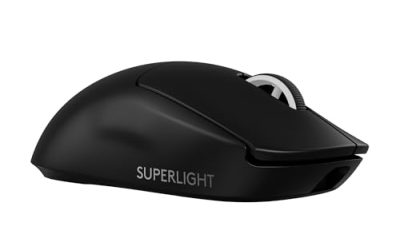
- 60g pro-grade lightweight design
- HERO 2 sensor with 44k DPI
- 8kHz report rate
- LIGHTSPEED wireless connection
Tarkov players who want a proven 60g wireless mouse with a high report rate.
Check whether the listing you buy is the standard model or the DEX variant, because the DEX version has a different right-handed shape.
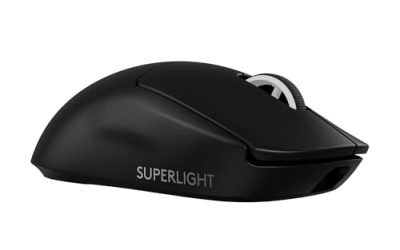
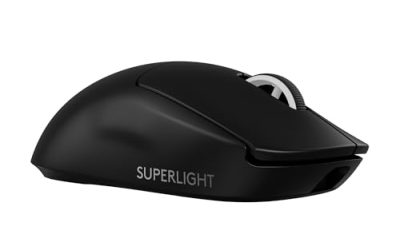
The Logitech G PRO X Superlight 2 suits Tarkov players who want a familiar, lightweight wireless mouse that works well with claw and fingertip grips. Its symmetrical shape is easy to pick up for players coming from another light mouse, and its low weight helps fast flicks and quick peeks feel less tiring over a long raid. The HERO 2 sensor and high report rate give it the tracking and responsiveness that long-range Tarkov fights demand, while the simple five-button layout keeps the focus on aiming rather than extra controls.
Watch out for: Check whether the listing you buy is the standard model or the DEX variant, because the DEX version has a different right-handed shape.
Razer Viper V3 Pro
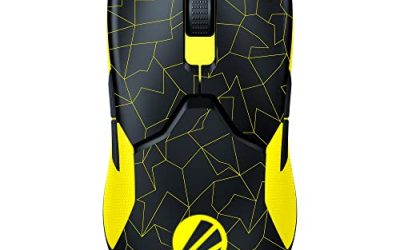
The Razer Viper V3 Pro suits claw and fingertip players who want the lightest flagship mouse in this guide. At 54g in the black model, it moves with very little effort, which helps in fast flicks, quick peeks and sudden target switches in close-quarters fights on maps such as Factory. Its symmetrical shape keeps the hand in a neutral position, and the Focus Pro sensor and 8K polling give it the tracking headroom that long-range shots demand. The eight programmable controls also leave room for extra binds without adding bulk to the shell.
Specs
- 54g lightweight symmetrical design
- Focus Pro 35K optical sensor
- 8K polling
- Gen-3 optical switches
- 8 programmable controls
- HyperSpeed wireless connection
- 95 Hr battery life
- For PC
Best for: Claw and fingertip players who want a 54g symmetrical mouse with 8K polling.
Watch out for: Check the colour and edition on the listing, because the white model is listed at 55g and special editions are separate listings.
Razer DeathAdder V3 Pro
- Best for: Palm-grip players who want a comfortable 63g ergonomic wireless mouse for long raids.
- 63g ultra-lightweight ergonomic design
- Focus Pro 30K optical sensor
- Gen-3 optical switches
- HyperSpeed wireless connection
Palm-grip players who want a comfortable 63g ergonomic wireless mouse for long raids.
Check whether the listing includes the HyperPolling wireless dongle, because the standard model and the dongle bundle are separate listings.
The Razer DeathAdder V3 Pro suits palm-grip players who find symmetrical mice too flat or too narrow for long raids. Its ergonomic right-handed shape supports the hand, and at 63g it is still light enough for fast movement and quick target switches. The Focus Pro 30K sensor and Gen-3 optical switches give it clean tracking and a crisp click, while the long battery life means fewer charging breaks between raids. It is a good fit for players who want comfort first without giving up competitive specifications.
Watch out for: Check whether the listing includes the HyperPolling wireless dongle, because the standard model and the dongle bundle are separate listings.
Razer Basilisk V3
- Best for: Tarkov players who want eleven programmable buttons and a thumb rest for long raids.
- 101g wired ergonomic design
- Focus+ 26K optical sensor
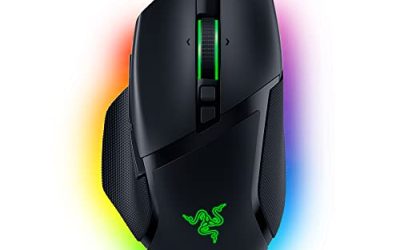
- 11 programmable buttons
- HyperScroll tilt wheel
Tarkov players who want eleven programmable buttons and a thumb rest for long raids.
Check that the listing is the wired Basilisk V3, because the Basilisk V3 Pro and Basilisk V3 X HyperSpeed are separate wireless listings with different specifications.
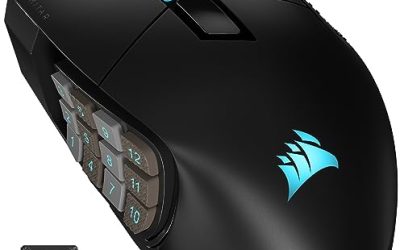
The Razer Basilisk V3 suits Tarkov players who want more buttons than a standard five-button mouse, because Tarkov rewards binding lean, healing and grenades to the thumb. Its right-handed ergonomic shape has a thumb rest that supports the hand through long raids, and the Focus+ 26K optical sensor tracks cleanly for long-range shots. The HyperScroll tilt wheel adds two more inputs, and because it is wired, the mouse never needs charging and never runs out of power in the middle of a raid.
Watch out for: Check that the listing is the wired Basilisk V3, because the Basilisk V3 Pro and Basilisk V3 X HyperSpeed are separate wireless listings with different specifications.
Logitech G305 LIGHTSPEED
- Best for: Players who want a simple wireless mouse with 250 hours of battery life and on-board memory.
- 99g lightweight design
- HERO 12K sensor with 12,000 DPI
- LIGHTSPEED wireless with 1ms report rate
- 6 programmable buttons
Players who want a simple wireless mouse with 250 hours of battery life and on-board memory.
Check the colour on the listing, because the black, white, blue, mint and lilac versions are separate listings with the same core specifications.
The Logitech G305 LIGHTSPEED suits Tarkov players who want a simple, dependable wireless mouse with very long battery life and no charging cable to manage. Its compact symmetrical shape works well for smaller hands and for players who use a claw or fingertip grip, and the HERO sensor tracks cleanly for the precise aiming Tarkov demands. With six programmable buttons and on-board memory, it covers the essentials without extra weight or complexity, and it is the most straightforward pick in this guide for a first wireless gaming mouse.
Watch out for: Check the colour on the listing, because the black, white, blue, mint and lilac versions are separate listings with the same core specifications.
Which One Fits Your Situation
You play long raids and your hand gets tired
Choose the Razer DeathAdder V3 Pro. Its ergonomic right-handed shape supports the whole hand, so the palm stays relaxed through raids that run for thirty minutes or more. At 63g with a Focus Pro 30K sensor and 90 hours of battery life, it gives palm-grip players comfort without dropping to a heavier, slower-feeling mouse in this guide.
You want lots of binds under your thumb
Choose the Razer Basilisk V3. With eleven programmable buttons and a HyperScroll tilt wheel, it puts lean, healing, grenades and push-to-talk within easy reach of your thumb. The ergonomic shape and thumb rest suit long raids, and because it is wired, it never needs charging in the middle of a session.
You want the lightest mouse for fast flicks and peeks
Choose the Razer Viper V3 Pro. At 54g with a Focus Pro 35K sensor, 8K polling and Gen-3 optical switches, it is built for fast flicks, quick peeks and sudden target switches in close-quarters fights. Its symmetrical shape suits claw and fingertip grips, and the 95-hour battery life covers many raids between charges.
You want a first wireless gaming mouse that just works
Choose the Logitech G305 LIGHTSPEED. It is a simple wireless mouse with a HERO 12K sensor, six programmable buttons, on-board memory and up to 250 hours from one AA battery. Its compact shape suits smaller hands and precise aiming, and there is no built-in battery to charge or replace with a cable.
Common Mistakes
- Choosing by DPI alone, when shape, weight and sensor tracking matter more for Tarkov aim.
- Picking a mouse that is too large or too small for your hand, which makes your grip tense up during long raids.
- Buying a special edition or bundle listing without checking it, because colour, edition and dongle bundles are often separate listings.
- Binding too many actions to the mouse at once, then hitting the wrong button under pressure in a fight.
- Ignoring battery life, so a wireless mouse runs out of power in the middle of a raid.
Frequently Asked Questions
What weight is best for a Tarkov gaming mouse?
There is no single best weight, because it depends on your grip and movement style. Most competitive mice sit between 54g and 101g, with lighter mice suiting fast wrist flicks and slightly heavier mice feeling steadier when you hold an angle. The mice in this guide range from the 54g Razer Viper V3 Pro to the 101g Razer Basilisk V3, so you can match the weight to how you move.
Is wireless good enough for Escape from Tarkov?
Yes, the wireless mice in this guide are built for competitive play, with fast wireless connections and high polling rates. The Logitech G PRO X Superlight 2 and Razer Viper V3 Pro both reach 8,000 Hz polling, while the Logitech G305 LIGHTSPEED uses a 1ms report rate. The main difference is battery life and charging, not whether wireless can keep up in a raid.
How many buttons do I need on a Tarkov mouse?
Five or six programmable buttons cover the needs of most Tarkov players, including the two main clicks, two side buttons and a DPI control. The Razer Basilisk V3 goes further with eleven programmable buttons, which suits players who want to bind lean, healing or grenades to the mouse. More buttons add weight and complexity, so a simple layout is often the better choice for pure aiming.
Do I need a high polling rate for Tarkov?
A polling rate of 1,000 Hz is enough for most players. Higher rates such as 8,000 Hz give smoother reporting in very fast movements, and they matter most in close-range fights with quick target switches. If you play at a high refresh rate and make fast flicks, the extra headroom is useful, but it will not fix a shape that does not fit your hand.
FAQ
What weight is best for a Tarkov gaming mouse?
Is wireless good enough for Escape from Tarkov?
How many buttons do I need on a Tarkov mouse?
Do I need a high polling rate for Tarkov?
More from Amazon
Programs that pair well with the guide above. Offers and eligibility are set by Amazon and may change.
Free shipping on eligible items, Prime Video and more. Eligible new members can start with a free trial.
Start a Prime free trialA Prime membership for ages 18-24 with a trial period. Eligibility is set by Amazon.
See Prime for Young AdultsAudiobooks and podcasts to listen to on the go. Eligible new members can start with a free trial.
Try Audible freeAd-free music streaming. Eligible new subscribers can start with a free trial.
Try Music Unlimited freeAs an Amazon Associate we earn from qualifying purchases.