
Key takeaways
- Compare the best mouse bungee for gaming picks for wired play, from RGB and USB hub models to a simple weighted holder that keeps cables off the desk.
Keeping a wired mouse has one stubborn annoyance: the cable. It drags across the desk edge, catches on a monitor stand, and tugs just as you line up a shot. A mouse bungee solves that specific problem by lifting the cable into the air and feeding it smoothly, so the real decision is not whether the idea works, but how much tension, stability, and extra desk hardware you actually want alongside it.
That choice splits buyers into clear groups. Competitive FPS players want a firm, planted base and predictable cable feed during wide, low-sensitivity swipes. Desk tidy-uppers mainly want the cable off the surface and out of sight. RGB builders and players short on front ports want lighting or USB sockets built in. The four picks below were chosen from the names and specifications on their Amazon listings to cover each of those needs.
Quick Picks
As an Amazon Associate we earn from qualifying purchases
| Product | Best for | Key spec from title |
|---|---|---|
| Razer Mouse Bungee V3 Chroma | RGB setups and broad cable fit | Weighted base, anti-slip feet |
| COUGAR Bunker RGB Mouse Bungee with 2x USB 2.0 | RGB plus a small USB hub | 2x USB 2.0 ports |
| ENHANCE Pro Gaming Mouse Bungee Cable Holder | Most front-facing ports | 4-port USB hub, 7 LED color modes |
| SteelSeries Mouse Bungee | Simple, no-frills cable control | Extra weight and rubber feet for stability |
How to Choose
Arm Tension and Cable Feed
Tension decides whether a bungee feels invisible or intrusive. A spring arm, like the clip-on designs from Razer and SteelSeries, holds the cable high and gives a little as you pull, which suits wide arm movements in shooters. A softer silicone arm bends more freely and can feel gentler with lightweight mice, though it may allow more cable sway. Think about your sensitivity and swipe width first. Low-sensitivity players who sweep across a large pad need an arm that extends and recovers without yanking the mouse back at the edge of the movement.
Base Weight and Stability
A bungee only helps if it stays exactly where you put it. Weighted bases around the weights listed for the Razer and SteelSeries models resist sliding during fast flicks, while rubber feet add grip on smooth desks. COUGAR takes a different route with a suction pad, which can lock down firmly on a flat, clean surface but depends on that surface being suitable. Before buying, picture your hardest movement: a sudden diagonal flick after a quiet moment. If the base shifts even slightly then, the cable angle changes and the drag you paid to remove comes straight back.
Cable Compatibility
Not every clip grips every cable equally well. Razer states its rubber-coated catch works with rubber, braided, and paracord cables, which covers most wired gaming mice sold today. Thicker braided cables from older mice can sit awkwardly in narrow clips, while very thin paracord can slip if the catch is loose. Check the listing wording against the cable you own, and pay attention to how the cable is held: a clip-on catch is quick to set up, while a threaded or channelled path can hold more securely but takes longer to adjust when you swap mice.
Extra Features Like USB Hubs and Lighting
Some bungees earn extra desk space by doing a second job. The ENHANCE model builds in four USB 2.0 ports, and the COUGAR adds two, which is handy for headset dongles, flash drives, and charging cables that otherwise snake across the desk. Razer and COUGAR both add RGB lighting, useful only if it matches a setup you already enjoy. Remember that hub ports on these models are USB 2.0, fine for peripherals but slow for moving large files, and every powered extra needs its own cable run to your PC.
The 4 Best Options
Razer Mouse Bungee V3 Chroma
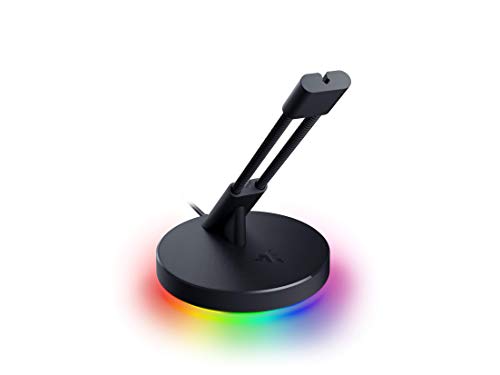
This is the pick for players who want proven cable control and lighting that matches a wider Razer setup. Its spring arm lifts the cable clear of the pad, the rubber-coated catch accepts the three common cable types, and the weighted base is built to stay planted through aggressive play. Because the Chroma lighting runs through Razer Synapse 3, it suits someone already using that software far more than someone who wants a plug-in-and-forget holder with no configuration at all.
Specs
- Brand: Razer
- Model: RC21-01520100-R3U1
- Weight: 240 g (8.5 oz)
- Lighting: Razer Chroma RGB underglow, powered by Razer Chroma RGB
- Cable catch: Clip-on, rubber-coated, fits rubber, braided, and paracord cables
- Arm: Spring arm, rust-resistant
- Base: Weighted base with anti-slip feet
- Cable: 1.8 m braided cable
- Software: Compatible with Razer Synapse 3
Best for: Wired players with a Razer-heavy desk who want RGB underglow and broad cable compatibility in one holder.
Watch out for: Confirm you are happy running Razer Synapse 3 for the lighting, and check that a spare USB port is free to power the Chroma features.
ASIN: B08HCF3W5Q
COUGAR Bunker RGB Mouse Bungee with 2x USB 2.0
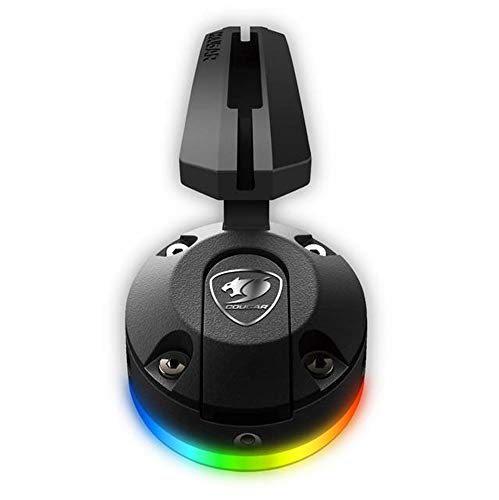
COUGAR’s Bunker RGB suits the player whose desk is short on both cable order and reachable ports. Its flexible cable mount keeps the cord raised and mobile, the patented suction pad anchors the base to the desk, and two USB 2.0 ports handle everyday peripherals without a separate hub. Fourteen lighting effects give it a visual presence that plain holders lack. It makes the most sense on a smooth, flat desk where the suction base can grip properly and where the extra ports will genuinely be used every day.
Specs
- Brand: COUGAR
- Series: BUNKER RGB
- Model number: BUNKER RGB
- USB ports: 2x USB 2.0
- Lighting: RGB lighting with 14 effects
- Base: Patented suction pad
- Cable mount: Flexible cable mount
- Color: Black
- Hardware platform: PC, Mac, Linux
- Dimensions: Approximately 2.75 x 4.33 x 4.52 inches
Best for: Players on smooth desks who want RGB lighting and two extra USB ports built into their cable holder.
Watch out for: Check your desk surface first, because a suction pad needs a flat, clean, non-porous area to hold reliably through a full session.
ASIN: B07JYX47QN
ENHANCE Pro Gaming Mouse Bungee Cable Holder

Choose the ENHANCE Pro when ports matter as much as cable control. Four active USB 2.0 ports sit in the base, so headsets, keyboards, mice, and flash drives can swap in at the front of the desk instead of behind the PC. A spring-loaded support arm handles the bungee job, while seven LED color modes let you set a steady glow that fits the rest of the setup. Its footprint is larger than a plain holder, so it rewards a desk with room behind the mousepad.
Specs
- Brand: ENHANCE
- Model: ENPCGHB100BKEW
- USB hub: 4-port USB hub with active USB 2.0 ports
- Lighting: 7 LED color modes
- Arm: Spring-loaded cable support arm
- Design: Weighted design with cable management support
- Included components: 4 USB ports, cable management accessory, spring-loaded cable support arm, USB hub
- Color: Black
Best for: Players who swap headsets, drives, and other peripherals often and want those ports at the front of the desk.
Watch out for: Remember the hub is USB 2.0 speed, so plan to keep fast storage and large file transfers connected directly to the PC instead.
ASIN: B074XKRKL1
SteelSeries Mouse Bungee

SteelSeries keeps this bungee deliberately plain, and that restraint is its appeal. There is no lighting and no hub, just a weighted base, rubber feet, and a rubber clip sized to hold different cable types while the cable stays suspended above the desk. For a player who has tried tape, monitor edges, and cable clips and simply wants the drag gone, this focused design avoids every distraction. It also travels easily between desks because there is no software, lighting profile, or hub connection to set up again.
Specs
- Brand: SteelSeries
- Model number: 60090
- Dimensions: 63 x 97 x 88 mm
- Weight: 263 g
- Cable holder: Rubber clip for holding different cable sizes
- Base: Extra weight and rubber feet for stability
- Purpose: Eliminates cable drag for faster response
- Color: Black
Best for: Players who want straightforward, stable cable control with no lighting, hub, or software attached.
Watch out for: Measure the space behind your mousepad, since the tall arm design needs clear vertical room for the cable to move freely.
ASIN: B0B1SHVZZF
Which One Fits Your Situation
You Play Low-Sensitivity FPS on a Wired Mouse
Pick a planted base and a spring arm, which points first to the Razer V3 Chroma or the SteelSeries. Both keep the cable suspended through wide sweeps, and neither relies on suction or adhesive. The Razer adds lighting you may never use, while the SteelSeries strips the idea back to weight, grip, and a clip, which many competitive players prefer.
Your Desk Has No Reachable Spare Ports
The ENHANCE Pro is the natural fit here, because its four USB 2.0 ports turn the bungee into the front panel your PC case lacks. Headsets, dongles, and flash drives plug in where you sit. If two ports are enough and you also want lighting, the COUGAR Bunker RGB covers both needs in a smaller feature set.
You Are Building a Matched RGB Setup
The Razer V3 Chroma integrates with Razer Synapse 3, so its underglow can follow the same profile as a Razer keyboard and mouse. The COUGAR Bunker RGB offers its own set of lighting effects without tying you to that ecosystem. Choose based on the software already on your PC, not on the glow alone, because the cable control underneath is similar.
You Want the Simplest Possible Fix
Go with the SteelSeries. Set it behind the pad, seat the cable in the rubber clip, and adjust the slack once. There is nothing to configure, no hub cable to route, and no lighting to manage. That simplicity also makes it the easiest of the four to lend, move to a second desk, or pack for play elsewhere.
Common Mistakes
- Buying a bungee for a wireless mouse, when there is no cable for it to manage in the first place.
- Leaving too little slack between the bungee and the mouse, so the arm pulls back at the edge of wide movements.
- Placing the bungee off to one side instead of centered behind the mousepad, which makes the cable drag diagonally.
- Choosing a suction or adhesive base for a textured, dusty, or uneven desk where it cannot grip properly.
- Expecting USB 2.0 hub ports on a bungee to handle fast external drives at full speed.
Frequently Asked Questions
Does a mouse bungee really make a wired mouse feel wireless?
It removes most of the cable drag that makes a wired mouse feel heavy, because the cable hangs in the air instead of scraping the desk or catching on its edge. You still have a physical connection and a small amount of arm tension, so the sensation is close to wireless freedom rather than identical to it.
Where should a mouse bungee sit on the desk?
Place it centered behind your mousepad, roughly in line with where the cable naturally leaves the mouse. That position lets the cable feed evenly to the left and right. Then adjust the slack so the mouse reaches every corner of the pad without the arm pulling, and recheck after any desk rearrangement.
Will a bungee fit my braided or paracord cable?
Most current models state compatibility with rubber, braided, and paracord cables, and the Razer catch is explicitly rubber-coated for all three. Very thick cables from older mice are the usual exception. Compare the listing wording with your cable type before ordering, especially if your mouse uses an unusually thick or stiff cord.
Is a bungee with a USB hub worth choosing over a plain one?
Only if you will actually use the ports. A hub model such as the ENHANCE Pro helps when your PC sits far away and you swap headsets or drives often. If your ports are already reachable, a plain weighted bungee does the cable job with less desk clutter, less cabling, and nothing extra to power.
FAQ
Does a mouse bungee really make a wired mouse feel wireless?
Where should a mouse bungee sit on the desk?
Will a bungee fit my braided or paracord cable?
Is a bungee with a USB hub worth choosing over a plain one?
More from Amazon
Programs that pair well with the guide above. Offers and eligibility are set by Amazon and may change.
Free shipping on eligible items, Prime Video and more. Eligible new members can start with a free trial.
Start a Prime free trialA Prime membership for ages 18-24 with a trial period. Eligibility is set by Amazon.
See Prime for Young AdultsAudiobooks and podcasts to listen to on the go. Eligible new members can start with a free trial.
Try Audible freeAd-free music streaming. Eligible new subscribers can start with a free trial.
Try Music Unlimited freeAs an Amazon Associate we earn from qualifying purchases.









