
Key takeaways
- Compare the best MMO gaming mice for small hands: short 118-119mm shells, 12-button thumb grids, weights and grip fit for claw and fingertip players.
Small hands and MMO mice pull in opposite directions. The twelve-button thumb grid that makes a mouse useful in Final Fantasy XIV or World of Warcraft normally comes attached to a long, wide, heavy shell, and on a shorter hand that shell pushes the back rows of the grid out of thumb reach. Sensor speed is not decisive, because every pick below tracks well enough for MMO play. What matters is which short shell lets your thumb cover the whole grid without stretching, and which weight your wrist can move all raid night.
That framing serves three groups: fingertip and claw players with hands under roughly 18cm, palm players with small hands who want support without a 130mm body, and first-time grid users unsure about twelve buttons. One honest warning: no major brand sells a compact MMO mouse, so every pick is a compromise, chosen because its Amazon listing states a 12-button side grid inside one of the category’s shortest shells, around 118 to 119mm long.
Quick Picks
As an Amazon Associate we earn from qualifying purchases.
| Product | Best for | Key spec from title |
|---|---|---|
| Razer Naga Trinity | Players unsure about committing to a full grid | Interchangeable Side Plate w/ 2, 7, 12 Button Configurations |
| Logitech G600 MMO Gaming Mouse | The shortest shell and the most total bindings | 20 Programmable Buttons |
| Corsair Scimitar Pro RGB | Palm players who want onboard profile storage | 16,000 DPI Optical Sensor – 12 Programmable Side Buttons |
How to Choose
Shell Dimensions Come First
Length decides more than any other number on the box. A small hand measuring 16 to 18cm from wrist crease to middle fingertip controls a mouse mostly with the fingers, and every extra millimetre of shell pushes the rear into the palm and the front grid rows further away. All three picks here sit between 118 and 119mm long, which is about as short as a twelve-button mouse gets. Width matters next: the G600 and Naga Trinity are 75mm across, while the Scimitar Pro stretches to about 77mm, and that extra width spreads smaller fingers wider. Height near 41 to 43mm suits a shallow claw better than a relaxed palm.
Side-Button Grid Layout and Reach
A grid only helps if your thumb can land on each row without shifting the mouse. On a short shell the thumb rests further forward, so the back row of four buttons is usually the stretch point, and the front row can sit under the thumb tip, inviting accidental presses. Layouts soften this in different ways. The G600 splits its twelve thumb buttons into two dished sets of six with a tactile landmark, the Naga Trinity lets you swap the twelve-button plate for a seven-button circular plate while you learn, and the Scimitar Pro keeps a flat grid of twelve. Bind your most-used abilities to the middle rows first and leave the corners for rare cooldowns.
Weight and Balance
Grid mice carry their button hardware on the left side, so they rarely feel neutral in the hand, and total weight decides how tiring that asymmetry becomes over a long session. The Naga Trinity is the lightest pick here at 120 grams, the G600 follows at 133 grams without its cable, and the Scimitar Pro lists 4.3 ounces on its Amazon page. For a small hand that repositions the mouse with fingertip lifts rather than arm sweeps, lighter is usually kinder, because each lift works against the full mass of the shell. Cable drag adds to the felt weight on all three wired models, so a bungee genuinely changes how heavy they play.
Grip Fit for Smaller Hands
Match the shell to the grip you actually use, not the one you think you should. Fingertip players need a shorter shell and a lower rear hump so the mouse can move under the fingers without the palm colliding with the back; the 118mm G600 suits that style best here. Claw players want a defined hump under the knuckles and benefit from the Naga Trinity’s interchangeable plates, since dropping to the seven-button plate reduces thumb crowding. Palm players with small hands should look at overall volume rather than length alone, and the Scimitar Pro’s taller, wider body fills a small palm more completely, at the cost of the widest finger spread of the three.
The 3 Best Options
Razer Naga Trinity

This is the safest first grid mouse for a small hand because it does not force the twelve-button layout on you from day one. Three interchangeable side plates give you two, seven, or twelve side buttons, so a player whose thumb keeps missing the full grid can step down to the circular seven-button plate and keep playing instead of returning the mouse. The shell is 4.69 inches long, among the shortest here, and at 120 grams it is also the lightest of the three, which helps fingertip and claw players who lift often during long sessions.
Specs
- Sensor: 5G optical sensor, up to 16,000 DPI
- Side plates: interchangeable 2, 7, and 12 button configurations
- Programmable buttons: up to 19
- Switches: mechanical mouse switches
- Connectivity: wired USB, 1000 Hz Ultrapolling
- Dimensions: 4.69″L x 2.91″W
- Weight: 120 g
- Hand orientation: right-handed
- Software: Razer Synapse 3 enabled
- Model number: RZ01-02410100-R3U1
Best for: Small-handed players who want to learn the grid gradually and also play MOBA or shooter titles with fewer side buttons.
Watch out for: The side plates are held by magnets, so confirm the twelve-button plate seats firmly with no wobble before your return window closes.
ASIN: B0788MCRGC
Logitech G600 MMO Gaming Mouse

The G600 is the shortest mouse in this guide at 118mm, and for a small hand that single millimetre or two shows up as an easier reach to the front thumb rows. Its twelve thumb buttons sit in two dished groups of six, a shape that gives a shorter thumb clear tactile separation between rows without looking down. A third primary button under the ring finger works as G-Shift, doubling the assignments on every other button while held, which suits players whose rotations outgrow twelve slots. It is a laser-sensor design rather than a modern optical one, something to accept knowingly.
Specs
- Buttons: 20 MMO-tuned, including 12 thumb buttons
- Sensor: gaming-grade laser, 50 to 8,200 DPI
- Thumb panel: dual-dish design, two sets of six buttons
- Extra control: G-Shift ring-finger button doubles assignments
- Profiles: three onboard memory profiles
- Dimensions: 118mm x 75mm x 41mm
- Weight: 133 grams without cable
- Cable length: 6.5 feet (2 meters)
- USB report rate: up to 1000 reports per second
- Primary button rating: 20 million clicks
- Model number: 910-002864
Best for: Fingertip and claw players with the smallest hands, and anyone who wants the most bindings from the shortest shell.
Watch out for: This is an older design with a laser sensor and wired-only connection, so check the listing carefully for which seller and condition you are actually buying.
ASIN: B0086UK7IQ
Corsair Scimitar Pro RGB
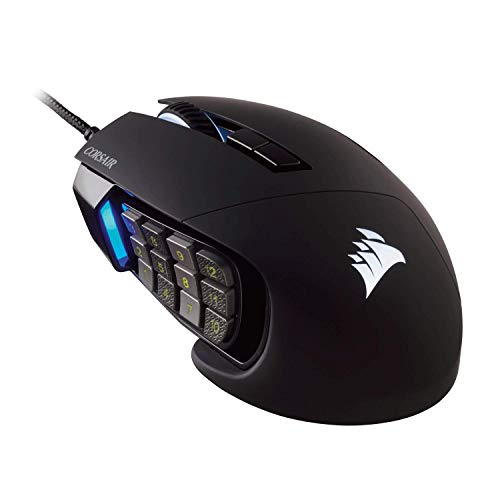
The Scimitar Pro suits the small-handed palm player better than the fingertip player. Its shell is roughly the same length as the other two at 4.69 inches, but it is the widest here at 3.03 inches and a touch lower at 1.65 inches tall, so it fills a small palm with support instead of asking the fingers to steer a narrow body. Twelve programmable side buttons cover the MMO grid requirement, the optical sensor reaches 16,000 DPI, and onboard storage keeps your profiles on the mouse when you move between computers. It is the pick for players who rest their whole hand and steer from the arm.
Specs
- Sensor: optical, 16,000 DPI (from product title)
- Side buttons: 12 programmable side buttons
- Total design: MMO gaming mouse with on-board storage
- Lighting: 4-zone RGB multicolour lighting
- Dimensions: 4.69 x 3.03 x 1.65 inches
- Item weight: 4.3 ounces
- Power source: corded electric
- Operating system support: Windows 10, Windows 7, Windows 8
- Model number: CH-9304111-EU
- Discontinued by manufacturer: No
Best for: Palm-grip players with small hands who want a fuller shell and profiles stored on the mouse itself.
Watch out for: The width is the widest here, so measure your current mouse across the grip; if 77mm already feels like a stretch, this shell will too.
ASIN: B01N9K2PBQ
Which One Fits Your Situation
You Play With a Fingertip Grip and Hands Under 17cm
Start with the G600. The 118mm shell is the easiest of the three to move with the fingers alone, the dished thumb panel helps a short thumb tell rows apart by touch, and the 133 gram weight is manageable when the mouse never fully leaves the pad. The Naga Trinity is the fallback if you also play games where twelve side buttons get in the way, since its two-button plate turns it into an ordinary mouse for those titles.
You Are New to Twelve-Button Grids
Choose the Naga Trinity and begin on the seven-button circular plate. Learning seven thumb positions takes days rather than weeks, and once your rotation feels cramped you can fit the twelve-button plate and expand gradually, binding the new rows to cooldowns first. Buying a fixed-grid mouse as a first step risks the opposite outcome: the hardware stays, but the back rows never get bound to anything, and you have paid for capacity you do not use.
You Rest Your Whole Palm on the Mouse
The Scimitar Pro fits this situation best. Its wider, lower body supports a relaxed hand through long sessions, and onboard storage means your bindings travel with the mouse between a desktop and a laptop. Accept the trade-off honestly: a small hand on a wide shell reaches the far side buttons by rolling the thumb rather than tapping, so put movement keys and rarely used cooldowns on the rows furthest from your resting thumb position.
You Play Long Raid Sessions on a Wired Setup
All three picks are wired, so the choice turns on weight and cable behaviour. The Naga Trinity at 120 grams asks the least of a small wrist over four hours, while the G600’s 6.5 foot cable gives the most routing freedom around monitors and desk edges. Whichever you pick, leave slack in the cable or use a bungee; on a light grip, cable pull is often mistaken for the mouse itself feeling heavy or drifting during precise clicks.
Common Mistakes
- Buying by button count alone and ignoring shell length, then finding the back grid rows sit beyond comfortable thumb reach.
- Assuming a lightweight wireless MMO mouse solves the problem; the best-known light option is roughly 129mm long, which is longer than every pick here and worse for a short hand.
- Binding all twelve buttons on the first day instead of growing into the grid a few rows at a time.
- Judging width from photos rather than the listed dimensions; two or three millimetres of extra width changes finger spread noticeably on a small hand.
- Forgetting that all three picks are wired and right-handed only, so left-handed players and cable-free desks need a different category entirely.
Frequently Asked Questions
How do I know if a 118mm mouse is small enough for my hand?
Measure from your wrist crease to the tip of your middle finger. Hands under about 18cm generally control a 118 to 119mm shell with the fingers without the rear hump jamming into the palm. If your current mouse forces your fingers nearly straight, a shorter shell like these will feel like a bigger change than the millimetres suggest.
Can a small hand really reach all twelve side buttons?
Most small-handed players reach eight to ten buttons comfortably and treat the furthest row as occasional-use space for cooldowns, mounts, or consumables. That is still a large gain over a standard mouse. Plates and dished panels help, but honest binding placement matters more: put your rotation on the rows your thumb finds without stretching.
Is a wired MMO mouse a problem for small hands?
Only through cable drag. A stiff cable pulling sideways is more noticeable when your grip is light and your hand is small, because there is less hand mass anchoring the mouse. Route the cable with slack, keep it off the desk edge, or add a bungee, and a wired grid mouse plays without the weight penalty of a battery.
Why are there only three picks instead of five?
Because the category is genuinely thin once size is filtered honestly. A pick had to have a twelve-button side grid stated in its Amazon listing and one of the shortest shells sold, and several MMO mice fail on size: some are 125mm or longer, and the lightest wireless grid mouse is about 129mm long. Padding the list with those would mislead the readers this guide is for.
FAQ
How do I know if a 118mm mouse is small enough for my hand?
Can a small hand really reach all twelve side buttons?
Is a wired MMO mouse a problem for small hands?
Why are there only three picks instead of five?
More from Amazon
Programs that pair well with the guide above. Offers and eligibility are set by Amazon and may change.
Free shipping on eligible items, Prime Video and more. Eligible new members can start with a free trial.
Start a Prime free trialA Prime membership for ages 18-24 with a trial period. Eligibility is set by Amazon.
See Prime for Young AdultsAudiobooks and podcasts to listen to on the go. Eligible new members can start with a free trial.
Try Audible freeAd-free music streaming. Eligible new subscribers can start with a free trial.
Try Music Unlimited freeAs an Amazon Associate we earn from qualifying purchases.









