Key takeaways
- Four wireless gaming mice that ship with a charging dock, compared by sensor, shape, and dock design, so you can pick the setup that stays charged.
A charging dock changes the daily routine of a wireless mouse more than any sensor upgrade does. Instead of plugging in a cable when the battery runs low, you set the mouse on a small cradle at the end of a session and it is ready the next time you sit down. The buying decision is therefore less about raw DPI and more about the dock itself: whether the cradle is included in the box, how it charges, and whether the mouse underneath still fits your hand, your grip, and the games you play most.
This guide is for competitive players who want a light mouse that is always charged, MMO and MOBA players who want extra buttons within thumb reach, and desk builders who want a cradle that doubles as a display stand. Every mouse below was chosen from the name and specifications on its Amazon product page, and each one ships with a charging dock in the box or as part of the listed bundle.
Quick Picks
As an Amazon Associate we earn from qualifying purchases
| Product | Best for | Key spec from title |
|---|---|---|
| Razer Viper Ultimate, Mercury White | Lightweight esports play with a dock that keeps it charged | 74g, 20K DPI sensor, RGB charging dock |
| ASUS ROG Spatha X | MMO and MOBA players who want many thumb buttons | 12 programmable buttons, 19,000 DPI, magnetic charging dock |
| Razer Basilisk V3 Pro + Mouse Dock Pro, Black | Ergonomic all-rounders who want 8K polling and wireless charging | 30K DPI sensor, HyperScroll tilt wheel, Mouse Dock Pro |
| Razer Basilisk V3 Pro + Mouse Dock Pro, Mercury White | Light-themed desks that want the same dock bundle in white | 30K DPI sensor, Mouse Dock Pro, Mercury White finish |
How to Choose
Dock design and charging method
Magnetic cradle docks and wireless-charging puck docks behave differently on a desk. A magnetic cradle holds the mouse upright, shows it off, and often holds the wireless receiver too, which shortens the link between mouse and computer. A puck dock charges through a small disc on the underside of the mouse and can add a faster polling mode, which matters at high refresh rates. Before buying, confirm the dock is actually in the box: some mice are sold both with and without a dock under nearly identical listings, and the dock on its own can cost almost as much as the mouse. Check the title for Mouse + Dock and confirm the included-components list names the dock.
Sensor and polling rate
Every mouse in this guide tracks well enough for competitive play, so the sensor is rarely the deciding factor — the polling rate is. A 1,000 Hz polling rate reports the mouse position a thousand times per second, which suits most players, while the Basilisk V3 Pro dock carries an 8K Hz transceiver that reports eight times as often. That extra rate only helps if your monitor and system can keep up, and it drains the battery faster, so treat it as a bonus rather than a must-have. Match the sensor to your sensitivity: low-sensitivity players who sweep the mouse across the pad benefit most from a clean high-DPI sensor, while high-sensitivity players will rarely notice the difference.
Shape, weight, and grip
Shape and weight decide whether a mouse disappears in your hand or fights it. Light mice around 74 grams suit fingertip and claw grips and fast flick shots, because less mass means less effort to stop and change direction. Heavier mice around 168 grams suit palm grips and deliberate aim, where the extra weight steadies the hand. A right-handed ergonomic shell with a thumb rest fits large palms, while a symmetrical shell suits players who switch hands or grips. Before buying, compare the length and width in the listing against your current mouse, and remember that a dock adds a fixed object to the desk — leave room for the cradle beside the pad.
Battery life and the charging habit
A dock only helps if it changes how you charge. Look at the battery figure in the listing and weigh it against your sessions: a mouse rated for 70 hours lasts weeks of evening play, while one rated for shorter spans needs the cradle every night. The habit matters more than the number — set the mouse on the dock whenever you leave the desk, and the battery never becomes a problem. Also check what the dock needs: it draws power from a USB port, so a desk with no free port needs a hub. Finally, confirm the dock and mouse speak the same language — a puck dock only charges mice with the matching puck fitted underneath.
The 4 Best Options
Razer Viper Ultimate, Mercury White
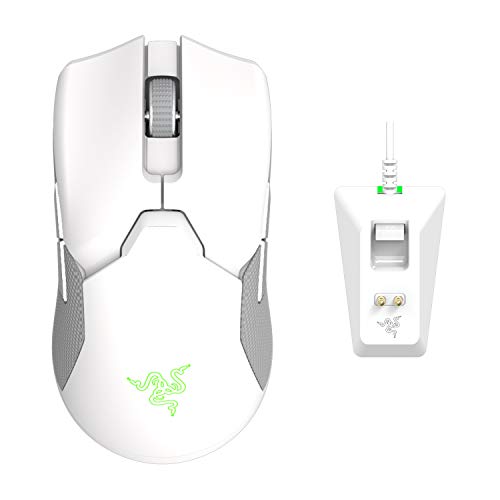
The Viper Ultimate is the lightest mouse in this guide, and the RGB charging dock is the reason it never runs flat in practice. At 74 grams with a symmetrical shape, it suits fast flick shots and long sessions where a heavy mouse would drag on the wrist. The 20K DPI optical sensor tracks cleanly at high speeds, the optical switches actuate with a light beam instead of a metal contact, and the dock itself glows with Chroma lighting that matches the mouse. Mercury White keeps the whole setup bright, which suits white desks and light-themed builds.
Specs
- HyperSpeed Wireless technology
- 20K DPI optical sensor
- 74g lightweight design
- 70-hour battery life
- RGB charging dock included
- 8 programmable buttons
- Chroma RGB lighting
- Razer optical mouse switches
Best for: Competitive FPS players who want the lightest mouse here with a dock that keeps it charged between matches.
Watch out for: Confirm the listing says Mouse + Dock and Mercury White, since the same mouse is also sold without a dock and in other colors.
ASUS ROG Spatha X

The Spatha X is built for players who live on their thumb buttons. Twelve programmable buttons sit under the thumb, the right-handed shell fills a large palm, and the magnetic charging stand holds the mouse upright between sessions while also carrying the wireless receiver. At 168 grams it is the heaviest mouse here, so it suits deliberate aim and long MMO sessions rather than fast flicking. A 15-minute charge on the dock or over USB-C gives up to 12 hours of play, and the hot-swap switch sockets let you change the click feel without soldering.
Specs
- Magnetic charging stand (wireless receiver/charging dock)
- 12 programmable buttons
- 19,000 DPI optical sensor
- Up to 67 hours of battery life
- Dual-mode wired/2.4 GHz connectivity
- 168g, right-handed design
- Push-fit hot-swap switch sockets
- ROG Micro Switches
- Aura RGB lighting
- 15-minute charge gives up to 12 hours of play
Best for: MMO and MOBA players who want a full row of thumb buttons and a stand that holds the mouse upright.
Watch out for: At 168g it is the heaviest mouse in this guide, so check the weight against your grip before buying if you play fast flick shooters.
Razer Basilisk V3 Pro + Mouse Dock Pro, Black

The Basilisk V3 Pro bundle is the most complete desk setup in this guide because the dock does two jobs at once. The Mouse Dock Pro charges the mouse through a magnetic puck and carries an 8K Hz transceiver, so the mouse can poll far faster than the usual 1,000 Hz without a separate dongle. The mouse itself is a right-handed ergonomic shape with a HyperScroll tilt wheel, a 30K DPI sensor, and 13 programmable controls for shooters and strategy games alike. Chroma lighting runs across the mouse and the dock, so the pair looks like one unit on the desk.
Specs
- Focus Pro 30K DPI optical sensor
- HyperScroll tilt wheel
- Gen-3 optical switches
- 13-zone Chroma RGB lighting
- 13 programmable controls
- 3 connection modes (HyperSpeed Wireless, Bluetooth, wired USB-C)
- Mouse Dock Pro with wireless charging puck
- Magnetic wireless charging
- Integrated HyperPolling 8K Hz transceiver in the dock
- Anti-slip base on the dock
Best for: Players who want an ergonomic all-rounder with the fastest polling in this guide and wireless charging in one bundle.
Watch out for: The 8K Hz polling mode needs the dock connected and the right settings in Razer Synapse, so confirm your setup supports it before counting on it.
Razer Basilisk V3 Pro + Mouse Dock Pro, Mercury White

The Mercury White bundle is the same Basilisk V3 Pro and Mouse Dock Pro pairing in a light finish, and it exists for desks where a black mouse would look out of place. The hardware is identical: the same 30K DPI sensor, the same HyperScroll tilt wheel, the same 13 programmable controls, and the same magnetic puck dock with its 8K Hz transceiver. White shells show dust and palm marks sooner than black ones, so this version suits players who wipe the mouse down often and who want the dock and mouse to match a white keyboard and monitor stand.
Specs
- Focus Pro 30K DPI optical sensor
- HyperScroll tilt wheel
- Gen-3 optical switches
- 13-zone Chroma RGB lighting
- 13 programmable controls
- 3 connection modes (HyperSpeed Wireless, Bluetooth, wired USB-C)
- Mouse Dock Pro with wireless charging puck
- Magnetic wireless charging
- Integrated HyperPolling 8K Hz transceiver in the dock
- Anti-slip base on the dock
- Mercury White finish
Best for: Light-themed desk setups that want the same dock bundle in white.
Watch out for: White shells show dust and palm marks sooner than black ones, and the bundle costs more than the mouse on its own, so confirm the listing names the dock before buying.
Which One Fits Your Situation
You play fast competitive shooters
You want the lightest mouse and the least friction between matches. The Viper Ultimate at 74 grams is the pick here: the symmetrical shape suits fast flicks, the dock keeps it charged without a cable, and the sensor tracks cleanly at high speeds. Keep the Spatha X off this list — at 168 grams it is built for a different kind of game.
You play MMOs or MOBAs with many abilities
Button count decides this one. The Spatha X gives you twelve programmable buttons under the thumb, a magnetic stand that holds the mouse upright, and a battery that lasts through long sessions. The Basilisk V3 Pro bundles are the fallback if the Spatha X feels too heavy: they still give you thirteen programmable controls with a dock that charges while you rest.
You want one tidy desk setup
If the dock is also a display piece, the Basilisk V3 Pro bundle is the neatest option. The Mouse Dock Pro charges the mouse, carries the 8K Hz transceiver, and glows with Chroma lighting that matches the mouse, so the pair reads as one unit. Pick the black bundle for dark desks and the Mercury White bundle for light ones — the hardware is the same either way.
You are buying your first dock mouse
Keep it simple and check the box contents twice. The Viper Ultimate Mercury White is the easiest entry point: the dock is in the box, the mouse is light, and the setup is one cradle on the desk. Whatever you choose, confirm the listing title names the dock — mouse-only listings look almost identical — and confirm the dock fits your desk space before the mouse arrives.
Common Mistakes
- Buying the mouse-only listing by mistake: the same mouse is often sold with and without a dock under nearly identical titles, so confirm the title says Mouse + Dock or Charging Dock and the included-components list names the dock.
- Assuming every dock charges wirelessly: some cradles only hold the mouse and carry the receiver, while puck docks charge through a disc on the underside — check how the dock in your listing actually charges.
- Ignoring the weight: a 168-gram MMO mouse feels very different from a 74-gram esports mouse, and no dock fixes a shape that fights your grip.
- Placing the dock too far from the mouse: the dock also holds the wireless receiver on some models, so a cradle buried behind a monitor can weaken the link.
- Forgetting the cable: the dock still needs power from a USB port, so count the cable run and the port it will use before the bundle arrives.
Frequently Asked Questions
Do all wireless gaming mice come with a charging dock?
No. Most wireless gaming mice charge over a USB-C cable, and the dock is either sold separately or left out entirely. The four mice in this guide are different because the dock is in the box or part of the listed bundle — check the listing title for Mouse + Dock before you buy.
Does a charging dock make the mouse slower?
No. The dock charges the battery between sessions and does not touch the wireless link while you play. On the Basilisk V3 Pro bundles the dock even raises the polling rate through its built-in 8K Hz transceiver, though that mode needs the right settings and a system that supports it.
Can I use the mouse while it charges?
Yes, with limits. A mouse on a magnetic cradle or puck dock cannot be used while it sits on the dock, so heavy sessions need the battery topped up first. Every mouse in this guide also works wired over its USB-C cable, so you can keep playing while it charges through the cable instead.
How long does a dock take to charge the mouse?
It depends on the mouse and how empty the battery is. The Spatha X listing states that a 15-minute charge gives up to 12 hours of play, and the Razer docks advertise five hours of play from ten minutes on the cradle. Treat those figures as listing claims and top the mouse up overnight for a full charge.
FAQ
Do all wireless gaming mice come with a charging dock?
Does a charging dock make the mouse slower?
Can I use the mouse while it charges?
How long does a dock take to charge the mouse?
More from Amazon
Programs that pair well with the guide above. Offers and eligibility are set by Amazon and may change.
Free shipping on eligible items, Prime Video and more. Eligible new members can start with a free trial.
Start a Prime free trialA Prime membership for ages 18-24 with a trial period. Eligibility is set by Amazon.
See Prime for Young AdultsAudiobooks and podcasts to listen to on the go. Eligible new members can start with a free trial.
Try Audible freeAd-free music streaming. Eligible new subscribers can start with a free trial.
Try Music Unlimited freeAs an Amazon Associate we earn from qualifying purchases.