Our Short List of 3

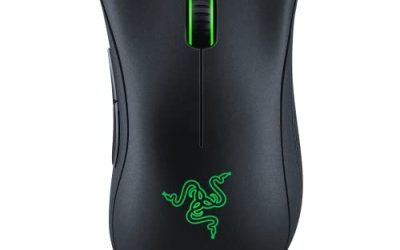
- Best for: Palm-grip players who want a wired mouse with esports-grade hardware.
- Weight: 59 g
- Sensor: Razer Focus Pro 30K optical sensor
- Polling: 8K Hz HyperPolling
- Switches: Razer Optical Switches Gen-3

- Best for: Players who want a proven symmetrical shape and tactile hybrid switches.
- Weight: 60 g
- Sensor: HERO 2, up to 44,000 DPI
- Report rate: up to 8 kHz
- Switches: LIGHTFORCE hybrid optical-mechanical switches

- Best for: Players who bind multiple item actives and commands to the mouse.
- Sensor: HERO 25K, 200 to 25,600 DPI
- Buttons: 11 programmable buttons
- Weights: adjustable system, five 3.6 g weights included
- Memory: on-board memory for profiles
All 4 Picks at a Glance
| Product | Specs | Action |
|---|---|---|
| Razer DeathAdder V3 |
| Check price on Amazon |
| Logitech G PRO X Superlight 2 |
| Check price on Amazon |
| Logitech G502 HERO |
| Check price on Amazon |
 Logitech G305 Lightspeed |
| Check price on Amazon |
Key takeaways
- Compare five gaming mice for League of Legends, from 54 g wireless esports shapes to an 11-button wired pick, with weight, button and grip advice.
In League of Legends your mouse never rests: you are steering your champion, checking the minimap, last-hitting and repositioning through every team fight, so the wrong mouse shows up as sore wrists, missed clicks and sloppy kiting long before it shows up in a spec sheet. The real decision is about fit: a shape your hand can hold through a three-game session, a weight you can flick all evening, and enough buttons for the handful of commands you actually move off the keyboard.
This guide is for ranked grinders, casual ARAM players and returning players replacing an office mouse. The five picks below come from current Amazon product pages, chosen on stated weight, sensor, button count and connection type rather than marketing claims. Two are ultralight wireless esports shapes, one is a wired ergonomic option, one carries extra buttons for item actives, and one keeps wireless play affordable.
Quick Picks
As an Amazon Associate we earn from qualifying purchases
| Product | Best for | Key spec from title |
|---|---|---|
| Razer Viper V3 Pro | Claw and fingertip players in long ranked sessions | 54 g wireless with 8K polling |
| Razer DeathAdder V3 | Palm-grip players who prefer a wired mouse | 59 g with Focus Pro 30K sensor |
| Logitech G PRO X Superlight 2 | Players wanting a safe symmetrical shape | 60 g with HERO 2 sensor up to 44,000 DPI |
| Logitech G502 HERO | Players who bind item actives to the mouse | 11 programmable buttons |
| Logitech G305 Lightspeed | Wireless play on a tight budget | 99 g with 250-hour battery life |
How to Choose
Weight decides how the mouse feels after game three
League is a high-mileage game for your mouse hand. You are constantly moving the cursor between your champion, the lane and the minimap, and that mileage adds up across a long session. Lighter mice such as the 54 g Viper V3 Pro and the 59 g DeathAdder V3 reduce the effort behind every small correction, which helps when you play several games in a row. Heavier, feature-dense designs like the G502 HERO trade that easy movement for extra buttons and a planted feel. Neither is automatically better, but if your wrist or forearm aches after playing, weight is the first spec to change.
Count the buttons you will actually press
A MOBA does not ask much of a mouse beyond the two main clicks, a wheel and a couple of side buttons. Most players move one or two things off the keyboard, usually an item active, a trinket or attack-move, and five or six buttons cover that comfortably. The G502 HERO and its 11 programmable buttons suit players who genuinely bind several actives and pings to the mouse. A full MMO side grid is usually wasted here and can crowd your thumb during fights. Before paying for extra buttons, list the exact commands you plan to move, then buy for that list.
Shape and grip matter more than sensor headlines
Every sensor in this guide tracks far beyond what a MOBA can use, so shape is where your money actually shows. Ergonomic right-handed shells like the DeathAdder V3 fill a palm grip and support relaxed fingers, while symmetrical shapes like the Viper V3 Pro and the G PRO X Superlight 2 suit claw and fingertip grips and feel easier to lift and reposition. Hand size counts too: compact mice such as the G305 can cramp larger hands in a palm grip. If you can, match the shape to the grip you already use instead of retraining your hand around a mouse.
Polling, connection and battery are one decision
Standard 1,000 Hz polling already reports your position every millisecond, and both the wired and the modern wireless mice here are responsive enough for ranked play. Higher polling options, up to 8K on the Viper V3 Pro and the DeathAdder V3, sound dramatic but mainly matter if the rest of your setup can use them, and on wireless models they drain the battery faster. Wired picks never need charging, the G305 runs up to 250 hours on a single AA battery, and rechargeable models trade that convenience for lighter weight. Pick the trade-off you will actually live with.
The 5 Best Options
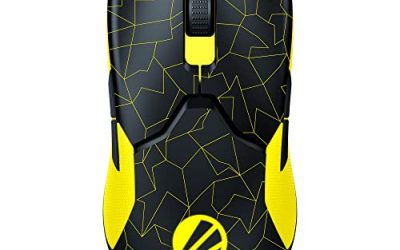
Razer Viper V3 Pro
The Viper V3 Pro is the pick for players whose grip barely touches the mouse. At a stated 54 g it is the lightest option here, and the symmetrical shell suits claw and fingertip grips that steer with small, quick movements rather than full-arm sweeps. Razer’s Focus Pro 35K optical sensor and Gen-3 optical switches cover the accuracy and click side, while the 8 programmable controls leave room for an item active and a ping without crowding your thumb. Battery life is listed at up to 95 hours, so charging rarely interrupts a week of ranked games.
Specs
- Weight: 54 g (black)
- Sensor: Razer Focus Pro 35K optical sensor
- Polling: up to 8K HyperPolling
- Switches: Razer Optical Mouse Switches Gen-3
- Buttons: 8 programmable controls
- Battery life: up to 95 hours
- Connection: Razer HyperSpeed wireless
- Model number: RZ01-05120100-R3U1
Best for: Claw and fingertip players who play several ranked games in one sitting.
Watch out for: Check whether the listing bundles the HyperPolling wireless dongle, and note that the 95-hour battery figure applies to standard polling rather than 8K mode.
ASIN: B0CW25XR5R
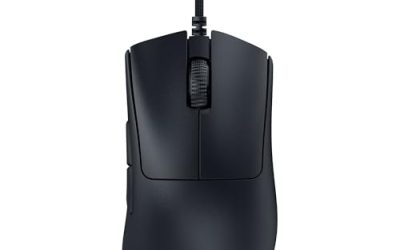
Razer DeathAdder V3
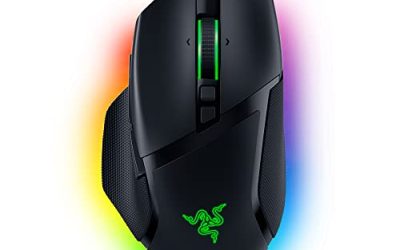
- Best for: Palm-grip players who want a wired mouse with esports-grade hardware.
- Weight: 59 g
- Sensor: Razer Focus Pro 30K optical sensor
- Polling: 8K Hz HyperPolling
- Switches: Razer Optical Switches Gen-3
Palm-grip players who want a wired mouse with esports-grade hardware.
It is wired only and right-handed, so confirm the cable suits your desk setup and that you do not need a wireless or left-handed option.
If your hand rests fully on the mouse, the DeathAdder V3 is the ergonomic counterpart to the Viper. Its right-handed shell supports a palm grip through long sessions, and at 59 g it stays easy to move despite the larger shape. The Focus Pro 30K optical sensor, Gen-3 optical switches and 8K HyperPolling give it the same headline hardware as Razer’s wireless flagship, while the Speedflex cable keeps drag low for a wired mouse. Six programmable buttons cover the essentials: item actives, trinket and attack-move, with nothing extra getting under your thumb.
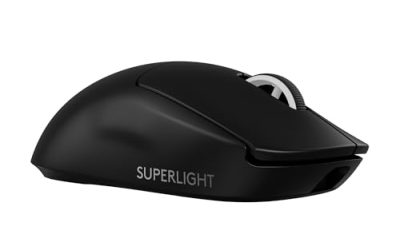
Logitech G PRO X Superlight 2
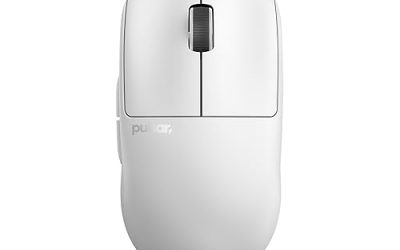
- Best for: Players who want a proven symmetrical shape and tactile hybrid switches.
- Weight: 60 g
- Sensor: HERO 2, up to 44,000 DPI
- Report rate: up to 8 kHz
- Switches: LIGHTFORCE hybrid optical-mechanical switches
Players who want a proven symmetrical shape and tactile hybrid switches.
Check the listing carefully, because the DEX version and the other colors are separate listings with different shell shapes.
Logitech’s Superlight 2 takes the middle path: a safe, symmetrical shape that most grips can use, at a stated 60 g. The HERO 2 sensor is listed up to 44,000 DPI with an 8 kHz report rate, and the LIGHTFORCE hybrid optical-mechanical switches are the draw if you like a defined, tactile click feel alongside fast actuation. Five programmable buttons is the leanest layout here, which fits players who keep almost everything on the keyboard. USB-C charging is a small but welcome detail if your desk already runs on that cable.
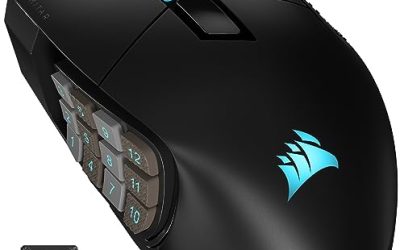
Logitech G502 HERO
- Best for: Players who bind multiple item actives and commands to the mouse.
- Sensor: HERO 25K, 200 to 25,600 DPI
- Buttons: 11 programmable buttons
- Weights: adjustable system, five 3.6 g weights included
- Memory: on-board memory for profiles
Players who bind multiple item actives and commands to the mouse.
This is a wired, weight-adjustable design with a lot of hardware on board, so check the listed dimensions against your hand size and grip before ordering, especially if you use a fingertip grip.
The G502 HERO takes the opposite philosophy: instead of cutting weight, it adds controls. Its 11 programmable buttons are the most here, enough to move several item actives, your trinket and a ping or two onto the mouse without touching the keyboard mid-fight. The HERO 25K sensor adjusts from 200 to 25,600 DPI, on-board memory stores your profiles, and the adjustable weight system with five 3.6 g weights lets you tune the balance. It suits deliberate, planted mouse movement rather than constant flicking, and players who value bindings over lightness.
Logitech G305 Lightspeed
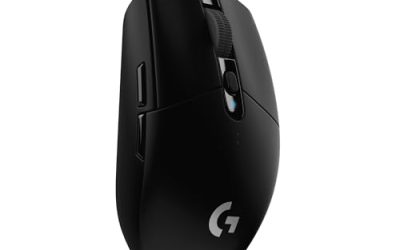
- Best for: Players who want dependable wireless performance on a tight budget.
- Weight: 99 g
- Sensor: HERO, 200 to 12,000 DPI, 400 IPS
- Buttons: 6 programmable buttons
- Battery life: up to 250 hours on one AA battery
Players who want dependable wireless performance on a tight budget.
It uses a replaceable AA battery rather than a rechargeable cell, and the compact shell can feel small in a large palm grip, so check the listed dimensions first.
The G305 is the straightforward way into wireless play. It weighs a stated 99 g, uses the HERO sensor with 200 to 12,000 DPI, and runs up to 250 hours on a single AA battery, so charging cables simply leave your routine. Six programmable buttons cover the standard MOBA bindings, the LIGHTSPEED connection reports at 1 ms, and the receiver stores inside the mouse for travel between desks. The compact shell suits small and medium hands best. For players upgrading from an office mouse, it fixes the two things that matter most, tracking and freedom from a cable, at an entry-level position in the range.
Which One Fits Your Situation
You play several ranked games most evenings
Pick the Viper V3 Pro if you use a claw or fingertip grip, or the DeathAdder V3 if you rest your palm on the mouse. Both keep weight low, which is what your hand notices by the third game, and both carry enough buttons for standard item and trinket bindings. The Viper adds wireless freedom; the DeathAdder removes charging from your routine entirely.
You keep forgetting your item actives
If actives sit unused because reaching the number row breaks your positioning, the G502 HERO is built for you. Its 11 programmable buttons let you place two or three item actives, your trinket and a ping under your thumb and fingers. The trade-off is a heavier, wired mouse, so this pick rewards players who move the mouse deliberately rather than flicking it constantly.
You want to cut the cable on a budget
The G305 Lightspeed covers the essentials with far less commitment than the flagship wireless picks: a HERO sensor, a 1 ms LIGHTSPEED connection, six buttons and up to 250 hours from one AA battery. It is heavier than the Viper V3 Pro and the G PRO X Superlight 2, but for MOBA movement that difference is modest, and you never wait on a charging cable.
Your hand is large, or you use a relaxed palm grip
Start with the DeathAdder V3. Its ergonomic right-handed shell gives a palm grip proper support, and the 59 g weight keeps it from feeling sluggish in lane. If you also want the extra buttons, the G502 HERO is the other full-size option here. Avoid the compact G305 unless you deliberately prefer a small mouse, because a cramped grip tires your hand faster than any specification can fix.
Common Mistakes
- Buying an MMO mouse with a 12-button side grid for a game that only needs a few bindings, then fighting your own thumb during team fights.
- Chasing the highest DPI number on the box instead of setting one comfortable sensitivity and leaving it alone for weeks.
- Choosing a heavy mouse for a game built on constant cursor travel, then blaming your wrist pain on your chair.
- Ignoring shape and hand size, which decide comfort long before sensor specifications do.
- Turning on maximum polling on a wireless mouse and then wondering why the battery drains between sessions.
Frequently Asked Questions
Is a lighter mouse actually better for League of Legends?
For most players, yes, within reason. League asks for constant small cursor movements rather than huge swipes, and a lighter mouse makes those movements with less effort over a long session. Shape still comes first: a 54 g mouse that fights your grip will feel worse than a slightly heavier one that fits your hand properly.
How many mouse buttons do I need for a MOBA?
Five or six is enough for most players: two main clicks, a wheel click and two side buttons cover an item active, a trinket and attack-move. Extra buttons only help if you have specific commands ready to move. If you cannot name the command a button will carry, you do not need the button.
Is wireless reliable enough for ranked play?
Yes. The wireless connections in this guide, Logitech LIGHTSPEED and Razer HyperSpeed, report at 1 ms in standard mode, the same interval as a typical wired gaming mouse. The real differences are practical: wired mice never need charging, while wireless models free your movement from cable drag but ask you to manage a battery.
What DPI should I set for League of Legends?
There is no single correct number, because the right setting depends on your screen size, your in-game sensitivity and how much you move your wrist versus your fingers. Pick a moderate setting, keep it fixed for several weeks, and judge it by whether your clicks land where you intend in fights, not by how large the number looks on the box.
FAQ
Is a lighter mouse actually better for League of Legends?
How many mouse buttons do I need for a MOBA?
Is wireless reliable enough for ranked play?
What DPI should I set for League of Legends?
More from Amazon
Programs that pair well with the guide above. Offers and eligibility are set by Amazon and may change.
Free shipping on eligible items, Prime Video and more. Eligible new members can start with a free trial.
Start a Prime free trialA Prime membership for ages 18-24 with a trial period. Eligibility is set by Amazon.
See Prime for Young AdultsAudiobooks and podcasts to listen to on the go. Eligible new members can start with a free trial.
Try Audible freeAd-free music streaming. Eligible new subscribers can start with a free trial.
Try Music Unlimited freeAs an Amazon Associate we earn from qualifying purchases.