Our Short List of 3

- Best for: Competitive shooter players who want a proven 60-gram wireless mouse with a long battery.
- Weight: 60 g
- Sensor: HERO 2, up to 44,000 DPI
- Polling rate: up to 8,000 Hz
- Battery life: up to 95 hours

- Best for: Right-handed players who want ergonomic comfort for long sessions.
- Weight: 63 g
- Sensor: Focus Pro 30K optical sensor, up to 30,000 DPI
- Battery life: up to 90 hours
- Programmable controls: 8

- Best for: Players buying their first ultralight mouse who want proven, tournament-used hardware.
- Weight: 63 g
- Sensor: HERO 25K, up to 25,600 DPI
- Programmable buttons: 5
- Battery life: up to 70 hours
All 4 Picks at a Glance
| Product | Specs | Action |
|---|---|---|
| Logitech G PRO X Superlight 2 |
| Check price on Amazon |
| Razer DeathAdder V3 Pro |
| Check price on Amazon |
| Logitech G PRO X Superlight |
| Check price on Amazon |
 Glorious Model O Wireless |
| Check price on Amazon |
Key takeaways
- Compare five ultralight gaming mice for PC play, from a 54-gram esports pick to a honeycomb wireless mouse, with sensors, battery life, and grip guidance.
Choosing an ultralight gaming mouse is not really about chasing the lowest number on a spec sheet. The real decision is whether a featherweight shell still feels steady in your hand during a long match, whether the sensor stays accurate when you flick across a large pad, and whether the battery survives a full week of evening sessions without a cable rescue. A mouse that is five grams lighter means nothing if its shape cramps your grip or its clicks feel mushy after a month.
This guide is for PC players who want less wrist fatigue without giving up tracking quality: competitive shooter fans, MMO players who flick constantly, and anyone whose current mouse feels like a brick after an hour. Each pick below is an ultralight wireless mouse with a genuine Amazon listing, and every specification comes from that listing rather than a guess.
Quick Picks
As an Amazon Associate we earn from qualifying purchases.
| Product | Best for | Key spec from title |
|---|---|---|
| Logitech G PRO X Superlight 2 | Competitive shooters who want a proven 60-gram shape | 60 g, HERO 2 sensor, 44,000 DPI |
| Razer Viper V3 Pro | Symmetrical-grip players chasing the lightest build | 54 g, Focus Pro 35K sensor, 8K polling |
| Razer DeathAdder V3 Pro | Right-handed players who want ergonomic comfort | 63 g, Focus Pro 30K sensor, 90-hour battery |
| Logitech G PRO X Superlight | Players who want a trusted first ultralight mouse | 63 g, HERO 25K sensor, 25,600 DPI |
| Glorious Model O Wireless | Ambidextrous players who like a honeycomb shell | 69 g, BAMF sensor, 19,000 DPI |
How to Choose
Weight Is Only Half the Story
A mouse can weigh 54 grams and still feel wrong if its balance sits too far forward or its shell is too narrow for your palm. Weight matters most during fast flicks and long sessions, where every extra gram adds up over thousands of small movements. But balance, shell width, and button placement shape how that weight feels in practice. Before you fixate on a number, think about how you hold a mouse: a claw grip forgives a narrower body, while a palm grip needs length and a filled-out rear. The lightest mouse in this guide suits fingertip players, while the slightly heavier ergonomic picks trade a few grams for a shape that supports your whole hand.
Match the Sensor to How You Play
Every mouse here uses a modern optical sensor, so the differences sit in the details rather than basic accuracy. Look at the maximum sensitivity range if you play at very high or very low DPI, and check whether the sensor tracks cleanly on glass or unusual pad surfaces, since that decides whether you need a dedicated mousepad. Polling rate matters too: an 8,000 Hz mode reports your position far more often than a 1,000 Hz mode, which competitive players notice in fast flicks, though it drains the battery faster. If you play at a single comfortable sensitivity on a standard cloth pad, any sensor in this guide will serve you well, and shape should decide the pick instead.
Battery Life and Charging Habits
Wireless freedom only helps if the mouse stays charged through your routine. The picks in this guide span 71 to 95 hours of wireless use, and that spread matters more than it looks: a mouse listed for 95 hours can run for two weeks of evening play, while a 71-hour mouse needs the cable sooner. All five charge over a cable, so you can top up between matches with a lead you already own. Think about whether you will remember to plug in overnight or prefer a mouse you can leave alone for days. If you hate cables, lean toward the longest-lasting battery; if you already charge gear nightly, the shorter battery is no burden at all.
Grip, Size, and Hand Fit
An ultralight mouse only feels light when it fits your hand. Small hands suit shorter, narrower shells that a fingertip grip can control, while larger hands need length and a taller hump so the palm rests instead of hovering. Side buttons should fall under your thumb without a stretch, and the scroll wheel should sit where your index finger lands naturally. If you switch between palm and claw grip depending on the game, a symmetrical shape gives you the most freedom, while a sculpted right-handed shape locks in comfort for one grip style. When in doubt, measure your hand from wrist to middle fingertip and compare it with the dimensions on the listing.
The 5 Best Options
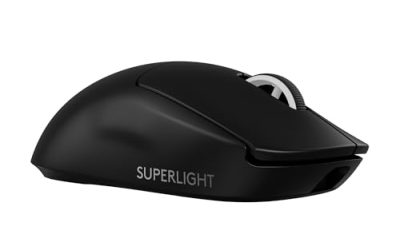
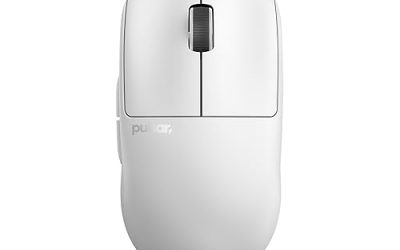
Logitech G PRO X Superlight 2
- Best for: Competitive shooter players who want a proven 60-gram wireless mouse with a long battery.
- Weight: 60 g
- Sensor: HERO 2, up to 44,000 DPI
- Polling rate: up to 8,000 Hz
- Battery life: up to 95 hours
Competitive shooter players who want a proven 60-gram wireless mouse with a long battery.
The 8,000 Hz polling mode uses more battery, so expect shorter life with it enabled.
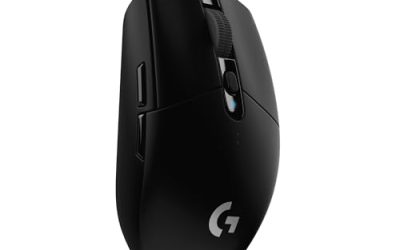
The Superlight 2 is the safe flagship pick in this guide, and its 60-gram body is the reason it shows up in so many competitive setups. Logitech pairs the HERO 2 sensor with LIGHTFORCE hybrid switches and an 8,000 Hz report rate, so clicks and tracking stay consistent through fast flicks. The symmetrical shape suits claw and fingertip grips, and the 95-hour battery means most players charge it once every week or two. It keeps things simple: five programmable buttons, no extra side clutter, and a clean matte shell that stays grippy during long sessions.
Watch out for: The 8,000 Hz polling mode uses more battery, so expect shorter life with it enabled.
Razer Viper V3 Pro
At 54 grams, the Viper V3 Pro is the lightest mouse in this guide, and its symmetrical shape has become a familiar sight in competitive lobbies. Razer fits it with the Focus Pro 35K optical sensor, Gen-3 optical switches, and true 8,000 Hz wireless polling, so tracking and clicks stay sharp at high speed. The 95-hour battery matches the Superlight 2, and eight programmable controls give you room to bind extra actions without reaching for the keyboard. If your grip shifts between claw and fingertip during a match, this is the mouse that adapts with you.
Specs
- Weight: 54 g
- Sensor: Focus Pro 35K optical sensor, up to 35,000 DPI
- Polling rate: true 8,000 Hz wireless
- Battery life: up to 95 hours
- Programmable controls: 8
- Switches: Gen-3 optical switches
- Connectivity: HyperSpeed wireless, USB-C charging
Best for: Symmetrical-grip players who want the lightest mouse here for fast-paced shooters.
Watch out for: The smooth symmetrical shell can feel slippery if your hands sweat, so grip tape may help.
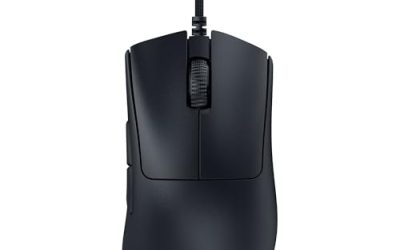
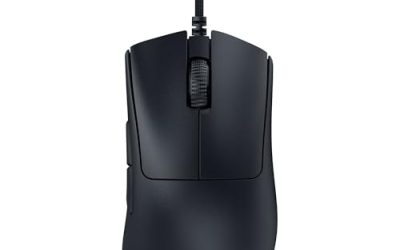
Razer DeathAdder V3 Pro
- Best for: Right-handed players who want ergonomic comfort for long sessions.
- Weight: 63 g
- Sensor: Focus Pro 30K optical sensor, up to 30,000 DPI
- Battery life: up to 90 hours
- Programmable controls: 8
Right-handed players who want ergonomic comfort for long sessions.
The right-handed shape does not suit left-handed players, and 8,000 Hz polling needs the separate HyperPolling dongle.
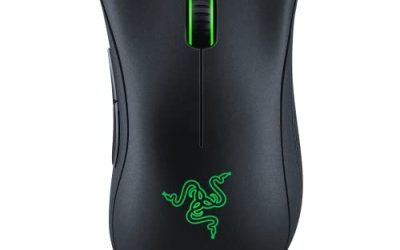
The DeathAdder V3 Pro is the comfort pick of the group, with a sculpted right-handed shape that supports your palm through long sessions. It weighs 63 grams, pairs the Focus Pro 30K optical sensor with Gen-3 optical switches, and runs for up to 90 hours on a charge. The ergonomic curve suits players who found symmetrical mice tiring, and the familiar DeathAdder outline means the side buttons sit exactly where your thumb expects them. It is the mouse to choose when your hand, rather than the spec sheet, makes the final call.
Watch out for: The right-handed shape does not suit left-handed players, and 8,000 Hz polling needs the separate HyperPolling dongle.
Logitech G PRO X Superlight
- Best for: Players buying their first ultralight mouse who want proven, tournament-used hardware.
- Weight: 63 g
- Sensor: HERO 25K, up to 25,600 DPI
- Programmable buttons: 5
- Battery life: up to 70 hours
Players buying their first ultralight mouse who want proven, tournament-used hardware.
It charges over micro-USB rather than USB-C, so keep its cable handy.
The original Superlight still earns its place here, and it remains the easiest first ultralight mouse to recommend. Its 63-gram body carries the HERO 25K sensor with up to 25,600 DPI, five programmable buttons, and a battery that outlasts a week of regular play. The clean symmetrical shape works for most grip styles, and the mouse has been a tournament staple long enough that replacement feet, grips, and setup advice are easy to find. If you want proven hardware without chasing the newest sensor, this is the steady pick.
Watch out for: It charges over micro-USB rather than USB-C, so keep its cable handy.
Glorious Model O Wireless
- Best for: Ambidextrous players who like a honeycomb shell and RGB lighting.
- Weight: 69 g
- Sensor: BAMF optical sensor, up to 19,000 DPI
- Tracking speed: 400 IPS
- Polling rate: up to 1,000 Hz
Ambidextrous players who like a honeycomb shell and RGB lighting.
The honeycomb holes can collect dust, and battery life drops with the lighting on.
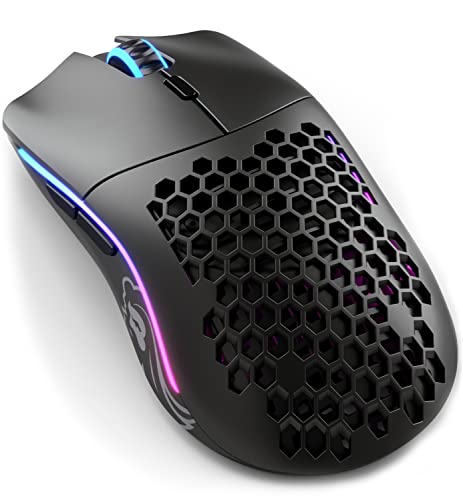
The Model O Wireless brings a different feel to this guide, with a honeycomb shell and RGB lighting that set it apart from the plainer esports mice. It weighs 69 grams, runs on the BAMF sensor with up to 19,000 DPI, and lasts up to 71 hours with the lighting switched off. The ambidextrous shape suits players who switch hands or grips, and the 2.4 GHz wireless link keeps latency low during fast play. It is the pick for players who want their mouse to look as lively as it feels in the hand.
Watch out for: The honeycomb holes can collect dust, and battery life drops with the lighting on.
Which One Fits Your Situation
You Play Fast-Paced Shooters Every Night
Pick the Razer Viper V3 Pro. Its 54-gram body and 8,000 Hz wireless polling keep flicks quick and tracking tight, while the symmetrical shape suits the claw and fingertip grips most shooter players use. The 95-hour battery means you will not be hunting for a cable mid-week, and the eight programmable controls cover grenades, pings, and push-to-talk without extra keys.
Your Hand Gets Tired During Long Sessions
Pick the Razer DeathAdder V3 Pro. Its sculpted right-handed shape supports your palm instead of forcing your fingers to do all the work, and the 63-gram weight keeps fatigue low without feeling flimsy. The 90-hour battery covers a full week of evening play, and the Focus Pro 30K sensor stays accurate on glass and cloth alike.
You Want a Proven First Ultralight Mouse
Pick the Logitech G PRO X Superlight. It has been a tournament staple for years, so its shape, switches, and sensor are known quantities rather than gambles. The 63-gram body and HERO 25K sensor handle every genre well, and the simple five-button layout means there is nothing to learn. If you would rather buy once and stop thinking about mice, this is the one.
You Like a Lively Look and an Ambidextrous Shape
Pick the Glorious Model O Wireless. Its honeycomb shell and RGB lighting give your desk a different character from the plain black esports mice, and the ambidextrous shape works for either hand. The 69-gram body is still firmly ultralight, the BAMF sensor tracks cleanly at up to 19,000 DPI, and the 71-hour battery with lighting off covers several days of play.
Common Mistakes
- Buying the lightest mouse without checking whether its shape fits your grip and hand size.
- Setting the polling rate to 8,000 Hz and wondering why the battery drains faster than the headline figure.
- Judging a mouse by maximum DPI alone, when most players use a fraction of that range.
- Forgetting to check whether the mouse charges over USB-C or an older connector before ordering a spare cable.
- Skipping the software setup, which is where DPI steps, lift-off distance, and button binds actually live.
Frequently Asked Questions
How light should an ultralight gaming mouse be?
Most players consider anything under 70 grams ultralight, and every mouse in this guide sits between 54 and 69 grams. Below that range, the differences are small: a 54-gram mouse feels quicker on flicks, while a 69-gram mouse can feel steadier and more planted. Shape and balance matter more than the last few grams, so treat weight as a starting filter rather than the final decision.
Does a lighter mouse make you aim better?
A lighter mouse can help, but it does not aim for you. Less weight means less effort on fast flicks and less fatigue over long sessions, which keeps your aim steadier late in a match. The sensor, your sensitivity setting, and your mousepad matter just as much. If your aim feels off, check your sensitivity and grip first; a lighter mouse supports good habits rather than replacing them.
Is wireless fast enough for competitive play?
Yes. Every mouse in this guide uses a low-latency 2.4 GHz wireless link, and two of them support 8,000 Hz polling, which reports your position far more often than older wireless mice. Competitive players have used wireless mice at the highest level for years. Keep the receiver close to the mouse, charge it regularly, and you will not notice a difference from a wired connection.
How long does the battery last on these mice?
It depends on the model and your settings. The longest-lasting picks here reach up to 95 hours of wireless use, while the shortest runs up to 71 hours with its lighting off. High polling rates and RGB lighting shorten those figures. In practice, most players charge once a week, and all five mice keep working while plugged in, so a dead battery never has to end a session.
FAQ
How light should an ultralight gaming mouse be?
Does a lighter mouse make you aim better?
Is wireless fast enough for competitive play?
How long does the battery last on these mice?
More from Amazon
Programs that pair well with the guide above. Offers and eligibility are set by Amazon and may change.
Free shipping on eligible items, Prime Video and more. Eligible new members can start with a free trial.
Start a Prime free trialA Prime membership for ages 18-24 with a trial period. Eligibility is set by Amazon.
See Prime for Young AdultsAudiobooks and podcasts to listen to on the go. Eligible new members can start with a free trial.
Try Audible freeAd-free music streaming. Eligible new subscribers can start with a free trial.
Try Music Unlimited freeAs an Amazon Associate we earn from qualifying purchases.