Our Short List of 3

- Best for: Palm-grip players who want ergonomic support without extra weight.
- Sensor: Razer Focus Pro 30K optical
- Switches: Razer Optical Mouse Switches Gen-3
- Buttons: 5 programmable buttons
- Battery: up to 90 hours

- Best for: Players who want a tilt wheel, lighting and flexible connections in one mouse.
- Sensor: Razer Focus Pro 30K optical (30K DPI)
- Switches: Razer Optical Mouse Switches Gen-3
- Controls: 13 programmable controls
- Wheel: HyperScroll tilt wheel

- Best for: MMO and MOBA players who bind many abilities to the thumb.
- Sensor: Razer Focus Pro 30K optical
- Switches: Razer Optical Mouse Switches Gen-3
- Buttons: 19+1 programmable buttons
- Side plates: 3 swappable plates (12, 6 and 2 buttons)
All 4 Picks at a Glance
| Product | Specs | Action |
|---|---|---|
| Razer DeathAdder V3 Pro |
| Check price on Amazon |
| Razer Basilisk V3 Pro |
| Check price on Amazon |
| Razer Naga V2 Pro |
| Check price on Amazon |
 Razer Cobra Pro |
| Check price on Amazon |
Key takeaways
- Compare five Razer gaming mice by shape, weight, sensor and battery life, from the 54g Viper V3 Pro to the Naga V2 Pro with swappable side plates.
Picking a Razer mouse is mostly a decision about shape and weight, because the sensor and switches are strong across the whole line. An ergonomic shell like the DeathAdder suits palm grip and long sessions, a symmetrical shell like the Viper suits fingertip aim, and a button-heavy shell like the Naga trades lightness for extra controls. Wireless freedom, battery endurance and wheel design then narrow the field further, so the right pick depends on your hand and your games far more than on headline sensitivity figures.
This guide is for FPS players who want the lightest shell they can control, MMO and MOBA players who need many thumb buttons, and mixed-genre players who want one mouse for work and play alike. Every pick below is a Razer gaming mouse sold on Amazon, and the details come from the names and specifications printed on each product page, including weight, sensor model, switch type, button count and stated battery life.
Quick Picks
As an Amazon Associate we earn from qualifying purchases
| Product | Best for | Key spec from title |
|---|---|---|
| Razer Viper V3 Pro | Fingertip and claw FPS play | 54g with 8K polling |
| Razer DeathAdder V3 Pro | Palm grip comfort | 63g ergonomic shell |
| Razer Basilisk V3 Pro | Mixed gaming with a tilt wheel | HyperScroll tilt wheel |
| Razer Naga V2 Pro | MMO and MOBA button layouts | 19+1 programmable buttons |
| Razer Cobra Pro | Smaller hands wanting wireless | Up to 170 hr battery |
How to Choose
Match the shape to your grip
Grip style decides which shell will feel natural after an hour. Palm-grip players rest the whole hand on the mouse, so a tall ergonomic shell like the DeathAdder V3 Pro fills the palm and supports the wrist. Claw and fingertip players steer with their fingers and prefer flatter symmetrical shells like the Viper V3 Pro or Cobra Pro, which let them lift and reposition quickly. Hand size matters just as much: a large shell can force small hands into an awkward stretch, while a compact shell cramps bigger hands. Check the stated shape and your usual grip before anything else.
Weight changes how aiming feels
Weight shapes how a mouse starts and stops moving. Lighter mice such as the 54g Viper V3 Pro and 63g DeathAdder V3 Pro ask for less force on flicks and feel easier to stop precisely, which suits low-sensitivity arm aiming. Heavier, feature-loaded mice such as the Naga V2 Pro move with more momentum and can feel steadier for slow tracking, but they tire the hand faster in long sessions. Neither direction is automatically better. The practical question is how you aim: wide arm sweeps reward lightness, while small wrist movements forgive extra grams.
Sensor and polling, in plain terms
Every mouse in this guide uses a Razer optical sensor specified far beyond what a human hand can outrun, so small sensitivity gaps between 30K and 35K models rarely decide games. Polling rate is the figure worth a second look: it describes how often the mouse reports its position each second. The Viper V3 Pro lists 8K polling for players chasing the lowest possible input delay, while the rest report at standard rates that already feel instant in most titles. Optical switches also remove the debounce delay of mechanical contacts, which keeps clicks consistent over time.
Buttons, wheels and battery trade-offs
Extra controls help only when your games use them. MMO and MOBA players gain real value from the Naga V2 Pro’s swappable side plates, while FPS players often prefer fewer buttons they cannot press by accident. A tilt wheel, like the HyperScroll wheel on the Basilisk V3 Pro, adds horizontal scrolling and free-spin modes that help in menus and documents as much as in games. Battery claims also need context: figures such as 90, 95 or 170 hours depend on the connection mode and polling rate in use, so treat them as relative guides rather than promises.
The 5 Best Options
Razer Viper V3 Pro
The Viper V3 Pro is the competitive pick in Razer’s line: a symmetrical 54g shell, a Focus Pro 35K optical sensor and true 8K polling aimed at players who aim with their fingertips or a relaxed claw grip. Eight programmable buttons keep the layout simple, and the Gen-3 optical switches register clicks without mechanical contact delay. With up to 95 hours of battery on board, it suits tournament-style practice and ranked sessions where a cable would drag. Players who want lighting, a tilt wheel or many side buttons should look further down this list instead.
Specs
- Sensor: Razer Focus Pro 35K optical
- Polling: 8K polling as stated in the listing title
- Switches: Razer Optical Mouse Switches Gen-3
- Buttons: 8 programmable buttons
- Battery: up to 95 hours
- Weight: 54g (black)
- Connection: Razer HyperSpeed wireless
- Model: RZ01-05120100-R3U1
Best for: Competitive FPS players using fingertip or claw grip.
Watch out for: The symmetrical shell has no tilt wheel or RGB lighting, and the white version is a separate listing with its own ASIN.
Razer DeathAdder V3 Pro
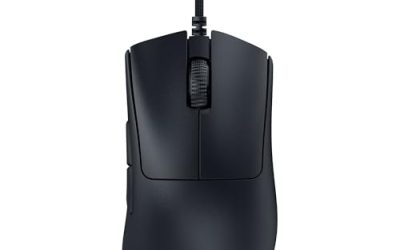
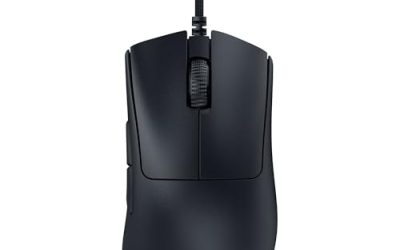
- Best for: Palm-grip players who want ergonomic support without extra weight.
- Sensor: Razer Focus Pro 30K optical
- Switches: Razer Optical Mouse Switches Gen-3
- Buttons: 5 programmable buttons
- Battery: up to 90 hours
Palm-grip players who want ergonomic support without extra weight.
A version bundled with the HyperPolling wireless dongle is sold under a separate listing, so confirm which package you are ordering.
The DeathAdder V3 Pro keeps the line’s famous ergonomic shape and trims it to 63g, which makes it the natural choice for palm-grip players who still want a light mouse. Its Focus Pro 30K optical sensor and Gen-3 optical switches match the hardware FPS players ask for, while five programmable buttons cover the essentials without crowding the side. HyperSpeed wireless and up to 90 hours of battery suit long evening sessions, and the shape supports the hand in a way flat symmetrical shells cannot. It is right-handed only, with no left-hand version in this listing.
Watch out for: A version bundled with the HyperPolling wireless dongle is sold under a separate listing, so confirm which package you are ordering.
Razer Basilisk V3 Pro
- Best for: Players who want a tilt wheel, lighting and flexible connections in one mouse.
- Sensor: Razer Focus Pro 30K optical (30K DPI)
- Switches: Razer Optical Mouse Switches Gen-3
- Controls: 13 programmable controls
- Wheel: HyperScroll tilt wheel
Players who want a tilt wheel, lighting and flexible connections in one mouse.
It is the heaviest style of shell in this guide and has no 8K polling, so pure FPS players may prefer the Viper V3 Pro.
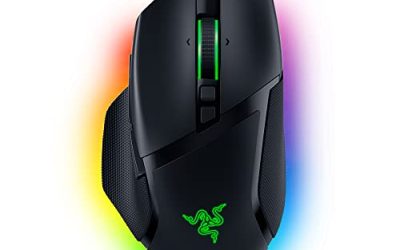
The Basilisk V3 Pro is the feature carrier of the group: a HyperScroll tilt wheel with free-spin and tactile modes, 13 programmable controls and 13-zone Chroma RGB lighting under the shell. Its Focus Pro 30K sensor and Gen-3 optical switches keep tracking and clicks competitive, while three connection modes let it move between a gaming PC and a work laptop. This is the Razer mouse for players who remap buttons often, scroll long pages between matches, and want one device to cover both desk setups without giving up gaming hardware.
Watch out for: It is the heaviest style of shell in this guide and has no 8K polling, so pure FPS players may prefer the Viper V3 Pro.
Razer Naga V2 Pro
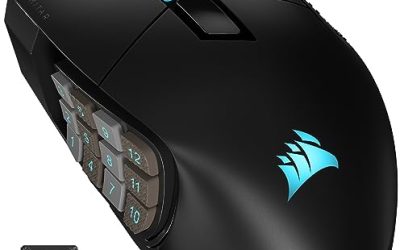
- Best for: MMO and MOBA players who bind many abilities to the thumb.
- Sensor: Razer Focus Pro 30K optical
- Switches: Razer Optical Mouse Switches Gen-3
- Buttons: 19+1 programmable buttons
- Side plates: 3 swappable plates (12, 6 and 2 buttons)
MMO and MOBA players who bind many abilities to the thumb.
A bundle with the Mouse Dock Pro charging puck is a different listing; this pick is the mouse on its own.
The Naga V2 Pro is built around its side panel: three magnetic plates with 12, 6 or 2 buttons let one mouse cover MMO rotations, MOBA abilities and shooter loadouts, giving 19+1 programmable buttons in total. A HyperScroll Pro wheel, Focus Pro 30K sensor and Gen-3 optical switches keep the rest of the hardware current, and the listing states up to 300 hours of battery life. It is the heaviest and widest mouse here, which is exactly the trade MMO players accept in exchange for a full keypad under the thumb.
Watch out for: A bundle with the Mouse Dock Pro charging puck is a different listing; this pick is the mouse on its own.
Razer Cobra Pro
- Best for: Small to medium hands wanting a compact wireless Razer mouse.
- Sensor: 30K optical sensor
- Switches: Razer Optical Mouse Switches Gen-3
- Controls: 10 customizable controls
- Lighting: Chroma RGB
Small to medium hands wanting a compact wireless Razer mouse.
Some reseller titles describe this model with 11 buttons; the Amazon listing title states 10 customizable controls, so check the page before ordering.
The Cobra Pro shrinks Razer’s wireless formula into a smaller symmetrical shell that suits small and medium hands, younger players and anyone who finds the Viper too long. It keeps a 30K optical sensor, Gen-3 switches and Chroma RGB lighting, with 10 customizable controls for a mid-size button layout. Three connection modes — 2.4GHz wireless, Bluetooth and USB Type C — plus up to 170 hours of stated battery life make it easy to move between a desktop, a laptop and a second machine without re-pairing or carrying a cable everywhere.
Watch out for: Some reseller titles describe this model with 11 buttons; the Amazon listing title states 10 customizable controls, so check the page before ordering.
Which One Fits Your Situation
You play ranked FPS most nights
Choose the Viper V3 Pro. Its 54g symmetrical shell, 8K polling and Focus Pro 35K sensor are built for fingertip and claw aiming, and the plain shell keeps nothing between your hand and the pad. If you use a full palm grip instead, take the DeathAdder V3 Pro: you keep the optical switches and wireless link, and the taller ergonomic shape supports your hand through long sessions.
You rotate between an MMO and shooters
Choose the Naga V2 Pro. The 12-button plate covers raid rotations and long ability bars, the 6-button plate suits MOBAs, and the 2-button plate keeps the side clean for shooters. Swapping plates is magnetic and tool-free, so one mouse genuinely covers a mixed library. Accept the wider, heavier shell as the trade for that flexibility, and plan desk space for it.
You split time between gaming and a work desk
Choose the Basilisk V3 Pro. Three connection modes let it pair with a gaming PC and a work laptop, the tilt wheel handles spreadsheets and long documents between matches, and 13 programmable controls leave room for both game binds and everyday shortcuts. The Chroma lighting can be set per application, so the same mouse looks at home in both settings.
You have smaller hands or a second setup
Choose the Cobra Pro. Its compact symmetrical shell fits hands that find full-size mice a stretch, and Bluetooth plus 2.4GHz wireless make it easy to leave one receiver in a laptop bag and pair the other way at a desk. The stated 170-hour battery suits a mouse that travels, and the 10 customizable controls still cover a shooter or MOBA layout.
Common Mistakes
- Buying by sensitivity figures alone: a 35K sensor will not fix a shell that fights your grip, so settle shape and size first.
- Assuming every color or bundle shares one listing: Razer sells each color and dongle bundle under separate ASINs, so confirm the exact page before ordering.
- Chasing the lightest mouse while using a palm grip: very light flat shells can leave palm-grip hands unsupported and sore over long sessions.
- Ignoring connection modes: a mouse with Bluetooth as well as 2.4GHz wireless is far easier to share between a gaming PC and a laptop.
- Leaving the polling rate at maximum everywhere: the highest rates shorten battery life, so match the setting to the game you are playing.
Frequently Asked Questions
Is the Viper V3 Pro or the DeathAdder V3 Pro better for FPS?
It depends on grip more than on hardware, because both use Razer optical switches and high-end optical sensors. Fingertip and claw players usually aim better with the lighter, symmetrical Viper V3 Pro, while palm-grip players get more support from the DeathAdder V3 Pro’s ergonomic shell. Pick by the shape your hand already uses, then by weight.
Does 8K polling make a visible difference?
The Viper V3 Pro lists 8K polling, which means it reports position 8,000 times per second. On a fast monitor the cursor path can look smoother and input delay drops slightly, but the gain is small next to shape, weight and a stable wireless link. It also draws more battery, so many players enable it only for competitive titles.
Can one Razer mouse cover both work and gaming?
Yes, and the Basilisk V3 Pro is the clearest example here: it connects three ways, so it can stay paired to a work laptop over Bluetooth and a gaming PC over its wireless receiver. The tilt wheel and 13 programmable controls help in documents and spreadsheets, while the 30K sensor and optical switches keep it fully capable in games.
Are the Naga V2 Pro side plates included?
Yes. The listing describes three swappable side plates — 12-button, 6-button and 2-button layouts — that attach magnetically, so the same mouse can present a full MMO keypad or a simple two-button side. The plates are part of this model’s package rather than separate accessories, which is why the button count is written as 19+1 programmable buttons.
FAQ
Is the Viper V3 Pro or the DeathAdder V3 Pro better for FPS?
Does 8K polling make a visible difference?
Can one Razer mouse cover both work and gaming?
Are the Naga V2 Pro side plates included?
More from Amazon
Programs that pair well with the guide above. Offers and eligibility are set by Amazon and may change.
Free shipping on eligible items, Prime Video and more. Eligible new members can start with a free trial.
Start a Prime free trialA Prime membership for ages 18-24 with a trial period. Eligibility is set by Amazon.
See Prime for Young AdultsAudiobooks and podcasts to listen to on the go. Eligible new members can start with a free trial.
Try Audible freeAd-free music streaming. Eligible new subscribers can start with a free trial.
Try Music Unlimited freeAs an Amazon Associate we earn from qualifying purchases.