Our Short List of 3

- Best for: players who want a proven light wireless mouse for fast flicks and long matches.
- Focus Pro 30K optical sensor
- 58 g
- Optical Switches Gen-3
- HyperSpeed wireless

- Best for: palm-grip players who want a larger ergonomic mouse for long matches.
- Focus Pro 30K optical sensor
- 63 g
- Gen-3 optical switches
- Up to 90 hours battery

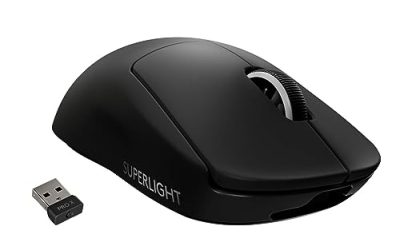
- Best for: players who want an ultralight wireless mouse with top polling and long battery life.
- HERO 2 sensor, up to 44,000 DPI
- 60 g
- Up to 8 kHz polling
- Up to 95 hours battery
All 3 Picks at a Glance
| Product | Specs | Action |
|---|---|---|
| Razer Viper V2 Pro |
| Check price on Amazon |
| Razer DeathAdder V3 Pro |
| Check price on Amazon |
| Logitech G PRO X Superlight 2 |
| Check price on Amazon |
Key takeaways
- Four light wireless mice for CS2, compared on sensor, weight, polling rate and grip shape, so you can pick the one that fits your hand and aim.
Counter-Strike 2 rewards clean aim, and the mouse is the part of the setup that turns hand movement into crosshair movement. A light body with a precise sensor and a fast wireless link helps flicks land and holds feel steady, while a heavy or laggy mouse fights you on every duel. The right pick depends on your grip, your hand size, and how you play, not on chasing the biggest number on the box.
This guide covers four wireless mice for CS2 players at different ranks, from casual matchmaking to serious Faceit grinds. Each one suits a different grip and hand size, and every pick below comes from its Amazon listing name and listed specs, so you can compare sensor, weight, polling and buttons on equal terms. Read the shape notes first, then match the mouse to the way you hold it.
Quick Picks
As an Amazon Associate we earn from qualifying purchases
| Product | Best for | Key spec from title |
|---|---|---|
| Razer Viper V2 Pro | fast flicks with a light wireless body | Focus Pro 30K sensor, 58 g |
| Razer DeathAdder V3 Pro | palm-grip comfort in long matches | Focus Pro 30K sensor, 63 g |
| Logitech G PRO X Superlight 2 | ultralight wireless play at top polling | HERO 2 sensor, 60 g, 8 kHz polling |
| Razer Viper V3 Pro | precise aim in the lightest body here | Focus Pro 35K Gen-2 sensor, 54 g |
How to Choose
Sensor and DPI range
Every mouse here uses a modern optical sensor with a high DPI ceiling, from 30,000 on the Razer models to 44,000 on the Logitech pick. A high ceiling matters because it gives you clean tracking at the low DPI settings most CS2 players actually use, usually 400 to 1,600, without the sensor losing accuracy. What matters more than the ceiling is how the sensor behaves at your chosen DPI: smooth tracking, no angle snapping, and no jitter when you move slowly to hold an angle. All four sensors in this guide are proven in competitive play, so pick the mouse whose shape and weight suit you and treat the sensor as a baseline, not the deciding factor.
Weight and balance
The four mice in this guide weigh between 54 and 63 grams, which is light. Light weight helps in CS2 because flicks, micro-adjustments and fast counter-strafing all ask your wrist and fingers to move the mouse quickly and stop it cleanly. A lighter mouse tires your hand less across a match, and it makes small corrections feel easier. Balance matters too: a mouse that feels nose-heavy or tail-heavy will pull your aim off line even if the total weight looks good on paper. All four picks here keep their weight centered, so the choice comes down to grip and hand size rather than hunting for the lightest number.
Polling rate and wireless link
Polling rate decides how often the mouse reports its position to your PC, and every pick here runs at 1,000 Hz or higher over a 2.4 GHz wireless link. At 1,000 Hz the mouse reports a thousand times per second, which is smooth. The two 8,000 Hz models report eight times as often, and the difference shows up on high refresh rate monitors where the cursor path looks smoother. Wireless used to mean lag, but the HyperSpeed and LIGHTSPEED links in this guide are built for competitive play, with latency low enough that most players cannot tell them apart from a cable. Keep the receiver close to the mouse and charge it before a session.
Shape, grip and hand size
Shape decides whether a mouse disappears in your hand or fights you. The DeathAdder V3 Pro is the ergonomic pick here, with a right-handed curve that fills the palm and supports long holds. The two Viper models are ambidextrous and low-profile, which suits claw and fingertip grips and players who lift the mouse often. The Superlight 2 sits between them, with a symmetrical shell that works for palm, claw and fingertip grips. Hand size matters as much as grip: a mouse that is too long forces your fingers to stretch, while one that is too short leaves your palm unsupported. Measure your hand, compare it with the size notes, and favor the shape that matches your grip.
The 4 Best Options
Razer Viper V2 Pro
- Best for: players who want a proven light wireless mouse for fast flicks and long matches.
- Focus Pro 30K optical sensor
- 58 g
- Optical Switches Gen-3
- HyperSpeed wireless
players who want a proven light wireless mouse for fast flicks and long matches.
check the listing is the standard black model, not a renewed unit.
The Viper V2 Pro is the proven all-rounder of this group, a light wireless mouse that has been a fixture in competitive CS2 loadouts since launch. Its 58 gram body and Focus Pro 30K sensor give you fast, clean tracking for flicks and precise micro-adjustments, while the Gen-3 optical switches respond quickly without the double-click faults that wear out older mechanical switches. On-mouse DPI controls let you change sensitivity between rounds without opening software, and the 90 hour battery means a week of evening matches on one charge. If you want a mouse with a long competitive track record, this is the safe pick.
Watch out for: check the listing is the standard black model, not a renewed unit.
Razer DeathAdder V3 Pro
- Best for: palm-grip players who want a larger ergonomic mouse for long matches.
- Focus Pro 30K optical sensor
- 63 g
- Gen-3 optical switches
- Up to 90 hours battery
palm-grip players who want a larger ergonomic mouse for long matches.
confirm the listing is the wireless Pro model, not the wired V3 or a bundle with a separate dongle.
The DeathAdder V3 Pro suits palm-grip players who want a larger mouse that fills the hand and stays comfortable through long matches. Its ergonomic right-handed shell supports the palm during slow holds and steady crosshair placement, and the 63 gram body keeps it light enough for quick flicks when a push comes through smoke. The Focus Pro 30K sensor tracks cleanly at low DPI, and the Gen-3 optical switches give a crisp click with a long service life. Six programmable buttons cover the essentials without crowding the shell, and the 90 hour battery handles a full week of play. Pick this one for comfort above all.
Watch out for: confirm the listing is the wireless Pro model, not the wired V3 or a bundle with a separate dongle.
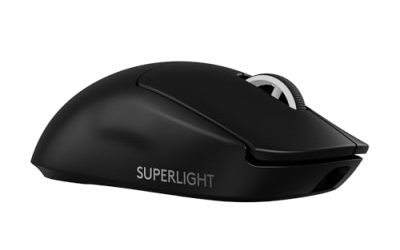
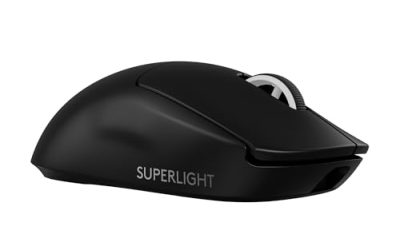
Logitech G PRO X Superlight 2
- Best for: players who want an ultralight wireless mouse with top polling and long battery life.
- HERO 2 sensor, up to 44,000 DPI
- 60 g
- Up to 8 kHz polling
- Up to 95 hours battery
players who want an ultralight wireless mouse with top polling and long battery life.
check what ships in the box so you know how the top polling rate is reached.
The Superlight 2 is Logitech’s ultralight flagship, and it earns its place here with a 60 gram body, a HERO 2 sensor that reaches 44,000 DPI, and polling up to 8,000 Hz. That combination gives you fast, stable tracking with little hand fatigue, which shows in later rounds when tired hands miss shots. LIGHTFORCE hybrid switches blend optical speed with a mechanical feel, and the 95 hour battery means you charge it rarely. The symmetrical shell suits palm, claw and fingertip grips, so it adapts to more players than the ergonomic picks. If you want the lightest-feeling mouse here with top polling, this is the one.
Watch out for: check what ships in the box so you know how the top polling rate is reached.
Razer Viper V3 Pro
The Viper V3 Pro is the newest Razer mouse in this guide and the lightest at 54 grams, built around the Focus Pro 35K Gen-2 sensor. That sensor tracks up to 35,000 DPI with high speed and acceleration headroom, so fast flicks stay accurate even when you swing hard across the pad. The 8,000 Hz wireless polling keeps the cursor path smooth on high refresh rate monitors, and the Gen-3 optical switches respond fast with long rated life. Eight programmable buttons give you room for utility binds without cluttering the shell. If you want the latest sensor in the lightest body, this is the pick.
Specs
- Focus Pro 35K Optical Sensor Gen-2, up to 35,000 DPI
- 54 g
- Up to 8,000 Hz wireless polling via included HyperPolling Wireless Dongle
- Gen-3 Optical Switches
- 8 programmable buttons
- Up to 95 hours battery at 1,000 Hz
Best for: aim-focused players who want the newest Razer sensor in the lightest body here.
Watch out for: buy the standard black model, not the Counter-Strike 2 Edition listing.
Which One Fits Your Situation
Palm grip, medium to large hands
If you palm the mouse with your whole hand resting on it, pick the DeathAdder V3 Pro. Its ergonomic right-handed shell fills the palm and supports your hand through long holds, so your wrist stays relaxed across a full match. The 63 gram body is still light enough for flicks, and the six buttons keep the layout simple. Skip the low-profile ambidextrous models if a full palm rest matters to you.
Claw or fingertip grip, fast flicks
If you play claw or fingertip and lift the mouse often, pick the Viper V3 Pro. At 54 grams it is the lightest mouse here, and its low-profile ambidextrous shell lets your fingers control the aim without the palm dragging. The Focus Pro 35K sensor and 8,000 Hz polling keep fast flicks accurate. The Viper V2 Pro is the close second if you prefer a proven model with a longer track record.
Wireless play with top polling
If you want wireless freedom with the fastest reporting in this guide, pick the Superlight 2. Its LIGHTSPEED link runs at up to 8,000 Hz, so the cursor stays smooth on high refresh rate monitors, and the 95 hour battery means you rarely think about charging. The symmetrical shell suits most grips, which makes it the most flexible pick here. Keep the receiver close to the mouse for the best link.
A proven shape with no surprises
If you want a mouse with a long competitive track record and a shape that has already proven itself in pro play, pick the Viper V2 Pro. It is light, wireless, and easy to live with, with on-mouse DPI controls for quick changes between rounds. It lacks the newest sensor and the top polling rate of the V3 Pro, but it costs less in practice and its design is battle-tested. It is the safe first CS2 mouse.
Common Mistakes
- Choosing a mouse by its DPI number alone instead of checking the shape and grip.
- Running the highest DPI setting and fighting the sensor on small adjustments.
- Buying a renewed or bundle listing without checking the exact model on the page.
- Ignoring polling rate and receiver placement, then blaming the mouse for lag.
- Picking an ergonomic mouse for a claw grip, or an ambidextrous one for a full palm.
Frequently Asked Questions
What DPI should I use in CS2?
Most CS2 players use 400 to 1,600 DPI with a low in-game sensitivity, because low DPI gives you finer control for small adjustments and steady crosshair placement. Set the mouse to one of its built-in DPI steps, then tune the in-game sensitivity until a full swipe across the pad turns you about 180 degrees. Avoid the maximum DPI setting, which makes small movements jumpy.
Is wireless fast enough for CS2?
Yes. Modern 2.4 GHz wireless links such as HyperSpeed and LIGHTSPEED report at 1,000 Hz or higher, and most players cannot tell them apart from a wired mouse in blind play. Keep the receiver close to the mouse and keep the battery charged. The 8,000 Hz models here give an even smoother cursor path on high refresh rate monitors.
Does a lighter mouse improve aim?
A lighter mouse helps with flicks and reduces wrist fatigue across a long match, because you move less mass with each correction. But weight is only part of the story: shape, grip and sensor matter just as much. A 54 gram mouse with the wrong shape will feel worse than a 63 gram mouse that fits your hand. Choose the shape first, then pick the lightest option in that shape.
Do I need 8,000 Hz polling?
No, not for most players. A 1,000 Hz rate already reports the mouse position a thousand times per second. The 8,000 Hz models help most on high refresh rate monitors, where the cursor path looks smoother and input feels slightly tighter. They also ask more of your CPU, so 1,000 Hz is safer on older PCs. Pick 8,000 Hz if your monitor can use it.
FAQ
What DPI should I use in CS2?
Is wireless fast enough for CS2?
Does a lighter mouse improve aim?
Do I need 8,000 Hz polling?
More from Amazon
Programs that pair well with the guide above. Offers and eligibility are set by Amazon and may change.
Free shipping on eligible items, Prime Video and more. Eligible new members can start with a free trial.
Start a Prime free trialA Prime membership for ages 18-24 with a trial period. Eligibility is set by Amazon.
See Prime for Young AdultsAudiobooks and podcasts to listen to on the go. Eligible new members can start with a free trial.
Try Audible freeAd-free music streaming. Eligible new subscribers can start with a free trial.
Try Music Unlimited freeAs an Amazon Associate we earn from qualifying purchases.