Our Short List of 3

- Best for: Builders who want many mouse buttons and a weight they can tune to their hand.
- Sensor: HERO 25K optical, 200 to 25,600 DPI
- Buttons: 11 programmable buttons
- Weight: 121 grams, plus five 3.6-gram tuning weights
- Connection: Wired

- Best for: Competitive players who want an ultralight wireless mouse with a top-tier sensor.
- Sensor: HERO 2 optical, up to 32,000 DPI
- Weight: Under 60 grams
- Connection: LIGHTSPEED wireless, wired over USB-C
- Battery life: Up to 95 hours

- Best for: Players who want long battery life and wireless DPI control without a flagship shell.
- Sensor: HERO 12K optical, 200 to 12,000 DPI
- Weight: 99 grams with battery installed
- Connection: LIGHTSPEED wireless, 1 millisecond report rate
- Battery life: Up to 250 hours on one AA battery
All 3 Picks at a Glance
| Product | Specs | Action |
|---|---|---|
| Logitech G502 HERO |
| Check price on Amazon |
| Logitech G Pro X Superlight 2 |
| Check price on Amazon |
| Logitech G305 LIGHTSPEED |
| Check price on Amazon |
Key takeaways
- Compare the best gaming mouse DPI for Fortnite: four mice for fast edits, steady tracking, and flicks, with sensors, DPI range, weight, and polling compared.
Fortnite rewards a very specific kind of aim. You flick to a target, track a player who is jumping and building, then switch to editing a wall or floor without losing your place. The DPI setting sits at the center of all of that, because it decides how far your crosshair travels for every inch your hand moves. A sensor that stays accurate across a wide DPI range lets you tune sensitivity until edits feel instant and long-range shots feel steady.
This guide is for Fortnite players who want to stop guessing about DPI and choose a mouse that fits how they play. It covers a button-heavy wired mouse for builders who bind every edit to the mouse, two ultralight wireless flagships for fast flicks and tracking, and a long-battery wireless mouse for players who want DPI control without a flagship shell. Each pick names its sensor, DPI range, weight, and polling rate from its Amazon listing, so you can compare the numbers that matter before you buy.
Quick Picks
As an Amazon Associate we earn from qualifying purchases at no extra cost to you.
| Product | Best for | Key spec from title |
|---|---|---|
| Logitech G502 HERO | Builders who want many programmable buttons and a tunable weight | HERO 25K sensor, up to 25,600 DPI |
| Logitech G Pro X Superlight 2 | Competitive players who want a proven 60-gram wireless shape | HERO 2 sensor, up to 32,000 DPI |
| Razer Viper V3 Pro | Claw and fingertip players who want the highest DPI ceiling | Focus Pro 35K sensor, up to 35,000 DPI |
| Logitech G305 LIGHTSPEED | Players who want wireless DPI control and a very long battery life | HERO 12K sensor, up to 12,000 DPI |
How to Choose
Start with your effective sensitivity, not the DPI number on the box
DPI alone tells you almost nothing about how a mouse will feel in Fortnite. What matters is effective sensitivity, which is your DPI multiplied by the in-game sensitivity setting. A player at 800 DPI with low in-game sensitivity and a player at 400 DPI with higher in-game sensitivity can end up with the same crosshair speed. The advantage of a wide DPI range is freedom: a sensor that tracks cleanly from 200 up to 25,600 DPI or higher lets you pick the exact combination that suits your arm, your desk space, and your grip. Before you buy, check how much desk room you have for sweeping arm movements, because low sensitivity needs more space.
Look for a sensor that holds accuracy at your DPI, not just at the top end
Every modern gaming sensor lists a maximum DPI, yet Fortnite players spend their time in the middle of the range, usually between 400 and 1,600 DPI. What you want is a sensor that tracks without smoothing, filtering, or acceleration at those everyday settings, so a slow drag across a target and a fast flick behave the same way. Current optical gaming sensors are built for exactly that. When you compare listings, look for the sensor name and the stated DPI range, then confirm the mouse lets you change DPI in small steps or save several DPI stages, so you can switch between a calm aiming setting and a faster building setting without opening software mid-match.
Weight changes how DPI feels in your hand
A heavy mouse at a high DPI can feel jumpy, because every small hand tremor moves the crosshair further. A light mouse at a low DPI can feel like hard work, because you move your arm more to cover the same distance. Weight and DPI belong in the same decision. Ultralight mice around 54 to 60 grams suit players who flick constantly and reset their aim between builds, while a heavier mouse around 99 to 121 grams can feel steadier for players who track targets with smooth, controlled movements. In long sessions, the shape matters as well as the number on the scale, since a comfortable shell matters more than a few grams once your hand gets tired.
Polling rate, buttons, and battery decide the rest
Polling rate is how often the mouse reports its position to the computer, and a higher rate means the cursor updates more often during fast movement. A 1,000 Hz polling rate updates every millisecond and is enough for most players, while 8,000 Hz polling can make fast flicks feel slightly smoother on a high-refresh monitor. Buttons matter in Fortnite more than in most shooters, because building and editing eat inputs: extra side buttons let you bind wall, floor, ramp, and edit without moving your left hand off movement keys. For wireless mice, battery life decides how often you think about charging, with some models lasting around 95 hours and others stretching past 250 hours on a single battery.
The 4 Best Options
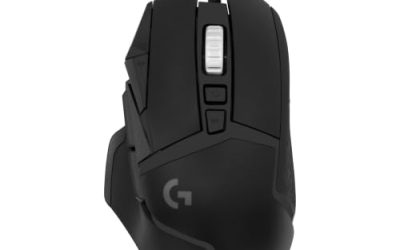
Logitech G502 HERO
- Best for: Builders who want many mouse buttons and a weight they can tune to their hand.
- Sensor: HERO 25K optical, 200 to 25,600 DPI
- Buttons: 11 programmable buttons
- Weight: 121 grams, plus five 3.6-gram tuning weights
- Connection: Wired
Builders who want many mouse buttons and a weight they can tune to their hand.
The shell is large and right-handed, so check the dimensions against your hand size before buying, and note that the weight system adds heft rather than removing it.
The G502 HERO is the pick for Fortnite players who build constantly and want every edit, weapon slot, and building piece within thumb reach. Its 11 programmable buttons give you room to bind wall, floor, ramp, cone, and edit across the mouse, so your left hand stays on movement while your right hand does the building. The wired connection keeps things simple, the tunable weight system lets you add up to five 3.6-gram weights until it feels planted, and the HERO 25K sensor covers a DPI range wide enough for any sensitivity style. Its large, right-handed shell suits palm and claw grips on medium to large hands.
Watch out for: The shell is large and right-handed, so check the dimensions against your hand size before buying, and note that the weight system adds heft rather than removing it.
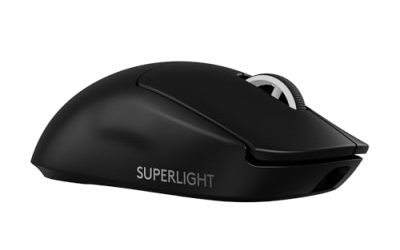
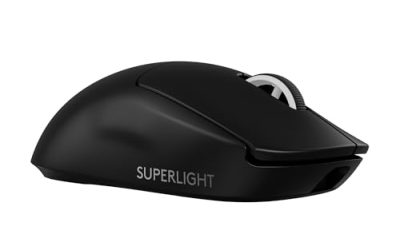
Logitech G Pro X Superlight 2
- Best for: Competitive players who want an ultralight wireless mouse with a top-tier sensor.
- Sensor: HERO 2 optical, up to 32,000 DPI
- Weight: Under 60 grams
- Connection: LIGHTSPEED wireless, wired over USB-C
- Battery life: Up to 95 hours
Competitive players who want an ultralight wireless mouse with a top-tier sensor.
There is no on-mouse DPI button, so confirm you are comfortable changing DPI through software, and check that the symmetrical shape suits your grip before committing.
The Superlight 2 is the mouse competitive Fortnite players reach for when they want the lightest proven shape with a sensor that never gets in the way. At under 60 grams, it moves with very little effort, which makes fast flicks and quick resets between edits feel almost automatic. The HERO 2 sensor tracks up to 32,000 DPI with no smoothing, filtering, or acceleration, and the LIGHTSPEED wireless link keeps the connection stable during long matches. Battery life reaches up to 95 hours, and charging runs over USB-C. There is no DPI button on the shell, so you change DPI stages through the Logitech software instead.
Watch out for: There is no on-mouse DPI button, so confirm you are comfortable changing DPI through software, and check that the symmetrical shape suits your grip before committing.
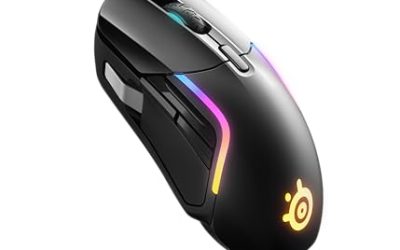
Razer Viper V3 Pro
The Viper V3 Pro is the pick for players who want the highest DPI ceiling in this guide and fine control over where their sensitivity lands. Its Focus Pro 35K sensor adjusts in 1-DPI steps all the way to 35,000 DPI, so you can dial in an unusual sensitivity value instead of a preset. At 54 grams it is the lightest mouse here, the included HyperPolling dongle pushes wireless polling to 8,000 Hz, and the sensor even tracks on glass. Eight programmable buttons cover the building binds most players need, and the battery lasts up to 95 hours at 1,000 Hz polling. The symmetrical shape suits claw and fingertip grips.
Specs
- Sensor: Focus Pro 35K Optical Sensor Gen-2, up to 35,000 DPI
- DPI adjustment: 1-DPI steps
- Weight: 54 grams
- Connection: HyperSpeed wireless, wired over USB-C
- Polling rate: Up to 8,000 Hz wireless with included HyperPolling dongle
- Switches: Gen-3 optical switches
- Buttons: 8 programmable buttons
- Battery life: Up to 95 hours at 1,000 Hz polling
- Model number: RZ01-05120100-R3U1
Best for: Claw and fingertip players who want 1-DPI step adjustments and the highest DPI ceiling.
Watch out for: Battery life drops when you run the mouse at 8,000 Hz polling, so plan for more frequent charging if you use the top polling rate, and note there is no RGB lighting.
Logitech G305 LIGHTSPEED
- Best for: Players who want long battery life and wireless DPI control without a flagship shell.
- Sensor: HERO 12K optical, 200 to 12,000 DPI
- Weight: 99 grams with battery installed
- Connection: LIGHTSPEED wireless, 1 millisecond report rate
- Battery life: Up to 250 hours on one AA battery
Players who want long battery life and wireless DPI control without a flagship shell.
The mouse runs on a single AA battery rather than a rechargeable cell, and it has no Bluetooth connection, so confirm the included receiver setup works for your desk.
The G305 LIGHTSPEED suits Fortnite players who want wireless freedom, a clean DPI range, and a battery they can forget about for weeks. Its HERO 12K sensor covers 200 to 12,000 DPI, which covers the sensitivity ranges Fortnite players use, and the LIGHTSPEED link reports at 1 millisecond for wired-like feel. One AA battery powers up to 250 hours of continuous play, the receiver stores inside the mouse for travel, and six programmable buttons handle the core building and weapon binds. At 99 grams with the battery installed, it is heavier than the ultralight flagships here, but that weight can feel steadier for players who track with smooth arm movements.
Watch out for: The mouse runs on a single AA battery rather than a rechargeable cell, and it has no Bluetooth connection, so confirm the included receiver setup works for your desk.
Which One Fits Your Situation
You build and edit constantly and want binds on the mouse
Choose the Logitech G502 HERO. Eleven programmable buttons let you put wall, floor, ramp, cone, and edit on the mouse itself, and the tunable weight system helps the mouse feel planted during long building sequences. The wide DPI range covers any sensitivity you settle on. The wired link keeps the setup simple, and the large right-handed shell suits medium to large hands.
You play competitive matches and want the lightest proven mouse
Choose the Logitech G Pro X Superlight 2. Under 60 grams with a HERO 2 sensor, it makes flicks and aim resets feel effortless, and the 95-hour battery means charging rarely interrupts a session. Just remember DPI changes happen in software, not on the shell. Its symmetrical shape suits claw and fingertip grips, which are common among competitive Fortnite players.
You want to fine-tune sensitivity to the exact DPI value
Choose the Razer Viper V3 Pro. Its 1-DPI step adjustments let you land on an exact sensitivity instead of the nearest preset, the 54-gram body suits fast claw and fingertip play, and the 8,000 Hz polling keeps tracking smooth during rapid movement. Eight programmable buttons cover the usual building binds, and the sensor even tracks on glass pads.
You want wireless play and a battery that lasts for weeks
Choose the Logitech G305 LIGHTSPEED. Up to 250 hours from one AA battery is the longest battery life in this guide, the HERO 12K sensor covers the DPI range most Fortnite players use, and the built-in receiver storage makes it easy to carry. At 99 grams it feels steadier than the ultralight flagships, which suits players who track with smooth arm movements.
Common Mistakes
- Setting DPI to the maximum value on the box and wondering why aim feels uncontrollable, when most Fortnite players do better with a moderate DPI and a matching in-game sensitivity.
- Changing DPI and in-game sensitivity at the same time, which makes it impossible to tell which setting caused the change in feel.
- Ignoring polling rate and weight, then blaming the sensor when the real problem is a heavy shell or a slow report rate during fast flicks.
- Binding every building piece to the mouse without practicing the new layout, then fumbling edits in the first real fight.
- Buying a mouse with no on-board memory and losing saved DPI stages when switching between computers or reinstalling software.
Frequently Asked Questions
What DPI do most Fortnite players use?
Most Fortnite players use a DPI between 400 and 1,600, paired with an in-game sensitivity that gives a comfortable effective sensitivity for their grip and desk space. The exact number matters less than consistency: pick a combination you can repeat every session, then practice with it long enough for your muscle memory to settle before changing anything.
Is a higher DPI always better for Fortnite?
No. A higher DPI only raises the ceiling of the sensor; it does not make your aim better on its own. Very high DPI settings make the crosshair jump with tiny hand movements, which hurts tracking and editing. A sensor that tracks cleanly at moderate DPI with no smoothing or acceleration is worth more than a huge maximum DPI number you never use.
Does polling rate matter for Fortnite?
Polling rate matters most during fast flicks and rapid building, when the mouse reports its position more often. A 1,000 Hz polling rate updates every millisecond and is enough for most players, while 8,000 Hz polling can feel smoother on a high-refresh monitor. The difference is subtle, so treat polling rate as a tiebreaker rather than the first thing you compare.
Should I choose a wired or wireless mouse for Fortnite?
Both work well for Fortnite today. Wired mice remove battery and charging from the equation entirely, while modern wireless mice with a 1 millisecond report rate feel just as responsive in practice. Choose wired if you dislike charging and want the simplest setup, or wireless if you want a clean desk and a lighter mouse with no cable drag.
FAQ
What DPI do most Fortnite players use?
Is a higher DPI always better for Fortnite?
Does polling rate matter for Fortnite?
Should I choose a wired or wireless mouse for Fortnite?
More from Amazon
Programs that pair well with the guide above. Offers and eligibility are set by Amazon and may change.
Free shipping on eligible items, Prime Video and more. Eligible new members can start with a free trial.
Start a Prime free trialA Prime membership for ages 18-24 with a trial period. Eligibility is set by Amazon.
See Prime for Young AdultsAudiobooks and podcasts to listen to on the go. Eligible new members can start with a free trial.
Try Audible freeAd-free music streaming. Eligible new subscribers can start with a free trial.
Try Music Unlimited freeAs an Amazon Associate we earn from qualifying purchases.