Key takeaways
- Five gaming mice with adjustable weights compared by tuning range, sensor, battery life and grip, so you can dial in the exact heft for long sessions.
The real question is not how heavy a gaming mouse is, but how heavy it feels in your hand, and whether you can change it. A fixed-weight mouse forces your wrist to adapt to the hardware. A mouse with removable weights lets you tune the heft to your grip and to the game you play. Too light, and the mouse skips across the pad when you flick. Too heavy, and your arm tires during long sessions. Every mouse in this guide lets you add or remove weights.
This guide is for players who want a heavier mouse for steady aim, players who want a lighter mouse for fast flicks, and anyone who shares one mouse between different games. We picked five mice with real weight-tuning systems from their Amazon listings, covering wired and wireless models, light and heavy bases, and small and large tuning steps. Each entry lists the specs from the listing, who it suits, and what to check before you buy.
Quick Picks
As an Amazon Associate we earn from qualifying purchases
| Product | Best for | Key spec |
|---|---|---|
| Logitech G502 HERO | Steady aim with a wired mouse | Five 3.6 g removable weights |
| Logitech G502 LIGHTSPEED | Wireless play with tuned heft | Six weights, 2 x 4 g plus 4 x 2 g |
| SteelSeries Rival 650 | Deep weight tuning over many steps | 256 weight configurations |
| Logitech G903 LIGHTSPEED | Ambidextrous shape with added heft | Optional 10 g weight |
| Redragon M908 Impact | MMO play with a heavy tunable body | Eight 2.4 g weights |
How to Choose
Weight range and tuning steps
Look at the tuning range before anything else. The range is the gap between the lightest setup with no weights fitted and the heaviest setup with every weight in place. The G502 HERO ships with five 3.6 g weights, while the Rival 650 ships with eight 4 g weights and 256 weight configurations, so the Rival 650 lets you move in smaller steps. Also check the base weight of the mouse itself, since a heavy shell with no weights fitted can still feel bulky. If you like fine control, pick a mouse with many small weights. If you only want a light or heavy feel, a few large weights will do.
Sensor and tracking
Weight tuning means little if the sensor cannot keep up with your hand. Check the DPI or CPI range on the listing and think about the sensitivity you actually use. The HERO 25K sensor in the Logitech mice reaches 25,600 DPI, while the Rival 650 TrueMove3+ dual sensor covers 100 to 12,000 CPI. High numbers matter less than steady tracking at the sensitivity you play with every day. A strong sensor holds its line during fast flicks and slow drags alike. Match the sensor to your game: fast shooters reward a sensor that tracks cleanly at high speed, while slower games reward smooth, even movement.
Wired or wireless
A cable adds drag, and drag changes how a tuned weight feels in play. Wireless mice remove the cable, but they add a battery to the shell and a charging routine to your week. The G502 LIGHTSPEED runs for 60 hours on a charge, the G903 runs for 140 hours, and the Rival 650 runs for over 24 hours with rapid charging that tops the battery up in minutes. If you play long sessions without a break, a wired mouse never runs out of charge. If your desk is tight and the cable keeps catching on the edge, wireless is the calmer choice. Pick the connection that fits how you play, not the one that sounds newer.
Shape, grip and buttons
Weight means nothing if the shell fights your hand. Check the shape against your grip: palm grip suits a tall, full shell, claw grip suits a shorter shell with a raised back, and fingertip grip suits a low, light shell. The G903 is ambidextrous, so it suits left-handed players and anyone who swaps hands between games. Button count matters too. The M908 carries 18 programmable buttons for games with many abilities, while the G502 mice carry 11. Count the buttons you actually use in play, then check that the mouse puts them where your thumb can reach them without shifting your grip.
The 5 Best Options
Logitech G502 HERO High Performance Wired Gaming Mouse

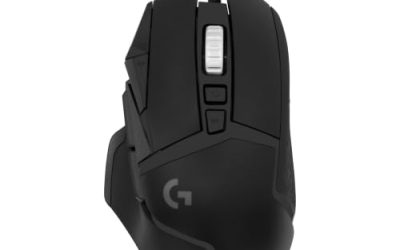
The G502 HERO is the wired anchor of this guide, and it earns that spot with a tuning system that is simple to use and easy to understand. Five 3.6 g weights sit in a tray under the shell, so you can add one weight at a time and feel the change after each step. The HERO 25K sensor tracks up to 25,600 DPI, which covers every sensitivity a player is likely to use. Eleven programmable buttons give you room for abilities, macros, and DPI shifts without reaching for the keyboard. Because the mouse is wired, the weight you set stays put all session.
Specs
- 5 x 3.6 g removable weights
- HERO 25K sensor, up to 25,600 DPI
- 11 programmable buttons
- Wired USB connection
Best for: players who want a wired mouse with a proven tuning system and steady aim.
Watch out for: check the cable length against your desk layout, and confirm each weight sits tight in the tray before long sessions.
Logitech G502 LIGHTSPEED Wireless Gaming Mouse

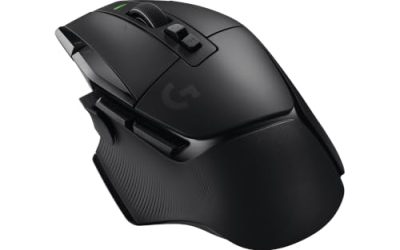
The G502 LIGHTSPEED takes the same tuning idea as the wired G502 HERO and cuts the cable. Six weights come in the box, two at 4 g and four at 2 g, so you can tune in finer steps than the wired model allows. The HERO 25K sensor reaches 25,600 DPI, and eleven programmable buttons cover abilities and DPI shifts. A 60-hour battery keeps the mouse running through a long week of evening sessions, and PowerPlay compatibility lets you charge it on a compatible pad while you play. It suits players who liked the wired G502 shape but want a clear desk and no cable drag.
Specs
- 6 weights: 2 x 4 g plus 4 x 2 g
- HERO 25K sensor, up to 25,600 DPI
- 11 programmable buttons
- PowerPlay compatible
- 60-hour battery
Best for: wireless players who want the same tuning feel as the wired G502.
Watch out for: keep the charging routine in mind, since a flat battery ends a session fast.
SteelSeries Rival 650 Wireless Gaming Mouse
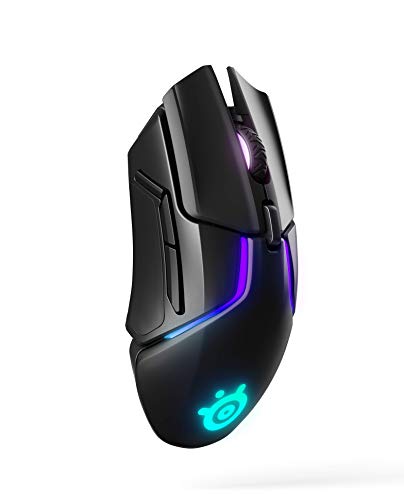
The Rival 650 offers the deepest tuning in this guide. Eight 4 g weights slide into the side panels, and the 256 weight configurations let you shift the center of gravity as well as the total heft, so the mouse can feel front-heavy, rear-heavy, or balanced. The base shell weighs 121 g without weights and 153 g with every weight fitted, which makes it the heaviest mouse here at full load. The TrueMove3+ dual sensor covers 100 to 12,000 CPI, and rapid charging tops the battery up in minutes. It suits players who enjoy tuning a mouse one small step at a time.
Specs
- 256 weight configurations
- 8 x 4 g weights
- 121 g to 153 g
- TrueMove3+ dual sensor, 100-12,000 CPI
- 24-hour-plus battery, rapid charging
Best for: players who want the finest tuning steps in this guide.
Watch out for: the Rival 650 is an older model, so confirm the listing shows it in stock before you buy.
Logitech G903 LIGHTSPEED Wireless Gaming Mouse

The G903 is the ambidextrous pick in this guide, and its weight system is built for players who want heft without giving up a symmetrical shell. The mouse weighs 107 g on its own, and an optional 10 g weight slots in when you want a heavier feel for steady aim. The HERO 25K sensor reaches 25,600 DPI, and the button layout can be configured for left or right-handed play. A 140-hour battery means the mouse can run for weeks of regular sessions before it needs a charge. It suits players who share a mouse with someone who uses the other hand.
Specs
- HERO 25K sensor, up to 25,600 DPI
- 107 g plus optional 10 g weight
- 140-hour battery
- Ambidextrous shape
Best for: left-handed players and anyone who swaps hands between games.
Watch out for: the ambidextrous shape suits smaller hands less well, so check the grip before you commit.
Redragon M908 Impact RGB LED MMO Gaming Mouse

The M908 is the heavy MMO pick in this guide, and its weight system is part of that role. Eight 2.4 g weights let you tune a large ergonomic shell that already carries 18 programmable buttons, including a 12-button thumb grid for abilities. The sensor reaches 12,400 DPI, which covers the sensitivity range most MMO players use. RGB lighting runs through the shell, and the wired connection keeps the mouse ready whenever you sit down. It suits players who want a big mouse with many buttons and a tuning system that lets them dial the heft up or down between raids and daily play.
Specs
- 8 x 2.4 g weight tuning set
- 12,400 DPI sensor
- 18 programmable buttons
- RGB LED lighting
- Wired USB connection
Best for: MMO players who want many buttons and a heavy tunable body.
Watch out for: the M908 is a large, heavy mouse, so players with small hands should check the size first, and confirm the listing shows it in stock, since availability has varied.
Which One Fits Your Situation
You want the heaviest mouse you can tune
Pick the Rival 650 or the M908. The Rival 650 runs from 121 g to 153 g with 256 weight configurations, so you can build a heavy mouse and shift its balance point as well. The M908 is a large ergonomic shell with eight 2.4 g weights and 18 buttons, which suits MMO players who want heft plus many abilities at their thumb.
You play wireless and hate cables
Pick the G502 LIGHTSPEED or the G903. The G502 LIGHTSPEED gives you six weights in fine steps and a 60-hour battery, while the G903 gives you a 140-hour battery and an ambidextrous shell. Choose the G903 if you are left-handed or share the mouse, and the G502 LIGHTSPEED if you want the finer weight steps.
You play MMOs with many abilities
Pick the M908. Its 12-button thumb grid and 18 programmable buttons put a full ability bar under your thumb, and the eight weights let you tune the heavy shell to your hand. No other mouse in this guide carries that many buttons, so the M908 is the clear pick for games with long ability lists.
You want one mouse for everything
Pick the G502 HERO. Its wired connection never runs out of charge, its five weights cover the tuning range most players need, and its 11 buttons handle abilities, DPI shifts, and macros across many game types. It is the most versatile mouse in this guide, and the simplest tuning system to live with.
Common Mistakes
- Adding every weight at once without testing the mouse light first.
- Judging a mouse by its base weight alone and ignoring the tuning range.
- Buying a wireless mouse without checking how long the battery lasts.
- Picking a heavy MMO mouse for fast flick shots in shooters.
- Forgetting to check hand size and grip shape before buying.
Frequently Asked Questions
Do weights make a mouse better for aiming?
Weights do not aim for you, but they change how the mouse feels when you move it. A heavier mouse resists small shakes, which helps steady aim at low sensitivity. A lighter mouse moves faster, which helps flick shots. The right weight is the one that lets your hand move smoothly without fighting the shell.
How many weights should I add?
Add one weight at a time and play a full session before you add another. Most players settle on two or three weights, not the full set. If your wrist feels tired after an hour, take a weight out. If the mouse skips across the pad, add one in and test again.
Are wireless mice with weights as good as wired ones?
Yes, for most players. Modern wireless mice track as cleanly as wired mice, and the weight system works the same way. The real difference is the battery: a wireless mouse needs charging, while a wired mouse never runs out of charge. Pick wireless if the cable bothers you, and wired if you play very long sessions.
Can I remove all the weights?
Yes. Every mouse in this guide works with no weights fitted, and that is the lightest setup it offers. Try the mouse empty first, then add weights one at a time until the feel is right. Keep the spare weights in the tray or a small box, so they do not roll away between sessions.
FAQ
Do weights make a mouse better for aiming?
How many weights should I add?
Are wireless mice with weights as good as wired ones?
Can I remove all the weights?
More from Amazon
Programs that pair well with the guide above. Offers and eligibility are set by Amazon and may change.
Free shipping on eligible items, Prime Video and more. Eligible new members can start with a free trial.
Start a Prime free trialA Prime membership for ages 18-24 with a trial period. Eligibility is set by Amazon.
See Prime for Young AdultsAudiobooks and podcasts to listen to on the go. Eligible new members can start with a free trial.
Try Audible freeAd-free music streaming. Eligible new subscribers can start with a free trial.
Try Music Unlimited freeAs an Amazon Associate we earn from qualifying purchases.