Key takeaways
- Compare the best network adf scanners for administrative teams with key specs, pros, cons, and buying guidance. See verified Amazon US picks with ASINs.
As an Amazon Associate we earn from qualifying purchases.
Disclosure: This article contains affiliate links. If you buy through links on this page, we may earn a commission at no extra cost to you. Product availability on Amazon US can change; check the product page for current details before ordering.
Our top pick: RICOH fi-7300NX. Runner-up: Kodak Alaris S2060W.
Administrative teams rarely scan from one fixed desk. Work moves between reception, shared offices, and project rooms, and documents need to reach shared folders and email without tying up a single workstation. A network ADF scanner fits that pattern because several people can walk up, load a batch, and send it to the right destination from the device itself.
This guide focuses on network-connected sheet-fed models with automatic document feeders, duplex capture, and walk-up controls suited to shared admin desks. The picks balance speed, feeder capacity, daily volume, and how much the scanner can do without a PC in the middle.
Quick Picks
| Product | Best For | Key Spec | ASIN |
|---|---|---|---|
| RICOH fi-7300NX | Best Overall PC-Free Scanning | 60 ppm / 120 ipm, 80-sheet ADF | B07H85KW2L |
| Kodak Alaris S2060W | Best Touchscreen Job Buttons | 60 ppm / 120 ipm, 80-sheet ADF | B076CX5G1H |
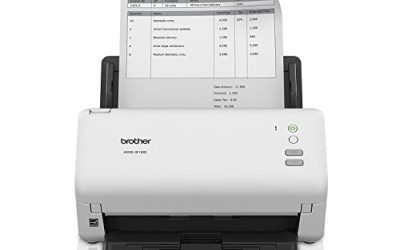
| Brother ADS-3350W | Best Wired and Wireless Flexibility | 40 ppm / 80 ipm, 60-sheet ADF | B0FWGHF1RS |
| RICOH fi-8040 | Best Front-Desk DirectScan | 40 ppm / 80 ipm, 50-sheet ADF | B0C8WG9F2H |
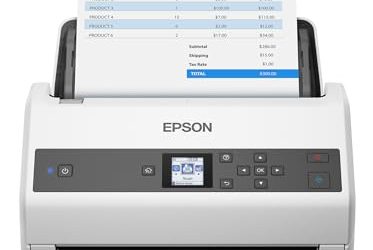
| Epson WorkForce ES-580W | Best Large Feeder for Small Offices | 35 ppm / 70 ipm, 100-sheet ADF | B08P3ZT5WH |
How We Selected These Picks
We narrowed the list to network ADF scanners that an administrative team can share without dedicating a computer to every job. That meant Wi-Fi, Ethernet, or both, plus duplex scanning and a feeder sized for everyday batches. USB-only models were excluded because they limit walk-up use.
Within that group, we compared speed ratings, feeder capacity, and expected daily volume, plus PC-free operation and preset job buttons that reduce training time when staff rotate through a desk.
1. RICOH fi-7300NX – Best For PC-Free Network Scanning

ASIN: B07H85KW2L
Amazon US: https://www.amazon.com/dp/B07H85KW2L
The RICOH fi-7300NX is built for shared desks where the scanner should work without a host PC. It scans at 60 ppm simplex and 120 ipm duplex, holds 80 sheets, and carries an expected daily volume of 9,000 sheets. Connectivity includes Wi-Fi on the 5 GHz band, Ethernet, and USB, which gives IT flexible placement in wired and wireless areas.
Staff can use the shared touchscreen to send documents to network folders or email, which suits reception intake, invoice routing, and shared filing. Because the destination is selected at the device, a document does not wait for a particular workstation to become free. The 80-sheet feeder covers typical admin packets, though it needs reloading sooner than 100-sheet rivals during longer runs.
Pros
– PC-free scanning from a shared touchscreen to folders and email
– 60 ppm / 120 ipm duplex with 9,000-sheet expected daily volume
– Wi-Fi 5 GHz, Ethernet, and USB for flexible placement
Cons
– 80-sheet feeder is smaller than 100-sheet rivals
– Folder and email destinations need IT setup at installation
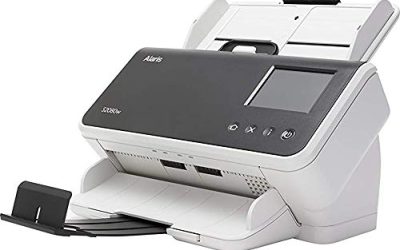
2. Kodak Alaris S2060W – Best For Touchscreen Job Buttons

ASIN: B076CX5G1H
Amazon US: https://www.amazon.com/dp/B076CX5G1H
The Kodak Alaris S2060W matches the fi-7300NX on throughput at 60 ppm and 120 ipm duplex, with an 80-sheet feeder and up to 9,000 pages per day. It connects by USB 3.2, Wi-Fi 802.11b/g/n, and Ethernet, so it can sit on a wired network or join a wireless segment.
Its touchscreen job buttons suit repetitive administrative work. Teams can assign common destinations such as an invoices folder or an email group to on-screen buttons, reducing steps for staff who scan the same document types daily. The trade-off is the older wireless radio without Wi-Fi 6, and a platform dating to 2017. Ethernet remains available for the most stable connection.
Pros
– Touchscreen job buttons for repeat admin destinations
– 60 ppm / 120 ipm speed and up to 9,000 pages per day
– USB 3.2, Wi-Fi, and Ethernet connectivity
Cons
– Older Wi-Fi radio without Wi-Fi 6 support
– Platform introduced in 2017
3. Brother ADS-3350W – Best For Wired and Wireless Flexibility

ASIN: B0FWGHF1RS
Amazon US: https://www.amazon.com/dp/B0FWGHF1RS
The Brother ADS-3350W targets mid-volume admin desks that want both wired and wireless networking. It scans at 40 ppm and 80 ipm duplex, holds 60 sheets, and is rated for a maximum of 6,000 sheets per day. Ethernet, USB, and Wi-Fi are all included, so the unit can start on a wireless desk and move to a wired location later.
For a team processing applications and correspondence in moderate batches, 40 ppm is workable when the scanner is shared by a small group. The limitation is speed relative to 60 ppm models. If your team regularly clears large backlogs, the ADS-3350W will take longer per batch. For steady walk-up scanning, its connectivity flexibility fits well.
Pros
– Ethernet, USB, and Wi-Fi in one unit
– 40 ppm / 80 ipm duplex with 6,000-sheet daily maximum
– Suited to small and mid-size admin teams
Cons
– Slower than 60 ppm and 80 ppm models
– 60-sheet feeder needs reloading on larger batches
4. RICOH fi-8040 – Best For Front-Desk DirectScan

ASIN: B0C8WG9F2H
Amazon US: https://www.amazon.com/dp/B0C8WG9F2H
The RICOH fi-8040 is a compact network option for front desks where space is tight but walk-up scanning is frequent. It scans at 40 ppm and 80 ipm duplex, holds 50 sheets, and carries an expected daily volume of 6,000 sheets. USB 3.2 and Ethernet are included, and DirectScan supports PC-less scanning to folders and email.
A receptionist can scan a signed form or incoming mail and route it immediately without opening a desktop application. The constraints are feeder size and wireless: at 50 sheets the feeder is the smallest here, and there is no Wi-Fi. If your front desk has a network drop, those limits are manageable.
Pros
– PC-less DirectScan touchscreen to folders and email
– Compact fit for reception counters
– 6,000-sheet expected daily volume
Cons
– 50-sheet feeder is small for long packets
– No Wi-Fi; Ethernet or USB required
5. Epson WorkForce ES-580W – Best For Large Feeder in Small Offices

ASIN: B08P3ZT5WH
Amazon US: https://www.amazon.com/dp/B08P3ZT5WH
The Epson WorkForce ES-580W pairs a 100-sheet feeder with wireless connectivity, suiting small offices that want to load a full batch and walk away. It scans at 35 ppm and 70 ipm with single-pass duplex, with a peak rating of 4,000 pages per day. Wi-Fi and USB are included; Ethernet is not.
The feeder is the headline feature. A 100-sheet capacity means fewer reloads during routine filing, and wireless placement lets the scanner sit on a shared shelf. The trade-offs are daily volume and wired networking: the ES-580W has the lowest daily duty rating here, and shared access depends on Wi-Fi. For a small team with moderate volume, those limits are reasonable.
Pros
– 100-sheet feeder reduces reloads
– Wi-Fi placement for shared shelves
– Single-pass duplex at 35 ppm / 70 ipm
Cons
– Peak rating of 4,000 pages per day
– No Ethernet connection
Buying Guide: What to Look For
Walk-Up Controls and PC-Free Operation
For administrative teams, the biggest time saver is often how quickly a person can start a job. Touchscreens, preset job buttons, and PC-free scanning to folders or email let staff finish at the device. If staff rotate through a shared desk, prioritize clear on-screen destinations and minimal desktop steps.
Speed, Feeder Capacity, and Daily Volume
Match the scanner rating to your busiest realistic day. Speed determines how long a batch takes, feeder capacity determines reload frequency, and expected daily volume indicates the workload the mechanism is designed to handle. A 60 ppm model rated at 9,000 sheets suits a busy hub; a 35 ppm model rated at 4,000 pages per day suits a small office.
Network Connectivity for Your Office Layout
Check whether each desk has Ethernet, reliable Wi-Fi, or both. Ethernet generally provides the most stable shared connection, while Wi-Fi allows flexible placement. Models with both, such as the fi-7300NX, S2060W, and ADS-3350W, let IT move the scanner as layouts change.
Compatibility and Setup Notes
Plan destinations before the scanner arrives. Decide which shared folders and email addresses each preset will use, and confirm permissions with IT. Test duplex settings with typical mixed packets, including two-sided forms, to confirm blank-page handling and orientation.
Comparison Table
| Product | Speed (ppm / ipm) | ADF Capacity | Daily Volume | Connectivity | ASIN |
|---|---|---|---|---|---|
| RICOH fi-7300NX | 60 / 120 | 80 sheets | 9,000 sheets expected | Wi-Fi 5 GHz, Ethernet, USB | B07H85KW2L |
| Kodak Alaris S2060W | 60 / 120 | 80 sheets | Up to 9,000 pages/day | USB 3.2, Wi-Fi, Ethernet | B076CX5G1H |
| Brother ADS-3350W | 40 / 80 | 60 sheets | Max 6,000 sheets/day | Ethernet, USB, Wi-Fi | B0FWGHF1RS |
| RICOH fi-8040 | 40 / 80 | 50 sheets | 6,000 sheets expected | USB 3.2, Ethernet | B0C8WG9F2H |
| Epson WorkForce ES-580W | 35 / 70 | 100 sheets | Peak 4,000 pages/day | Wi-Fi, USB | B08P3ZT5WH |
FAQ
Do administrative teams need Ethernet, or is Wi-Fi enough?
Wi-Fi is enough for many small offices with strong coverage, as with the ES-580W. Ethernet is preferable where wireless coverage is uneven or IT prefers a fixed network address. Models with both connections give the most flexibility.
What daily volume should a shared admin scanner have?
Add up intake and filing on your busiest day and choose a rating above that total. A small team may stay within 4,000 pages per day, while a central hub benefits from 6,000 to 9,000 sheets of expected daily volume.
Can staff scan without a PC at the desk?
Yes, with PC-free models. The fi-7300NX and fi-8040 support touchscreen scanning to folders and email from the device, and the S2060W uses touchscreen job buttons for preset destinations.
Final Verdict
For most administrative teams, the RICOH fi-7300NX is the strongest choice because it combines 60 ppm duplex speed, a 9,000-sheet daily rating, and PC-free touchscreen scanning over Wi-Fi and Ethernet. The Kodak Alaris S2060W fits when preset job buttons matter most, while the Brother ADS-3350W suits mid-volume teams that want wired and wireless flexibility.
Choose the RICOH fi-8040 for a compact front desk with an Ethernet drop, and the Epson WorkForce ES-580W when a 100-sheet feeder and wireless placement matter more than daily volume. Matching speed, feeder size, and connectivity to your busiest day keeps shared scanning smooth.
FAQ
Do administrative teams need Ethernet, or is Wi-Fi enough?
What daily volume should a shared admin scanner have?
Can staff scan without a PC at the desk?
More from Amazon
Programs that pair well with the guide above. Offers and eligibility are set by Amazon and may change.
Free shipping on eligible items, Prime Video and more. Eligible new members can start with a free trial.
Start a Prime free trialA Prime membership for ages 18-24 with a trial period. Eligibility is set by Amazon.
See Prime for Young AdultsAudiobooks and podcasts to listen to on the go. Eligible new members can start with a free trial.
Try Audible freeAd-free music streaming. Eligible new subscribers can start with a free trial.
Try Music Unlimited freeAs an Amazon Associate we earn from qualifying purchases.