Our Short List of 3

- Best for: Competitive shooter players who want the lightest wireless mouse in this guide.
- HERO 2 sensor, up to 44,000 DPI
- LIGHTSPEED wireless with up to 8,000 Hz polling rate
- 60 g weight
- Up to 95 hours of battery life

- Best for: Players who want many buttons, tunable weight, and a steady wired connection.
- HERO 25K sensor, 200 to 25,600 DPI
- Zero smoothing, filtering, or acceleration
- 400-plus IPS tracking speed
- 11 programmable buttons

- Best for: Palm-grip players with medium-to-large hands who want ergonomic comfort and flagship tracking.
- Focus Pro 30K Optical Sensor, up to 30,000 DPI
- 750 IPS tracking speed, 70G acceleration
- 99.8 percent resolution accuracy
- 63 g weight
All 3 Picks at a Glance
| Product | Specs | Action |
|---|---|---|
| Logitech G Pro X Superlight 2 |
| Check price on Amazon |
| Logitech G502 HERO |
| Check price on Amazon |
| Razer DeathAdder V3 Pro |
| Check price on Amazon |
Key takeaways
- Find a gaming mouse built for precision aiming. Compare four high-DPI picks by sensor, tracking, weight, and polling rate to steady every shot.
Precision is not a single number on a box. It is the sum of small things working together: a sensor that tracks without smoothing or acceleration, a polling rate that keeps up with fast flicks, a shape that lets your hand move the same way every time, and a weight that neither drags nor skates away from you. Buyers who chase only the biggest DPI figure often end up with a mouse that feels worse in play, because that number says nothing about tracking quality, lift-off behavior, or how the shell fits a palm, claw, or fingertip grip.
This guide is for competitive shooter players who live or die by crosshair placement, strategy and MOBA players who need pixel-level cursor control, and anyone who does precise desktop work between matches. Every mouse below was picked from its Amazon listing name and specifications, with the focus on sensor accuracy, tracking speed, polling rate, and the practical details that keep a mouse steady under pressure.
Quick Picks
As an Amazon Associate we earn from qualifying purchases at no extra cost to you.
| Product | Best for | Key spec from title |
|---|---|---|
| Logitech G Pro X Superlight 2 | Featherweight wireless precision for competitive shooters | HERO 2 sensor, up to 44,000 DPI |
| Razer Viper V3 Pro | Symmetrical speed with the sharpest tracking in this lineup | Focus Pro 35K Gen-2 sensor, 35,000 DPI |
| Logitech G502 HERO | Button-heavy wired control for precise work and play | HERO 25K sensor, 25,600 DPI |
| Razer DeathAdder V3 Pro | Ergonomic palm-grip precision for long sessions | Focus Pro 30K sensor, 30,000 DPI |
How to Choose
Read the sensor, not just the DPI number
A high DPI ceiling looks impressive, but precision lives in the sensor’s tracking behavior. Look for zero smoothing, zero acceleration, and zero filtering in the listing, plus a high IPS figure, which tells you how fast you can move the mouse before tracking breaks down. A sensor rated for 750 IPS holds its line during flicks, while a weaker one can skip or spin out at the same speed. Fine DPI steps matter too: 1-DPI or 50-DPI increments let you land on the sensitivity that matches your arm, instead of jumping between steps that feel a touch too fast or too slow. Treat the DPI ceiling as headroom, and judge the sensor by tracking speed and acceleration tolerance.
Match polling rate and connection to your pace
Polling rate is how often the mouse reports its position to the computer, and it sets a ceiling on responsiveness. A 1,000 Hz rate reports every millisecond, which is plenty for most players, while an 8,000 Hz rate reports far more often and pairs best with high-refresh displays where every frame counts. The trade is battery life: wireless mice burn through charge faster at 8,000 Hz, so some models last a fraction of their rated hours. Wired mice sidestep the battery question and keep latency steady, which is why many precision-focused players still prefer a cable. Pick the connection that fits your desk first, then set the polling rate to match your monitor.
Let weight and shape steady your hand
Weight changes how a mouse starts, stops, and holds a line. A mouse under 60 grams starts moving with no effort, which suits fast flicks and fingertip grips, but the same lightness can feel twitchy when you need to hold a pixel-perfect angle. A heavier mouse resists accidental drift and gives your hand more feedback, which some players prefer for slow, deliberate aiming. Shape matters as much: a symmetrical shell suits claw and fingertip grips and works for either hand, while a right-handed ergonomic shell supports the palm and thumb during long sessions. Before you commit, compare the shell against your grip and hand size, and remember that tunable weights let you adjust balance after the mouse arrives.
Check lift-off distance and software control
Lift-off distance is the height at which the sensor stops tracking when you raise the mouse, and it decides how cleanly you can reposition during play. A low lift-off distance means the cursor stays put while you lift and reset, which keeps your aim honest, while a high one can send the cursor drifting mid-lift. Some sensors let you tune this in software, with asymmetric cut-off settings that set landing and lift-off points. Software controls DPI steps, button assignments, and onboard profiles, so check whether the mouse stores settings on the device itself. A mouse with onboard memory keeps your setup when you move between machines, while one without it needs its app running to hold your configuration.
The 4 Best Options
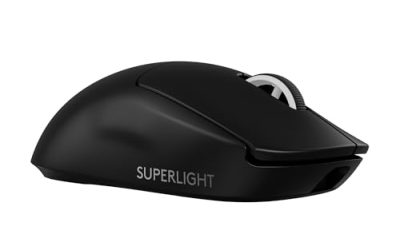
Logitech G Pro X Superlight 2
- Best for: Competitive shooter players who want the lightest wireless mouse in this guide.
- HERO 2 sensor, up to 44,000 DPI
- LIGHTSPEED wireless with up to 8,000 Hz polling rate
- 60 g weight
- Up to 95 hours of battery life
Competitive shooter players who want the lightest wireless mouse in this guide.
There is no DPI button on the mouse itself, so DPI changes go through Logitech G HUB software.
The Superlight 2 is built around a single idea: remove everything that does not help you aim. At 60 grams it starts and stops with little effort, and the HERO 2 sensor tracks with zero smoothing, zero acceleration, and zero filtering, so the cursor goes where your hand sends it. The shell is a plain, right-handed symmetrical shape with five buttons and no RGB lighting, which keeps the focus on movement rather than decoration. It is the pick for players who want a wireless mouse that feels like an extension of the hand, and who are happy to set DPI steps in software rather than on the mouse itself.
Watch out for: There is no DPI button on the mouse itself, so DPI changes go through Logitech G HUB software.
Razer Viper V3 Pro
The Viper V3 Pro pairs the sharpest sensor in this guide with the lightest body, and that combination stands out for precision play. Its Focus Pro 35K Gen-2 sensor reaches 35,000 DPI with 99.8 percent resolution accuracy, tracks at 750 IPS, and holds its line on glass surfaces, while the HyperPolling dongle in the box pushes wireless polling to 8,000 Hz. At 54 grams the mouse barely registers in the hand, and the symmetrical shell suits claw and fingertip grips that need quick flicks. It is the most complete mouse here, provided you are comfortable with a minimalist shell and few buttons.
Specs
- Focus Pro 35K Optical Sensor Gen-2, up to 35,000 DPI
- 99.8 percent resolution accuracy
- 750 IPS tracking speed, 70G acceleration
- Up to 8,000 Hz HyperPolling wireless polling rate
- 54 g weight
- Up to 95 hours of battery life
- Gen-3 optical switches rated for 90 million clicks
- 8 programmable buttons
- Tracks on glass surfaces
- Model number RZ01-05120100-R3U1
Best for: Claw and fingertip players who want the highest tracking ceiling in this guide.
Watch out for: Battery life drops sharply at the 8,000 Hz polling rate, so plan on charging more often at the top setting.
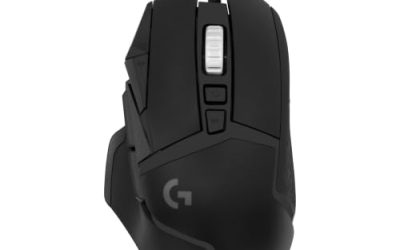
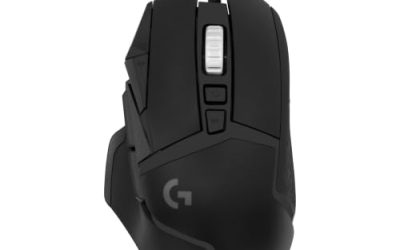
Logitech G502 HERO
- Best for: Players who want many buttons, tunable weight, and a steady wired connection.
- HERO 25K sensor, 200 to 25,600 DPI
- Zero smoothing, filtering, or acceleration
- 400-plus IPS tracking speed
- 11 programmable buttons
Players who want many buttons, tunable weight, and a steady wired connection.
At 121 grams before weights, it is the heaviest mouse in this guide and may feel slow to players used to ultralight shells.
The G502 HERO is the wired anchor of this guide, and its strength is control rather than raw speed. The HERO 25K sensor tracks to 25,600 DPI with zero smoothing, filtering, or acceleration, and the 400-plus IPS rating keeps it honest during sweeps. Eleven buttons and a scroll wheel give you room for macros, DPI shifts, and weapon swaps without moving your hand, and five 3.6-gram tuning weights let you set the balance to your taste. It is heavier than the wireless flagships, but that weight is the point: the G502 HERO suits players who want a planted feel and a mouse that handles precise desktop work.
Watch out for: At 121 grams before weights, it is the heaviest mouse in this guide and may feel slow to players used to ultralight shells.
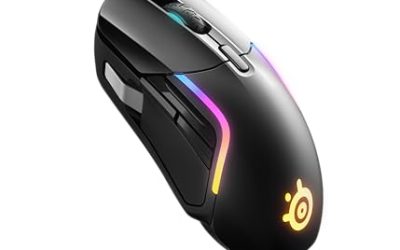
Razer DeathAdder V3 Pro
- Best for: Palm-grip players with medium-to-large hands who want ergonomic comfort and flagship tracking.
- Focus Pro 30K Optical Sensor, up to 30,000 DPI
- 750 IPS tracking speed, 70G acceleration
- 99.8 percent resolution accuracy
- 63 g weight
Palm-grip players with medium-to-large hands who want ergonomic comfort and flagship tracking.
The 8,000 Hz polling rate needs the HyperPolling Wireless Dongle, which is sold separately for this model.
The DeathAdder V3 Pro brings flagship tracking to the classic ergonomic shape that many palm-grip players already trust. Its Focus Pro 30K sensor reaches 30,000 DPI with 750 IPS tracking and tracks cleanly on glass, while the 63-gram shell keeps the familiar right-handed curve without the bulk of older DeathAdders. Gen-3 optical switches remove the double-click failure mode of mechanical switches, and the 90-hour battery at the standard polling rate means long sessions without a cable. It is the pick for medium-to-large hands that want precision without giving up comfort, and for players who hold the mouse for hours at a time.
Watch out for: The 8,000 Hz polling rate needs the HyperPolling Wireless Dongle, which is sold separately for this model.
Which One Fits Your Situation
You play competitive shooters and flick constantly
Pick the Razer Viper V3 Pro if you grip with claw or fingertips and want the lightest body with the sharpest sensor, or the Logitech G Pro X Superlight 2 if you prefer a larger shell with the same featherweight feel. Both track cleanly at high speed and report at up to 8,000 Hz, so flicks land where you expect them. Set your DPI between 400 and 1,600 and let the sensor’s headroom do the work.
You want one mouse for gaming and precise desktop work
Pick the Logitech G502 HERO. Its eleven buttons handle macros, DPI shifts, and shortcuts, the tuning weights let you dial in a planted feel, and the wired connection never needs charging. The HERO 25K sensor is accurate enough for competitive play, and the onboard memory carries your profiles between machines. It is the most versatile mouse here, and the only one that treats desktop precision as seriously as in-game aiming.
You have medium-to-large hands and play palm grip for hours
Pick the Razer DeathAdder V3 Pro. The shell supports the palm and thumb, the 63-gram body stays light enough for quick corrections, and the Focus Pro 30K sensor tracks cleanly across the pad. Battery life holds up across long sessions, and the optical switches avoid the double-click problems that mechanical switches can develop. It is the comfortable pick that does not ask you to give up flagship tracking.
You travel between setups or switch machines often
Pick the Logitech G Pro X Superlight 2. Its USB-C charging travels well, the onboard memory keeps your DPI and button settings when you plug into another machine, and the 60-gram body disappears into a bag. If you prefer a symmetrical shape with the same travel-friendly weight, the Razer Viper V3 Pro is the alternative, with its 8,000 Hz dongle included in the box rather than sold separately.
Common Mistakes
- Playing at the maximum DPI on the box instead of a sensitivity your arm can actually control, which makes small corrections jump past the target.
- Ignoring lift-off distance, then wondering why the cursor drifts every time you lift the mouse to reposition.
- Picking a mouse by weight alone and ending up with a shell that fights your grip style during long sessions.
- Running the top polling rate on a weak setup or a low-refresh display, where the extra reports cost battery life without a visible benefit.
- Skipping the software setup, so DPI steps, button assignments, and onboard profiles never get configured and the mouse runs on defaults.
Frequently Asked Questions
What DPI should I use for precise aiming?
Most players land between 400 and 1,600 DPI, paired with a low in-game sensitivity, because that range gives fine control without making small hand movements jump across the screen. The 25,000-plus DPI ceilings on these mice are headroom for the sensor, not a target to play at. Start at 800 DPI and adjust in small steps until your flicks land consistently.
Does a higher polling rate improve precision?
A higher polling rate reports the mouse position more often, which smooths fast movement and shortens the delay. The jump from 125 Hz to 1,000 Hz is easy to feel, while the jump to 8,000 Hz is subtler and shows up most on high-refresh displays. Wireless mice drain battery much faster at 8,000 Hz, so many players settle at 1,000 Hz for daily play.
Is a lighter mouse always more precise?
No, lighter is not more precise. A light mouse starts and stops with less effort, which helps fast flicks, but it can feel twitchy when you need to hold a steady angle or make a correction. A slightly heavier mouse resists drift and gives your hand more feedback. Precision comes from the match between weight, shape, and grip, so try the weight that lets you stop where you intend.
Do I need software to set DPI on these mice?
Yes, for fine control you will need the maker’s software at least once. The Superlight 2 has no DPI button on the body, so its DPI steps are set in Logitech G HUB. The Razer mice use Synapse for DPI steps, polling rate, and lift-off settings. Once configured, the G502 HERO and the Superlight 2 store profiles in onboard memory, so your settings travel with the mouse.
FAQ
What DPI should I use for precise aiming?
Does a higher polling rate improve precision?
Is a lighter mouse always more precise?
Do I need software to set DPI on these mice?
More from Amazon
Programs that pair well with the guide above. Offers and eligibility are set by Amazon and may change.
Free shipping on eligible items, Prime Video and more. Eligible new members can start with a free trial.
Start a Prime free trialA Prime membership for ages 18-24 with a trial period. Eligibility is set by Amazon.
See Prime for Young AdultsAudiobooks and podcasts to listen to on the go. Eligible new members can start with a free trial.
Try Audible freeAd-free music streaming. Eligible new subscribers can start with a free trial.
Try Music Unlimited freeAs an Amazon Associate we earn from qualifying purchases.