Our Short List of 3

- Best for: Players who want a proven mechanical click with deep customization and adjustable weight.
- Switch type: Mechanical switch button tensioning with metal spring and pivot hinges
- Sensor: HERO 25K, up to 25,600 DPI
- Programmable buttons: 11
- Scroll wheel: Dual-mode hyper-fast

- Best for: FPS players who want fast optical clicks in a comfortable right-handed ergonomic shape.
- Switch type: Razer Optical Mouse Switches, 70-million click lifecycle, 0.2 ms actuation
- Sensor: Focus+ 20K DPI optical sensor
- Programmable buttons: 8
- Lighting: Chroma RGB

- Best for: Competitive FPS players who want hybrid switches in a light wireless mouse.
- Switch type: LIGHTFORCE hybrid optical-mechanical switches, 70-million click lifecycle
- Sensor: HERO 2, up to 44,000 DPI
- Weight: 60 g
- Battery life: Up to 95 hours
All 4 Picks at a Glance
| Product | Specs | Action |
|---|---|---|
| Logitech G502 HERO |
| Check price on Amazon |
| Razer DeathAdder V2 |
| Check price on Amazon |
| Logitech G Pro X Superlight 2 |
| Check price on Amazon |
 SteelSeries Rival 5 |
| Check price on Amazon |
Key takeaways
- Compare the switch types inside today's best gaming mice, from classic mechanical clicks to optical and hybrid designs, and pick the feel that fits your hand.
The switch under each main button decides how a gaming mouse feels in your hand, how fast it registers a click, and how long it keeps working before it starts misbehaving. A mechanical switch uses two metal contacts that meet when you press, while an optical switch breaks a beam of light, and a hybrid design mixes optical actuation with a mechanical click feel. Each approach trades click sound, actuation speed, and long-term wear differently, so the best switch is the one that matches your games, your grip, and your tolerance for maintenance.
This guide is for competitive shooter players who want the fastest possible actuation, MMO and strategy players who click thousands of times in a session, and anyone replacing a mouse that began registering extra clicks on its own. Each mouse below represents a different switch family, and every specification comes from that product’s own Amazon listing, including switch type, sensor, weight, and button count.
Quick Picks
As an Amazon Associate we earn from qualifying purchases at no extra cost to you.
| Product | Best for | Key spec from title |
|---|---|---|
| Logitech G502 HERO | Classic mechanical feel with adjustable weight | HERO 25K sensor, 25,600 DPI |
| Razer DeathAdder V2 | Fast optical clicks without double-click risk | Focus+ 20K DPI optical sensor |
| Logitech G Pro X Superlight 2 | Lightweight wireless play with hybrid switches | HERO 2 sensor, LIGHTFORCE hybrid switches |
| SteelSeries Rival 5 | Sealed switches for dusty or busy desks | TrueMove Air 18,000 CPI sensor |
| Razer Viper V3 Pro | Newest optical switches in an ultralight shell | Focus Pro 35K sensor, Gen-3 optical switches |
How to Choose
Learn how each switch type works
A mechanical switch closes a metal contact when you press the button, which gives the crisp, tactile click most gamers know. An optical switch instead interrupts an infrared beam, so there is no metal contact to wear down or bounce, and the click registers as soon as the beam breaks. Hybrid switches use optical actuation for speed and a mechanical element for feel, while sealed switches add dust and water resistance around the mechanism. Reading the switch description on the listing tells you which family you are buying, and that matters more than the brand name on the box.
Match click feel to your games
Fast-paced shooters reward a light, short click with minimal travel, because every millisecond between finger and shot counts in a close duel. MMO, MOBA, and strategy players press buttons far more often, so a switch with a high click lifecycle and a firm, consistent feel holds up better over long sessions. If you play a mix of genres, look for a middle ground: a switch that feels deliberate without demanding too much force. The shape of the mouse still matters, since a great switch in a shell that fights your grip will not feel good after an hour.
Check durability and double-click risk
Switch makers rate their designs in millions of clicks, and those ratings are a useful way to compare longevity across mice. Mechanical switches can develop contact bounce as the metal parts wear, which shows up as a single press registering twice. Optical and hybrid switches avoid that failure mode because the signal comes from light rather than metal contact, which is why many players switch to them after a mouse starts double-clicking. A sealed switch design adds another layer of protection when dust, crumbs, or humidity reach your desk.
Mind weight, shape, and connection
The switch is only one part of the mouse, so weigh it against the rest of the hardware before you decide. A heavy mouse with a great switch still tires your wrist in long sessions, while an ultralight shell with a switch you dislike will not feel right either. Check whether the mouse is wired or wireless, how long the battery lasts on wireless models, and whether the shape suits a palm, claw, or fingertip grip. A switch you love in the wrong shape is a poor trade, so let fit and connection narrow the list first.
The 5 Best Options
Logitech G502 HERO
- Best for: Players who want a proven mechanical click with deep customization and adjustable weight.
- Switch type: Mechanical switch button tensioning with metal spring and pivot hinges
- Sensor: HERO 25K, up to 25,600 DPI
- Programmable buttons: 11
- Scroll wheel: Dual-mode hyper-fast
Players who want a proven mechanical click with deep customization and adjustable weight.
The right-handed shape does not suit left-handed players, and the mouse is heavier than ultralight esports models even before you add tuning weights.
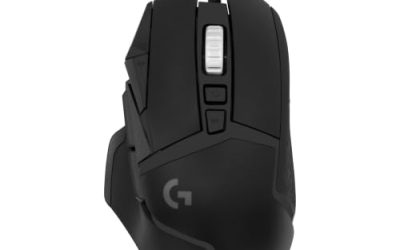
The G502 HERO is the classic mechanical choice, and it earns its place here because its switch system is built around metal spring tensioning and pivot hinges that keep the click crisp. With eleven programmable buttons, a dual-mode scroll wheel, and removable tuning weights, it suits players who want one mouse for shooters, MMOs, and everyday work alike. The right-handed shape with a thumb rest fits larger hands well, and the onboard memory carries your button assignments between computers without extra software running.
Watch out for: The right-handed shape does not suit left-handed players, and the mouse is heavier than ultralight esports models even before you add tuning weights.
Razer DeathAdder V2
- Best for: FPS players who want fast optical clicks in a comfortable right-handed ergonomic shape.
- Switch type: Razer Optical Mouse Switches, 70-million click lifecycle, 0.2 ms actuation
- Sensor: Focus+ 20K DPI optical sensor
- Programmable buttons: 8
- Lighting: Chroma RGB
FPS players who want fast optical clicks in a comfortable right-handed ergonomic shape.
This listing is the wired version only, so check the listing carefully if you expected wireless, and the ergonomic shape is built for right-handed use.
The DeathAdder V2 shows what an optical switch feels like in a familiar ergonomic shell. Its infrared beam registers each click in a fraction of a millisecond, and because there is no metal contact to wear out, the switches are rated for a long service life with no debounce delay. The Focus+ sensor tracks precisely at high speeds, and the flexible cable keeps drag low during fast swipes. This is the pick for players who loved the DeathAdder shape but want to leave double-click trouble behind.
Watch out for: This listing is the wired version only, so check the listing carefully if you expected wireless, and the ergonomic shape is built for right-handed use.
Logitech G Pro X Superlight 2
- Best for: Competitive FPS players who want hybrid switches in a light wireless mouse.
- Switch type: LIGHTFORCE hybrid optical-mechanical switches, 70-million click lifecycle
- Sensor: HERO 2, up to 44,000 DPI
- Weight: 60 g
- Battery life: Up to 95 hours
Competitive FPS players who want hybrid switches in a light wireless mouse.
There is no DPI button on the mouse itself, no Bluetooth connection, and the symmetrical shape has no left-handed version.
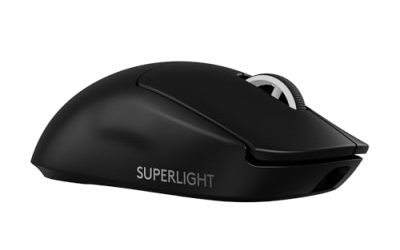
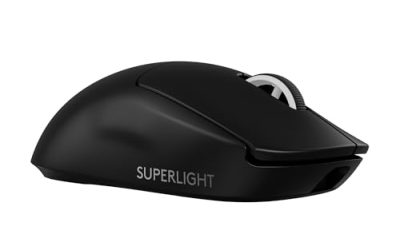
The Superlight 2 pairs LIGHTFORCE hybrid switches with one of the lightest shells in its class, and that combination is why it appears in so many competitive setups. The hybrid design uses optical actuation for speed while keeping the tactile mechanical feel that many players prefer, and the switches are rated to outlast the metal-contact designs they replace. At 60 grams with a long battery life and fast wireless polling, it suits players who want flagship performance without carrying extra weight through long matches.
Watch out for: There is no DPI button on the mouse itself, no Bluetooth connection, and the symmetrical shape has no left-handed version.
SteelSeries Rival 5
- Best for: Multi-genre players who want sealed, dust-resistant switches and plenty of side buttons.
- Switch type: SteelSeries Golden Micro IP54 mechanical switches, 80-million click lifecycle
- Sensor: TrueMove Air, 18,000 CPI, 400 IPS, 40 G acceleration
- Programmable buttons: 9
- Lighting: 10-zone Prism RGB
Multi-genre players who want sealed, dust-resistant switches and plenty of side buttons.
This is a wired mouse, so confirm the cable length suits your desk layout, and confirm the listing shows model 62551 before ordering.
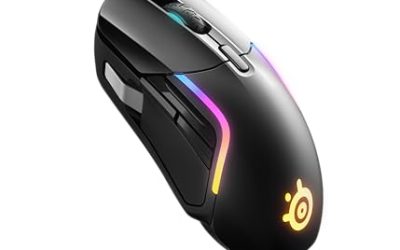
The Rival 5 stands out because its Golden Micro switches carry an IP54 rating, which means the mechanism resists dust and splashes that would shorten the life of an unsealed switch. With nine programmable buttons and a five-button side cluster, it handles battle royale, MOBA, and MMO play without forcing you to reach for the keyboard as often. The TrueMove Air sensor tracks cleanly at high speeds, and the ten-zone RGB lighting gives the shell a distinct look on the desk.
Watch out for: This is a wired mouse, so confirm the cable length suits your desk layout, and confirm the listing shows model 62551 before ordering.
Razer Viper V3 Pro
The Viper V3 Pro carries the newest optical switches in this lineup, the third generation of Razer’s light-beam design, rated for 90 million clicks with no debounce delay. At 54 grams it is the lightest mouse here, and the Focus Pro 35K sensor pairs with 8,000 Hz wireless polling for tracking that keeps up with the fastest flicks. The symmetrical shape suits claw and fingertip grips, and the grip tape in the box helps players who want extra hold during long sessions.
Specs
- Switch type: Razer Optical Mouse Switches Gen-3, 90-million click lifecycle, 0.2 ms actuation
- Sensor: Focus Pro 35K Optical Sensor Gen-2, 35,000 DPI, 750 IPS, 70 G acceleration
- Weight: 54 g
- Polling rate: 8,000 Hz HyperPolling wireless
- Battery life: Up to 95 hours
- Feet: PTFE feet
- Model: RZ01-05120100-R3U1
Best for: Esports players who want the latest optical switches in the lightest shell available here.
Watch out for: There is no RGB lighting, battery life drops when polling runs at 8,000 Hz, and the low symmetrical shape suits claw and fingertip grips better than a full palm grip.
Which One Fits Your Situation
You play competitive FPS and want the fastest clicks
Pick the Razer Viper V3 Pro for the newest optical switches and the lightest shell, or the Razer DeathAdder V2 if you prefer a fuller ergonomic shape with the same light-beam actuation. Both register clicks without the metal contact bounce that slows older designs. The Viper V3 Pro wins on weight and polling rate, while the DeathAdder V2 wins on palm comfort during long sessions.
You click all day and worry about wear
Pick the Logitech G502 HERO for its proven mechanical tensioning system and deep customization, or the SteelSeries Rival 5 for sealed switches rated for 80 million clicks. The G502 HERO suits players who want tuning weights and eleven buttons, while the Rival 5 suits players whose desks see dust, snacks, and heavy daily use. Either way, a high click lifecycle rating matters more than a flashy sensor number.
You want a light wireless mouse with hybrid switches
Pick the Logitech G Pro X Superlight 2. Its LIGHTFORCE switches combine optical speed with a mechanical click feel, and the 60-gram shell with a long battery life makes it easy to carry through long matches without fatigue. The wireless connection runs at a fast polling rate, and the simple five-button layout keeps the focus on aim rather than extra controls.
You are replacing a mouse that started double-clicking
Pick any of the optical or hybrid options: the DeathAdder V2, the Superlight 2, or the Viper V3 Pro. All three actuate with light instead of metal contact, so the contact bounce that causes double-clicking cannot form. If you want to stay with mechanical switches, the Rival 5 is the safer mechanical pick because its sealed design protects the mechanism from the dust and wear that speed up failure.
Common Mistakes
- Assuming every mechanical switch feels the same, when force, travel, and sound vary widely between designs.
- Ignoring the click lifecycle rating and then wondering why a mouse fails after a year of heavy use.
- Choosing a mouse on sensor numbers alone while the switch feel decides how it plays every day.
- Forgetting to check whether the mouse is wired or wireless and whether the cable or battery fits the desk setup.
- Picking a switch type you read about online without checking whether the shell shape fits your grip and hand size.
Frequently Asked Questions
Do optical switches last longer than mechanical switches?
Optical switches usually carry higher click lifecycle ratings because the signal comes from a light beam instead of metal parts rubbing together. Mechanical contacts wear down with each press and can develop bounce over time, while an optical switch has no contact to degrade the same way. Feel still matters: some players prefer the tactile break of a mechanical click.
What causes double-clicking in gaming mice?
Double-clicking usually comes from contact bounce or wear inside a mechanical switch, where the metal parts no longer make a clean connection on the first press. Dust and moisture speed up the problem by coating the contacts. Optical and hybrid switches avoid this failure mode because the click is registered by light rather than metal contact.
Are hybrid switches the same as optical switches?
Hybrid switches are not the same as pure optical switches, though they share the same actuation method. A hybrid switch uses an optical beam to register the click, then adds a mechanical element that reproduces the tactile feel of a traditional switch. The result is optical speed with a familiar click sensation, while a pure optical switch can feel lighter.
Can I replace the switches in my gaming mouse?
Most gaming mice have switches soldered to the circuit board, so replacing them means opening the shell and soldering new parts in place. A few designs use push-fit sockets that let you pull switches out and press new ones in without soldering, and the listing usually highlights that feature when it exists. Check the product description before buying.
FAQ
Do optical switches last longer than mechanical switches?
What causes double-clicking in gaming mice?
Are hybrid switches the same as optical switches?
Can I replace the switches in my gaming mouse?
More from Amazon
Programs that pair well with the guide above. Offers and eligibility are set by Amazon and may change.
Free shipping on eligible items, Prime Video and more. Eligible new members can start with a free trial.
Start a Prime free trialA Prime membership for ages 18-24 with a trial period. Eligibility is set by Amazon.
See Prime for Young AdultsAudiobooks and podcasts to listen to on the go. Eligible new members can start with a free trial.
Try Audible freeAd-free music streaming. Eligible new subscribers can start with a free trial.
Try Music Unlimited freeAs an Amazon Associate we earn from qualifying purchases.