Key takeaways
- Compare the best production document scanners for administrative teams with key specs, pros, cons, and buying guidance. See verified Amazon US picks with ASINs.
As an Amazon Associate we earn from qualifying purchases.
Disclosure: This article contains affiliate links. If you buy through links on this page, we may earn a commission at no extra cost to you. Product availability on Amazon US can change; check the product page for current details before ordering.

Some administrative departments process paper at a scale that everyday office scanners cannot sustain. Central admin hubs, university offices, and government service centers may clear thousands of pages a day across intake, filing, and records work. Production document scanners serve that scale with higher speeds, larger feeders, and daily ratings built for sustained sessions.
This guide covers five models in the 60 ppm class and above for high-volume administrative teams, including one true production unit with an A3 flatbed for oversized originals. The picks span USB-attached production scanning, network-connected high-throughput units, and a shared-workstation 60 ppm model.
Quick Picks
| Product | Best For | Key Spec | ASIN |
|---|---|---|---|
| Fujitsu fi-7700 | Best True Production Scanner | 100 ppm / 200 ipm, 300-sheet ADF | B071FGBKPY |
| Kodak Alaris S2080W | Best Network Production | 80 ppm / 160 ipm, 80-sheet ADF | B076CVP7Y6 |
| Fujitsu fi-8170 | Best 100-Sheet Feeder Production | 70 ppm / 140 ipm, 100-sheet ADF | B0BZZ9W6V1 |
| Fujitsu fi-7160 | Best Shared Workstation 60 ppm | 60 ppm / 120 ipm, 80-sheet ADF | B00GKC5HO6 |
| Kodak Alaris S2060W | Best Network 60 ppm | 60 ppm / 120 ipm, 80-sheet ADF | B076CX5G1H |
How We Selected These Picks
We selected scanners in the 60 ppm class and above with daily ratings suited to high-volume administrative work. Speed alone is not enough at this scale; feeder capacity and expected daily volume determine whether a scanner can sustain a full shift. Models below that class were excluded because they create queues in a central hub.
Within the high-volume group, we compared connection patterns: dedicated USB stations versus network routing for shared units, plus an A3 flatbed option for oversized originals.
1. Fujitsu fi-7700 – Best For True Production Scanning

ASIN: B071FGBKPY
Amazon US: https://www.amazon.com/dp/B071FGBKPY
The Fujitsu fi-7700 is the only true production unit here. It scans at 100 ppm and 200 ipm in A4 landscape orientation, holds 300 sheets, and carries an expected daily volume of 44,000 sheets. An A3 flatbed handles oversized originals, and connection is by USB 3.1 with duplex scanning.
A 300-sheet hopper means operators load large batches and focus on preparation and quality checks rather than reloading. The A3 flatbed covers large forms and fragile items that should not go through a feeder. The trade-offs are size and connectivity: the A3 footprint needs dedicated space, and USB-only connection ties the unit to a capture workstation. For a central production station, that is the intended setup.
Pros
– 300-sheet feeder and 44,000-sheet expected daily volume
– 100 ppm / 200 ipm duplex in A4 landscape orientation
– A3 flatbed for oversized and fragile originals
Cons
– Large A3 footprint needs dedicated space
– USB only; no network connection
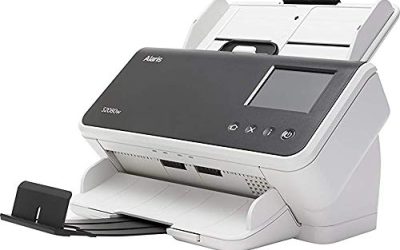
2. Kodak Alaris S2080W – Best For Network Production
ASIN: B076CVP7Y6
Amazon US: https://www.amazon.com/dp/B076CVP7Y6
The Kodak Alaris S2080W brings production-class speed to a network-connected unit. It scans at 80 ppm and 160 ipm duplex, holds 80 sheets, and is rated for up to 12,000 pages per day. USB, Wi-Fi, and Ethernet are included, so a team can share it across a network or attach it to a workstation.
The 80 ppm rate is the fastest desktop-class speed here, and the daily rating supports long sessions. Network routing lets several admin groups send batches to shared folders from one fast unit. The feeder is the planning point: at 80 sheets it reloads far more often than the 300-sheet fi-7700 hopper, so large batches must be staged in smaller loads.
Pros
– 80 ppm / 160 ipm duplex, fastest desktop-class here
– Up to 12,000 pages per day with network connectivity
– USB, Wi-Fi, and Ethernet for shared or attached use
Cons
– 80-sheet feeder needs reloading on very large batches
– Smaller hopper than true production units
3. Fujitsu fi-8170 – Best For 100-Sheet Feeder Production
ASIN: B0BZZ9W6V1
Amazon US: https://www.amazon.com/dp/B0BZZ9W6V1
The Fujitsu fi-8170 balances high throughput with a larger feeder. It scans at 70 ppm and 140 ipm duplex, holds 100 sheets, and carries an expected daily volume of 10,000 sheets. Ethernet and USB support wired routing or workstation attachment.
The 100-sheet feeder reduces interruptions compared with 80-sheet rivals. Operators load a full batch and prepare the next file while scanning continues. Connectivity is wired only, with no Wi-Fi. In a fixed hub with network drops, that is usually acceptable. Teams that need wireless placement should compare the S2080W or S2060W.
Pros
– 100-sheet feeder reduces reloads during long sessions
– 70 ppm / 140 ipm duplex with 10,000-sheet expected daily volume
– Ethernet routing to shared storage
Cons
– No Wi-Fi; wired Ethernet only
– Suited to fixed stations
4. Fujitsu fi-7160 – Best For Shared Workstation 60 ppm Scanning
ASIN: B00GKC5HO6
Amazon US: https://www.amazon.com/dp/B00GKC5HO6
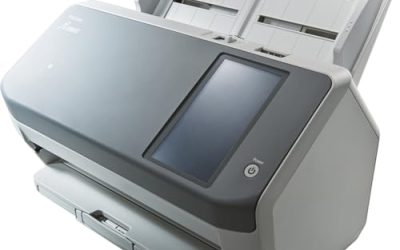
The Fujitsu fi-7160 is a 60 ppm workstation scanner for admin teams that share one capture desk. It scans at 60 ppm and 120 ipm duplex, holds 80 sheets, and is rated for up to 4,000 scans per day. Connection is by USB 3.0 only.
That speed covers steady departmental batches where staff take turns scanning into a capture application. For teams whose volume is spread across several workstations, a 60 ppm unit per desk can be the right scale. The limits are daily rating and connectivity: up to 4,000 scans per day is well below the ratings above, and USB-only connection means it cannot be network-shared.
Pros
– 60 ppm / 120 ipm duplex for workstation batches
– 80-sheet feeder for typical admin packets
– USB 3.0 workstation connection
Cons
– USB only; cannot be network-shared
– Up to 4,000 scans per day suits workstation volume
5. Kodak Alaris S2060W – Best For Network 60 ppm Scanning
ASIN: B076CX5G1H
Amazon US: https://www.amazon.com/dp/B076CX5G1H
The Kodak Alaris S2060W provides 60 ppm network scanning for departments that need shared access. It scans at 60 ppm and 120 ipm duplex, holds 80 sheets, and is rated for up to 9,000 pages per day. USB 3.2, Wi-Fi 802.11b/g/n, and Ethernet are included, with touchscreen job buttons for preset destinations.
Each group can send work to its own folder from the touchscreen, while the daily rating supports a full day of intake. Ethernet provides a stable wired station, and Wi-Fi covers placement where cabling is limited. The wireless radio is an older generation without Wi-Fi 6, and the platform dates to 2017. Compared with the fi-7160, the S2060W adds network sharing and a higher daily rating at the same speed.
Pros
– Network sharing at 60 ppm / 120 ipm duplex
– Up to 9,000 pages per day
– Touchscreen job buttons for group destinations
Cons
– Older Wi-Fi radio without Wi-Fi 6 support
– Platform introduced in 2017
Buying Guide: What to Look For
Daily Volume and Sustained Throughput
Start with your busiest day in pages, including re-scans, and choose a rating with clear headroom. A dedicated production line fits the fi-7700 class at 44,000 sheets expected daily, a busy shared hub fits the 10,000 to 12,000 range, and a shared workstation fits the fi-7160 at up to 4,000 scans per day.
Feeder Capacity and Original Types
Feeder size determines reload frequency. A 300-sheet hopper supports true batch production, a 100-sheet feeder supports long sessions, and an 80-sheet feeder suits workstation batches. If your department handles oversized forms, the fi-7700 A3 flatbed keeps that work at the same station.
Network Sharing vs Dedicated Workstation
Decide whether scanning happens at one capture station or across several groups. USB-attached models, such as the fi-7700 and fi-7160, center the workflow on one PC. Network models, such as the S2080W, fi-8170, and S2060W, let groups share one fast unit and route output to common folders.
Compatibility and Setup Notes
Confirm capture software, folder destinations, and permissions before installation, and test with your real document mix, including oversized originals. Plan physical space for the scanner and staging area, especially for the A3 footprint of the fi-7700. Assign batch responsibilities so stations keep a clear log during peak periods.
Comparison Table
| Product | Speed (ppm / ipm) | ADF Capacity | Daily Volume | Connectivity | ASIN |
|---|---|---|---|---|---|
| Fujitsu fi-7700 | 100 / 200 (A4 landscape) | 300 sheets + A3 flatbed | 44,000 sheets expected | USB 3.1 | B071FGBKPY |
| Kodak Alaris S2080W | 80 / 160 | 80 sheets | Up to 12,000 pages/day | USB, Wi-Fi, Ethernet | B076CVP7Y6 |
| Fujitsu fi-8170 | 70 / 140 | 100 sheets | 10,000 sheets expected | Ethernet, USB | B0BZZ9W6V1 |
| Fujitsu fi-7160 | 60 / 120 | 80 sheets | Up to 4,000 scans/day | USB 3.0 only | B00GKC5HO6 |
| Kodak Alaris S2060W | 60 / 120 | 80 sheets | Up to 9,000 pages/day | USB 3.2, Wi-Fi, Ethernet | B076CX5G1H |
FAQ
What daily volume counts as production scanning?
Production work typically runs thousands of pages per day in sustained sessions. The fi-7700 rating of 44,000 sheets expected daily is true production class, the 10,000 to 12,000 range suits busy hubs, and up to 4,000 scans per day fits a shared workstation.
Do high-volume admin teams need an A3 flatbed?
Only if oversized or fragile originals are part of the workload. The fi-7700 A3 flatbed handles large forms and items that should not go through a feeder. Departments scanning only standard pages can choose feeder-only models.
Should a production scanner be network-connected or USB-attached?
A dedicated capture station usually uses USB with scanning software on that workstation, as with the fi-7700. Shared hubs benefit from Ethernet or Wi-Fi routing to common folders, as with the S2080W, fi-8170, and S2060W.
Final Verdict
For true production volume, the Fujitsu fi-7700 is the clear choice with a 300-sheet feeder, 44,000-sheet expected daily volume, and an A3 flatbed. For network-connected high throughput, the Kodak Alaris S2080W leads at 80 ppm and up to 12,000 pages per day, while the Fujitsu fi-8170 adds a 100-sheet feeder at 70 ppm over Ethernet.
At the 60 ppm level, choose the Fujitsu fi-7160 for a shared USB workstation and the Kodak Alaris S2060W for network sharing with touchscreen job buttons. Matching daily volume, feeder size, and connectivity to your busiest day keeps high-volume scanning on schedule.
FAQ
What daily volume counts as production scanning?
Do high-volume admin teams need an A3 flatbed?
Should a production scanner be network-connected or USB-attached?
More from Amazon
Programs that pair well with the guide above. Offers and eligibility are set by Amazon and may change.
Free shipping on eligible items, Prime Video and more. Eligible new members can start with a free trial.
Start a Prime free trialA Prime membership for ages 18-24 with a trial period. Eligibility is set by Amazon.
See Prime for Young AdultsAudiobooks and podcasts to listen to on the go. Eligible new members can start with a free trial.
Try Audible freeAd-free music streaming. Eligible new subscribers can start with a free trial.
Try Music Unlimited freeAs an Amazon Associate we earn from qualifying purchases.