Key takeaways
- Compare the best fixed-mount barcode scanners with gs1 decoding for warehouse picking with key specs, pros, cons, and buying guidance. See verified Amazon US picks with ASINs.
As an Amazon Associate we earn from qualifying purchases.
Disclosure: This article contains affiliate links. If you buy through links on this page, we may earn a commission at no extra cost to you. Product availability on Amazon US can change; check the product page for current details before ordering.

Quick Picks
| Product | Best For | Key Spec | ASIN |
|---|---|---|---|
| Honeywell Vuquest 3320G | Compact GS1 mount | 73x51x26 mm, 77 g fixed-mount | B0G1NF6ZRH |
| Honeywell Orbit HF680 | Presentation GS1 station | 1280×800 sensor, RS232 variant ASIN | B0CPGJQPKF |
| Honeywell Genesis 7580g | Hands-free GS1 with object detection | USB kit ASIN, object detection | B00C79VKTM |
| ## How We Selected These Picks | |||
| Picking stations need a scanner that stays in place while staff present cartons, totes, or items for verification, keeping both hands available for handling product. When labels use GS1 symbologies, the scanner must decode those exact symbologies, including GS1-128 on cartons and GS1 DataBar variants on products. This guide includes only fixed-mount and presentation models with confirmed GS1 decoding. |
Only the three GS1-confirmed models below are included. Most budget embedded engines lack confirmed GS1 support and are excluded, even when they decode general 1D and 2D codes. A scanner that reads standard Code 128 does not automatically handle GS1-128 data or GS1 DataBar Expanded data as a picking system expects. Each pick lists confirmed GS1 symbologies explicitly.
Presentation depth of field needs honest framing. These are counter-class scanners for labels presented at bench distance, measured in millimetres from the scan window. They are not conveyor-distance scanners. Within that class, the picks differ in size, mounting, interface, and hands-free behaviour. Interface notes are ASIN-specific, so check the Orbit HF680 variant note before ordering.
1. Honeywell Vuquest 3320G – Best For Compact GS1 Mount

ASIN: B0G1NF6ZRH
Amazon US: https://www.amazon.com/dp/B0G1NF6ZRH
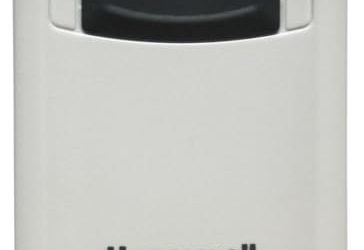
The Honeywell Vuquest 3320G is the compact pick for tight mounting space. At 73x51x26 mm and 77 g, this hands-free/presentation fixed-mount scanner fits small enclosures and under-shelf mounts where a larger presentation unit would crowd the work area. It decodes 1D, PDF, and 2D codes with USB, RS-232, and Keyboard Wedge connectivity. For stations presenting small cartons or items at close range, the small footprint keeps the scanner present without dominating the bench.
GS1 support is confirmed for GS1 DataBar, GS1 DataBar Limited, GS1 DataBar Expanded, and GS1-128, plus Data Matrix listed separately from the GS1 symbologies. Match the confirmed list against exact GS1 symbologies on pick labels. The limitation is duty level: IP53 sealing and a 1.5 m drop specification make this a light-duty device. A protected fixed mount reduces handling, but stations with heavy impact risk should weigh that specification carefully.
Pros
– Compact 73x51x26 mm, 77 g body for tight mounts
– Confirmed GS1 DataBar, DataBar Limited, DataBar Expanded, GS1-128 + Data Matrix
– USB, RS-232, Keyboard Wedge connectivity
– Hands-free presentation operation
Cons
– Light-duty IP53, 1.5 m drop specification
– Counter-class range; not a distance scanner
– Needs a suitable mount for consistent presentation
2. Honeywell Orbit HF680 – Best For Presentation GS1 Station
ASIN: B0CPGJQPKF
Amazon US: https://www.amazon.com/dp/B0CPGJQPKF
The Honeywell Orbit HF680 is the presentation pick for stations where staff present each item to a fixed scan window. This hands-free presentation area imager uses a 1280×800 sensor in an 85x88x139 mm, 278 g housing, with motion tolerance of 2.5 m/s. Depth of field examples show the bench-distance class: 13 mil UPC-A 0-210 mm and 20 mil Code 39 0-300 mm. That range supports presenting carton and product labels directly in front of the scanner during pick verification.
GS1 support is confirmed for GS1-128, GS1 DataBar Omnidirectional/Limited/Expanded, GS1 Composite, plus Data Matrix. That suits stations verifying GS1-128 carton labels and GS1 DataBar product labels at the bench. Interface is critical: ASIN B0CPGJQPKF is the RS232 variant (HF680-R0-1RS232-US), so USB is not the interface for this ASIN. Hosts expecting USB need RS-232 support confirmed or a different variant. The short presentation depth of field requires labels within bench distance.
Pros
– Confirmed GS1-128, GS1 DataBar Omnidirectional/Limited/Expanded, GS1 Composite + Data Matrix
– 1280×800 sensor, 2.5 m/s motion tolerance
– Hands-free presentation design
– Specified bench-distance depth of field
Cons
– RS232 variant ASIN; do not assume USB
– Short presentation depth of field
– Station layout must bring labels to the window
3. Honeywell Genesis 7580g – Best For Hands-Free GS1 With Object Detection
ASIN: B00C79VKTM
Amazon US: https://www.amazon.com/dp/B00C79VKTM
The Honeywell Genesis 7580g suits stations wanting hands-free scanning with handheld flexibility. This presentation area imager decodes 1D, PDF417, and 2D codes, measures 83x80x150 mm, and supports hands-free operation with object detection. Object detection helps when items enter the scan zone repeatedly during verification. Staff can pick the unit up for awkward label angles, then return it to hands-free use. This ASIN is the USB kit, suiting USB bench hosts.
GS1 support is confirmed for GS1 DataBar/Limited/Expanded, GS1-128, plus Data Matrix. Match that list to carton and product labels, including whether Expanded data must be captured in full by picking software. Limitations are platform age and range class. This is an older platform, so confirm host compatibility and support expectations. Depth of field is counter-class: labels are presented at bench distance, not read across the station.
Pros
– Hands-free with object detection
– Can be picked up handheld for angled labels
– Confirmed GS1 DataBar/Limited/Expanded, GS1-128 + Data Matrix
– USB kit for this ASIN
Cons
– Older platform; confirm host compatibility
– Counter-class depth of field
– Larger footprint than compact mounts
Buying Guide: What to Look For
Confirmed GS1 Symbologies for Pick Labels
List every GS1 symbology on carton, tote, and product labels, then match against confirmed decoder support. GS1-128 and GS1 DataBar variants serve different label types, and Expanded variants can carry additional data. Avoid budget embedded engines without confirmed GS1 support for GS1-dependent stations. Where GS1 Composite appears, confirm support explicitly; only the Orbit HF680 here lists GS1 Composite. Confirm picking software parses GS1 data correctly, then validate with real labels.
Presentation Depth of Field and Station Layout
Presentation scanners read labels brought to the window. Examples such as 0-210 mm for 13 mil UPC-A and 0-300 mm for 20 mil Code 39 on the Orbit HF680 show bench-distance operation. Design the station so staff naturally present labels within range. Motion tolerance helps moving presentation, but labels must pass through the working zone. If work requires reading without presentation at distance, choose a different scanner category. Fix the mount position so scan placement stays consistent.
Interface Matched to the Picking Host
Interface is ASIN-specific. The Vuquest 3320G supports USB, RS-232, and Keyboard Wedge. The Genesis 7580g ASIN here is the USB kit. The Orbit HF680 ASIN here is the RS232 variant HF680-R0-1RS232-US, so USB must not be assumed. Confirm host port and input mode before ordering. A variant mismatch stops deployment even when decoding is correct. Also confirm whether the application expects Keyboard Wedge style input or a host mode.
Compatibility and Setup Notes
Confirm four items: exact GS1 symbologies, presentation distance, host interface for the specific ASIN, and mount location. Verify RS-232 host support for Orbit HF680 ASIN B0CPGJQPKF. Confirm the Genesis 7580g USB kit matches the bench host. Confirm the Vuquest 3320G mount protects the light-duty housing. Validate with real GS1-128 and GS1 DataBar labels at normal presentation distance.
Comparison Table
| Feature | Vuquest 3320G | Orbit HF680 | Genesis 7580g |
|---|---|---|---|
| ASIN | B0G1NF6ZRH | B0CPGJQPKF | B00C79VKTM |
| Form factor | Compact fixed-mount | Hands-free presentation | Presentation, object detection |
| Size | 73x51x26 mm, 77 g | 85x88x139 mm, 278 g | 83x80x150 mm |
| Interface (ASIN) | USB / RS-232 / Keyboard Wedge | RS232 HF680-R0-1RS232-US | USB kit |
| Confirmed GS1 | DataBar/Limited/Expanded, GS1-128 + Data Matrix | GS1-128, DataBar Omni/Ltd/Exp, Composite + Data Matrix | DataBar/Ltd/Exp, GS1-128 + Data Matrix |
| Key limit | Light-duty IP53, 1.5 m drop | Short presentation depth | Older platform, counter-class depth |
| ## FAQ | |||
| ### Why are only three models included? | |||
| Only fixed-mount and presentation models with confirmed GS1 decoding are included. Most budget embedded engines lack confirmed GS1 support and are excluded. Each pick lists confirmed GS1 symbologies to match against pick labels. |
Can these scanners read labels from across the warehouse?
No. These are counter-class presentation scanners with depth of field in millimetres. Staff present items at bench distance. Distance reading needs a different scanner category.
Which interface does the Orbit HF680 ASIN use?
Final Verdict
Choose the Vuquest 3320G for compact mounts needing confirmed GS1 DataBar variants and GS1-128 in a 77 g body. Choose the Orbit HF680 for bench presentation with GS1 Composite support, provided the RS232 variant matches the host. Choose the Genesis 7580g USB kit for hands-free object detection with handheld flexibility. Decide by mount space, host interface, and exact GS1 symbologies.
FAQ
Can these scanners read labels from across the warehouse?
More from Amazon
Programs that pair well with the guide above. Offers and eligibility are set by Amazon and may change.
Free shipping on eligible items, Prime Video and more. Eligible new members can start with a free trial.
Start a Prime free trialA Prime membership for ages 18-24 with a trial period. Eligibility is set by Amazon.
See Prime for Young AdultsAudiobooks and podcasts to listen to on the go. Eligible new members can start with a free trial.
Try Audible freeAd-free music streaming. Eligible new subscribers can start with a free trial.
Try Music Unlimited freeAs an Amazon Associate we earn from qualifying purchases.