
Our Short List of 3

- Best for: Competitive players who want 1TB of Gen4 storage behind a 165Hz screen.
- Processor: Intel Core i7-13650HX
- Graphics: NVIDIA GeForce RTX 4060 Laptop GPU, 140W Max TGP
- Display: 16″ FHD+ 165Hz
- Memory: 16GB DDR5-4800

- Best for: Players who multitask heavily and want a sharper QHD screen with their 1TB.
- Processor: Intel Core i7-13650HX
- Graphics: NVIDIA GeForce RTX 4060, 8GB GDDR6, 140W TGP
- Display: 16″ QHD 165Hz G-SYNC
- Memory: 32GB DDR5-4800 (two 16GB modules)

- Best for: Library-first buyers who want 1TB of room and accept a lower graphics tier to get it.
- Processor: AMD Ryzen 7 7735HS, 8 cores, up to 4.7 GHz boost
- Graphics: NVIDIA GeForce RTX 4050, 6GB GDDR6
- Display: 15.6″ FHD 144Hz, 100% sRGB
- Memory: 16GB DDR5-4800
All 4 Picks at a Glance
| Product | Specs | Action |
|---|---|---|
| ASUS ROG Strix G16 |
| Check price on Amazon |
| Lenovo Legion 5i |
| Check price on Amazon |
| ASUS TUF Gaming A15 |
| Check price on Amazon |
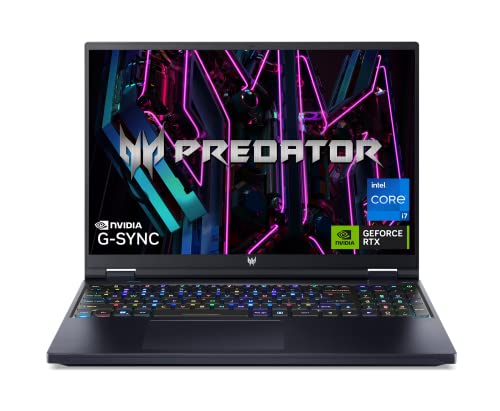 Acer Predator Helios 16 |
| Check price on Amazon |
Key takeaways
- Four gaming laptops that all ship with a 1TB SSD, compared on GPU tier, screen and upgrade room, so capacity stops being what limits your library.
In 2026, asking whether a gaming laptop has an SSD settles nothing, because every serious model ships with one. The decision that actually matters is capacity: a single modern release can swallow well over a hundred gigabytes, so a 512GB drive fills up after a handful of installs and leaves you deleting games to make room for the next one. Shoppers comparing gaming laptops with SSD storage are really choosing between living with that shuffle and starting at 1TB.
That is the cut applied here. Value hunters, competitive players, multitaskers and long-term upgraders are all served by the same shortlist, because each of the four machines below ships with a 1TB SSD as its own listing states. They were picked from the names and specifications on their Amazon product pages, and they separate on graphics tier, screen quality and expansion room rather than on storage size, which is identical across the group.
Quick Picks
As an Amazon Associate we earn from qualifying purchases.
| Product | Best for | Key spec |
|---|---|---|
| ASUS ROG Strix G16 | High-refresh play at 1080p-class resolution | 1TB PCIe Gen4 SSD |
| Lenovo Legion 5i | A sharper screen plus heavy multitasking | 1TB PCIe NVMe SSD, 32GB DDR5 |
| ASUS TUF Gaming A15 | Getting 1TB on the value route | 1TB PCIe SSD, Ryzen 7 7735HS |
| Acer Predator Helios 16 | Adding a second drive down the line | 1TB PCIe Gen 4 SSD, 2 × M.2 slots |
How to Choose
Start With Capacity, Not the SSD Label
Every listing in this category leads with the words solid state drive, so the label itself tells you nothing. Capacity is where laptops genuinely differ. A 512GB drive sounds adequate until the operating system, launchers and two or three large releases move in, at which point each new install forces an uninstall. A 1TB drive roughly doubles the working room and lets a library of mixed sizes coexist. Treat 512GB as a compromise you accept knowingly, and 1TB as the capacity that keeps storage out of your weekly decisions.
Read the Interface Wording Carefully
Listings describe fast storage in inconsistent language. Some name the interface directly, such as PCIe Gen4, while others stop at PCIe NVMe or simply PCIe SSD. Those phrases are not interchangeable promises, and none of the four listings in this article states read or write speeds, so any speed figure attached to these models elsewhere has not come from the product page. Buy on the wording the listing actually uses: a named Gen4 interface is a stated fact, while an unnamed PCIe drive is a capacity fact and nothing more.
Check Expansion Room Before You Need It
A full drive hurts less when the machine can take a second one. One laptop in this group, the Predator Helios 16, states two PCIe M.2 slots in its own specifications, which means a second drive can join the original instead of replacing it. The other three listings make no such statement, so their upgrade path is swapping the fitted drive for a larger one and reinstalling everything. If your library grows every year, slot count belongs in the decision now, not after the first storage warning appears.
See What the 1TB Tier Costs Elsewhere
Storage capacity is bundled with everything else, so two 1TB laptops can be very different machines. In this group the value-priced 1TB model pairs its drive with an RTX 4050, while the RTX 4060 models spread the money across stronger graphics, and their screens range from a 165Hz FHD+ panel to QHD and 2560×1600 panels with G-SYNC. Decide which pairing suits your games: a fast screen for competitive play, more pixels for slower cinematic titles, or the cheaper graphics tier when the library matters more than frame rates.
The 4 Best Options
ASUS ROG Strix G16
- Best for: Competitive players who want 1TB of Gen4 storage behind a 165Hz screen.
- Processor: Intel Core i7-13650HX
- Graphics: NVIDIA GeForce RTX 4060 Laptop GPU, 140W Max TGP
- Display: 16″ FHD+ 165Hz
- Memory: 16GB DDR5-4800
Competitive players who want 1TB of Gen4 storage behind a 165Hz screen.
Confirm a live featured offer for the exact ASIN before ordering, and check who the seller is, since marketplace offers have appeared on this listing.
The Strix G16 is the pick whose own listing headlines its storage: a 1TB PCIe Gen4 SSD sits in the title specification alongside an Intel Core i7-13650HX and an RTX 4060 laptop GPU running at a 140W maximum TGP. Its 16-inch FHD+ screen refreshes at 165Hz, which suits fast competitive titles where frame rate matters more than pixel count, and 16GB of DDR5-4800 covers current games comfortably. For players who want the capacity question answered and the refresh rate high, this is the most direct route in the group.
Watch out for: Confirm a live featured offer for the exact ASIN before ordering, and check who the seller is, since marketplace offers have appeared on this listing.
Lenovo Legion 5i
- Best for: Players who multitask heavily and want a sharper QHD screen with their 1TB.
- Processor: Intel Core i7-13650HX
- Graphics: NVIDIA GeForce RTX 4060, 8GB GDDR6, 140W TGP
- Display: 16″ QHD 165Hz G-SYNC
- Memory: 32GB DDR5-4800 (two 16GB modules)
Players who multitask heavily and want a sharper QHD screen with their 1TB.
Confirm a live featured offer for the exact ASIN before ordering, and re-check the RAM and storage figures on the page, because Legion 5i listings circulate in several configurations that are easy to confuse.
This Legion 5i listing is a specific seller-configured build, and its specification pairs the 1TB PCIe NVMe SSD with 32GB of DDR5-4800 in two modules, double the memory of the other picks here. The 16-inch QHD panel runs at 165Hz with G-SYNC, the RTX 4060 carries 8GB of GDDR6 at a 140W TGP per the listing’s graphics block, and a four-zone RGB backlit keyboard rounds out the package. Buyers who keep a game, a browser full of guides and voice chat open together will feel that memory headroom daily.
Watch out for: Confirm a live featured offer for the exact ASIN before ordering, and re-check the RAM and storage figures on the page, because Legion 5i listings circulate in several configurations that are easy to confuse.
ASUS TUF Gaming A15
- Best for: Library-first buyers who want 1TB of room and accept a lower graphics tier to get it.
- Processor: AMD Ryzen 7 7735HS, 8 cores, up to 4.7 GHz boost
- Graphics: NVIDIA GeForce RTX 4050, 6GB GDDR6
- Display: 15.6″ FHD 144Hz, 100% sRGB
- Memory: 16GB DDR5-4800
Library-first buyers who want 1TB of room and accept a lower graphics tier to get it.
Confirm a live featured offer for the exact ASIN before ordering, and do not expect RTX 4060 performance from this configuration.
The TUF Gaming A15 is the value route to the same headline capacity: its listing states a 1TB PCIe SSD, matched with an AMD Ryzen 7 7735HS and 16GB of DDR5-4800. The honest trade sits in the graphics line, where an RTX 4050 with 6GB of GDDR6 is a clear tier below the RTX 4060 machines above, so frame rates at high settings will sit lower even though the storage story is identical. The 15.6-inch FHD screen refreshes at 144Hz with full sRGB coverage, which keeps fast games fluid and colors honest for everyday creative work.
Watch out for: Confirm a live featured offer for the exact ASIN before ordering, and do not expect RTX 4060 performance from this configuration.
Acer Predator Helios 16
- Best for: Long-term owners who expect to add a second SSD rather than replace the first.
- Processor: Intel Core i7-13700HX
- Graphics: NVIDIA GeForce RTX 4060
- Display: 16″ 2560×1600 165Hz G-SYNC
- Memory: 16GB DDR5
Long-term owners who expect to add a second SSD rather than replace the first.
Confirm a live featured offer for the exact ASIN before ordering; reproductions of this listing are the oldest of the four, so verify the offer and the full specification on the page itself rather than trusting any summary.
The Helios 16 is the upgrade pick, and the reason sits in its own internal specifications: the 1TB PCIe Gen 4 SSD is backed by two PCIe M.2 slots, making this the only machine in the group whose listing promises a second drive bay. Around that storage story sit an Intel Core i7-13700HX, an RTX 4060, and a 16-inch 2560×1600 display at 165Hz with G-SYNC, the sharpest panel here. Killer Wi-Fi 6E handles networking. For a buyer planning to keep one laptop for years while the library keeps growing, that empty slot is the whole argument.
Watch out for: Confirm a live featured offer for the exact ASIN before ordering; reproductions of this listing are the oldest of the four, so verify the offer and the full specification on the page itself rather than trusting any summary.
Which One Fits Your Situation
You Play Competitive Titles Most Nights
Choose the ROG Strix G16. Its FHD+ panel refreshes at 165Hz and the RTX 4060 runs at the full 140W maximum TGP its listing states, a pairing aimed at high frame rates rather than high pixel counts. The 1TB Gen4 drive means your regular rotation of shooters and sports titles stays installed together, ready for a session instead of waiting on a download queue.
One Laptop Has to Cover Play, Study and Everything Else
Take the Legion 5i in this 32GB configuration. Double the memory of the rest of the group keeps games, coursework, streaming and a crowded browser comfortable at the same time, while the QHD G-SYNC screen makes text and video look sharper than a 1080p-class panel. Its 1TB drive holds the library; the extra RAM holds the rest of your day.
Your Library Is Big but the Budget Is Not
The TUF Gaming A15 fits this spot. It delivers the same 1TB capacity as every other pick here, so nothing in your collection has to live on an external drive, and the 144Hz screen still suits fast games. The compromise is the RTX 4050: expect to tune settings down in demanding releases, and treat this as a storage-and-value choice rather than a performance one.
You Keep a Laptop for Years and Hate Reinstalling
Pick the Predator Helios 16. When the first drive eventually fills, its listing states a second M.2 slot waiting, so expansion means adding storage instead of cloning and replacing the original drive. The 2560×1600 G-SYNC display and RTX 4060 give the machine enough headroom to stay enjoyable across that longer ownership, which is exactly when the expansion room starts paying off.
Common Mistakes
- Buying a 512GB model because the headline looks cheaper, then spending the machine’s life shuffling installs or tethering an external drive.
- Assuming every drive described as a PCIe SSD is a Gen4 part, when some listings name the generation and others deliberately do not.
- Mixing up Legion 5i configurations across listings, since RAM and storage change between ASINs sold under the same model name.
- Taking a second M.2 slot for granted on a laptop whose own specifications never mention one.
- Ordering from a listing you have not re-opened, without confirming a live featured offer for the exact ASIN and checking who actually sells it.
Frequently Asked Questions
Is 1TB really necessary on a gaming laptop?
For most players, yes. Current releases routinely pass a hundred gigabytes each, and launchers, updates and saved captures add steady overhead on top. A 1TB drive holds a working library of large and small titles together, while 512GB forces regular deletions. If you only ever play two or three compact games, the smaller capacity can work, but it leaves no slack.
Does a Gen4 SSD make games faster than a plain PCIe SSD?
The listings here do not publish read or write speeds, so no honest ranking of load times can be built from the product pages alone. Gen4 is the newer interface generation and two picks name it directly, while the other two state PCIe or PCIe NVMe without a generation. In practice, capacity and a free slot will shape your experience more than the interface label.
Can I add a second SSD to any of these laptops?
Only the Predator Helios 16 states two PCIe M.2 slots in its own specifications, so it is the one pick here sold on expansion. The Strix G16, Legion 5i and TUF A15 listings do not claim a second slot, which means growing their storage would involve replacing the fitted drive. Always check the exact product page for the configuration you are buying before relying on an upgrade plan.
Why does the Legion 5i show different memory on other listings?
Because the Legion 5i name covers many seller configurations, and each listing carries its own specification. The machine in this article is one exact build with 32GB of DDR5-4800 and a 1TB SSD under its ASIN; other listings under the same model name pair different memory and storage. Compare the details block of the specific listing, not the model name, before ordering.
FAQ
Is 1TB really necessary on a gaming laptop?
Does a Gen4 SSD make games faster than a plain PCIe SSD?
Can I add a second SSD to any of these laptops?
Why does the Legion 5i show different memory on other listings?
More from Amazon
Programs that pair well with the guide above. Offers and eligibility are set by Amazon and may change.
Free shipping on eligible items, Prime Video and more. Eligible new members can start with a free trial.
Start a Prime free trialA Prime membership for ages 18-24 with a trial period. Eligibility is set by Amazon.
See Prime for Young AdultsAudiobooks and podcasts to listen to on the go. Eligible new members can start with a free trial.
Try Audible freeAd-free music streaming. Eligible new subscribers can start with a free trial.
Try Music Unlimited freeAs an Amazon Associate we earn from qualifying purchases.









