Our Short List of 3
All 4 Picks at a Glance
| Product | Specs | Action |
|---|---|---|
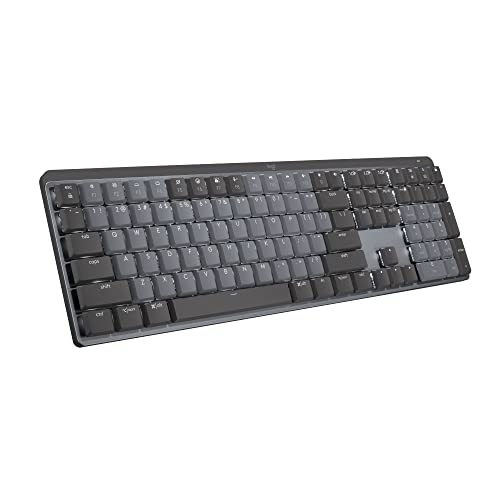 1. Logitech MX Mechanical | Check price on Amazon | |
 3. Keychron K2 Version 2 | Check price on Amazon | |
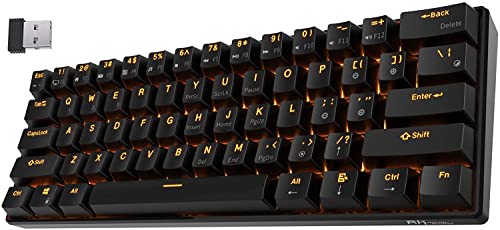 4. RK ROYAL KLUDGE RK61 Wireless | Check price on Amazon | |
 5. Epomaker TH80 Pro | Check price on Amazon |
Key takeaways
- Find the best mechanical keyboards for typing, from quiet low-profile boards to hot-swappable compact models, with switch, layout, and comfort guidance.
Typing on a mechanical keyboard feels different from typing on a flat membrane board. Each key has its own switch underneath, so a press has a clear start, a defined actuation point, and a satisfying return. For people who write all day, answer long email threads, draft reports, or work in code, that feedback can make long sessions feel less tiring and more accurate. The right board also stays comfortable after hours at a desk, keeps its legends readable, and connects easily to the computer in front of you.
This guide focuses on mechanical keyboards built for typing first. That means switch feel, key stability, layout, sound, and comfort matter more than lighting effects or extra macro keys. Every keyboard below uses mechanical switches, is sold as a complete keyboard rather than a bare kit, and is available on Amazon US. The picks cover full-size, tenkeyless, compact 75 percent, and compact 60 percent layouts, so you can match the board to your desk space and your typing habits.
If you type for a living, the keyboard is one of the most used tools on your desk, and choosing it well is worth a little care.
What Makes a Mechanical Keyboard Good for Typing
A good typing keyboard starts with the switch. A mechanical switch is a small mechanism under each keycap. When you press a key, the switch travels down, registers the press at a set point, and springs back up. The travel distance, the force needed, and the sound it makes all shape how typing feels. A switch that is too heavy can tire your fingers. A switch that is too light can lead to accidental presses. A switch that is too loud can disturb people nearby.
Key stability matters almost as much as switch feel. Wide keys such as the space bar, Enter, and Shift need stabilizers underneath. Good stabilizers keep those keys level and quiet. Poor stabilizers let a key wobble or rattle, which is noticeable on every long press. Keycap material also plays a role. Double-shot PBT keycaps tend to resist shine and wear better than thin ABS caps, and their legends stay readable longer. A keyboard with a solid plate or a well-damped case usually sounds deeper and less hollow than a thin, empty case.
Layout is the third major factor. A full-size board includes a number pad, which helps if you enter numbers often. A tenkeyless board drops the number pad and brings the mouse closer to your body. A 75 percent board keeps the function row and arrow keys in a tighter package. A 60 percent board is the most compact option, but it moves some keys to a second layer, which takes time to learn.
How to Choose the Right Switch
Switch choice is personal, but the three main families are easy to understand. Linear switches move straight down with no bump and no click. They feel smooth and fast, and they suit typists who like a clean, quiet press. Tactile switches have a small bump partway down. That bump tells your fingers that the key has registered, without the need to press all the way to the bottom. Many writers prefer tactile switches because the bump gives clear feedback. Clicky switches add an audible click to the tactile bump. They give the most feedback of all, and they sound the most distinct, but they are also the loudest option and are not ideal for a shared office or a quiet home.
Low-profile switches deserve a separate note. They sit closer to the case, travel a shorter distance, and feel closer to a laptop keyboard. Some typists love the shorter travel and the slimmer board. Others prefer the deeper travel of a standard switch. If you are moving from a laptop, a low-profile board can feel familiar. If you are moving from an older desktop keyboard, a standard-profile board may feel more natural.
Hot-swappable boards let you pull a switch out and press a different switch in without soldering. That feature is useful if you want to try a different feel later, or if one switch starts to feel different from the rest. It is not essential for every buyer, but it adds flexibility and can extend the life of a keyboard. If you do not plan to change switches, a well-chosen fixed board is just as good for daily typing.
Sound is another practical concern. Foam layers, a gasket mount, and a solid case can soften the sound of each press. Lubricated stabilizers reduce rattle. If you work near other people, look for a quiet tactile or linear switch, a damped case, and a board that does not ring when you type quickly. If you work alone, sound is a matter of taste, and a slightly louder click can be part of the appeal.
The Keyboards
1. Logitech MX Mechanical
The Logitech MX Mechanical is a full-size, low-profile mechanical keyboard designed for long work sessions. It uses low-profile mechanical switches in a slim aluminum case, and it is available in tactile quiet, linear, and clicky versions. The tactile quiet version covered here gives a clear bump without a sharp click, which suits an office desk and a home desk alike. The full layout includes a number pad, a function row, and dedicated media keys, so there is no need to learn a second layer for common tasks.
Connectivity is a strong point. The board pairs over Bluetooth with up to three devices, connects through a USB receiver, and also works over a wired USB-C connection. Switching between a work laptop and a personal computer takes one key press. The backlit keys adjust to ambient light and dim when your hands move away, which helps battery life. The keycaps are low and well spaced, and the typing angle feels natural without a separate wrist rest for many users.
This is the best pick in this guide for a typist who wants a full-size board, a quiet feel, and multi-device switching in one package. It is also a good choice for someone moving from a laptop keyboard who wants mechanical feedback without a tall, bulky case. Check the switch version carefully before ordering, because the tactile quiet, linear, and clicky versions feel and sound different.
2. Logitech MX Mechanical Mini
The Logitech MX Mechanical Mini takes the same low-profile approach and fits it into a compact layout without a number pad. The tenkeyless-style design keeps the function row and arrow keys, so most typists lose little, while the board takes up less desk space and brings the mouse closer in. The version covered here uses clicky switches, which give a crisp bump and an audible click on every press. That feedback suits a private workspace where sound is not a concern.
Like its full-size sibling, the Mini pairs over Bluetooth with up to three devices, works with a USB receiver, and connects over USB-C. The backlit keys are easy to read in low light, and the slim case sits comfortably on a desk. The shorter width is a real advantage on a small desk, on a keyboard tray, or in a bag for travel between home and office.
Choose the Mini if you rarely use a number pad, you want more room for your mouse, or you prefer a smaller board that still has a full function row. If you enter numbers often, the full-size MX Mechanical above is the better match. If you share a room, consider the tactile quiet version of the Mini family instead of the clicky version, because the click is easy to hear across a room.
ASIN: B09LJTPXCF
3. Keychron K2 Version 2
The Keychron K2 Version 2 is a 75 percent wireless mechanical keyboard with 84 keys, a compact footprint, and a classic typing feel. It uses Gateron G Pro Blue switches in the version covered here, which give a tactile bump and a clear click. The aluminum frame feels solid, the RGB backlight is adjustable, and the board connects over Bluetooth or a wired USB-C cable. It works with Mac and Windows layouts, and it includes keycaps for both systems.
The 75 percent layout is a useful middle ground. It keeps the function row and the arrow keys, drops the number pad, and still fits on a smaller desk. The standard-profile switches have deeper travel than a low-profile board, which many long-form writers prefer. The board is also hot-swappable in many configurations, so you can change switches later if your taste changes. The rechargeable battery supports wireless use away from a cable, and the wired mode works when you want a fixed desk setup.
This is a strong pick for a typist who wants a compact board with a traditional mechanical feel, a solid frame, and the option to change switches. It suits writers, students, and home-office users who type for hours and want a board that feels substantial under the fingers. If you prefer a quiet board, choose a red or brown switch version rather than the blue switch version covered here.
4. RK ROYAL KLUDGE RK61 Wireless
The RK ROYAL KLUDGE RK61 Wireless is a 60 percent mechanical keyboard with 61 keys, triple-mode connectivity, and hot-swappable switches. The version covered here uses hot-swappable red switches in black, which feel smooth and linear, with no bump and no click. It connects over Bluetooth, a 2.4 GHz receiver, or a wired USB-C cable, and it works with Windows, Mac, and mobile devices. The compact size makes it easy to carry and easy to fit on a crowded desk.
A 60 percent board is the smallest layout in this guide, and it asks the most from the typist. There is no number pad, no function row, and no dedicated arrow keys. Those functions live on a second layer, reached with a function key. That takes a few days to learn, but many users find the smaller footprint worth the adjustment. The hot-swappable design is a real advantage here, because you can try a tactile or clicky switch later without buying a new board.
Choose the RK61 if you want the most compact board possible, you like a smooth linear feel, and you are willing to learn a layered layout. It is also a good budget-friendly entry point into mechanical keyboards. If you need a number pad or dedicated arrow keys every day, a larger board in this guide will serve you better.
5. Epomaker TH80 Pro
The Epomaker TH80 Pro is a 75 percent mechanical keyboard with 80 keys, a hot-swappable PCB, and triple-mode connectivity. It connects over Bluetooth, a 2.4 GHz receiver, or a wired USB-C cable. The board uses a gasket mount with foam layers, which softens the sound of each press and gives typing a deeper, more cushioned feel. The RGB backlight, the small display, and the volume knob add convenience without getting in the way of typing.
The 75 percent layout keeps the function row and arrow keys in a compact frame, which is a good balance for most desks. The hot-swappable design lets you change switches to suit your taste, and the PBT keycaps resist shine over time. The board is a good fit for a typist who wants a modern, well-damped keyboard with a soft sound profile and a compact footprint.
This pick suits a home office, a writing desk, or a shared space where a softer typing sound is welcome. Check the switch and color version carefully when ordering, because the TH80 Pro is sold in several switch and color combinations, and the feel changes with the switch. If you want the quietest typing experience in this guide, pair this board with a linear or quiet tactile switch.
Which Keyboard Fits Your Typing Style
A full-size board fits a typist who uses a number pad daily, works with spreadsheets, or wants every key in its usual place. The Logitech MX Mechanical is the clearest full-size pick here. A compact board fits a small desk, a keyboard tray, or a setup where the mouse needs more room. The MX Mechanical Mini and the Keychron K2 both fit that need, with the Mini offering a low-profile feel and the K2 offering a deeper, standard-profile feel.
Switch feel is the next decision. A quiet tactile switch suits an office and a shared home. A clicky switch suits a private room where feedback matters more than silence. A linear switch suits a typist who likes a smooth, fast press and does not want a bump. If you are unsure, a hot-swappable board such as the Keychron K2, the RK61, or the TH80 Pro gives you a way to change switches later without replacing the whole keyboard.
Noise, travel, and layout all interact. A low-profile board has shorter travel and a slimmer case. A standard-profile board has deeper travel and a more traditional feel. A 60 percent board saves the most space but needs the most learning. A 75 percent board saves space while keeping the keys most typists use every day. Try to match the board to the way you actually type, not to the way you think you should type.
Setting Up a Mechanical Keyboard for Comfort
A good keyboard still needs a good setup. Place the board so your wrists stay straight and your elbows rest near your sides. If the board feels too high, a wrist rest can help, but it should support your palms, not press into your wrists. Take short breaks and stand up regularly during long writing sessions.
Keycap and switch care is simple. Keep food and drinks away from the board, brush dust from between the keys, and wipe the keycaps with a dry or slightly damp cloth. On a hot-swappable board, pull switches straight up with the included tool if you change them, and press the new switch in until it sits flat. Avoid forcing a switch, because bent pins can cause a key to stop registering.
If a key starts to feel different from the rest, check for dust under the keycap first, then check the switch itself. On a hot-swappable board, swapping in a spare switch is often a quick fix.
Frequently Asked Questions
Are mechanical keyboards better for typing than membrane keyboards?
Mechanical keyboards give each key its own switch, so the press feels more defined and the key returns more clearly. Many typists find that feedback helps accuracy and comfort over long sessions. A membrane keyboard can still be comfortable, but it usually feels softer and less distinct.
What switch is best for typing?
Tactile switches are the most popular choice for typing, because the small bump gives clear feedback without a loud click. Linear switches suit typists who like a smooth press. Clicky switches suit typists who want the most feedback and do not mind the sound. If you share a room, choose a quiet tactile or linear switch.
Is a 60 percent keyboard hard to learn?
A 60 percent keyboard moves the function row, arrow keys, and some symbols to a second layer. Most users adjust within a few days, but it can feel slow at first. If you use arrow keys or function keys often, a 75 percent or tenkeyless board is easier to learn.
Do I need a hot-swappable keyboard?
You do not need a hot-swappable keyboard to type well, but it adds flexibility. It lets you try a different switch feel, replace a single switch, and keep the board longer. If you know exactly which switch you like, a fixed board is fine.
How do I keep a mechanical keyboard quiet?
Choose a quiet tactile or linear switch, use a board with foam damping or a gasket mount, and avoid clicky switches in a shared space. A desk mat can also soften the sound.
Final Thoughts
The best mechanical keyboard for typing is the one that matches your switch preference, your layout needs, and your workspace. A full-size low-profile board suits a number-heavy workflow. A compact 75 percent board suits a smaller desk without giving up the keys you use most. A 60 percent board suits a minimalist setup and a typist willing to learn a layered layout. A hot-swappable board suits a typist who wants to experiment with switches over time.
Start with switch feel, then choose a layout, then check connectivity and build. The five keyboards above cover those choices well, from a quiet office board to a compact, customizable typer. Pick the one that fits the way you type today, and it should serve you well through long writing sessions.
Disclosure: As an Amazon Associate, we earn from qualifying purchases.
More from Amazon
Programs that pair well with the guide above. Offers and eligibility are set by Amazon and may change.
Free shipping on eligible items, Prime Video and more. Eligible new members can start with a free trial.
Start a Prime free trialA Prime membership for ages 18-24 with a trial period. Eligibility is set by Amazon.
See Prime for Young AdultsAudiobooks and podcasts to listen to on the go. Eligible new members can start with a free trial.
Try Audible freeAd-free music streaming. Eligible new subscribers can start with a free trial.
Try Music Unlimited freeAs an Amazon Associate we earn from qualifying purchases.