Our Short List of 3

- Best for: Anyone who wants one compact wireless board for both work and gaming.
- Switches: GX Brown tactile
- Connectivity: LIGHTSPEED wireless, Bluetooth, and USB
- Keycaps: Dual-shot PBT
- Layout: Tenkeyless
- Best for: A fixed gaming or work desk where a number pad and media keys stay within reach.
- Switches: CHERRY MX Red linear
- Number of keys: 104
- Polling: 8,000Hz hyper-polling
- Keycaps: PBT double-shot

- Best for: Typists who move between Mac and Windows machines or juggle a laptop, tablet, and phone.
- Switches: Gateron G Pro Brown
- Layout: Tenkeyless, 87 keys
- Connectivity: Bluetooth 5.1 for up to 3 devices, USB Type-C wired mode
- Battery: 4000mAh
All 3 Picks at a Glance
| Product | Specs | Action |
|---|---|---|
| Logitech G PRO X TKL |
| Check price on Amazon |
| Corsair K70 RGB PRO |
| Check price on Amazon |
| Keychron K8 |
| Check price on Amazon |
Key takeaways
- Five mechanical keyboards compared for typing, gaming, and daily work, covering switch feel, layout, connectivity, build quality, and keycap material.
A mechanical keyboard changes the daily feel of a desk more than almost any other peripheral, because every keystroke carries its own switch, spring, and sound. Shoppers usually start by comparing layouts and switch colours, then discover that connectivity, keycap material, and software matter just as much once the board is in daily use. Picking the wrong combination means living with a layout that crowds the mouse or a switch that feels tiring after a long afternoon.
This guide covers five mechanical keyboards suited to different desks and habits, from a compact wireless board for a shared workspace to a full-size wired board for a fixed gaming setup. Each pick below is identified by the name and specifications shown on its Amazon listing, so the switch type, layout, and connection options can be checked directly against the product page before ordering.
Quick Picks
As an Amazon Associate we earn from qualifying purchases.
| Product | Best for | Key spec |
|---|---|---|
| Logitech G PRO X TKL | Wireless play and work on a small desk | GX Brown tactile switches with LIGHTSPEED, Bluetooth, and USB |
| Corsair K70 RGB PRO | A full-size wired setup with media controls | CHERRY MX Red switches with 8,000Hz hyper-polling |
| Keychron K8 | Mac and Windows typing across several devices | Gateron G Pro Brown switches with Bluetooth 5.1 for up to 3 devices |
| Razer BlackWidow V3 TKL | Quiet linear typing in a compact frame | Yellow linear silent switches with Chroma RGB lighting |
| Keychron C3 Pro | Customising a wired board without extra parts | QMK and VIA support with a gasket mount and Red switches |
How to Choose
Start With the Switch Feel
Switches decide how each keypress feels and sounds, and the choice is personal rather than technical. Linear switches travel smoothly from top to bottom, which suits fast repeated presses and readers who dislike a bump under each finger. Tactile switches add a small bump midway through the press, giving feedback without an audible click, while clicky switches add both a bump and a sharp sound. Before settling, consider who shares the room: a clicky board can carry across an open office, whereas a linear or silent tactile switch stays far less noticeable. If possible, narrow the field to one feel first, then compare boards that carry it.
Match the Layout to the Desk
Full-size boards keep the number pad, which helps anyone who enters figures regularly, yet they push the mouse further to the right and demand a wider desk. Tenkeyless boards drop the number pad and reclaim that space, a trade many typists and gamers accept gladly. Smaller layouts save even more room but move functions like arrow keys and navigation onto layered key combinations, which takes time to learn. Measure the desk, note where the mouse hand rests, and check whether a number pad is used daily or only occasionally before choosing between full-size and tenkeyless.
Check How It Connects
Connection options shape where a keyboard can live. Wired USB-C boards never need charging and suit a fixed desk, while wireless boards free the desk from cables and travel more easily. Some wireless models pair with several devices over Bluetooth and switch between them with a keystroke, which helps anyone alternating between a laptop, a tablet, and a desktop. Others rely on a dedicated wireless receiver for lower latency during games. Confirm that the board supports the devices in use, including Mac or Windows layouts where relevant, and check whether the wireless mode works alongside a wired connection as a fallback.
Look at Keycaps and Build
Keycaps and frames decide how a board ages. Double-shot PBT keycaps resist shine and wear better than thin ABS caps, so legends stay readable after months of heavy typing. An aluminium frame adds weight and stability, keeping the board planted during fast typing, while a plastic body can flex and slide unless it has rubber feet. Gasket-mounted designs add a softer landing to each press, and hot-swappable sockets let switches be changed later without soldering. These details rarely appear in the headline, yet they explain why two boards with the same switches can feel entirely different.
The 5 Best Options
Logitech G PRO X TKL
- Best for: Anyone who wants one compact wireless board for both work and gaming.
- Switches: GX Brown tactile
- Connectivity: LIGHTSPEED wireless, Bluetooth, and USB
- Keycaps: Dual-shot PBT
- Layout: Tenkeyless
Anyone who wants one compact wireless board for both work and gaming.
The tenkeyless layout has no number pad, so frequent spreadsheet work needs a separate keypad.
Built with input from competitive players, the Logitech G PRO X TKL packs a portable tenkeyless design around GX Brown tactile switches that give a gentle bump without a loud click. LIGHTSPEED wireless, Bluetooth, and USB connections cover a desktop, a laptop, and a bag, while dual-shot PBT keycaps and a volume roller add everyday practicality. Game mode control blocks accidental key presses during play, and programmable keys with LIGHTSYNC RGB lighting let the layout adapt to different tasks.
Watch out for: The tenkeyless layout has no number pad, so frequent spreadsheet work needs a separate keypad.
Corsair K70 RGB PRO
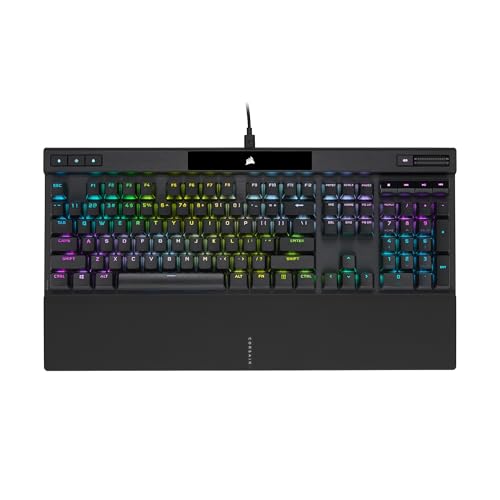
- Best for: A fixed gaming or work desk where a number pad and media keys stay within reach.
- Switches: CHERRY MX Red linear
- Number of keys: 104
- Polling: 8,000Hz hyper-polling
- Keycaps: PBT double-shot
A fixed gaming or work desk where a number pad and media keys stay within reach.
At full size it needs a wide desk, and the linear switches give little tactile feedback for touch typists who rely on a bump.
The Corsair K70 RGB PRO suits a permanent desk where a full-size layout and dedicated media controls earn their space. CHERRY MX Red linear switches respond with a short 1.2mm actuation distance and are built for 100 million keystrokes, while the aluminium frame and per-key RGB backlighting give the board a solid, finished feel. A detachable USB Type-C cable, dedicated media keys, an aluminium volume roller, and a tournament switch round out a board built for long sessions.
Watch out for: At full size it needs a wide desk, and the linear switches give little tactile feedback for touch typists who rely on a bump.
Keychron K8
- Best for: Typists who move between Mac and Windows machines or juggle a laptop, tablet, and phone.
- Switches: Gateron G Pro Brown
- Layout: Tenkeyless, 87 keys
- Connectivity: Bluetooth 5.1 for up to 3 devices, USB Type-C wired mode
- Battery: 4000mAh
Typists who move between Mac and Windows machines or juggle a laptop, tablet, and phone.
Confirm the exact switch and colour variant on the listing before ordering, since the K8 is sold in several configurations under different ASINs.
Keychron’s K8 brings a Mac-friendly layout to a wireless tenkeyless board, with extra keycaps for both Windows and Mac included in the box. Gateron G Pro Brown switches sit under an aluminium and ABS frame, and Bluetooth 5.1 connects with up to three devices at once, switching between them for multitasking. A USB Type-C wired mode covers sessions when the battery runs low, and more than 15 RGB lighting modes plus three levels of adjustable typing angle let the board adapt to different desks.
Watch out for: Confirm the exact switch and colour variant on the listing before ordering, since the K8 is sold in several configurations under different ASINs.
Razer BlackWidow V3 TKL
For a quieter desk, the Razer BlackWidow V3 TKL pairs Yellow linear silent switches with Chroma RGB lighting in a compact tenkeyless frame. The linear travel suits fast repeated presses without the click of green switches, and programmable macros through Razer software let frequently used commands sit on a single key. Its smaller footprint leaves more room for the mouse, which matters on crowded desks and during long gaming sessions alike.
Specs
- Switches: Yellow linear silent
- Layout: Tenkeyless
- Backlight: Chroma RGB
- Model number: RZ03-03491800-R3M1
- Dimensions: 14.26 x 6.1 x 1.62 inches
- Weight: 1.85 pounds
- First available: February 26, 2022
Best for: A shared room or late-night desk where quiet linear switches matter more than a click.
Watch out for: The board is wired, so check cable routing and desk space before choosing it over a wireless model.
Keychron C3 Pro
Keychron’s C3 Pro gives customisation fans a straightforward starting point: a wired tenkeyless board with QMK and VIA support, a gasket mount, and Red switches, all without extra parts to buy. The 87-key layout keeps navigation keys close while freeing desk space, and the Red LED backlight keeps the look simple. Because the firmware is programmable, key assignments and layers can be changed as habits develop, which makes this board a practical first step into custom keyboards.
Specs
- Switches: Red
- Layout: Tenkeyless, 87 keys
- Connectivity: Wired
- Mount: Gasket mount
- Firmware: QMK and VIA programmable
- Backlight: Red LED
- Compatibility: Mac, Windows, and Linux
Best for: Anyone curious about custom keyboards who wants programmable firmware in a ready-to-use wired board.
Watch out for: It is wired only, so it cannot pair with a tablet or phone over Bluetooth.
Which One Fits Your Situation
A Small Desk Shared With a Mouse
When desk space is tight, the Logitech G PRO X TKL or the Razer BlackWidow V3 TKL both remove the number pad and give the mouse room to move. Choose the Logitech when wireless freedom matters, since LIGHTSPEED and Bluetooth free the desk from cables entirely. Pick the Razer when quiet linear switches matter more, and the wired connection is acceptable.
A Fixed Desk for Gaming and Spreadsheets
A permanent setup with room to spare suits the Corsair K70 RGB PRO, because the full-size layout keeps the number pad and media keys in place. Its aluminium frame stays planted during fast play, and the dedicated volume roller beats reaching for on-screen controls. Anyone who rarely touches the number pad gains little here and gives up desk space for it.
Typing Across Mac, Windows, and Mobile
The Keychron K8 fits a multi-device routine, pairing with up to three devices over Bluetooth and switching between them without replugging. Extra Mac and Windows keycaps in the box keep legends correct on either system, and the wired USB-C mode covers long days. This is the pick when the same keyboard serves a work laptop, a home desktop, and a tablet.
A First Step Into Custom Keyboards
Curiosity about custom boards starts well with the Keychron C3 Pro, which brings QMK and VIA programming plus a gasket mount to a ready-to-use wired board. Layers and remaps can be tried without buying switches, tools, or a separate case. Move up to the Keychron K8 instead when wireless use or hot-swappable switches matter more than firmware tinkering.
Common Mistakes
- Choosing clicky switches for a shared office or bedroom without checking how loud they sound in the room.
- Buying a full-size board for a narrow desk, then discovering the mouse has nowhere comfortable to rest.
- Ignoring the operating system layout, so Mac command and option keys sit in unfamiliar positions.
- Assuming every wireless keyboard pairs with several devices, when some connect to only one receiver at a time.
- Overlooking keycap material, then watching thin caps turn shiny and legends fade within months.
Frequently Asked Questions
Are mechanical keyboards better for typing than membrane keyboards?
Mechanical keyboards give each key its own switch, so the feel stays consistent from key to key and the travel is usually deeper and more defined. Membrane boards use a single rubber layer, which can feel mushy and wear unevenly over time. Whether that difference matters depends on typing volume: heavy daily typists notice it quickly, while occasional users may find a membrane board perfectly adequate for short sessions.
Do I need a full-size keyboard or is tenkeyless enough?
Tenkeyless is enough for most people, since it keeps letters, navigation, and function keys while dropping only the number pad. A full-size board suits anyone who enters numbers often, such as spreadsheet work or data entry. If the number pad is used only a few times a week, a separate USB keypad paired with a tenkeyless board offers the same function without permanently widening the desk.
What is the difference between linear, tactile, and clicky switches?
Linear switches press smoothly with no bump, tactile switches add a small bump partway down, and clicky switches add both a bump and an audible click. Linear switches suit fast repeated presses, tactile switches suit typists who want feedback without noise, and clicky switches suit those who enjoy a sharp sound. The right choice depends on the room, the task, and personal preference rather than any single switch being best.
Can a mechanical keyboard work with both Mac and Windows?
Many mechanical keyboards work with both systems, and some include extra keycaps for Mac and Windows layouts in the box. Check the listing for Mac compatibility and whether the board ships with a Mac layout or a Windows layout by default. Software for remapping keys and lighting may be limited on one system, so confirm that the features in use are supported on the computer the board will serve.
FAQ
Are mechanical keyboards better for typing than membrane keyboards?
Do I need a full-size keyboard or is tenkeyless enough?
What is the difference between linear, tactile, and clicky switches?
Can a mechanical keyboard work with both Mac and Windows?
More from Amazon
Programs that pair well with the guide above. Offers and eligibility are set by Amazon and may change.
Free shipping on eligible items, Prime Video and more. Eligible new members can start with a free trial.
Start a Prime free trialA Prime membership for ages 18-24 with a trial period. Eligibility is set by Amazon.
See Prime for Young AdultsAudiobooks and podcasts to listen to on the go. Eligible new members can start with a free trial.
Try Audible freeAd-free music streaming. Eligible new subscribers can start with a free trial.
Try Music Unlimited freeAs an Amazon Associate we earn from qualifying purchases.