Our Short List of 3

- Best for: Remote workers in noisy households who need strong noise canceling on both sides of the call.
- Brand: Poly
- Model: Voyager Focus 2 UC USB-C, model number 214432-02
- Connectivity: Bluetooth 5.1 with BT700 USB-C adapter
- Noise control: Active noise cancellation, three hybrid ANC levels

- Best for: Teams users who want the longest battery life and a visible do-not-disturb light at home.
- Brand: Jabra
- Model: Evolve2 65 MS Stereo, model number 26599-999-899
- Connectivity: Bluetooth 5.0 with Link 380c USB-C adapter
- Battery life: Up to 37 hours

- Best for: Home workers with a fixed desk who want a headset that is always charged and ready.
- Brand: Poly
- Model: Voyager 4320 UC, model number 218476-01
- Connectivity: Bluetooth with USB-A adapter, mobile Bluetooth pairing
- Microphone: Dual noise-canceling boom mic with Acoustic Fence technology
All 4 Picks at a Glance
| Product | Specs | Action |
|---|---|---|
| Poly Voyager Focus 2 UC USB-C |
| Check price on Amazon |
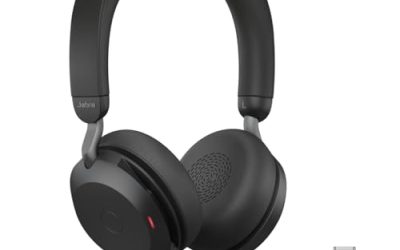
| Jabra Evolve2 65 MS Stereo with Link 380c |
| Check price on Amazon |
| Poly Voyager 4320 UC with Charge Stand |
| Check price on Amazon |
 Jabra Evolve2 40 UC USB-A Stereo |
| Check price on Amazon |
Key takeaways
- Compare five headsets for remote work with clear boom mics, all-day comfort, and wired or wireless links for calls on PC and phone daily at home.
A remote work headset is bought on one decision: how your voice sounds to everyone else. Laptop microphones pick up the room, the keyboard, and the dog, so the real choice is between a dedicated boom microphone that stays close to your mouth, the connection style that fits your desk, and a fit you can wear through a full day of calls without sore ears or a dead battery.
This guide is for home-based workers, hybrid staff, and anyone whose calendar is a stack of video meetings. The picks below span a Poly headset with three levels of active noise canceling, two Jabra models in wireless and wired form, a second Poly with a charging stand, and a lightweight Logitech that weighs under two hundred grams.
Quick Picks
As an Amazon Associate we earn from qualifying purchases
| Product | Best for | Key spec from title |
|---|---|---|
| Poly Voyager Focus 2 UC USB-C | Noisy homes needing focus | Active noise canceling with boom mic |
| Jabra Evolve2 65 MS Stereo | Long call days on Teams | 37 hours of battery life |
| Poly Voyager 4320 UC with Charge Stand | Desk setups that stay put | Up to 24 hours of talk time |
| Logitech Zone Vibe 100 | Lightweight all-day comfort | Noise canceling microphone, multipoint Bluetooth |
| Jabra Evolve2 40 UC USB-A | Wired reliability, no charging | USB-A connection, stereo |
How to Choose
Microphone design decides how you sound
The microphone matters more than the speakers, because your coworkers hear the mic, not the drivers. A boom arm places the microphone near your mouth, which raises your voice above room noise before any processing happens. Multi-microphone systems then filter what is left: Poly uses Acoustic Fence technology, Jabra uses a three-microphone setup, and Logitech uses dual omni-directional microphones. If your home has kids, pets, or an open-plan layout, prioritize a boom design with named noise-canceling microphone technology over a headset that hides its mics in the earcup, where wind and room echo are harder to separate from speech.
Wireless freedom versus wired simplicity
Wireless headsets connect through Bluetooth or a USB adapter and let you stand, stretch, and fetch coffee mid-call. Battery life becomes the trade-off: the models here range from roughly eighteen hours of talk time to thirty-seven hours of total battery life. Adapters such as the Jabra Link 380 and Poly BT700 give a laptop a more stable link than built-in Bluetooth and keep call controls working in meeting software. A wired USB headset removes charging from your routine entirely and never drops a pairing, but the cable fixes you to the desk. Choose based on how often you actually leave your chair during calls.
Comfort is a specification, not a luxury
A headset worn six hours a day needs its weight, earcup style, and cushion material checked like any other spec. On-ear models such as the Jabra Evolve2 line sit lighter and let in some awareness of the room, while over-ear designs seal more sound out. Weights here run from about one hundred twenty-nine grams for the Poly Voyager Focus 2 to around one hundred eighty-five grams for the Logitech Zone Vibe 100. Memory foam cushions, padded or sling-style headbands, and adjustable arms all reduce pressure points. If you wear glasses, softer cushions and a lighter clamp usually matter more than driver size.
Platform certification and controls
Certified headsets integrate with meeting software instead of merely playing its audio. Microsoft Teams certified models add a dedicated Teams button, synced mute status, and call answering from the headset controls. UC variants work across Zoom, Google Meet, and other platforms without promising one vendor’s deep integration, so match the variant to the software your employer actually uses. Also check the mute method: a flip-up boom, a button, or raising the arm to mute, plus a visible busylight or online indicator that warns family members you are live. These small controls get used dozens of times a week.
The 5 Best Options
Poly Voyager Focus 2 UC USB-C
- Best for: Remote workers in noisy households who need strong noise canceling on both sides of the call.
- Brand: Poly
- Model: Voyager Focus 2 UC USB-C, model number 214432-02
- Connectivity: Bluetooth 5.1 with BT700 USB-C adapter
- Noise control: Active noise cancellation, three hybrid ANC levels
Remote workers in noisy households who need strong noise canceling on both sides of the call.
The on-ear fit seals less than a full over-ear design, and talk time is the shortest of the wireless picks here.
This is the pick for a home office that is not quiet. Three levels of hybrid active noise canceling let you choose how much of the room disappears, and the Acoustic Fence microphone system is built to keep your surroundings out of the call. It connects to a computer through the included BT700 USB-C adapter and to a phone over Bluetooth at the same time, and smart sensors and a dynamic mute alert cover the everyday fumbles of meeting-heavy work. At one hundred twenty-nine grams with plush ear cushions, it is also the lightest full-featured option here.
Jabra Evolve2 65 MS Stereo with Link 380c
- Best for: Teams users who want the longest battery life and a visible do-not-disturb light at home.
- Brand: Jabra
- Model: Evolve2 65 MS Stereo, model number 26599-999-899
- Connectivity: Bluetooth 5.0 with Link 380c USB-C adapter
- Battery life: Up to 37 hours
Teams users who want the longest battery life and a visible do-not-disturb light at home.
Noise cancellation is passive rather than active, so very loud rooms still leak through.
Battery life is the headline here: up to thirty-seven hours on a charge, with a short top-up returning hours of use, so charging becomes a weekly chore instead of a nightly one. The three-microphone call technology and memory foam on-ear cushions target the standard home-office mix of calls and music, and the improved busylight is visible from all directions to guard your focus time. This MS variant is optimized for Microsoft Teams as a plug-and-play experience and ships with the Link 380c USB-C adapter, while also pairing with a phone or tablet over Bluetooth.
Poly Voyager 4320 UC with Charge Stand
- Best for: Home workers with a fixed desk who want a headset that is always charged and ready.
- Brand: Poly
- Model: Voyager 4320 UC, model number 218476-01
- Connectivity: Bluetooth with USB-A adapter, mobile Bluetooth pairing
- Microphone: Dual noise-canceling boom mic with Acoustic Fence technology
Home workers with a fixed desk who want a headset that is always charged and ready.
There is no active noise canceling for the wearer, so your own focus relies on the earcup seal.
The Voyager 4320 UC suits a desk that stays a desk. The included charge stand keeps the headset parked, powered, and easy to grab when a call comes in, and up to twenty-four hours of talk time covers a full work week for most people. Its dual noise-canceling microphones use Acoustic Fence technology, and the connection story is flexible: a computer through the USB-A Bluetooth adapter, a phone through Bluetooth, or both across the day. Memory foam ear cushions and an adjustable padded headband round out a straightforward, call-first package.
Logitech Zone Vibe 100 in Graphite
The Zone Vibe 100 is the comfort-first pick, weighing one hundred eighty-five grams with soft memory foam ear cushions in an over-ear design that looks more like everyday headphones than call-center gear. Its noise-canceling microphone flips up to mute and tucks away when you switch from meetings to music. Multipoint Bluetooth connects two devices at once, the wireless range reaches thirty meters, and battery life runs to eighteen hours of talk time or twenty hours of listening. The Logi Tune app adds sidetone, microphone level, and equalizer adjustments from the desktop or a phone.
Specs
- Brand: Logitech
- Model: Zone Vibe 100, model number 981-001256
- Color: Graphite
- Connectivity: Bluetooth, multipoint
- Drivers: 40 millimeter speakers
- Microphone: Noise-canceling, flip-to-mute boom
- Battery life: Up to 18 hours talk time, 20 hours listening time
- Wireless range: 30 meters or 98.4 feet
- Weight: 185 grams or 0.19 kilograms
- Compatibility: Windows, macOS, ChromeOS, Teams, Google Meet, Zoom
Best for: Workers who wear a headset all day and want the lightest, softest fit with simple controls.
Watch out for: There is no USB adapter in the box, so laptops rely on their built-in Bluetooth connection.
ASIN: B09NBVS84T
Jabra Evolve2 40 UC USB-A Stereo
- Best for: Anyone who wants zero charging, zero pairing, and a headset that is ready the second it is plugged in.
- Brand: Jabra
- Model: Evolve2 40 UC Stereo, model number 24089-989-999
- Connectivity: Wired USB-A
- Speakers: 40 millimeter drivers
Anyone who wants zero charging, zero pairing, and a headset that is ready the second it is plugged in.
The cable ties you to the desk, and there is no phone connection without a computer in between.
The wired option in this guide removes batteries and pairing from the equation: plug the USB-A connector into your computer and the Evolve2 40 simply works, every call, every day. It shares the family’s three-microphone call technology, forty-millimeter speakers, and memory foam on-ear cushions with passive noise cancellation, and the busylight still signals when you are on a call. An integrated call control unit sits on the cable for volume and mute. For shared desks, spare setups, or anyone tired of charging reminders, this is the dependable baseline the wireless models are measured against.
Which One Fits Your Situation
Your home is loud during work hours
Start with the Poly Voyager Focus 2 UC. Its three levels of hybrid active noise canceling reduce what reaches your ears, while the Acoustic Fence microphone system works on what reaches everyone else. That two-sided approach is what a busy household actually demands, and the fifty-meter range lets you escape to a quieter room mid-call without dropping the meeting.
You are on calls almost all day
Comfort and battery decide this one. The Logitech Zone Vibe 100 spreads one hundred eighty-five grams over soft memory foam in an over-ear fit, and the Jabra Evolve2 65 stretches battery life to thirty-seven hours so midweek charging rarely interrupts you. Pick the Logitech for fit, the Jabra for endurance, and either will outlast a laptop microphone for clarity.
Your desk is permanent and tidy
The Poly Voyager 4320 UC with its charge stand fits a fixed workstation best. The headset lives on the stand between calls, stays charged, and presents a clean desk on camera. Twenty-four hours of talk time and a fifty-meter range still leave room for kitchen trips, and the Teams and Zoom support covers the standard meeting mix without extra software.
You want simple and dependable
Choose the Jabra Evolve2 40. A wired USB connection never needs pairing, firmware nudges, or a charging cable, which makes it the easiest headset to hand to a family member or keep as a backup. You give up walking-around freedom, but for a seated worker at one computer, the trade is often worth it every single day.
Common Mistakes
- Buying a music headphone with a built-in mic and expecting meeting-grade voice quality, when a boom microphone near the mouth is what actually separates your voice from the room.
- Ignoring the variant name: MS models are optimized for Microsoft Teams, while UC models target mixed platforms, and the wrong one can lose the dedicated button and synced mute features you wanted.
- Choosing wireless without checking how it connects, since a headset with a USB adapter usually holds a steadier laptop link and working call controls than one relying on built-in Bluetooth alone.
- Forgetting that wired headsets still differ, because cable controls, connector type, and cushion quality decide whether a plug-in model is pleasant for six hours or merely functional.
- Overlooking the busylight or online indicator if other people share your space, since a visible on-call signal prevents more interruptions than any software status icon.
Frequently Asked Questions
Is a boom microphone really better for working from home?
Yes, for voice clarity it is the single biggest upgrade over a laptop or earbud microphone. A boom places the microphone a few inches from your mouth, so your voice arrives louder than the room around you, and noise-canceling microphone systems then have a cleaner signal to work with. Headsets without a boom can sound fine in a silent room, but they struggle once a household gets busy.
Should I choose a wired or wireless headset for remote work?
Choose wireless if you move during calls, switch between a computer and a phone, or hate cable clutter; the models here offer up to fifty meters of range and as much as thirty-seven hours of battery life. Choose wired if your work is seated and you value never charging or pairing. Both styles appear in this guide because neither answer fits every home office.
What does Teams certified or UC optimized actually mean?
Certification means the headset is built to work with that platform’s call controls: answering and ending calls, syncing mute, and in Teams models, a dedicated button that opens the app. UC optimized headsets aim at broad compatibility across Zoom, Google Meet, and other services instead. Match the label to the software your employer uses daily, because the integration benefits only appear on the platform named.
How long should a work headset battery last?
Aim for at least a full work week of your real talk time. Ratings here run from eighteen hours of talk time on the Logitech Zone Vibe 100 to a thirty-seven-hour total battery rating on the Jabra Evolve2 65. Remember that talk time and listening time are measured separately, and microphone-heavy days drain a battery faster than music playback, so leave yourself a comfortable margin.
FAQ
Is a boom microphone really better for working from home?
Should I choose a wired or wireless headset for remote work?
What does Teams certified or UC optimized actually mean?
How long should a work headset battery last?
More from Amazon
Programs that pair well with the guide above. Offers and eligibility are set by Amazon and may change.
Free shipping on eligible items, Prime Video and more. Eligible new members can start with a free trial.
Start a Prime free trialA Prime membership for ages 18-24 with a trial period. Eligibility is set by Amazon.
See Prime for Young AdultsAudiobooks and podcasts to listen to on the go. Eligible new members can start with a free trial.
Try Audible freeAd-free music streaming. Eligible new subscribers can start with a free trial.
Try Music Unlimited freeAs an Amazon Associate we earn from qualifying purchases.