Our Short List of 3
All 5 Picks at a Glance
| Product | Specs | Action |
|---|---|---|
 Our Top Picks | Check price on Amazon | |
 2. ASUS RT-AX86U Pro — Best Full-Size Router with VPN Fusion | Check price on Amazon | |
 3. GL.iNet Beryl AX (GL-MT3000) — Best Pocket VPN Router | Check price on Amazon | |
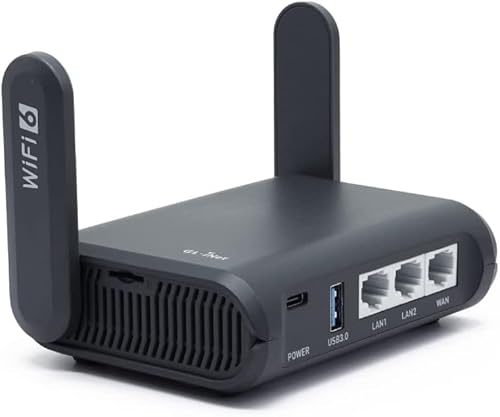 4. GL.iNet Slate AX (GL-AXT1800) — Best Travel VPN Router for Wired Devices | Check price on Amazon | |
 5. TP-Link ER605 V2 — Best Wired VPN Gateway for a Small Office | Check price on Amazon |
Key takeaways
- Find the best vpn routers for whole-home privacy. Compare five routers with built-in WireGuard and OpenVPN support, plus setup guidance for every household.
As an Amazon Associate I earn from qualifying purchases.
The Short Answer
A VPN router runs the encrypted tunnel at the network level, so every connected device is covered without installing VPN software on each one. A single app protects a single device. A VPN router protects the household.
For most homes, the GL.iNet Flint 2 (GL-MT6000) is the strongest starting point, with fast stated WireGuard throughput, two multi-gigabit ports, and built-in OpenVPN and WireGuard client and server support. Travelers should look at the GL.iNet Beryl AX (GL-MT3000) for a pocket-sized box, or the GL.iNet Slate AX (GL-AXT1800) for more wired ports and stronger stated VPN throughput. The ASUS RT-AX86U Pro suits a household that wants a full-size Wi-Fi 6 router with VPN Fusion, so some devices use the tunnel while others stay direct. The TP-Link ER605 V2 is the wired specialist: it has no built-in Wi-Fi, so it fits a small office or home lab that already has access points and wants a dedicated VPN gateway. A VPN router is not a VPN service: a commercial VPN service still requires its own active subscription.
Our Top Picks
1. GL.iNet Flint 2 (GL-MT6000) — Best overall VPN router for a whole home. View on Amazon
2. ASUS RT-AX86U Pro — Best full-size router with VPN Fusion. View on Amazon
3. GL.iNet Beryl AX (GL-MT3000) — Best pocket VPN router. View on Amazon
4. GL.iNet Slate AX (GL-AXT1800) — Best travel VPN router for wired devices. View on Amazon
5. TP-Link ER605 V2 — Best wired VPN gateway for a small office. No built-in Wi-Fi. View on Amazon
Quick Comparison
| Router | Wi-Fi | VPN protocols | WireGuard throughput | Ports | Best for |
|---|---|---|---|---|---|
| Flint 2 (GL-MT6000) | Wi-Fi 6, AX6000 | OpenVPN, WireGuard, Tailscale, ZeroTier | Up to 900 Mbps | 2 x 2.5G, 4 x 1G | Whole-home VPN |
| RT-AX86U Pro | Wi-Fi 6, AX5700 | WireGuard, OpenVPN, IPSec | Confirm on listing | 1 x 2.5G, 4 x 1G | VPN plus gaming |
| Beryl AX (GL-MT3000) | Wi-Fi 6, AX3000 | OpenVPN, WireGuard | Up to 300 Mbps | 1 x 2.5G WAN, 1 x 1G LAN | Travel |
| Slate AX (GL-AXT1800) | Wi-Fi 6, AX1800 | OpenVPN, WireGuard | Up to 550 Mbps | 3 x 1G | Travel, wired gear |
| ER605 V2 | None, wired only | OpenVPN, IPSec, L2TP, PPTP | Confirm on listing | 5 x 1G, up to 3 WAN | Small office |
How to Choose
VPN client or VPN server, or both
A VPN client connects the router outward to a commercial VPN service, so traffic leaving the house travels through the tunnel. A VPN server lets you connect back into your home network from outside. Every router here supports a client. The GL.iNet models and the ER605 V2 also support a server, and the RT-AX86U Pro includes Instant Guard for remote access.
Match the protocol to the service
WireGuard and OpenVPN dominate this category, and both are supported by the GL.iNet and ASUS picks. WireGuard is newer and usually faster; OpenVPN is older and more widely supported. IPSec, L2TP, and PPTP appear mainly on business hardware such as the ER605 V2, and PPTP is outdated. Confirm the router supports the same protocols as your VPN service.
VPN throughput is not Wi-Fi speed
A router can advertise AX6000 wireless speeds and still move traffic through a VPN tunnel far more slowly. Encryption takes processing power, and the VPN throughput figure decides how fast the household feels once the tunnel is on. A stated WireGuard figure of 300 Mbps covers browsing, streaming, and video calls without strain. A figure near 900 Mbps, as stated for the Flint 2, leaves headroom for many users.
Kill switch
A kill switch blocks internet traffic if the VPN tunnel drops, so a device never silently continues on an unprotected connection. All three GL.iNet routers here include a kill switch option, and it is worth turning on during setup.
Whole-home coverage or a travel companion
A full-size router such as the Flint 2 or RT-AX86U Pro replaces the household router and covers every room. A pocket router such as the Beryl AX or Slate AX is a second network: it sits behind a hotel connection or a home router and creates a small protected network for a few devices. A travel router as the only household router usually ends in weak coverage.
Ports, firmware, and management
Wired ports decide how many devices can connect without Wi-Fi. The Flint 2 leads with two 2.5G ports and four Gigabit ports. The Slate AX gives three Gigabit ports in a pocket body. The Beryl AX has only two ports. The ER605 V2 has five Gigabit ports but no Wi-Fi, so it needs separate access points. GL.iNet routers run OpenWrt firmware with AdGuard Home, ASUS routers run ASUSWRT with AiProtection, and the ER605 V2 is managed through Omada, which adds setup steps for a single-router home.
The Picks in Detail
1. GL.iNet Flint 2 (GL-MT6000) — Best Overall VPN Router for a Whole Home
The Flint 2 leads this guide because it is strong in every category that matters for whole-home use. It is a dual-band Wi-Fi 6 router at AX6000 class, with stated band rates up to 1,148 Mbps on 2.4 GHz and 4,804 Mbps on 5 GHz. Two 2.5G ports and four Gigabit ports serve a modem, a wired PC, a console, and storage without a separate switch.
The listing states WireGuard throughput up to 900 Mbps and OpenVPN throughput up to 190 Mbps, the fastest stated VPN performance in this guide by a wide margin. Both protocols work as client and server, and the router also supports Tailscale and ZeroTier. The VPN client supports more than 30 commercial VPN services. It is full-size with no built-in modem.
Pros:
– Fastest stated VPN throughput, up to 900 Mbps
– Two 2.5G ports plus four Gigabit ports
– OpenVPN and WireGuard client and server
– OpenWrt firmware with AdGuard Home
Cons:
– Full-size body, not for travel
2. ASUS RT-AX86U Pro — Best Full-Size Router with VPN Fusion
The RT-AX86U Pro is the pick for a household that wants VPN protection without giving up gaming features. It is a dual-band Wi-Fi 6 router at AX5700 class, with a 2.5G port, a dedicated gaming port, and four Gigabit LAN ports.
VPN Fusion is the feature that sets it apart. It lets the owner assign specific devices to the VPN tunnel while others keep a direct connection, so a work laptop can run through the tunnel while a console keeps its lowest-latency path to a game server. The router supports WireGuard, OpenVPN, and IPSec, and ASUS Instant Guard gives one-tap secure remote access to the home network. AiProtection Pro adds malicious-site blocking, and AiMesh support allows a second ASUS router to extend coverage. The main limitation is VPN throughput: ASUS does not publish a WireGuard figure on the listing, and independent roundups report figures near 350 Mbps, ample for most households but possibly trailing a fast connection.
Pros:
– VPN Fusion keeps selected devices in the tunnel
– WireGuard, OpenVPN, and IPSec plus Instant Guard
– Dedicated gaming port and quality of service controls
– AiProtection Pro included without a subscription
Cons:
– VPN throughput lower than the Flint 2
– Gaming styling may not suit every room
3. GL.iNet Beryl AX (GL-MT3000) — Best Pocket VPN Router
The Beryl AX is the smallest router in this guide, and the right choice when the VPN network needs to fit in a bag. It measures roughly 4.17 inches long by 3.27 inches wide by 1.3 inches tall and weighs 196 g. Power comes from USB-C at 5V and 3A, so a laptop charger or a capable power bank can run it on the road.
It is a Wi-Fi 6 router at AX3000 class, with stated band rates of 574 Mbps on 2.4 GHz and 2,402 Mbps on 5 GHz. A 2.5G WAN port feeds it from hotel Ethernet or a home connection, a Gigabit LAN port serves one wired device, and a USB 3.0 port supports phone tethering or a shared drive. OpenVPN and WireGuard are pre-installed, with support for more than 30 VPN service providers and an active subscription required. Stated VPN throughput is up to 300 Mbps on WireGuard and up to 150 Mbps on OpenVPN. Two Ethernet ports suit travel but not a desk full of wired gear, and coverage fits a room, not a large house.
Pros:
– Pocket-sized and USB-C powered
– Wi-Fi 6 with a 2.5G WAN port
– OpenVPN and WireGuard pre-installed
Cons:
– Only two Ethernet ports
– Coverage suits a room, not a large house
4. GL.iNet Slate AX (GL-AXT1800) — Best Travel VPN Router for Wired Devices
The Slate AX is the Beryl AX with more ports, more stated VPN throughput, and a slightly larger body. It is a pocket-sized Wi-Fi 6 travel router at AX1800 class, with stated band rates of 600 Mbps on 2.4 GHz and 1,200 Mbps on 5 GHz, and it connects up to 120 devices at once according to the listing.
Three Gigabit Ethernet ports give room for two wired devices alongside the internet connection, and a microSD card slot adds local storage for a pocket media share. OpenVPN and WireGuard are pre-installed with support for more than 30 VPN service providers, and the listing states WireGuard throughput up to 550 Mbps and OpenVPN throughput up to 500 Mbps, the strongest stated VPN figures of any pocket router in this guide. It runs OpenWrt 21.02 firmware with AdGuard Home. At 245 g it is larger and heavier than the Beryl AX, and it ships with a power adapter rather than running from a spare USB-C charger. Its Ethernet ports are Gigabit rather than multi-gigabit, so a connection faster than gigabit speeds will be capped at the port.
Pros:
– Strongest stated VPN throughput of the pocket picks
– Three Gigabit Ethernet ports for wired devices
– MicroSD slot for local media sharing
– Connects up to 120 devices, per the listing
Cons:
– Larger and heavier than the Beryl AX
– Gigabit ports cap multi-gigabit plans
5. TP-Link ER605 V2 — Best Wired VPN Gateway for a Small Office
The ER605 V2 is the only pick in this guide without Wi-Fi, and that is a deliberate strength rather than a gap. It is a wired Gigabit VPN router built for a small office, a home lab, or a household that already owns access points and wants a dedicated gateway. Five Gigabit Ethernet ports include up to three WAN ports plus a USB WAN port, so a second internet connection can take over automatically if the first one fails, and load balancing can spread traffic across both links.
VPN support is broad. The router supports up to 20 IPSec tunnels, 16 L2TP tunnels, 16 PPTP tunnels, and 16 OpenVPN tunnels at the same time, according to the manufacturer specifications, making it the most flexible pick here for site-to-site connections between two locations. OpenVPN works as both client and server, and the SPI firewall adds protection at the network edge. Its full feature set opens up inside Omada, which adds setup steps for a single-router home. There is no wireless radio at all, so wireless devices need separate access points, and VPN throughput figures are not stated on the listing, so buyers with a fast connection should confirm on the listing and in the manual.
Pros:
– Multi-WAN support with failover and load balancing
– Broad VPN support, including OpenVPN and IPSec
– SPI firewall and Omada central management
– Five Gigabit ports in a compact metal body
Cons:
– No built-in Wi-Fi, access points required
– Omada management adds setup steps
Who Should Choose What
A household that wants one router to protect everything should start with the Flint 2. Its stated VPN throughput, port selection, and server support cover the most ground. A household that already lives in the ASUS ecosystem, or that wants gaming traffic kept outside the tunnel, should choose the RT-AX86U Pro for VPN Fusion and AiMesh expansion. A traveler packing light should choose the Beryl AX: it is the smallest and lightest pick, it runs from USB-C power, and its stated VPN throughput covers streaming and calls on the road. A traveler who needs more wired ports or higher stated VPN throughput should step up to the Slate AX. A small office or home lab with access points already in place should choose the ER605 V2 for its multi-WAN failover.
Common Mistakes
Buying for Wi-Fi speed and ignoring VPN throughput. The wireless class describes the local network, not the tunnel. A router with fast Wi-Fi and slow VPN processing will feel slow the moment the tunnel turns on. Compare stated VPN throughput with the internet connection before buying.
Assuming the router includes a VPN service. The router provides the client, and the service is separate. A commercial VPN service requires its own active subscription, and the subscription must support the protocol the router uses. Check both sides before buying.
Choosing a travel router as the only household router. Pocket routers are built for a room, not a house. Their coverage and port count suit travel, and a large home will expose both limits quickly. Use a travel router as a second network.
Forgetting the kill switch. A tunnel that drops without a kill switch leaves devices on an unprotected connection, often without any visible warning. Turn the kill switch on during setup, and check it again after firmware updates.
Putting the VPN on every device by default. Some services work better outside the tunnel. Game consoles benefit from a direct connection for latency, and some banking and streaming services block known VPN addresses. Per-device rules let the household choose device by device.
Skipping the protocol check. WireGuard is fast, but not every VPN service supports it on a router. OpenVPN is widely supported but slower on modest hardware. Confirm the protocol list on both the router listing and the VPN service page.
FAQ
Do I still need a VPN subscription if I buy a VPN router?
Yes, in most cases. The router provides the VPN client or server, and a commercial VPN service still requires its own active subscription. The exception is a self-hosted setup, where the router connects to a server the owner controls instead of a commercial service.
Will a VPN router slow down my internet connection?
Some slowdown is normal, because encryption takes processing power. The size of the slowdown depends on the router’s stated VPN throughput and the speed of the internet connection. A router with stated WireGuard throughput near the connection speed will feel close to normal, while a lower figure caps the household while the tunnel is active.
What is the difference between a VPN client and a VPN server on a router?
A VPN client connects the router outward to a service or server, so household traffic travels through the tunnel. A VPN server lets devices outside the home connect back into the home network securely. Most households need a client first. A server is useful for remote access to home files, cameras, or a printer while traveling.
Is a travel VPN router enough for a whole house?
Usually not. Travel routers are designed for a room or a small apartment, with coverage and port counts to match. A large house needs a full-size router such as the Flint 2 or the RT-AX86U Pro, or a mesh system with VPN support on the main unit. A travel router still works well as a second network for guests, a home office, or a trip.
Does the TP-Link ER605 V2 provide Wi-Fi?
No. The ER605 V2 is a wired-only router with no wireless radio. It needs separate access points to serve phones, laptops, and other wireless devices. It suits a small office or home lab that already has access points, rather than a home looking for a single box that does everything.
Conclusion
The best vpn routers share one trait: the VPN feature is built into the router itself, not added as an afterthought, and the stated VPN throughput is high enough for the household using it. The GL.iNet Flint 2 leads this guide because it pairs the fastest stated WireGuard throughput with strong ports and flexible server support. The ASUS RT-AX86U Pro is the pick for a household that wants VPN Fusion and gaming features in one full-size router. The GL.iNet Beryl AX and Slate AX cover travel, with the Beryl AX winning on size and the Slate AX winning on ports and stated VPN throughput. The TP-Link ER605 V2 covers the wired small office that already has access points and wants a dedicated gateway. Before buying, confirm the supported protocols, the stated VPN throughput, and whether a separate VPN subscription is required.
FAQ
Do I still need a VPN subscription if I buy a VPN router?
Will a VPN router slow down my internet connection?
What is the difference between a VPN client and a VPN server on a router?
Is a travel VPN router enough for a whole house?
Does the TP-Link ER605 V2 provide Wi-Fi?
More from Amazon
Programs that pair well with the guide above. Offers and eligibility are set by Amazon and may change.
Free shipping on eligible items, Prime Video and more. Eligible new members can start with a free trial.
Start a Prime free trialA Prime membership for ages 18-24 with a trial period. Eligibility is set by Amazon.
See Prime for Young AdultsAudiobooks and podcasts to listen to on the go. Eligible new members can start with a free trial.
Try Audible freeAd-free music streaming. Eligible new subscribers can start with a free trial.
Try Music Unlimited freeAs an Amazon Associate we earn from qualifying purchases.