
Our Short List of 3

- Best for: Immersive gaming with the deepest curve in the group, especially racers and flight sims.
- 34-inch 3440 x 1440 VA panel, 1000R curve
- 165Hz refresh rate
- 1ms MPRT response time
- HDR10 support
- Best for: A desk setup without separate speakers, for gaming and work in equal measure.
- 34-inch 3440 x 1440 VA panel, 1800R curve
- 160Hz refresh rate
- 1ms Motion Blur Reduction
- HDR10 support

- Best for: Gaming plus colour work on one wide screen, with HDR400 for judging highlights.
- 34-inch 3440 x 1440 VA panel, 1500R curve
- 144Hz refresh rate
- 1ms MPRT response time
- 90% DCI-P3 colour coverage
All 4 Picks at a Glance
| Product | Specs | Action |
|---|---|---|
| Samsung Odyssey G5 |
| Check price on Amazon |
| LG UltraGear 34GP63A-B |
| Check price on Amazon |
| Gigabyte G34WQC A |
| Check price on Amazon |
 Dell S3422DWG |
| Check price on Amazon |
Key takeaways
- Explore the best ultrawide curved monitors with wide 21:9 screens, fast refresh rates and rich colour. Compare four curved displays for gaming and work.
One ultrawide curved monitor replaces a pair of screens with a single seamless panel, and the curve pulls the edges into your peripheral vision. The 21:9 shape gives games a wider field of view, spreads timelines and documents side by side for work, and turns movie nights into a small cinema. The catch is that curve radius, refresh rate and panel quality vary widely, so two monitors that look identical on a shelf can feel very different on a desk. The four monitors below share size and resolution, so curve, refresh rate and colour decide.
This guide is written for gamers building an immersive desk setup, workers who want one wide screen instead of two, and anyone weighing a curved ultrawide against a standard monitor. Every monitor below was chosen from the name and specifications shown on its Amazon page, with size, resolution, curve, refresh rate and ports checked against the listing. We also note where HDMI caps the refresh rate.
Quick Picks
As an Amazon Associate we earn from qualifying purchases
| Product | Best for | Key spec from title |
|---|---|---|
| Samsung Odyssey G5 | Deepest curve and fast play | 34-inch 3440×1440, 165Hz, 1000R |
| LG UltraGear 34GP63A-B | Built-in speakers and colour | 34-inch 3440×1440, 160Hz, 1800R |
| Gigabyte G34WQC A | Colour work and gaming | 34-inch 3440×1440, 144Hz, 1500R |
| Dell S3422DWG | Value and strong contrast | 34-inch 3440×1440, 144Hz, 1800R |
How to Choose
Curve Radius Changes the Feel
Curve radius, written as 1000R, 1500R or 1800R, measures how tightly the screen bends. A 1000R curve wraps aggressively around your view, which suits gaming and simulation where immersion matters most. A 1500R curve is a middle ground that still feels curved without dominating the desk. An 1800R curve is gentle, closer to a flat screen, and suits mixed work and play. The tighter the curve, the closer you should sit, so check your desk depth before choosing the most dramatic option. A monitor arm can help, since it lets you adjust distance and angle freely.
Resolution and Refresh Rate Together
Every monitor here runs at 3440 x 1440, the standard ultrawide resolution, which spreads 1440p across a wider frame. Refresh rates from 144Hz to 165Hz keep motion smooth in fast games, while variable refresh rate support smooths out frame dips. Check whether the top refresh rate works over DisplayPort and HDMI, because some panels cap the HDMI rate lower. A 144Hz floor covers most gaming, and the extra headroom matters mainly when the same screen also serves a PC with a strong graphics card. Check the HDMI rate, since some panels cap it below the DisplayPort figure.
VA Panels Bring Contrast and Trade-Offs
All four monitors here use VA panels, which deliver strong native contrast and deep blacks that suit dark games and movies. The trade-off is narrower viewing angles than IPS, so colours shift when viewed from the side, and some VA panels show smearing in fast dark transitions. Brightness and HDR support vary, so read the listed HDR level rather than trusting the label alone. For a single user sitting centred in front of the screen, VA contrast is a genuine advantage. A matte coating also cuts reflections, which helps in bright rooms with windows behind you.
Desk Space and Mounting Deserve a Measure
A 34-inch ultrawide is wide, and the curve adds depth, so measure the desk before ordering. The screen needs roughly 80 centimetres of width plus room for speakers or a console beside it. A deep desk lets the curve sit at a comfortable distance, while a shallow desk pushes the edges too close to your eyes. Check the VESA mount pattern and the stand footprint, because a monitor arm frees space and lets you set the height exactly for long sessions. Leave room for speakers or a soundbar, since ultrawide screens crowd a narrow desk.
The 4 Best Options
Samsung Odyssey G5
- Best for: Immersive gaming with the deepest curve in the group, especially racers and flight sims.
- 34-inch 3440 x 1440 VA panel, 1000R curve
- 165Hz refresh rate
- 1ms MPRT response time
- HDR10 support
Immersive gaming with the deepest curve in the group, especially racers and flight sims.
The tight curve needs a deep desk to sit at a comfortable distance from your eyes.
The Samsung Odyssey G5 has the tightest curve in this group at 1000R, wrapping the 34-inch screen around your view for the strongest sense of immersion. Its VA panel runs at 165Hz with a 1ms moving-picture response, keeping fast games clean, while the 3440 x 1440 resolution holds detail across the wide frame. HDR10 support and FreeSync Premium cover the console and PC basics, and the 3000:1 contrast ratio gives dark scenes real depth. It is the pick when the curve itself is the point. The slim stand leaves room beside the screen for a console or speakers.
Watch out for: The tight curve needs a deep desk to sit at a comfortable distance from your eyes.
LG UltraGear 34GP63A-B
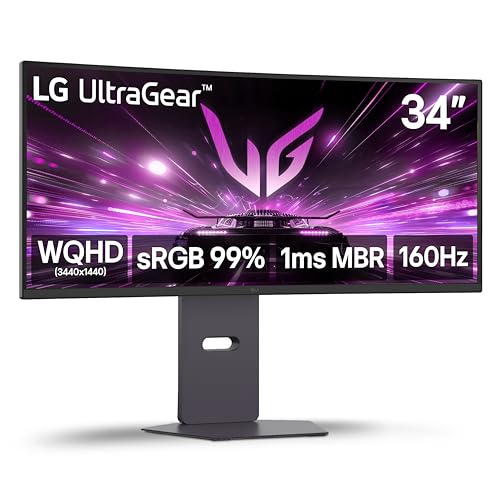
- Best for: A desk setup without separate speakers, for gaming and work in equal measure.
- 34-inch 3440 x 1440 VA panel, 1800R curve
- 160Hz refresh rate
- 1ms Motion Blur Reduction
- HDR10 support
A desk setup without separate speakers, for gaming and work in equal measure.
HDMI caps below the full refresh rate, so use DisplayPort for 160Hz.
The LG UltraGear 34GP63A-B is the most complete package for a desk without separate speakers. Its two 7-watt MaxxAudio drivers are genuinely usable for games, calls and background music, which is rare in this class. The 34-inch VA panel runs at 160Hz with a 1ms motion blur reduction mode, and the 99 percent sRGB coverage keeps colours accurate for everyday work. A gentle 1800R curve suits mixed use, and the height-adjustable stand moves 110 millimetres to find a comfortable position. The panel also handles split-screen work well, with two windows side by side.
Watch out for: HDMI caps below the full refresh rate, so use DisplayPort for 160Hz.
Gigabyte G34WQC A
- Best for: Gaming plus colour work on one wide screen, with HDR400 for judging highlights.
- 34-inch 3440 x 1440 VA panel, 1500R curve
- 144Hz refresh rate
- 1ms MPRT response time
- 90% DCI-P3 colour coverage
Gaming plus colour work on one wide screen, with HDR400 for judging highlights.
The 144Hz rate is the lowest here, though still smooth for most games.
The Gigabyte G34WQC A suits players who also edit photos or video, thanks to its 90 percent DCI-P3 colour coverage and DisplayHDR 400 support. Its 34-inch VA panel bends at 1500R, a middle ground that feels curved during games without overwhelming the desk, and the 144Hz refresh rate keeps motion smooth. Two DisplayPort and two HDMI inputs cover a console and a PC at once, and the built-in speakers handle casual sound. Height and tilt adjustment help the screen fit a shared workspace. The two DisplayPort inputs also suit a dual-PC setup without cable swapping.
Watch out for: The 144Hz rate is the lowest here, though still smooth for most games.
Dell S3422DWG
- Best for: Strong contrast and a long warranty at a calmer level of spending, for gaming and work.
- 34-inch 3440 x 1440 VA panel, 1800R curve
- 144Hz refresh rate over DisplayPort, 100Hz over HDMI
- 1ms MPRT and 2ms GtG response times
- VESA DisplayHDR 400
Strong contrast and a long warranty at a calmer level of spending, for gaming and work.
HDMI tops out at 100Hz, so DisplayPort is needed for the full rate.
The Dell S3422DWG is the value pick in this group, offering the ultrawide experience with strong contrast and a solid feature set. Its 34-inch VA panel runs at 144Hz over DisplayPort with a 1800R curve, and the 3000:1 contrast ratio gives dark scenes depth that cheaper panels cannot match. FreeSync Premium Pro, DisplayHDR 400 and 90 percent DCI-P3 coverage cover gaming and creative work, while four USB ports add hub convenience. Dell’s three-year exchange service adds reassurance that the others do not match. The USB hub also connects a keyboard, mouse and headset through one cable.
Watch out for: HDMI tops out at 100Hz, so DisplayPort is needed for the full rate.
Which One Fits Your Situation
For Sim Racing and Flight Games
Racing and flight simulators reward the widest, most curved view. The Samsung Odyssey G5 leads here, with its 1000R curve wrapping the track around your vision and its 165Hz rate keeping motion smooth. The Gigabyte G34WQC A is the fallback when the desk is shallower, since its 1500R curve still immerses without demanding as much depth. A wheel and pedal set completes the rig, with the screen at eye level.
For One Screen That Does Everything
A single screen for gaming, work and movies needs balance rather than extremes. The LG UltraGear 34GP63A-B fits best, with usable speakers, accurate colour and a gentle curve that suits documents as well as games. The Dell S3422DWG is the alternative when warranty and contrast matter more than built-in sound. Either screen also handles video calls well, with room for notes beside the window.
For Colour Work Between Games
Photo and video editing between sessions calls for the widest colour coverage. The Gigabyte G34WQC A and the Dell S3422DWG both cover 90 percent of DCI-P3, with HDR400 support for judging highlights. The Gigabyte panel adds a tighter curve for gaming, while the Dell screen brings a longer warranty and a USB hub for peripherals. Keep a calibrated profile for editing, since factory settings vary.
For a Deep Desk and a Lean-Back Setup
A deep desk with a chair set back suits the largest-feeling screens. The Samsung Odyssey G5 and the Dell S3422DWG both fill the view from further away, the Samsung with its dramatic curve and the Dell with its contrast and value. Mount either on an arm to free the desk surface underneath. A soundbar fits neatly under either screen without blocking the view.
Common Mistakes
- Ordering a 34-inch ultrawide without measuring the desk width and depth.
- Assuming the top refresh rate works over HDMI when it needs DisplayPort.
- Buying on an HDR badge without checking peak brightness and dimming zones.
- Sitting too close to a tightly curved screen and getting eye strain.
- Forgetting audio and relying on weak speakers for every session.
Frequently Asked Questions
Is a curved ultrawide good for work as well as gaming?
Yes, for most people. The wide 21:9 frame holds two documents side by side without a bezel in the middle, and the curve keeps the edges readable. Straight lines can look slightly bent on a tight curve, so spreadsheet-heavy work suits a gentler 1800R panel better than a 1000R one.
What does 1000R or 1800R mean on a curved monitor?
The number is the radius of the curve in millimetres, so a 1000R screen bends more tightly than an 1800R screen. A smaller number wraps the image further around your view, which suits gaming, while a larger number feels closer to flat and suits mixed work. Sit near the radius distance for the most natural view.
Do ultrawide monitors work with consoles?
Yes, though consoles handle them differently from PCs. A PlayStation or Xbox will usually output a 16:9 image with black bars on the sides, or stretch to fill the screen depending on the game. The ultrawide advantage shows most on PC, while console owners should weigh whether the extra width justifies the cost. Check support per title.
Is 144Hz enough for an ultrawide gaming monitor?
Yes, 144Hz is smooth for nearly every game, and the jump to 165Hz or 170Hz is subtle by comparison. Refresh rate matters more than the last few hertz, so spend the difference on panel quality, colour or HDR instead. Adaptive sync matters more than a few extra hertz.
FAQ
Is a curved ultrawide good for work as well as gaming?
What does 1000R or 1800R mean on a curved monitor?
Do ultrawide monitors work with consoles?
Is 144Hz enough for an ultrawide gaming monitor?
More from Amazon
Programs that pair well with the guide above. Offers and eligibility are set by Amazon and may change.
Free shipping on eligible items, Prime Video and more. Eligible new members can start with a free trial.
Start a Prime free trialA Prime membership for ages 18-24 with a trial period. Eligibility is set by Amazon.
See Prime for Young AdultsAudiobooks and podcasts to listen to on the go. Eligible new members can start with a free trial.
Try Audible freeAd-free music streaming. Eligible new subscribers can start with a free trial.
Try Music Unlimited freeAs an Amazon Associate we earn from qualifying purchases.









