Our Short List of 3
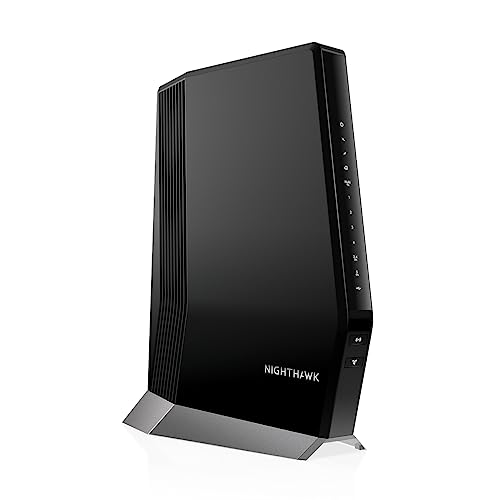
- DOCSIS 3.1 modem supports Xfinity plans up to 2.37 Gbps wired, covering Gigabit and Gigabit Extra tiers
- AX6000 Wi-Fi 6 with combined wireless speeds up to 6 Gbps
- 2.5 Gig port plus four gigabit Ethernet ports with link aggregation for wired devices
- Covers up to 2,500 square feet for 30 or more devices

- DOCSIS 3.1 modem with 32×8 channel bonding in a single-box combo
- AX2700 Wi-Fi 6 with combined wireless speeds up to 2.7 Gbps
- Approved for Xfinity plans up to 800 Mbps, covering the most common tiers
- Covers up to 2,000 square feet for 25 devices

- DOCSIS 3.1 modem with an Xfinity-listed wired ceiling of up to 2.37 Gbps
- AX3000 Wi-Fi 6 router with coverage listed up to 2,500 square feet
- Dedicated 2.5 Gbps Ethernet port plus four 1-gigabit ports for wired devices
- 2-year limited warranty
All 4 Picks at a Glance
| Product | Specs | Action |
|---|---|---|
| 1. NETGEAR Nighthawk CAX80 |
| Check price on Amazon |
| 2. NETGEAR Nighthawk CAX30 |
| Check price on Amazon |
| 3. ARRIS SURFboard G36 |
| Check price on Amazon |
 4. Motorola MG8702 |
| Check price on Amazon |
Key takeaways
- Compare the best modem routers for xfinity: four DOCSIS 3.1 modem-router combos approved for Xfinity, with Wi-Fi 6 and Wi-Fi 5 picks for every plan.
As an Amazon Associate I earn from qualifying purchases.
The Short Answer
If you rent a gateway from Xfinity, you are paying a monthly rental fee for two devices that can live in one box. A modem-router combo, also called a gateway, combines a DOCSIS 3.1 cable modem and a Wi-Fi router in a single unit, so you return the rented equipment, plug one device into the coax outlet, and run your whole home network from it. Every pick in this guide is a true combo unit approved for Xfinity, and every one is DOCSIS 3.1, which is the modem standard Xfinity uses for its current speed tiers.
The NETGEAR Nighthawk CAX80 is the pick for most Xfinity homes on a fast plan, with an AX6000 Wi-Fi 6 router and support for Xfinity plans up to 2.37 Gbps wired. The NETGEAR Nighthawk CAX30 is the sensible middle pick for plans up to 800 Mbps on Xfinity, with the same DOCSIS 3.1 modem in a smaller Wi-Fi 6 package. The ARRIS SURFboard G36 suits homes that want a 2.5 Gbps wired port for a desktop or console, and the Motorola MG8702 is the Wi-Fi 5 alternative for homes that want a proven DOCSIS 3.1 combo at a lower cost.
Before you buy any of them, check your Xfinity plan speed and whether your service includes bundled cable voice. None of these combos supports bundled voice service, so a home with Xfinity Voice needs a separate telephone adapter. Confirm the exact model against Xfinity’s compatible-device list for your address and plan tier before ordering, since approval can vary by tier.
Our Top Picks
- Best overall: NETGEAR Nighthawk CAX80 — DOCSIS 3.1 modem with AX6000 Wi-Fi 6, for Xfinity plans up to 2.37 Gbps wired and larger homes.
- Best mid-range pick: NETGEAR Nighthawk CAX30 — DOCSIS 3.1 modem with AX2700 Wi-Fi 6, approved for Xfinity plans up to 800 Mbps.
- Best for wired multi-gig: ARRIS SURFboard G36 — DOCSIS 3.1 modem with AX3000 Wi-Fi 6 and a 2.5 Gbps Ethernet port.
- Best Wi-Fi 5 value pick: Motorola MG8702 — DOCSIS 3.1 modem with AC3200 Wi-Fi and Intelligent Power Boost, approved for Comcast Xfinity.
Quick Comparison
| Product | Modem | Wi-Fi | Xfinity plan support | Coverage | Ethernet ports |
|---|---|---|---|---|---|
| NETGEAR Nighthawk CAX80 | DOCSIS 3.1 | Wi-Fi 6, AX6000 | Up to 2.37 Gbps | Up to 2,500 sq ft | 2.5 Gig port plus 4 gigabit ports |
| NETGEAR Nighthawk CAX30 | DOCSIS 3.1 | Wi-Fi 6, AX2700 | Up to 800 Mbps | Up to 2,000 sq ft | 4 gigabit ports |
| ARRIS SURFboard G36 | DOCSIS 3.1 | Wi-Fi 6, AX3000 | Up to 2.37 Gbps wired, per Xfinity list | Up to 2,500 sq ft | 2.5 Gig port plus 4 gigabit ports |
| Motorola MG8702 | DOCSIS 3.1 | Wi-Fi 5, AC3200 | Gigabit cable plans | Confirm on the listing | Confirm on the listing |
How to Choose
Match the Modem to Your Plan Speed
The modem side of a combo has a ceiling, and buying below your plan speed wastes the connection you already pay for. The CAX30 is approved for Xfinity plans up to 800 Mbps, so it fits the common 400, 600, and 800 Mbps tiers but not a Gigabit tier. The CAX80 and the G36 both carry an Xfinity-listed wired ceiling of up to 2.37 Gbps, so either one fits Gigabit and Gigabit Extra tiers with room to spare. The MG8702 is built for gigabit cable plans. Read your Xfinity plan speed in your account first, then pick a combo whose stated ceiling sits above it.
DOCSIS 3.1 Is the Minimum
DOCSIS is the cable-industry standard that defines how a cable modem talks to the provider’s equipment over coax. DOCSIS 3.1 supports the fastest cable plans and uses 32×8 channel bonding as a DOCSIS 3.0 fallback. All four picks here are DOCSIS 3.1, the safe minimum for a new purchase. Avoid older DOCSIS 3.0 combos for new activations: the NETGEAR C7000, for example, is now listed as discontinued with no new cable provider activations.
Wi-Fi Generation and Speed Class
The speed class, such as AX6000, AX2700, AX3000, or AC3200, is a combined figure across all wireless bands rather than the speed a single device will reach. Compare combos by Wi-Fi generation first and speed class second. Wi-Fi 6 adds efficiency features that help a home with many connected devices, which is why three of the four picks here are Wi-Fi 6. The MG8702 is Wi-Fi 5, which still handles streaming, video calls, and gaming on a gigabit plan. If your phones and laptops already have Wi-Fi 6 radios, a Wi-Fi 6 combo gets more from them.
Coverage and Device Count
Coverage figures on a listing describe an open-plan home with few walls, so treat them as a ceiling rather than a promise. A combo listed for up to 2,500 square feet suits a medium to large house, while one listed for up to 2,000 square feet fits an apartment or a smaller home. Thick walls, multiple floors, and a router tucked behind a television all shrink real coverage. Device count matters just as much: a home with phones, tablets, televisions, consoles, and smart plugs can pass 25 connected devices quickly. The CAX80 handles 30 or more devices and the CAX30 handles 25.
Ports and Wired Connections
The ports on the back decide what the combo can do beyond Wi-Fi. A 2.5 Gbps Ethernet port, found on the CAX80 and the G36, lets a wired desktop or a network drive use more than a gigabit of throughput. Four gigabit Ethernet ports handle wired consoles, televisions, and desktops, and link aggregation combines two gigabit ports into a faster pipe for a network drive. If you game on a console or a PC, wire it to the combo when possible, since a cable beats any wireless connection for latency.
Xfinity Approval and Activation
Approval is not universal: a combo that works on one plan can be refused activation on another, so confirm the exact model number against Xfinity’s compatible-device tool for your address and tier. Activation usually happens through the Xfinity app or by calling support with the modem’s MAC address, printed on the label on the bottom of the unit. Keep the rented gateway until the new combo is activated and working. None of these four combos supports bundled cable voice, fiber, DSL, or satellite service.
The Picks in Detail
1. NETGEAR Nighthawk CAX80
- DOCSIS 3.1 modem supports Xfinity plans up to 2.37 Gbps wired, covering Gigabit and Gigabit Extra tiers
- AX6000 Wi-Fi 6 with combined wireless speeds up to 6 Gbps
- 2.5 Gig port plus four gigabit Ethernet ports with link aggregation for wired devices
- Covers up to 2,500 square feet for 30 or more devices
The NETGEAR Nighthawk CAX80 is the strongest all-around modem-router combo for Xfinity in this guide. It pairs a DOCSIS 3.1 cable modem with an AX6000 Wi-Fi 6 router in a single box, with combined wireless speeds up to 6 Gbps across its 2.4 GHz and 5 GHz bands. It supports Xfinity plans up to 2.37 Gbps wired, covers up to 2,500 square feet for 30 or more devices, and carries a 2.5 Gig multi-gig port alongside four gigabit Ethernet ports with link aggregation. The 32×8 channel bonding keeps the modem side fast, and the Nighthawk app guides setup and manages the network, including guest networks and device pausing. NETGEAR Armor scans connected devices for threats, and WPA3 encryption protects the wireless network. It is approved for Xfinity, Spectrum, and Cox.
Pros:
Cons:
2. NETGEAR Nighthawk CAX30
- DOCSIS 3.1 modem with 32×8 channel bonding in a single-box combo
- AX2700 Wi-Fi 6 with combined wireless speeds up to 2.7 Gbps
- Approved for Xfinity plans up to 800 Mbps, covering the most common tiers
- Covers up to 2,000 square feet for 25 devices
The NETGEAR Nighthawk CAX30 is the balanced pick for a typical Xfinity household. It combines a DOCSIS 3.1 cable modem with 32×8 channel bonding and a dual-band AX2700 Wi-Fi 6 router, with combined wireless speeds up to 2.7 Gbps. It is approved for Xfinity plans up to 800 Mbps, covers up to 2,000 square feet for 25 devices, and carries four gigabit Ethernet ports with link aggregation, plus a USB 3.0 port for shared storage. The Nighthawk app manages setup and security, and WPA3 encryption protects the wireless network.
Pros:
Cons:
3. ARRIS SURFboard G36
- DOCSIS 3.1 modem with an Xfinity-listed wired ceiling of up to 2.37 Gbps
- AX3000 Wi-Fi 6 router with coverage listed up to 2,500 square feet
- Dedicated 2.5 Gbps Ethernet port plus four 1-gigabit ports for wired devices
- 2-year limited warranty
The ARRIS SURFboard G36 is the wired multi-gig pick of this guide. It combines a DOCSIS 3.1 cable modem with an AX3000 Wi-Fi 6 router, and Xfinity lists it with a wired ceiling of up to 2.37 Gbps, the highest published ceiling of any combo in this guide alongside the CAX80. It carries a dedicated 2.5 Gbps Ethernet port plus four 1-gigabit Ethernet ports, and ARRIS lists coverage up to 2,500 square feet. The G36 carries a 2-year limited warranty. It is approved for Comcast Xfinity, Cox, and Spectrum. A few Xfinity forum users have reported speed problems after buying one, so buy from a seller with a straightforward return policy and test the unit in the first week.
Pros:
Cons:
4. Motorola MG8702
- DOCSIS 3.1 cable modem built for gigabit cable plans
- AC3200 dual-band Wi-Fi with Intelligent Power Boost
- Approved for Comcast Xfinity, Cox, and Charter Spectrum
- Single-box combo that replaces a rented modem and a separate router
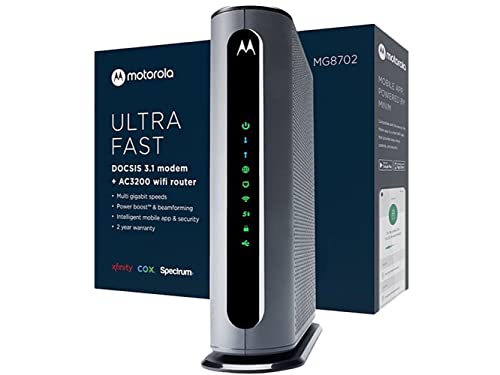
The Motorola MG8702 is the Wi-Fi 5 pick for Xfinity homes that want a proven DOCSIS 3.1 combo. It pairs a DOCSIS 3.1 cable modem with an AC3200 dual-band Wi-Fi router, and its Intelligent Power Boost feature adjusts the signal for the connected devices. It is approved for Comcast Xfinity, Cox, and Charter Spectrum, and it is built for gigabit cable plans. The MG8702 suits a home whose devices are mostly Wi-Fi 5, or a household that wants a straightforward single-box replacement for a rented gateway. Confirm the port count, coverage, and device limit on the listing before ordering, since those figures vary across listing variants.
Pros:
Cons:
Who Should Choose What
Homes on an Xfinity Gigabit or Gigabit Extra tier should pick the NETGEAR Nighthawk CAX80 or the ARRIS SURFboard G36. Both carry a 2.5 Gbps wired port and cover up to 2,500 square feet. Choose the CAX80 for the stronger Wi-Fi 6 speed class and the Nighthawk app, or the G36 for the longer 2-year warranty.
Homes on an Xfinity plan up to 800 Mbps should pick the NETGEAR Nighthawk CAX30. It matches the most common speed tiers, covers up to 2,000 square feet, and handles 25 devices, which fits a typical apartment or smaller house.
Homes whose devices are mostly Wi-Fi 5, or that want a simple DOCSIS 3.1 combo for a gigabit plan, should pick the Motorola MG8702.
Common Mistakes
- Buying a combo for a fiber connection it cannot serve. These are cable modem combos with a coax input. They do not work with fiber, DSL, or satellite service, so confirm your connection type before ordering.
- Choosing a combo that caps below your plan speed. The CAX30 caps at 800 Mbps on Xfinity. Pairing it with a Gigabit tier wastes the connection you already pay for.
- Ignoring bundled voice. None of these combos supports bundled cable voice service. A home with Xfinity Voice needs a separate telephone adapter or a different device.
- Reading the combined speed class as the speed a single device will reach. AX6000, AX2700, AX3000, and AC3200 are combined figures across all bands. A single phone or laptop will reach only a fraction of that figure.
- Placing the combo behind a television or in a cabinet, then blaming the signal on the hardware. A combo needs open air, a central spot, and height.
- Skipping the Xfinity compatibility check. Approval varies by plan tier and address. Confirm the exact model number against Xfinity’s compatible-device tool before ordering.
- Returning the rented gateway before the new combo is activated. Keep the rented equipment until the new combo is online and working, so you are never without internet during the swap.
Frequently Asked Questions
Do I need a separate modem and router for Xfinity?
No. A modem-router combo such as any of the four picks in this guide replaces both devices with one box: the DOCSIS 3.1 modem connects to the coax outlet, and the built-in Wi-Fi router serves your home network. You only need separate devices if you want a mesh system or a standalone router with features a combo lacks.
Which modem-router combo is best for Xfinity Gigabit?
The NETGEAR Nighthawk CAX80 and the ARRIS SURFboard G36 are the strongest picks for a Gigabit tier. The CAX80 supports Xfinity plans up to 2.37 Gbps wired with AX6000 Wi-Fi 6, and the G36 carries the same Xfinity-listed wired ceiling of up to 2.37 Gbps with a 2.5 Gbps Ethernet port. Either one fits a Gigabit or Gigabit Extra tier with room to spare.
Does a modem-router combo work with Xfinity Voice?
No. None of the four combos in this guide supports bundled cable voice service. If your Xfinity service includes a home phone line, you need a separate telephone adapter or a gateway that supports voice. Check your service details before ordering a combo.
How do I activate a modem-router combo on Xfinity?
Activation usually happens through the Xfinity app or by calling support with the modem’s MAC address, which is printed on the label on the bottom of the unit. Plug the combo into the coax outlet, power it on, and follow the activation steps in the app. Keep your rented gateway until the new combo is activated and working.
Is DOCSIS 3.1 required for Xfinity?
All four picks in this guide are DOCSIS 3.1. Several older DOCSIS 3.0 combos are now listed as discontinued with no new cable provider activations, so DOCSIS 3.1 is the safe minimum for a new purchase.
Can I use these modem-router combos with Spectrum or Cox?
Yes. The CAX80, CAX30, and G36 are approved for Xfinity, Spectrum, and Cox, and the MG8702 is approved for Comcast Xfinity, Cox, and Charter Spectrum. Confirm the exact model against your provider’s compatible-device list for your plan tier, since approval can vary.
Conclusion
The best modem routers for Xfinity are DOCSIS 3.1 combos that match your plan speed and cover your home. The NETGEAR Nighthawk CAX80 is the pick for most fast-plan homes, with AX6000 Wi-Fi 6 and support for Xfinity plans up to 2.37 Gbps wired. The NETGEAR Nighthawk CAX30 is the balanced pick for plans up to 800 Mbps, with the same DOCSIS 3.1 modem in a smaller package. The ARRIS SURFboard G36 suits homes that want a 2.5 Gbps wired port and a two-year warranty, and the Motorola MG8702 is the Wi-Fi 5 pick for a straightforward gigabit combo.
Check your plan speed, confirm the exact model against Xfinity’s compatible-device tool, and make sure your service does not include bundled voice. Then pick the combo whose ceiling sits above your plan, place it centrally and high, and return the rented gateway once the new unit is activated.
FAQ
Do I need a separate modem and router for Xfinity?
Which modem-router combo is best for Xfinity Gigabit?
Does a modem-router combo work with Xfinity Voice?
How do I activate a modem-router combo on Xfinity?
Is DOCSIS 3.1 required for Xfinity?
Can I use these modem-router combos with Spectrum or Cox?
More from Amazon
Programs that pair well with the guide above. Offers and eligibility are set by Amazon and may change.
Free shipping on eligible items, Prime Video and more. Eligible new members can start with a free trial.
Start a Prime free trialA Prime membership for ages 18-24 with a trial period. Eligibility is set by Amazon.
See Prime for Young AdultsAudiobooks and podcasts to listen to on the go. Eligible new members can start with a free trial.
Try Audible freeAd-free music streaming. Eligible new subscribers can start with a free trial.
Try Music Unlimited freeAs an Amazon Associate we earn from qualifying purchases.