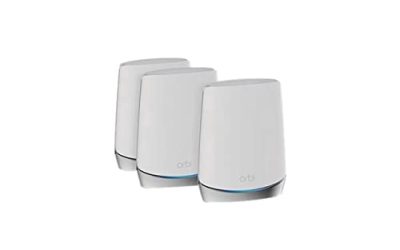
Our Short List of 3

- Best for: buyers who want manufacturer-stated DD-WRT readiness out of the box.
- AC3200 dual-band gigabit Wi-Fi router with Tri-Stream 160 technology, MU-MIMO and beamforming
- Listing description states: “Open source ready with OpenWrt and DD-WRT”
- 1.8GHz dual-core processor
- Ethernet ports and a USB 3.0 port

- Best for: households that want stock-firmware OpenVPN now with a DD-WRT flash available later.
- AC1900 dual-band (2.4GHz + 5GHz) gigabit Wi-Fi router, up to 1900 Mbps, 802.11ac 3×3
- 1GHz dual-core CPU; 128 MB Flash; 256 MB RAM
- 5x gigabit ports (as the listing title words it), 1x USB 3.0 and 1x USB 2.0
- AiProtection security powered by Trend Micro; ASUSWRT interface

- Best for: busy households flashing DD-WRT that also need several wired connections.
- AC1900 Wi-Fi, up to 1900 Mbps; listing cites up to 1,800 sq ft coverage and 30 devices
- 4x 1G Ethernet ports; 2 USB ports (1x USB 3.0 and 1x USB 2.0)
- 1GHz dual-core processor; 256 MB RAM
- NETGEAR Armor security on the stock firmware
All 3 Picks at a Glance
| Product | Specs | Action |
|---|---|---|
| Linksys WRT3200ACM |
| Check price on Amazon |
| ASUS RT-AC68U |
| Check price on Amazon |
| NETGEAR Nighthawk R7000 |
| Check price on Amazon |
Key takeaways
- Compare 3 DD-WRT routers for home networks: check hardware revisions against the DD-WRT database, flash memory, ports and USB before you flash.
Choosing a DD-WRT router is less about Wi-Fi speed than about a label on the bottom of the box. DD-WRT support is granted to specific hardware revisions, so two routers with the same name can differ entirely: one flashes cleanly, the other has no supported build. What matters is whether the unit you receive appears, revision and all, in the DD-WRT supported-device database, and whether its flash memory and processor can carry the firmware.
The three routers below suit different starting points. Buyers who want the manufacturer to state DD-WRT readiness on the listing get the Linksys WRT3200ACM, whose listing says so outright. Households content to run stock firmware today and flash later get the ASUS RT-AC68U, a long-standing entry on the DD-WRT supported list. Wired-heavy homes get the NETGEAR Nighthawk R7000, whose support comes from the DD-WRT project itself rather than the box. All three are legacy-stock models, so every pick carries an availability check.
Quick Picks
As an Amazon Associate we earn from qualifying purchases.
| Product | Best for | Key spec |
|---|---|---|
| Linksys WRT3200ACM | Buyers who want manufacturer-stated DD-WRT readiness | AC3200 dual-band with Tri-Stream 160 |
| ASUS RT-AC68U | Households running stock firmware now, flashing later | AC1900 with 128 MB flash and 256 MB RAM |
| NETGEAR Nighthawk R7000 | Busy homes that need several wired connections | AC1900 with 4 gigabit Ethernet ports |
How to Choose
Start With the Hardware Revision, Not the Model Name
DD-WRT builds are compiled for exact hardware, not for product families. A model name can span several revisions built around different chipsets and flash layouts, and only some of those revisions have a supported build. Before ordering, find the revision printed on the router’s rating label or box, then look that exact model-and-revision combination up in the DD-WRT supported-device database. If the database lists your revision, a documented flash path exists. If it lists a neighbouring revision only, treat the router as unsupported, however similar the name looks.
Give the Firmware Room: Flash Memory and RAM
A DD-WRT build has to fit in the router’s flash memory alongside the bootloader, and larger builds with more features need more room. The ASUS RT-AC68U carries 128 MB of flash and 256 MB of RAM, figures its listing states plainly, which leaves comfortable headroom for full builds and for services such as VPN clients running on the router itself. Cramped flash forces stripped-down builds that drop features buyers often flash for in the first place. Compare the flash and RAM figures on each listing against the build size the DD-WRT database shows for that revision.
Match the Radios and Ports to the House
Firmware freedom does not rescue weak hardware. The Linksys WRT3200ACM is an AC3200 design with Tri-Stream 160 and MU-MIMO for homes full of wireless devices, while the two AC1900 picks trade peak radio class for maturity and broad build support. Count wired gear as well: the NETGEAR R7000 offers four gigabit Ethernet ports and two USB ports, useful for a printer or shared drive on the local network. Decide whether your bottleneck is wireless capacity, wired sockets or storage sharing, then let that ranking order the shortlist.
Plan the Flash Itself Before You Need It
None of these routers ships with DD-WRT installed; on all three, the firmware is something you download and flash yourself. That means reading the revision-specific flashing notes first, saving a copy of the stock firmware for recovery, and scheduling the job when the household can tolerate downtime. A wrong build can leave a router unresponsive, and recovery steps differ by model. Treat the flash as a small project with a rollback plan, and the flexibility DD-WRT offers becomes a benefit rather than a gamble.
The 3 Best Options
Linksys WRT3200ACM
- Best for: buyers who want manufacturer-stated DD-WRT readiness out of the box.
- AC3200 dual-band gigabit Wi-Fi router with Tri-Stream 160 technology, MU-MIMO and beamforming
- Listing description states: “Open source ready with OpenWrt and DD-WRT”
- 1.8GHz dual-core processor
- Ethernet ports and a USB 3.0 port
buyers who want manufacturer-stated DD-WRT readiness out of the box.
Availability signals conflict for this ASIN — trackers show no current Amazon-sold price and one aggregator marks the listing out of stock, while recent roundups still list it as buyable. Confirm a live featured offer for the exact ASIN before ordering, and check the hardware revision on the unit’s label against the DD-WRT supported-device database before planning the flash.
Most routers leave DD-WRT support as something buyers must verify elsewhere, but this one’s Amazon listing settles the question in its own description, which states it is “Open source ready with OpenWrt and DD-WRT”. That manufacturer wording makes the WRT3200ACM the natural starting point for buyers who want the flash sanctioned by the brand. Underneath sits an AC3200 dual-band design with Tri-Stream 160, MU-MIMO and beamforming, driven by a 1.8GHz dual-core processor, so the hardware keeps pace with the extra services custom firmware tends to accumulate.
ASUS RT-AC68U
- Best for: households that want stock-firmware OpenVPN now with a DD-WRT flash available later.
- AC1900 dual-band (2.4GHz + 5GHz) gigabit Wi-Fi router, up to 1900 Mbps, 802.11ac 3×3
- 1GHz dual-core CPU; 128 MB Flash; 256 MB RAM
- 5x gigabit ports (as the listing title words it), 1x USB 3.0 and 1x USB 2.0
- AiProtection security powered by Trend Micro; ASUSWRT interface
households that want stock-firmware OpenVPN now with a DD-WRT flash available later.
The freshest crawl of this Amazon listing is roughly 282 days old and no current tracker price could be pinned, so confirm a live featured offer for the exact ASIN before ordering. DD-WRT support also varies by hardware revision (B1, C1 and others), so match the revision on the label to the supported-device database before buying.
The RT-AC68U built its reputation twice: first as a polished stock-firmware router with the ASUSWRT interface and AiProtection security, and then as one of the most durable entries on the DD-WRT supported-device list, with FreshTomato, OpenWrt and Asuswrt-Merlin also available for the model. That dual life suits households that want dependable firmware today and an open flash path whenever curiosity or a missing feature pushes them. The listing’s stated 128 MB of flash and 256 MB of RAM give full DD-WRT builds room to breathe, and five gigabit ports plus two USB sockets cover wired corners of the home.
NETGEAR Nighthawk R7000
- Best for: busy households flashing DD-WRT that also need several wired connections.
- AC1900 Wi-Fi, up to 1900 Mbps; listing cites up to 1,800 sq ft coverage and 30 devices
- 4x 1G Ethernet ports; 2 USB ports (1x USB 3.0 and 1x USB 2.0)
- 1GHz dual-core processor; 256 MB RAM
- NETGEAR Armor security on the stock firmware
busy households flashing DD-WRT that also need several wired connections.
Trackers show no current Amazon-sold price for this listing, so confirm a live featured offer for the exact ASIN before ordering — and note that the separate Renewed listing is a different offer, not this ASIN. Check the hardware revision printed on the label against the DD-WRT supported-device database before flashing.
The R7000 is the veteran of this group: an AC1900 router whose listing cites coverage for up to 1,800 sq ft and 30 devices, with four gigabit Ethernet ports for the wired side of the house. Its DD-WRT story differs from the Linksys — the stock listing makes no DD-WRT promise, because support comes from the DD-WRT project, which has carried this model for years. That distinction matters now that NETGEAR has wound down stock-firmware support for this router generation: for owners who flash, community firmware is the route that keeps the hardware receiving attention.
Which One Fits Your Situation
You Want the Manufacturer’s Own Blessing to Flash
Pick the Linksys WRT3200ACM. Its listing states its open-source readiness outright, which removes the guesswork that surrounds most models, and its AC3200 radios and dual-core processor leave headroom for the services people usually add after flashing. You still verify the revision on the label against the DD-WRT database, but you start from a listing that was written with custom firmware in mind.
You Plan to Run Stock Firmware First, Flash Later
Choose the ASUS RT-AC68U. ASUSWRT and AiProtection make it a complete router on day one, so there is no rush to change anything, yet the model sits on the DD-WRT supported list with alternative firmwares besides. When a feature gap eventually appears, the flash path is documented and waiting — provided the revision on your unit’s label is one of the supported ones.
Half Your Devices Never Touch Wi-Fi
The NETGEAR Nighthawk R7000 fits wired-leaning homes. Four gigabit Ethernet ports keep desktops, consoles and a network drive off the wireless bands entirely, while the two USB ports handle a shared printer or storage. Its DD-WRT support comes from the project rather than the box, so the pre-purchase routine is the same database check, this time on a model the community has supported for years.
Your Current Router Stopped Getting Vendor Updates
Consider the R7000 as the template for your replacement strategy. NETGEAR has wound down stock-firmware support for this generation, which is exactly the situation DD-WRT exists for: community builds keep a capable router current after the vendor moves on. Whichever pick you take, favour models with a long DD-WRT track record, because that history is your best predictor of continued support.
Common Mistakes
- Assuming a model name guarantees DD-WRT support, when support is granted per hardware revision and a same-name unit can be unflashable.
- Flashing a build written for a different revision, which can leave the router unresponsive and force a recovery procedure.
- Ordering the NETGEAR R7000’s separate Renewed listing while believing it is the same offer as the new listing’s ASIN.
- Expecting DD-WRT to be preinstalled — none of these routers ships with it; the firmware is always a self-installed download.
- Comparing only headline Wi-Fi class and ignoring flash memory, which decides whether full DD-WRT builds fit at all.
Frequently Asked Questions
Does any of these routers arrive with DD-WRT already installed?
No. On all three picks, DD-WRT is firmware you download from the project and install yourself; each router ships with its manufacturer’s stock firmware. That is normal for this class, but it means your purchase decision should include the revision check and the flashing notes for your exact unit, not just the hardware itself.
How do I check my router’s hardware revision before flashing?
Look at the rating label on the underside of the router or on its box, where the revision or version code is printed next to the model number. Then search the DD-WRT supported-device database for that exact model-and-revision pair. If the pair appears with a build and flashing instructions, you have a documented path; if only other revisions appear, do not proceed.
Does NETGEAR itself promise DD-WRT support on the R7000?
No. The R7000’s stock listing does not promise DD-WRT; the support comes from the DD-WRT project, which lists the model in its database. The distinction matters because NETGEAR has wound down stock-firmware support for this generation, so the community firmware is the ongoing route — checked, as always, against the exact revision you own.
What happens if I flash a build meant for a different revision?
At best the router refuses the file; at worst it becomes unresponsive and needs a recovery procedure that varies by model. Avoid the situation entirely by matching the build to the revision printed on your unit’s label, downloading only from the DD-WRT database entry for that pair, and keeping a copy of the stock firmware before you start.
FAQ
Does any of these routers arrive with DD-WRT already installed?
How do I check my router’s hardware revision before flashing?
Does NETGEAR itself promise DD-WRT support on the R7000?
What happens if I flash a build meant for a different revision?
More from Amazon
Programs that pair well with the guide above. Offers and eligibility are set by Amazon and may change.
Free shipping on eligible items, Prime Video and more. Eligible new members can start with a free trial.
Start a Prime free trialA Prime membership for ages 18-24 with a trial period. Eligibility is set by Amazon.
See Prime for Young AdultsAudiobooks and podcasts to listen to on the go. Eligible new members can start with a free trial.
Try Audible freeAd-free music streaming. Eligible new subscribers can start with a free trial.
Try Music Unlimited freeAs an Amazon Associate we earn from qualifying purchases.