Our Short List of 3

- Best for: Two-computer desks that need KVM switching in a 34-inch ultrawide.
- Panel: 34-inch QHD 3440 x 1440 IPS
- Curve: 3800R
- Video: HDR 10
- Switching: built-in KVM
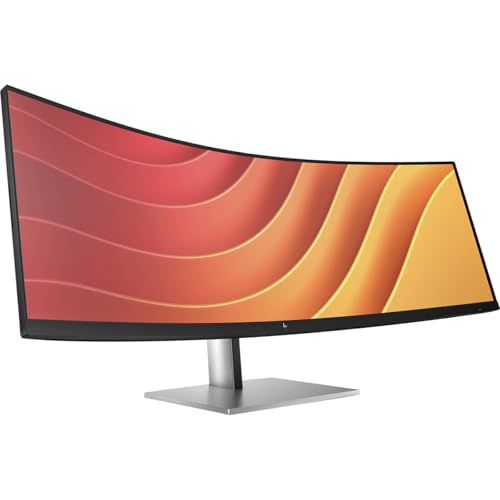
- Best for: Analysts and multitaskers replacing a two-monitor setup with one screen.
- Panel: 44.5-inch DQHD 5120 x 1440 VA, 32:9
- Refresh: 165Hz, 3ms GtG response
- Switching: built-in KVM switch
- Hub: USB-C connectivity

- Best for: Offices and home workers who want a proven 34-inch hub monitor without frills.
- Panel: 34.14-inch WQHD 3440 x 1440 IPS
- Curve: 3800R
- Refresh: 60Hz, 5ms response
- Colour: 99 percent sRGB
All 3 Picks at a Glance
| Product | Specs | Action |
|---|---|---|
| LG 34WQ75C-B Curved UltraWide |
| Check price on Amazon |
| HP E45c G5 DQHD Curved Monitor |
| Check price on Amazon |
| Dell 34 Curved USB-C Hub Monitor P3424WE |
| Check price on Amazon |
Key takeaways
- Five curved and ultrawide monitors for office work compared: USB-C hub models with power delivery, KVM switching and the panel specs that matter daily.
A curved work monitor earns its desk space by solving two problems at once: it replaces a dual-monitor setup with one unbroken screen, and it keeps the far edges of a wide panel at a more natural viewing distance. The real decision, though, is about the hub inside the screen. The right pick docks your laptop with a single USB-C cable, charges it, wires it to Ethernet and switches your keyboard and mouse between machines — the wrong one leaves the cable clutter exactly as it was.
This guide is for office and home-office workers choosing a curved or ultrawide monitor for productivity: documents, spreadsheets, code, calls and several windows side by side. Every pick is a work-positioned model with a USB-C hub, taken from the specifications on its Amazon listing. Pure gaming panels were left out, however impressive their refresh rates, because they skip the docking features a work desk actually runs on.
Quick Picks
As an Amazon Associate we earn from qualifying purchases
| Product | Best for | Key spec from title |
|---|---|---|
| Dell UltraSharp 34 Curved Thunderbolt Hub Monitor U3425WE | The complete Thunderbolt docking station | Thunderbolt 4 hub, 90W power delivery, 120Hz |
| Samsung ViewFinity S65UA | A deep curve and single-cable charging | 1000R curve, USB-C with 90W charging, 100Hz |
| LG 34WQ75C-B Curved UltraWide | A 34-inch hub monitor with KVM | QHD IPS, built-in KVM, USB Type-C |
| HP E45c G5 DQHD Curved Monitor | Replacing two monitors outright | 44.5-inch DQHD 5120 x 1440, 32:9 |
| Dell 34 Curved USB-C Hub Monitor P3424WE | A dependable 34-inch office standard | USB-C hub, 90W power delivery, 99 percent sRGB |
How to Choose
Resolution and width decide how many windows fit
On a 34-inch ultrawide, 3440 x 1440 is the working standard: it holds two full documents or a document beside a spreadsheet without scaling tricks, and text stays sharp at normal desk distances. Step up to the 44.5-inch DQHD format and the screen becomes two 27-inch monitors fused together, which suits traders, analysts and anyone who lives in side-by-side comparisons. Width is not free, though — a wider screen demands more desk depth and a longer glance across it, so match the panel to the work you actually open every day.
The hub is the feature you use every hour
A work monitor’s USB-C connection should do three jobs at once: carry the picture, charge the laptop and host your peripherals. Look for power delivery around 90W, which keeps most work laptops charged under load, plus an RJ45 Ethernet port so the wired network runs through the monitor rather than a separate dongle. A built-in KVM switch matters if you dock two computers — one button moves your keyboard and mouse between them. Count the downstream USB ports against your webcam, headset dongle and drives before deciding a hub is complete.
Curve radius shapes comfort more than size does
The curve is described by its radius: a 1000R screen wraps noticeably and suits a single viewer sitting centred, pulling the edges of a 34-inch panel closer to your eyes. A gentler 3800R curve is subtler — it flattens the geometry for design and document work and looks more natural in a shared office or on a video call backdrop. Neither is better in the abstract; the tighter curve rewards immersion in one wide workspace, while the flatter curve behaves more like a conventional monitor that happens to be wide.
Panel and refresh rate still matter for office work
You do not need gaming speeds to scroll spreadsheets, but a 100Hz or 120Hz panel makes window dragging, scrolling and cursor movement visibly smoother across a long day, and modern work laptops drive those rates over USB-C without fuss. For colour, a wide gamut with full sRGB coverage keeps documents, dashboards and the occasional photo honest. Brightness uniformity and a height-adjustable stand matter more than headline contrast for comfort: your neck and eyes will judge this purchase long after the spec sheet is forgotten.
The 5 Best Options
Dell UltraSharp 34 Curved Thunderbolt Hub Monitor U3425WE
The U3425WE is the flagship work hub in this guide: a 34.14-inch WQHD IPS Black panel with a 1900R curve, running at 120Hz, wrapped around a full Thunderbolt 4 dock. That dock delivers 90W of power to your laptop and includes 2.5GbE Ethernet, so one cable carries picture, charge and a fast wired network. Dual 5W speakers handle calls without extra hardware, and the colour coverage — sRGB at 100 percent and DCI-P3 at 98 percent, as listed — suits work that strays into photo or video. It is the most complete single-cable desk upgrade here.
Specs
- Panel: 34.14-inch WQHD 3440 x 1440, IPS Black, 120Hz
- Curve: 1900R
- Hub: Thunderbolt 4 with 90W power delivery
- Network: 2.5GbE RJ45
- Audio: dual 5W speakers
- Colour: sRGB 100 percent, DCI-P3 98 percent
Best for: Laptop workers who want the monitor to be the entire docking station.
Watch out for: Confirm on the live product page that the listing is the exact U3425WE variant before ordering, since Dell sells several near-identical 34-inch hub models.
ASIN: B0CXDQJ2PQ
Samsung ViewFinity S65UA
The ViewFinity S65UA takes the opposite approach to curve: its 1000R radius is the deepest here, wrapping the 34-inch Ultra-WQHD panel around a single centred viewer. It refreshes at 100Hz, supports HDR10 with one billion colours as listed, and its USB-C connection charges at 90W while an RJ45 port provides wired Ethernet. The height-adjustable stand and TUV-certified Intelligent Eye Care features round out a package aimed squarely at long seated days. If you work alone at one wide screen and want the edges pulled in close, this is the shape to buy.
Specs
- Panel: 34-inch Ultra-WQHD 3440 x 1440, 100Hz
- Curve: 1000R
- Video: HDR10
- Hub: USB-C with 90W charging
- Network: RJ45 Ethernet
- Stand: height-adjustable
- Eye care: TUV-certified Intelligent Eye Care
Best for: Solo workers who want a deep, immersive curve and single-cable charging.
Watch out for: The tight 1000R curve is a personal-viewing design; it is less comfortable for two people sharing the screen or frequent over-the-shoulder reviews.
ASIN: B0BLT79X2G
LG 34WQ75C-B Curved UltraWide
- Best for: Two-computer desks that need KVM switching in a 34-inch ultrawide.
- Panel: 34-inch QHD 3440 x 1440 IPS
- Curve: 3800R
- Video: HDR 10
- Switching: built-in KVM
Two-computer desks that need KVM switching in a 34-inch ultrawide.
The listing material captured for this model does not state a USB-C power-delivery wattage, so check the live page if your laptop needs a specific charging figure.
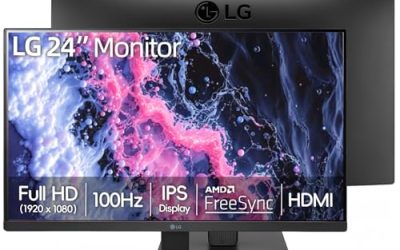
LG’s 34WQ75C-B is the understated 34-inch option: a QHD 3440 x 1440 IPS panel with a gentle 3800R curve that behaves like a wide flat monitor, plus the two hub features that matter most — a built-in KVM switch and USB Type-C connectivity, with an RJ-45 Ethernet port in the hub as listed. HDR 10 support covers casual media and presentation work. The gentle curve makes it a good citizen in shared offices and on camera, and the KVM lets a work laptop and a personal machine share one screen and one set of peripherals.
HP E45c G5 DQHD Curved Monitor
- Best for: Analysts and multitaskers replacing a two-monitor setup with one screen.
- Panel: 44.5-inch DQHD 5120 x 1440 VA, 32:9
- Refresh: 165Hz, 3ms GtG response
- Switching: built-in KVM switch
- Hub: USB-C connectivity
Analysts and multitaskers replacing a two-monitor setup with one screen.
At 44.5 inches wide it needs a deep, wide desk, and a single centred webcam position sits a long way from either edge of your workspace.
The E45c G5 is the dual-monitor replacement in the literal sense: 44.5 inches of DQHD at 5120 x 1440 in a 32:9 aspect ratio, the same desktop area as two 27-inch QHD screens with no bezel down the middle. It is a VA panel running at 165Hz with a 3ms GtG response as listed, and the work features are thorough — USB-C connectivity, a built-in KVM switch, an ambient light sensor, dual 3W speakers, RJ-45 and HP Device Bridge 2.0, which lets you work across two connected computers. Choose it when your workflow genuinely fills two screens all day.
Dell 34 Curved USB-C Hub Monitor P3424WE
- Best for: Offices and home workers who want a proven 34-inch hub monitor without frills.
- Panel: 34.14-inch WQHD 3440 x 1440 IPS
- Curve: 3800R
- Refresh: 60Hz, 5ms response
- Colour: 99 percent sRGB
Offices and home workers who want a proven 34-inch hub monitor without frills.
The 60Hz refresh rate is the plainest here; if you notice scrolling smoothness, the 100Hz and 120Hz picks above will feel better across a long day.
The P3424WE is the sensible fleet-standard pick: a 34.14-inch WQHD IPS panel with a gentle 3800R curve, a USB-C hub delivering 90W of power, RJ45 Ethernet and five USB ports for peripherals, plus HDMI and DisplayPort for a second source. Colour coverage is listed at 99 percent sRGB, the refresh rate is a standard 60Hz with a 5ms response, and everything about it is tuned for reliability across a whole office rather than excitement on one desk. If your IT department were choosing from this list, this is the monitor they would deploy.
Which One Fits Your Situation
You dock a laptop and want one cable for everything
Choose the Dell U3425WE. Its Thunderbolt 4 hub combines 90W charging, 2.5GbE Ethernet and peripheral hosting in a single connection, and the 120Hz IPS Black panel is the best all-round screen here. The Dell P3424WE covers the same one-cable job at a plainer spec if your needs stop at charging, Ethernet and USB ports.
You work alone and live in wide spreadsheets
The Samsung ViewFinity S65UA’s deep 1000R curve was designed for exactly your seating position — centred, alone, with data stretching to both edges. If your sheets and dashboards outgrow even that, the HP E45c G5 doubles the canvas to a full dual-monitor width while keeping the KVM and hub features a work desk needs.
You switch between a work laptop and a personal computer
A built-in KVM is your deciding feature. The LG 34WQ75C-B pairs KVM switching with a gentle curve that suits a home office on camera, while the HP E45c G5 offers KVM across a much wider screen. Either way, your keyboard, mouse and webcam move between machines without re-plugging a single cable.
You are equipping several desks, not just your own
Standardise on the Dell P3424WE. Its spec is deliberately unremarkable — 60Hz, full sRGB coverage, every port an office uses — which is what you want when ten people with different laptops must all dock successfully on day one. Keep the U3425WE as the upgrade tier for staff whose work justifies the faster panel and Thunderbolt dock.
Common Mistakes
- Buying an ultrawide for a dual-monitor workload, then discovering your laptop cannot drive 3440 x 1440 over its USB-C port.
- Choosing on panel size alone and ignoring power delivery, then watching a power-hungry laptop slowly drain while docked.
- Ordering a conferencing variant of a hub monitor by mistake — check the exact model suffix on the listing, because the camera-equipped versions are different products.
- Sitting too close to a deep-curve screen, or mounting a 44.5-inch panel on a shallow desk where its edges crowd your speakers and laptop.
- Forgetting the KVM question: without one, a two-computer desk means moving the keyboard and mouse cables by hand every single day.
Frequently Asked Questions
Is a curved monitor actually better for office work than a flat one?
For wide screens, yes in one specific way: the curve keeps the left and right edges at a more even distance from your eyes, so text at the margins stays in comfortable focus without leaning. On a 34-inch or wider panel that effect is real across a full working day. On smaller screens the benefit fades, which is why every pick here is an ultrawide rather than a curved 27-inch panel.
Can one USB-C cable really replace my docking station?
On the hub models here, yes: the cable carries the video signal, delivers up to 90W of charging as listed, and connects the monitor’s USB ports and Ethernet to your laptop. What it cannot do is exceed the monitor’s port selection, so count your peripherals first. If you run more devices than the hub offers, you will still need a small hub downstream of the monitor.
What resolution should I choose for a 34-inch ultrawide?
3440 x 1440, which every 34-inch pick in this guide uses. It gives you the height of a QHD monitor with roughly a third more width, so two windows sit side by side at full size and text remains crisp at typical viewing distances. Lower resolutions stretch visibly at this size, and higher ones mostly appear on the much wider 44.5-inch format instead.
Does my laptop need Thunderbolt for these monitors?
No. Thunderbolt is only required to use the U3425WE’s dock at its full specification; the other picks connect over standard USB-C with DisplayPort alt mode, which most modern work laptops support. Check that your machine’s USB-C port carries video — some ports are data-only — and fall back to HDMI or DisplayPort for the picture while keeping USB-C for the hub if it does not.
FAQ
Is a curved monitor actually better for office work than a flat one?
Can one USB-C cable really replace my docking station?
What resolution should I choose for a 34-inch ultrawide?
Does my laptop need Thunderbolt for these monitors?
More from Amazon
Programs that pair well with the guide above. Offers and eligibility are set by Amazon and may change.
Free shipping on eligible items, Prime Video and more. Eligible new members can start with a free trial.
Start a Prime free trialA Prime membership for ages 18-24 with a trial period. Eligibility is set by Amazon.
See Prime for Young AdultsAudiobooks and podcasts to listen to on the go. Eligible new members can start with a free trial.
Try Audible freeAd-free music streaming. Eligible new subscribers can start with a free trial.
Try Music Unlimited freeAs an Amazon Associate we earn from qualifying purchases.