Our Short List of 3

- TP-Link Deco X55 AX3000 Wi-Fi 6 Mesh System (3-Pack) — Best all-around pick for most homes. See it on Amazon
- Amazon eero 6+ Mesh Wi-Fi System (3-Pack) — Simplest setup and the friendliest app. See it on Amazon
- ASUS ZenWiFi AX6600 Tri-Band Mesh Wi-Fi 6 System (XT8 2-Pack) — Tri-band backhaul for demanding households. See it on Amazon
- Google Nest Wifi Pro Wi-Fi 6E System (3-Pack, Snow) — Wi-Fi 6E plus smart-home hub features. See it on Amazon

- Best for: Households that want the simplest setup and the least fuss. Wi-Fi standard: Wi-Fi 6, AX3000 dual-band Coverage: up to 4,500 sq. ft. for the 3-pack Device support: 75 or more devices Internet plans: supports plans up to a gigabit Ethernet: two gigabit ports per unit Smart home: built-in Zigbee smart-home hub The eero 6+ is the system to buy when you would rather not think about your network. The listing states coverage up to 4,500 square feet for the three-pack, support for internet plans up to a gigabit, and connections for 75 or more devices, which suits a three- or four-bedroom home. The eero app walks through setup in plain language, and the system updates itself. Each unit carries two gigabit Ethernet ports, and every node doubles as a Zigbee smart-home hub, so smart bulbs and sensors connect directly without a separate hub. The trade-offs are the smaller coverage figure and lower device count next to the Deco X55.
- Best for: Households that want the simplest setup and the least fuss.
- Wi-Fi standard: Wi-Fi 6, AX3000 dual-band
- Coverage: up to 4,500 sq. ft. for the 3-pack
- Device support: 75 or more devices

- Best for: Households that want a dedicated backhaul band and strong wired options. Wi-Fi standard: Wi-Fi 6, AX6600 tri-band (574 + 1,201 + 4,804 Mbps across three bands) Coverage: up to 5,500 sq. ft. for the 2-pack Rooms: 6 or more rooms per the listing Ethernet: a 2.5G port plus gigabit ports on each unit Extras: AiMesh compatibility, lifetime internet security, three SSIDs, parental controls The XT8 is the only tri-band Wi-Fi 6 kit here, and that second 5 GHz band is its reason to exist: it serves as a dedicated backhaul, so the far node holds its speed while your devices use the other bands. The listing states coverage up to 5,500 square feet and 6 or more rooms from just two units — the right shape for a home where two well-placed nodes beat three weaker ones. AiMesh lets the XT8 combine with other ASUS routers in one mesh network, so an existing ASUS router can join instead of being retired. Lifetime internet security, parental controls, and three SSIDs are included per the listing. Confirm the device count on the listing before ordering.
- Best for: Households that want a dedicated backhaul band and strong wired options.
- Wi-Fi standard: Wi-Fi 6, AX6600 tri-band (574 + 1,201 + 4,804 Mbps across three bands)
- Coverage: up to 5,500 sq. ft. for the 2-pack
- Rooms: 6 or more rooms per the listing
All 5 Picks at a Glance
| Product | Specs | Action |
|---|---|---|
| Our Top Picks |
| Check price on Amazon |
| Amazon eero 6+ Mesh Wi-Fi System (3-Pack) |
| Check price on Amazon |
| ASUS ZenWiFi AX6600 Tri-Band Mesh Wi-Fi 6 System (XT8 2-Pack) |
| Check price on Amazon |
 Google Nest Wifi Pro Wi-Fi 6E System (3-Pack, Snow) |
| Check price on Amazon |
 TP-Link Deco BE63 Tri-Band Wi-Fi 7 BE10000 Mesh System (3-Pack) |
| Check price on Amazon |
Key takeaways
- The best mesh routers for whole-home Wi-Fi, compared by coverage, bands, ports, and device capacity, from budget Wi-Fi 6 kits to Wi-Fi 7 systems.
As an Amazon Associate I earn from qualifying purchases.
The Short Answer
A mesh router system replaces one lone router with two or three units that work together under a single network name, so your phone or laptop moves from room to room without dropping to a weak signal. Coverage comes from spreading units through the home, not from one box shouting louder from a corner.
The short version: the TP-Link Deco X55 three-pack is the pick for most homes — Wi-Fi 6, coverage up to 6,500 sq. ft., three wired ports per unit, and support for up to 150 devices. The Amazon eero 6+ is the easiest to live with, the ASUS ZenWiFi XT8 adds a tri-band backhaul, the Google Nest Wifi Pro adds Wi-Fi 6E and smart-home hub duties, and the TP-Link Deco BE63 is the Wi-Fi 7 choice. Every system below is a multi-node mesh kit, not a single standalone router or an extender, picked from its Amazon listing.
Our Top Picks
- TP-Link Deco X55 AX3000 Wi-Fi 6 Mesh System (3-Pack) — Best all-around pick for most homes. See it on Amazon
- Amazon eero 6+ Mesh Wi-Fi System (3-Pack) — Simplest setup and the friendliest app. See it on Amazon
- ASUS ZenWiFi AX6600 Tri-Band Mesh Wi-Fi 6 System (XT8 2-Pack) — Tri-band backhaul for demanding households. See it on Amazon
- Google Nest Wifi Pro Wi-Fi 6E System (3-Pack, Snow) — Wi-Fi 6E plus smart-home hub features. See it on Amazon
Quick Comparison
| System | Wi-Fi | Listed coverage | Devices | Ethernet per unit | Best for |
|---|---|---|---|---|---|
| TP-Link Deco X55 (3-Pack) | Wi-Fi 6, AX3000 dual-band | Up to 6,500 sq. ft. | Up to 150 | 3 gigabit ports | Most homes, best all-around value |
| Amazon eero 6+ (3-Pack) | Wi-Fi 6, AX3000 dual-band | Up to 4,500 sq. ft. | 75 or more | 2 gigabit ports | Simple setup and everyday ease |
| ASUS ZenWiFi XT8 (2-Pack) | Wi-Fi 6, AX6600 tri-band | Up to 5,500 sq. ft. | Confirm on the listing | 2.5G port plus gigabit ports | Tri-band backhaul and wired gear |
| Google Nest Wifi Pro (3-Pack) | Wi-Fi 6E tri-band | Up to 6,600 sq. ft. | Confirm on the listing | 2 gigabit ports | Smart-home households |
| TP-Link Deco BE63 (3-Pack) | Wi-Fi 7, BE10000 tri-band | Up to 7,600 sq. ft. | Confirm on the listing | 4 x 2.5G ports | Fast plans and long-term use |
How to Choose
Match the coverage figure to your floor plan
Start with the coverage number on the listing, then trim it for your construction. Makers measure in open, favorable layouts, so brick interior walls, a metal roof, or a long single-story footprint will deliver less reach than the same square footage in an open two-story build. If your home sits near the top of a kit’s stated range, plan on the next pack size up.
Understand bands and the backhaul
Mesh units relay traffic between themselves, and that relay decides how fast the far rooms feel. Dual-band systems share the 5 GHz band between your devices and the link between units, which is fine for ordinary use but can slow down when many devices are active. Tri-band systems keep a dedicated band for this backhaul, and Wi-Fi 6E and Wi-Fi 7 kits can use the 6 GHz band for it. If your walls allow it, wired backhaul is even better: a cable run to a far unit removes the wireless relay entirely.
Count ports before you count speed
Count the wired devices that live where the satellites will sit before you fall for a headline speed. A living-room satellite with three Ethernet ports can wire the TV, a game console, and a desktop PC, taking three demanding devices off the wireless network. The internet port matters too: a gigabit WAN port caps any faster fiber plan.
Check device capacity and leave headroom
Homes accumulate connected devices quietly: phones, laptops, TVs, cameras, doorbells, and bulbs all hold a connection at once. Compare the device count on each listing with your household today, then leave generous headroom for the next few years. A system that spreads devices across three units and three bands handles a busy evening better than one router juggling the same load alone.
Weigh Wi-Fi 6, Wi-Fi 6E, and Wi-Fi 7
Wi-Fi 6 is the sensible mainstream choice and covers nearly every device in a typical home today. Wi-Fi 6E adds the 6 GHz band, which helps most as a clean backhaul channel. Wi-Fi 7 adds wider channels, lower latency, and multi-link operation, but only the newest devices can use its headline features. Buy Wi-Fi 7 if you keep gear for five years or more; otherwise a Wi-Fi 6 or 6E kit leaves more budget for the right number of nodes.
The Picks in Detail
TP-Link Deco X55 AX3000 Wi-Fi 6 Mesh System (3-Pack)
- Best for: Most homes that want whole-home Wi-Fi without a premium kit.
- Wi-Fi standard: Wi-Fi 6, AX3000 dual-band
- Coverage: up to 6,500 sq. ft. for the 3-pack
- Device support: up to 150 devices
- Ethernet: three gigabit ports per unit
- Security: TP-Link HomeShield, WPA3
The Deco X55 is the strongest budget pick here, with the three things that matter most in a mesh kit — wide coverage, plenty of wired ports, and a high device count — at the entry level. TP-Link lists coverage up to 6,500 square feet for the three-pack and support for up to 150 connected devices, enough for a multi-story family home. Each unit carries three gigabit Ethernet ports, so a console or desktop near any node can plug in, and the nodes can be wired together for Ethernet backhaul. Setup runs through the Deco app. The limitation is the dual-band design: backhaul shares the 5 GHz band with devices unless you wire the nodes together.
Pros
- Coverage up to 6,500 sq. ft. and up to 150 devices at the budget end
- Three gigabit Ethernet ports on every unit
- Simple app setup with AI-driven mesh steering
Cons
- Dual-band only, so wireless backhaul shares the 5 GHz band
- Gigabit ports cap wired speeds
- No 6 GHz band
Amazon eero 6+ Mesh Wi-Fi System (3-Pack)
- Best for: Households that want the simplest setup and the least fuss. Wi-Fi standard: Wi-Fi 6, AX3000 dual-band Coverage: up to 4,500 sq. ft. for the 3-pack Device support: 75 or more devices Internet plans: supports plans up to a gigabit Ethernet: two gigabit ports per unit Smart home: built-in Zigbee smart-home hub The eero 6+ is the system to buy when you would rather not think about your network. The listing states coverage up to 4,500 square feet for the three-pack, support for internet plans up to a gigabit, and connections for 75 or more devices, which suits a three- or four-bedroom home. The eero app walks through setup in plain language, and the system updates itself. Each unit carries two gigabit Ethernet ports, and every node doubles as a Zigbee smart-home hub, so smart bulbs and sensors connect directly without a separate hub. The trade-offs are the smaller coverage figure and lower device count next to the Deco X55.
- Best for: Households that want the simplest setup and the least fuss.
- Wi-Fi standard: Wi-Fi 6, AX3000 dual-band
- Coverage: up to 4,500 sq. ft. for the 3-pack
- Device support: 75 or more devices
Households that want the simplest setup and the least fuss. Wi-Fi standard: Wi-Fi 6, AX3000 dual-band Coverage: up to 4,500 sq. ft. for the 3-pack Device support: 75 or more devices Internet plans: supports plans up to a gigabit Ethernet: two gigabit ports per unit Smart home: built-in Zigbee smart-home hub The eero 6+ is the system to buy when you would rather not think about your network. The listing states coverage up to 4,500 square feet for the three-pack, support for internet plans up to a gigabit, and connections for 75 or more devices, which suits a three- or four-bedroom home. The eero app walks through setup in plain language, and the system updates itself. Each unit carries two gigabit Ethernet ports, and every node doubles as a Zigbee smart-home hub, so smart bulbs and sensors connect directly without a separate hub. The trade-offs are the smaller coverage figure and lower device count next to the Deco X55.
The eero 6+ is the system to buy when you would rather not think about your network. The listing states coverage up to 4,500 square feet for the three-pack, support for internet plans up to a gigabit, and connections for 75 or more devices, which suits a three- or four-bedroom home. The eero app walks through setup in plain language, and the system updates itself. Each unit carries two gigabit Ethernet ports, and every node doubles as a Zigbee smart-home hub, so smart bulbs and sensors connect directly without a separate hub. The trade-offs are the smaller coverage figure and lower device count next to the Deco X55.
Pros
Cons
ASUS ZenWiFi AX6600 Tri-Band Mesh Wi-Fi 6 System (XT8 2-Pack)
- Best for: Households that want a dedicated backhaul band and strong wired options. Wi-Fi standard: Wi-Fi 6, AX6600 tri-band (574 + 1,201 + 4,804 Mbps across three bands) Coverage: up to 5,500 sq. ft. for the 2-pack Rooms: 6 or more rooms per the listing Ethernet: a 2.5G port plus gigabit ports on each unit Extras: AiMesh compatibility, lifetime internet security, three SSIDs, parental controls The XT8 is the only tri-band Wi-Fi 6 kit here, and that second 5 GHz band is its reason to exist: it serves as a dedicated backhaul, so the far node holds its speed while your devices use the other bands. The listing states coverage up to 5,500 square feet and 6 or more rooms from just two units — the right shape for a home where two well-placed nodes beat three weaker ones. AiMesh lets the XT8 combine with other ASUS routers in one mesh network, so an existing ASUS router can join instead of being retired. Lifetime internet security, parental controls, and three SSIDs are included per the listing. Confirm the device count on the listing before ordering.
- Best for: Households that want a dedicated backhaul band and strong wired options.
- Wi-Fi standard: Wi-Fi 6, AX6600 tri-band (574 + 1,201 + 4,804 Mbps across three bands)
- Coverage: up to 5,500 sq. ft. for the 2-pack
- Rooms: 6 or more rooms per the listing
Households that want a dedicated backhaul band and strong wired options. Wi-Fi standard: Wi-Fi 6, AX6600 tri-band (574 + 1,201 + 4,804 Mbps across three bands) Coverage: up to 5,500 sq. ft. for the 2-pack Rooms: 6 or more rooms per the listing Ethernet: a 2.5G port plus gigabit ports on each unit Extras: AiMesh compatibility, lifetime internet security, three SSIDs, parental controls The XT8 is the only tri-band Wi-Fi 6 kit here, and that second 5 GHz band is its reason to exist: it serves as a dedicated backhaul, so the far node holds its speed while your devices use the other bands. The listing states coverage up to 5,500 square feet and 6 or more rooms from just two units — the right shape for a home where two well-placed nodes beat three weaker ones. AiMesh lets the XT8 combine with other ASUS routers in one mesh network, so an existing ASUS router can join instead of being retired. Lifetime internet security, parental controls, and three SSIDs are included per the listing. Confirm the device count on the listing before ordering.
The XT8 is the only tri-band Wi-Fi 6 kit here, and that second 5 GHz band is its reason to exist: it serves as a dedicated backhaul, so the far node holds its speed while your devices use the other bands. The listing states coverage up to 5,500 square feet and 6 or more rooms from just two units — the right shape for a home where two well-placed nodes beat three weaker ones. AiMesh lets the XT8 combine with other ASUS routers in one mesh network, so an existing ASUS router can join instead of being retired. Lifetime internet security, parental controls, and three SSIDs are included per the listing. Confirm the device count on the listing before ordering.
Pros
Cons
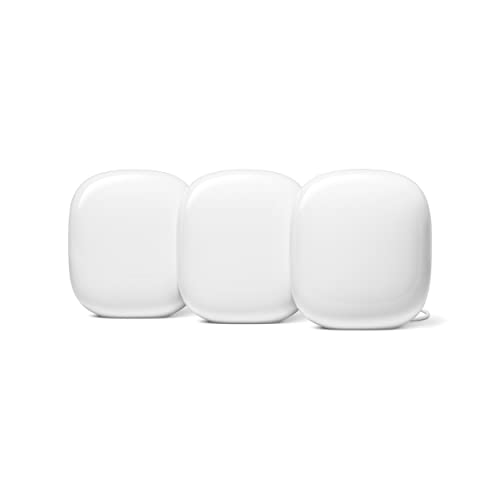
Google Nest Wifi Pro Wi-Fi 6E System (3-Pack, Snow)
- Best for: Smart-home households built around Google and Matter devices. Wi-Fi standard: Wi-Fi 6E, tri-band Coverage: up to 2,200 sq. ft. per router, up to 6,600 sq. ft. for the 3-pack Ethernet: two 1 Gbps ports per router Smart home: Thread border router and Matter support Combined speed: confirm on the listing The Nest Wifi Pro is the most smart-home focused system here. It is a Wi-Fi 6E tri-band kit, so the 6 GHz band is available for newer devices and for the backhaul between nodes. Google lists coverage up to 2,200 square feet per router and up to 6,600 square feet for the three-pack. Each router carries two 1 Gbps Ethernet ports — enough for a modem plus one wired device per node, though less generous than the Deco kits. Every node works as a Thread border router with Matter support, so Thread-based sensors, locks, and lights join your home network directly. The main limitation is the gigabit Ethernet ceiling.
- Best for: Smart-home households built around Google and Matter devices.
- Wi-Fi standard: Wi-Fi 6E, tri-band
- Coverage: up to 2,200 sq. ft. per router, up to 6,600 sq. ft. for the 3-pack
- Ethernet: two 1 Gbps ports per router
Smart-home households built around Google and Matter devices. Wi-Fi standard: Wi-Fi 6E, tri-band Coverage: up to 2,200 sq. ft. per router, up to 6,600 sq. ft. for the 3-pack Ethernet: two 1 Gbps ports per router Smart home: Thread border router and Matter support Combined speed: confirm on the listing The Nest Wifi Pro is the most smart-home focused system here. It is a Wi-Fi 6E tri-band kit, so the 6 GHz band is available for newer devices and for the backhaul between nodes. Google lists coverage up to 2,200 square feet per router and up to 6,600 square feet for the three-pack. Each router carries two 1 Gbps Ethernet ports — enough for a modem plus one wired device per node, though less generous than the Deco kits. Every node works as a Thread border router with Matter support, so Thread-based sensors, locks, and lights join your home network directly. The main limitation is the gigabit Ethernet ceiling.
The Nest Wifi Pro is the most smart-home focused system here. It is a Wi-Fi 6E tri-band kit, so the 6 GHz band is available for newer devices and for the backhaul between nodes. Google lists coverage up to 2,200 square feet per router and up to 6,600 square feet for the three-pack. Each router carries two 1 Gbps Ethernet ports — enough for a modem plus one wired device per node, though less generous than the Deco kits. Every node works as a Thread border router with Matter support, so Thread-based sensors, locks, and lights join your home network directly. The main limitation is the gigabit Ethernet ceiling.
Pros
Cons
TP-Link Deco BE63 Tri-Band Wi-Fi 7 BE10000 Mesh System (3-Pack)
- Best for: Fast internet plans and buyers who keep networking gear for years. Wi-Fi standard: Wi-Fi 7, BE10000 tri-band Coverage: up to 7,600 sq. ft. for the 3-pack Ethernet: four 2.5G ports per unit, with wired backhaul Backhaul: 6 GHz band plus Ethernet backhaul support Extras: VPN support, HomeShield security, AI-roaming The Deco BE63, also labeled the Deco 7 Pro BE63, is the Wi-Fi 7 pick here. It is a tri-band BE10000 system, with a combined wireless figure of up to 10 Gbps and the 6 GHz band available as a wide backhaul between the three units. TP-Link lists coverage up to 7,600 square feet for the three-pack, the largest figure here, and each unit carries four 2.5G Ethernet ports — a genuine step up from the gigabit ports on the Wi-Fi 6 kits, and the reason this kit suits multi-gig fiber plans. Wired backhaul is fully supported, with VPN support and HomeShield security. The caution: only the newest phones, laptops, and adapters can use Wi-Fi 7 features. Confirm the BE10000 three-pack configuration before ordering, since a single add-on unit is a separate listing.
- Best for: Fast internet plans and buyers who keep networking gear for years.
- Wi-Fi standard: Wi-Fi 7, BE10000 tri-band
- Coverage: up to 7,600 sq. ft. for the 3-pack
- Ethernet: four 2.5G ports per unit, with wired backhaul
Fast internet plans and buyers who keep networking gear for years. Wi-Fi standard: Wi-Fi 7, BE10000 tri-band Coverage: up to 7,600 sq. ft. for the 3-pack Ethernet: four 2.5G ports per unit, with wired backhaul Backhaul: 6 GHz band plus Ethernet backhaul support Extras: VPN support, HomeShield security, AI-roaming The Deco BE63, also labeled the Deco 7 Pro BE63, is the Wi-Fi 7 pick here. It is a tri-band BE10000 system, with a combined wireless figure of up to 10 Gbps and the 6 GHz band available as a wide backhaul between the three units. TP-Link lists coverage up to 7,600 square feet for the three-pack, the largest figure here, and each unit carries four 2.5G Ethernet ports — a genuine step up from the gigabit ports on the Wi-Fi 6 kits, and the reason this kit suits multi-gig fiber plans. Wired backhaul is fully supported, with VPN support and HomeShield security. The caution: only the newest phones, laptops, and adapters can use Wi-Fi 7 features. Confirm the BE10000 three-pack configuration before ordering, since a single add-on unit is a separate listing.
The Deco BE63, also labeled the Deco 7 Pro BE63, is the Wi-Fi 7 pick here. It is a tri-band BE10000 system, with a combined wireless figure of up to 10 Gbps and the 6 GHz band available as a wide backhaul between the three units. TP-Link lists coverage up to 7,600 square feet for the three-pack, the largest figure here, and each unit carries four 2.5G Ethernet ports — a genuine step up from the gigabit ports on the Wi-Fi 6 kits, and the reason this kit suits multi-gig fiber plans. Wired backhaul is fully supported, with VPN support and HomeShield security. The caution: only the newest phones, laptops, and adapters can use Wi-Fi 7 features. Confirm the BE10000 three-pack configuration before ordering, since a single add-on unit is a separate listing.
Pros
Cons
Who Should Choose What
- A family home with dead zones upstairs: the Deco X55 three-pack — wide coverage, up to 150 devices, and three ports per unit cover the common case.
- Someone who wants networking to just work: the eero 6+ three-pack — the app does the thinking, and the Zigbee hub removes a separate box.
- A home with a wired entertainment center: the ASUS ZenWiFi XT8 two-pack — tri-band backhaul, a 2.5G port, and AiMesh room to grow.
- A Google-centered smart home: the Nest Wifi Pro three-pack — Thread and Matter support make the Wi-Fi system the center of the smart home.
- A fast fiber plan and a long upgrade cycle: the Deco BE63 three-pack — Wi-Fi 7, four 2.5G ports per unit, and the largest coverage figure here.
Common Mistakes
- Buying one node too few. A two-pack in a three-story house leaves the top floor guessing. Confirm the system supports single add-on units before you buy.
- Putting satellites too far apart. Nodes need a solid link back to the main unit — place each node one or two rooms from the next, not at the far end of the dead zone.
- Hiding nodes inside cabinets. A unit inside a closed cabinet or behind a TV loses signal. Put nodes out in the open, at waist height or higher.
- Ignoring the internet port. A gigabit WAN port caps a faster fiber plan before the wireless network starts. Match the port to your plan.
- Judging by headline speed alone. The combined figure adds up all bands at once. Coverage, backhaul, and ports matter more.
- Mixing mesh brands. Nodes from different makers do not form one mesh network. Buy matching nodes from the same family, or replace the whole system.
FAQ
Is a mesh system better than one strong router?
For a home with dead zones, yes. One strong router cannot push a signal through several floors and masonry walls as well as two or three units spread through the house. For a small flat, a single router is simpler and often enough.
How many mesh units do I need?
Count rooms and floors, not just square footage. A flat or a small single-story home usually needs two units; a two- or three-story house, or a long single-story layout, usually needs three. If your home sits near the top of a kit’s stated range, choose the next pack size up.
Can I use mesh units from different brands together?
No, not as one mesh network. Each maker’s units form a mesh only with matching units from the same family, using the same app and roaming logic. Some systems, such as the ASUS XT8 with AiMesh, can combine with other routers from the same maker, but cross-brand mixing does not work.
Do I need Wi-Fi 7 now?
Only if your devices and plan can use it. Wi-Fi 7 brings wider channels, lower latency, and multi-link operation, but phones and laptops from the last few years cannot use those features. A good Wi-Fi 6 or Wi-Fi 6E kit serves most homes today.
Should I wire the nodes together?
If you can, yes. Ethernet backhaul removes the wireless relay between units, so the far node runs at full speed no matter how busy the airwaves are. Check that each satellite has a spare Ethernet port, and confirm the port speed matches your plan.
Where should I place the satellite units?
Place each satellite in the open, one or two rooms away from the next unit, at waist height or higher, roughly halfway between the main router and the weak-signal area. Avoid inside cabinets, behind large TVs, and next to thick metal or mirrors.
Conclusion
The best mesh routers match your floor plan, your device load, and your internet plan — not the ones with the biggest headline number. For most homes, the TP-Link Deco X55 three-pack covers the common case: wide coverage, up to 150 devices, and three wired ports on every unit. The eero 6+ is the pick when simplicity matters most, the ASUS ZenWiFi XT8 suits households that want a tri-band backhaul, the Google Nest Wifi Pro fits smart-home households, and the TP-Link Deco BE63 is the Wi-Fi 7 choice for fast plans and long upgrade cycles. Measure your home, count your devices, and check the ports against your plan.
FAQ
Is a mesh system better than one strong router?
How many mesh units do I need?
Can I use mesh units from different brands together?
Do I need Wi-Fi 7 now?
Should I wire the nodes together?
Where should I place the satellite units?
More from Amazon
Programs that pair well with the guide above. Offers and eligibility are set by Amazon and may change.
Free shipping on eligible items, Prime Video and more. Eligible new members can start with a free trial.
Start a Prime free trialA Prime membership for ages 18-24 with a trial period. Eligibility is set by Amazon.
See Prime for Young AdultsAudiobooks and podcasts to listen to on the go. Eligible new members can start with a free trial.
Try Audible freeAd-free music streaming. Eligible new subscribers can start with a free trial.
Try Music Unlimited freeAs an Amazon Associate we earn from qualifying purchases.