Key takeaways
- Compare the best golf launch monitors for the range and home practice, with radar tracking, ball speed, launch angle, spin, and simulator features explained.
A golf launch monitor turns guesswork into numbers. Instead of wondering whether a swing change added distance or tightened dispersion, a launch monitor reports ball speed, launch angle, spin, and carry distance after every shot. That feedback loop is what makes practice sessions productive, whether they happen on a driving range, in a garage, or in a living room with a hitting net.
The best golf launch monitors balance accuracy, portability, and ease of use. Some units work with a phone app and show every metric on a handset screen. Others carry their own display, so the phone can stay in a pocket. Some focus on a handful of core numbers, while others add full simulator play with virtual courses. The right choice depends on where practice happens, which numbers matter most, and how much setup is acceptable before the first swing.
Disclosure: As an Amazon Associate, we earn from qualifying purchases.
What a Launch Monitor Measures
Every launch monitor in this guide uses Doppler radar to track the ball after impact. Radar units sit behind the ball, measure the ball in flight, and calculate the numbers that describe the shot. The core metrics most golfers watch are ball speed, club head speed, launch angle, spin rate, carry distance, and total distance. Smash factor, which is ball speed divided by club head speed, describes how efficiently energy transfers from club to ball. Apex, or maximum shot height, and launch direction complete the picture for shaping shots.
Not every monitor reports every metric. Entry level units often cover distance, ball speed, club speed, launch angle, and smash factor. More advanced units add spin rate, spin axis, club path, and attack angle. Spin matters most for approach shots and wedge play, where stopping the ball on a green depends on backspin. Club path and attack angle matter for golfers working on a draw, a fade, or a steeper strike. Before choosing, it helps to list the three or four numbers that would actually change practice decisions, then match a monitor to that list.
Accuracy figures deserve a careful look. Manufacturers state accuracy as a margin around each measurement, such as ball speed within one mile per hour or carry distance within a few yards. Those margins are measured under controlled conditions, with the unit placed at the recommended distance behind the ball and aligned square to the target line. Real world results depend on setup. A unit placed too close, too far, or off angle will report less reliable numbers. Radar units also need a clear line of sight to the ball, so a crowded range bay or a net placed too close to the hitting area can interfere with readings.
Indoor and outdoor use raise different demands. Outdoors, a monitor needs enough range to track full shots and a battery that lasts through a long session. Indoors, it needs to work in a shorter space, often with a net only a few yards ahead of the ball. Some monitors handle short indoor distances well, while others need more ball flight to calculate spin and carry. Checking the minimum indoor hitting distance before buying prevents disappointment in a garage or basement setup.
Phone App or Built In Display
One of the biggest differences between launch monitors is where the numbers appear. Phone based monitors pair with an app over Bluetooth and show metrics, shot dispersion charts, and video on a handset or tablet. This keeps the hardware small and light, and the app can store a history of sessions by club, track trends over weeks, and overlay data on swing video. The trade off is dependence on a phone: the handset must be charged, mounted where it can be seen, and running the companion app.
Monitors with a built in display show the key numbers on the device itself. That keeps practice simple, with no phone mount and no app to open before each session. A display also helps on a busy range, where glare and notifications compete for attention. Some display units still offer an app for deeper analysis and session history, giving both options. Golfers who practice mostly outdoors and want the fastest possible setup often prefer a display, while golfers who like digging into dispersion charts and video tend to prefer an app.
Subscription and Simulator Features
Many launch monitors include simulator features, and the subscription model varies widely. Some units include a set of virtual courses with no ongoing plan. Others include a trial period, after which full simulator play and some advanced metrics require a paid membership. A few keep every core metric free and charge only for course play and extra practice modes.
Simulator play turns a monitor into an indoor golf game, with virtual rounds on well known courses and skill challenges for short game practice. For golfers in cold climates or with limited daylight, that can be the difference between practicing through winter and not practicing at all. But a simulator is only useful if the space allows it. A full swing indoors needs ceiling height for the longest clubs, a hitting mat, a net or screen, and enough room behind the ball for the monitor itself. Before paying for simulator features, it is worth measuring the available space and confirming the ceiling clears a driver swing.
Battery Life and Portability
A launch monitor earns its keep by going wherever practice happens, so weight, size, and battery life matter. Most portable units weigh under a pound and fit in a golf bag pocket or a small carry case. Battery life of around ten hours covers several range sessions between charges, while shorter battery life means charging after every outing. Units that charge over a standard USB cable are easier to top up from a portable battery pack than units that need a proprietary charger.
Weather resistance is another practical point. A monitor used outdoors will eventually meet rain, dew, or a damp range mat. Water resistance ratings describe how much exposure a unit can handle, and a sealed design survives a wet bag better than an open one. A carry case protects the radar lens and display during transport, and a tripod or stand keeps the unit at the right height and angle on uneven ground.
Best Golf Launch Monitors
1. Garmin Approach R10
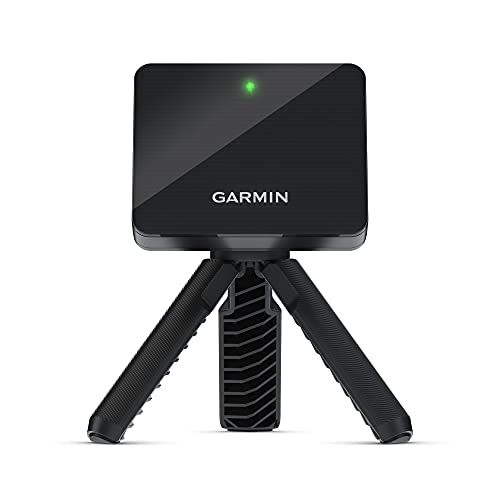
The Garmin Approach R10 is a compact radar launch monitor that pairs with the Garmin Golf app on a compatible smartphone. It tracks club head speed, ball speed, swing tempo, ball spin, launch angle, and carry distance, and it presents the results in the app with a shot dispersion chart for each club. Accuracy is listed as club head speed within three miles per hour, ball speed within one mile per hour, and launch angle and launch direction within one degree.
Battery life runs up to ten hours, which covers long range sessions without a recharge. The unit carries an IPX7 water resistance rating, so rain and wet conditions are less of a concern outdoors. In the box are the Approach R10 itself, a tripod stand, a phone mount, a carry case, and a microUSB cable. The phone mount attaches to a golf bag, keeping the handset visible during practice without a separate stand.
Training mode records statistics for each club and builds a dispersion chart from estimated ball flight, which helps identify which clubs produce the tightest groupings. Swing video clips are recorded automatically and shown with the metrics for that swing, so a golfer can connect a number to the movement that produced it. With an active subscription and the Garmin Golf app, the R10 also offers virtual rounds on more than 42,000 courses and a weekly tournament with scores posted to a global leaderboard.
The R10 suits golfers who already carry a smartphone to the range and want a small, weather resistant unit with deep app based analysis. Its strength is the combination of measured accuracy figures, long battery life, and a training mode that organizes data by club. Golfers who want numbers without a phone will need to look at a unit with its own display instead.
ASIN: B095QX1FSR
2. Rapsodo Mobile Launch Monitor
The Rapsodo Mobile Launch Monitor, often called the MLM, is a compact Doppler radar unit built around a phone or tablet. It measures ball speed, club speed, launch angle, distance, shot shape, and smash factor, and it pairs with an iPhone or iPad over Bluetooth. GPS satellite mapping tracks shot dispersion on a course map, and video playback with an active shot tracer draws the ball flight path over a recording of the swing.
Setup is straightforward: the unit sits behind the ball on its own stand, the app connects, and the first swing produces numbers within seconds. The MLM works indoors and outdoors, and its small size makes it easy to carry in a golf bag. The included carrying case, charging cord, and setup booklet cover the basics, and the unit runs on a rechargeable battery. A one year limited warranty is included.
The app adds practice structure through interactive challenges and virtual courses, turning a solo session into a game with targets and scoring. Shot history is stored by club, so trends in distance and dispersion are visible over time rather than guessed at from memory. That history is most useful for golfers working on consistency, since a single session rarely shows whether a change is real or random.
One limitation to note is platform support: the MLM works with iPhone and iPad only, so golfers on other platforms need a different unit. Within that constraint, it is a strong choice for golfers who want a light, simple monitor with video replay and shot tracing, and who practice with an Apple device already in hand.
ASIN: B07T91KFMP
3. Voice Caddie Swing Caddie SC4
The Voice Caddie Swing Caddie SC4 takes a different approach from the two units above: it shows the numbers on its own built in display, so no phone is needed during a session. Its 4.8 inch LCD shows eight metrics after each shot, including carry and total distance, swing speed, ball speed, smash factor, launch angle, apex, launch direction, and spin rate. Voice output calls out the distance after each shot, which is useful when the display faces away from the golfer.
The SC4 uses K band Doppler radar at 24 GHz, with a barometric pressure sensor that helps account for air density. Listed accuracy is carry distance within three yards in target mode, and the measuring range covers shots from 15 to 370 yards, which spans wedge shots through full drives. A remote control is included, so modes can be changed without walking back to the unit between shots.
Practice modes cover target practice, full practice, and speed training, and the unit works as a simulator when connected to a phone or tablet app, with compatibility for E6 Connect courses. Battery life runs up to ten hours on the rechargeable lithium ion battery, and the unit measures 4.88 inches by 7.59 inches by 1.14 inches at 15.4 ounces, so it fits in a bag side pocket. It works with both iOS and Android devices when the app is used.
The SC4 suits golfers who want to leave the phone in the bag and read numbers straight off the device. Its display, voice readout, and remote make it the most self contained option in this guide, and the eight on screen metrics cover the numbers most golfers check after every shot.
ASIN: B0C4KWYSHG
Which Launch Monitor Fits Which Golfer
The three monitors here cover three different practice styles. The Garmin Approach R10 fits golfers who want app based analysis, per club statistics, and virtual course play, with a weather resistant body and long battery life for outdoor sessions. The Rapsodo MLM fits golfers who practice with an iPhone or iPad and want video replay with a shot tracer alongside the core numbers. The Voice Caddie SC4 fits golfers who want a self contained unit with its own display, voice readout, and remote, and who would rather not depend on a phone at the range.
Budget is not the only divider. A golfer who practices mostly indoors with a net should check minimum hitting distance and simulator compatibility first, since those decide whether a unit works in the available space. A golfer who practices mostly outdoors should weigh battery life, water resistance, and how easily the unit sets up on uneven ground. A golfer who shares practice time with a coach should look at video features and session history, since those make it easier to go over a lesson after the fact.
Spin measurement deserves special attention. All three units report spin, but spin accuracy depends heavily on setup, ball type, and distance. Using the same ball for practice and play, placing the unit at the recommended distance, and aligning it square to the target line all improve spin readings. For wedge practice, where spin decides whether a ball stops near the pin, a unit with a dedicated spin reading is worth more than one that estimates it.
Getting Accurate Numbers
A launch monitor is only as good as its setup. Place the unit directly behind the ball on the target line, at the distance the manufacturer recommends, and level it so the radar faces the ball flight path. On a range, pick a bay with a clear view and avoid placing the unit where other golfers balls cross its field of view. Indoors, leave enough room between the hitting area and the net for the radar to track the ball, and keep the net far enough away that the ball does not rebound toward the unit.
Alignment matters more than most golfers expect. Even a small angle between the unit and the target line shifts launch direction readings and changes the reported carry distance. Some units include an alignment aid in the app or on the display, and taking a minute to align before the first shot pays off across the whole session. Calibration features, where offered, should be run when moving between indoor and outdoor setups or when switching ball types.
Ball choice affects readings too. Range balls with worn covers and mixed compression fly differently from new premium balls, and a monitor will report those differences faithfully. For the most useful numbers, practice with the same ball model used on the course, and keep a separate set of range balls only for warm up swings where the numbers do not matter.
Common Questions
Do launch monitors work with a net indoors?
Most portable radar monitors work with a net, provided the ball flies far enough for the radar to track it. Check the minimum ball flight distance for the specific unit, and place the net beyond that distance. A net that is too close can produce incomplete readings, especially for spin and carry.
Is a subscription required?
Core metrics are usually available without a subscription. Simulator courses, advanced practice modes, and some extra metrics often require a membership. The exact split varies by brand and can change with app updates, so confirm what is included before buying.
Can a launch monitor replace lessons?
A launch monitor reports what happened, not why it happened. It shows that ball speed dropped or launch angle rose, but it does not diagnose the swing change behind the number. Pairing monitor data with coaching, video analysis, or a structured practice plan produces better results than numbers alone.
How much space is needed at home?
A full swing with a driver needs ceiling height above the club at the top of the swing, plus room behind the ball for the monitor and room ahead for ball flight into a net or screen. Shorter clubs need less space, so many golfers begin with irons and wedges indoors and save driver work for the range.
Final Thoughts
The best golf launch monitor is the one that gets used every practice session. A unit that is quick to set up, easy to read, and matched to the available practice space will see far more swings than a more capable unit that stays in the bag. Begin with the metrics that matter, confirm the unit works in the intended space, and choose the display style that fits how practice actually happens. The numbers will take care of the rest, one shot at a time.
More from Amazon
Programs that pair well with the guide above. Offers and eligibility are set by Amazon and may change.
Free shipping on eligible items, Prime Video and more. Eligible new members can start with a free trial.
Start a Prime free trialA Prime membership for ages 18-24 with a trial period. Eligibility is set by Amazon.
See Prime for Young AdultsAudiobooks and podcasts to listen to on the go. Eligible new members can start with a free trial.
Try Audible freeAd-free music streaming. Eligible new subscribers can start with a free trial.
Try Music Unlimited freeAs an Amazon Associate we earn from qualifying purchases.