Key takeaways
- Monitors made easy: pick the right size, plug in one cable, and enjoy a clear screen. Compare five simple monitors for a home desk and find your fit.
Choosing a monitor is simple once you know the three things that matter: size, screen type, and ports. A 24-inch Full HD screen with an IPS panel and an HDMI port covers homework, office work, video calls, and casual video for most homes. The five monitors below all set up in minutes with one cable, and each one keeps its menus and controls plain.
Disclosure: As an Amazon Associate, we earn from qualifying purchases.
Monitors Made Easy at a Glance
| Monitor | Size | Panel | Refresh | Ports | Best For |
|---|---|---|---|---|---|
| Dell SE2422HX | 23.8 in | VA | 75 Hz | HDMI, VGA | Everyday home use |
| Dell P2422HE | 23.8 in | IPS | 60 Hz | USB-C, HDMI, DisplayPort | Laptop docking |
| Acer SB220Q bi | 21.5 in | IPS | 75 Hz | HDMI, VGA | Small desks |
| LG 24U411A-B | 23.8 in | IPS | 120 Hz | HDMI, VGA | Smooth everyday motion |
| AOC 24B2H2 | 23.8 in | IPS | 100 Hz | 2x HDMI | Two-device desks |
Three Simple Choices Before You Buy
Size. A 24-inch screen is the easy default for a home desk. Text stays readable at arm’s length, and the monitor fits on a standard desk without crowding your keyboard. A 21.5-inch screen works when desk space is tight, and it still shows a full document or video page clearly. Going larger than 24 inches at Full HD makes text look softer, so stay at 24 inches or below unless you move up to a higher resolution.
Screen type. IPS panels show steady color from wide angles, so the picture looks the same whether you sit straight ahead or lean to one side. That matters in a shared home, where someone often watches from the next chair. VA panels give deeper dark tones and work well for video in a dim room, but colors shift a little more when you view from the side. For mixed home use, IPS is the safer pick.
Ports. Check the back of your computer before you buy. Nearly every modern laptop and desktop has HDMI, and every monitor below has at least one HDMI port. If your laptop has a USB-C port that carries video, a USB-C monitor lets one cable handle picture, charging, and accessories at the same time. VGA is an older port that still helps when an older desktop or a spare computer needs a screen. Match the monitor to the cable you already own, and setup takes minutes.
A few extras make daily life easier. A tilt stand lets you angle the screen to cut glare from a window. VESA mounting holes let you hang the monitor on an arm later if you want the desk space back. Low blue light modes soften the screen for evening use. None of these need setup or software — they work from the monitor’s own buttons.
5 Easy Monitors for a Simple Home Setup
1. Dell SE2422HX — Everyday Home Use

The SE2422HX is the plain, dependable choice for a family desk. Its VA panel shows Full HD clearly, the 75 Hz refresh keeps scrolling smooth, and ComfortView softens blue light for long sessions. Setup is one HDMI cable and the included stand, which tilts to find a comfortable angle.
- Specs: 23.8-inch VA panel; 1920 x 1080 Full HD; 75 Hz refresh; HDMI and VGA ports; AMD FreeSync; ComfortView low blue light; anti-glare coating; tilt stand; 3-year warranty
- Best for: A shared home desk where the monitor handles homework, browsing, video, and office work without fuss.
- Watch out for: The VA panel shifts color slightly at wide side angles, so sit mostly in front of it for the truest picture. There is no height adjustment — a monitor riser or a stack of books fixes that if you need it.
- View on Amazon
2. Dell P2422HE — Laptop Docking Made Simple

The P2422HE turns one cable into a full desk. Plug a laptop into its USB-C port and the monitor shows the picture, charges the laptop with up to 65 W, and connects keyboards, drives, and wired internet through its built-in hub. Its IPS panel keeps colors steady from any seat, and the stand adjusts in height, tilt, swivel, and pivot.
- Specs: 23.8-inch IPS panel; 1920 x 1080 Full HD; 60 Hz refresh; USB-C with up to 65 W power delivery; HDMI, DisplayPort in and out; 4x USB ports; RJ45 Ethernet; 250 nits brightness; sRGB coverage 99; ComfortView Plus; height, tilt, swivel, and pivot stand
- Best for: Anyone who docks a laptop at a home desk and wants one cable to connect everything.
- Watch out for: The 60 Hz refresh is fine for work and video but less smooth than the faster screens below. Check that your laptop’s USB-C port carries video — some budget laptops only charge through USB-C.
- View on Amazon
3. Acer SB220Q bi — Small Desks
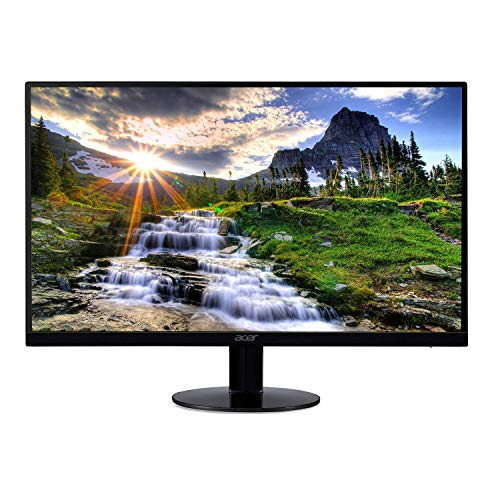
The SB220Q bi fits where bigger screens cannot. Its 21.5-inch IPS panel keeps the footprint small, the thin Zero Frame bezel looks tidy, and the 75 Hz refresh keeps everyday motion smooth. One HDMI cable connects it to a laptop or desktop, and the VGA port covers older machines.
- Specs: 21.5-inch IPS panel; 1920 x 1080 Full HD; 75 Hz refresh; 4 ms response time; 250 nits brightness; HDMI and VGA ports; AMD FreeSync; Zero Frame thin bezel; 178-degree viewing angles
- Best for: A small desk, a dorm room, a kitchen counter setup, or a second screen beside a laptop.
- Watch out for: At 21.5 inches, side-by-side windows feel cramped — this is a one-window-at-a-time screen. The stand tilts only, with no height adjustment.
- View on Amazon
4. LG 24U411A-B — Smooth Everyday Motion
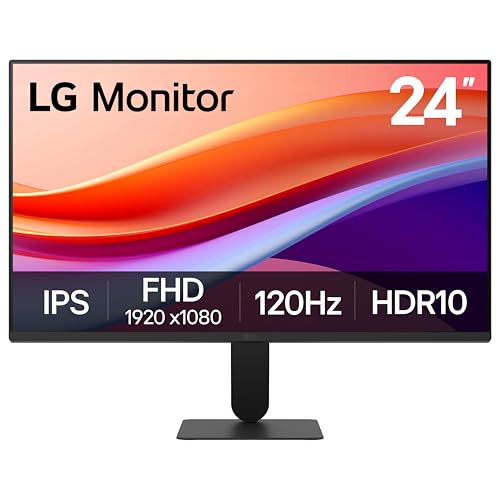
The 24U411A-B pairs a 120 Hz refresh with an IPS panel, so scrolling, dragging windows, and casual video look noticeably smoother than on a standard 60 Hz screen. Reader Mode softens the screen for long reading sessions, and the slim stand base leaves more desk room for a keyboard and notebook.
- Specs: 23.8-inch IPS panel; 1920 x 1080 Full HD; 120 Hz refresh; 1 ms Motion Blur Reduction; HDR10; sRGB coverage 99; HDMI and VGA ports; Reader Mode; Flicker Safe; slim stand base; VESA mountable
- Best for: Anyone who reads, scrolls, and watches video for hours and wants motion to look smooth without paying for a gaming screen.
- Watch out for: The stand tilts only, so plan on a riser or a VESA arm if you need the screen higher. There is no USB-C port — connect with HDMI.
- View on Amazon
5. AOC 24B2H2 — Two-Device Desks

The 24B2H2 keeps two computers on one screen simple: two HDMI ports let a desktop and a laptop share the monitor, and switching takes one button press. Its 100 Hz IPS panel looks smooth and bright, the frameless design suits a clean desk, and Low Blue Mode softens the screen in the evening.
- Specs: 23.8-inch IPS panel; 1920 x 1080 Full HD; 100 Hz refresh; 2x HDMI ports; sRGB coverage 106; Low Blue Mode; 3-sided frameless design; VESA mountable; tilt stand
- Best for: A desk shared by a desktop and a laptop, or a home worker who switches between a work machine and a personal one.
- Watch out for: There is no DisplayPort or USB-C, so HDMI is the only digital input. The stand tilts only, with no height adjustment.
- View on Amazon
Frequently Asked Questions
What size monitor is easiest for a home desk?
A 24-inch Full HD monitor is the easiest size for most home desks. Text is readable at arm’s length, the screen fits a standard desk, and Full HD gives a clear picture at this size. Choose 21.5 inches only when desk space is tight.
Do I need a 4K monitor for home use?
No. Full HD (1920 x 1080) is clear enough for documents, video calls, browsing, and video on a 24-inch screen. A higher resolution helps mainly on larger screens or for detailed photo and video work. For everyday home use, Full HD keeps things simple and easy on your computer.
What cable do I need to connect a monitor?
Most computers connect with HDMI — one cable carries picture and sound. If your laptop has a USB-C port that carries video, a USB-C monitor like the Dell P2422HE above connects picture, charging, and accessories through a single cable. Older desktops may need VGA, which several monitors above still include.
Can I use a monitor with a laptop that stays closed?
Yes. Connect the laptop to the monitor with HDMI or USB-C, plug in a keyboard and mouse, and close the lid — the laptop keeps running and uses the monitor as its screen. A USB-C monitor also charges the laptop while it works, so you can leave the laptop charger in your bag.
Conclusion
Monitors are easy once the choice is simple: a 24-inch Full HD IPS screen, an HDMI cable, and a stand that tilts. The Dell SE2422HX covers everyday home use, the Dell P2422HE docks a laptop with one cable, the Acer SB220Q bi fits small desks, the LG 24U411A-B adds smooth motion, and the AOC 24B2H2 shares one screen between two computers. Pick the one that matches your desk and your cables, plug it in, and you are done.
FAQ
What size monitor is easiest for a home desk?
Do I need a 4K monitor for home use?
What cable do I need to connect a monitor?
Can I use a monitor with a laptop that stays closed?
More from Amazon
Programs that pair well with the guide above. Offers and eligibility are set by Amazon and may change.
Free shipping on eligible items, Prime Video and more. Eligible new members can start with a free trial.
Start a Prime free trialA Prime membership for ages 18-24 with a trial period. Eligibility is set by Amazon.
See Prime for Young AdultsAudiobooks and podcasts to listen to on the go. Eligible new members can start with a free trial.
Try Audible freeAd-free music streaming. Eligible new subscribers can start with a free trial.
Try Music Unlimited freeAs an Amazon Associate we earn from qualifying purchases.