Key takeaways
- The best clicky keyboard pairs a mechanical board with blue-style clicky switches. Compare four boards for typing feel, layout, and everyday use.
The best clicky keyboard is the Razer BlackWidow V3 with Green switches for most buyers, because it pairs a loud, tactile click with a full-size layout, per-key RGB lighting, and a wrist rest in one complete board. If you want a smaller wireless board, the Keychron K2 Version 2 with Gateron Blue switches is the better pick, and typists who want a no-nonsense full-size board should look at the Das Keyboard 4 Professional with Cherry MX Blue switches. Every keyboard in this guide uses clicky switches only, so each keypress gives you a tactile bump and an audible click.
What Makes a Keyboard Clicky
A clicky keyboard uses switches that produce two kinds of feedback at once: a tactile bump you feel as the key actuates, and a sharp click you hear at the same moment. The click comes from a small mechanism inside the switch, often called a click jacket or click leaf, that snaps as the key travels down. Blue-style switches are the classic example, and most clicky boards use them or a close equivalent: Cherry MX Blue, Gateron Blue, Razer Green, and Logitech GX Blue all follow the same idea.
That feedback is the whole point. The click tells your fingers a key has registered without you needing to press the key all the way down, which many typists find faster and more accurate than a smooth linear switch. The sound also makes typing feel more deliberate, and for many people it is simply more enjoyable than typing on a quiet membrane board.
The trade-off is noise. A clicky board is loud by design, and the click carries across a room. It can be a poor fit for shared offices, late-night sessions in a shared bedroom, or voice chat where the microphone picks up every keystroke. Before you buy, think about where the keyboard will live and who else will hear it.
How to Choose a Clicky Keyboard
Switch type
All four boards in this guide use clicky switches, but the switches are not identical. Cherry MX Blue is the long-running reference, with a firm bump and a crisp click. Gateron Blue feels a little smoother on the way down, Razer Green has a slightly heavier and more pronounced click, and Logitech GX Blue sits in the same family with a clean snap. If you have tried one blue-style switch and liked it, the others will feel familiar. If you have never typed on a clicky board, any of these four is a fair introduction, and the layout and features matter more than the small differences between blue switches.
Layout
Full-size boards keep the number pad, which suits spreadsheets and data entry. Tenkeyless boards drop the number pad and give your mouse more room, which many gamers prefer. Compact 75 percent boards go further, keeping the function row and arrow keys in a smaller footprint that fits small desks and travel bags. Pick the layout that matches your desk space and whether you use a number pad every day.
Connection
Wired boards give you a simple plug-and-play connection with no battery to charge, and they are the natural choice for a desk that never moves. Wireless boards add Bluetooth and a rechargeable battery, which suits people who switch between a desktop, a laptop, and a tablet. A wireless board that also works wired over USB-C gives you both options, so a dead battery never ends a session.
Build and keycaps
An aluminum top plate adds weight and keeps the board from sliding around during fast typing. Doubleshot keycaps resist shine and keep legends legible longer than pad-printed caps. A detachable cable makes the board easier to pack and lets you replace a worn cable instead of the whole keyboard.
Extras that matter
A wrist rest helps during long typing sessions. A volume roller and dedicated media keys let you adjust sound without leaving your game or document. A built-in USB hub turns the keyboard into a small dock for a mouse receiver or flash drive. Per-key RGB lighting is a matter of taste, and some of the best typing boards skip lighting entirely in favor of a cleaner design.
The Best Clicky Keyboards
Razer BlackWidow V3 With Green Switches

The BlackWidow V3 is the classic full-size clicky gaming keyboard, and the Green switch version is the one to buy if you want the loudest, most tactile feel Razer makes. Each Green switch gives a firm bump and a clear click, with an actuation force of 50 grams and a lifespan of 80 million keystrokes. The transparent switch housing lets the Chroma RGB lighting shine through, and the doubleshot ABS keycaps hold up to heavy daily use.
The board itself is built around an aluminum top frame, and it includes a multi-function digital roller, dedicated media keys, USB passthrough, and an ergonomic wrist rest. Fully programmable keys and on-the-fly macro recording run through Razer Synapse software, so you can remap keys and build macros for games or work. Cable-routing grooves under the board keep the cable tidy on your desk.
Who it is for: Gamers and typists who want a full-size board with a number pad, bright per-key lighting, and a wrist rest included in the box.
Limitations: It is wired only, with no wireless mode, and the click is loud enough to carry into voice chat. The board is large, so it needs a desk with room for a full-size layout plus a mouse.
Keychron K2 Version 2 With Gateron Blue Switches

The Keychron K2 Version 2 is a compact 75 percent board with 84 keys, and the Gateron Blue version brings a satisfying click to a layout that still keeps the function row and arrow keys. Gateron Blue switches actuate at 60 grams of force with a clear tactile bump and click, and they are built for a lifespan of 50 million keystrokes. The board connects over Bluetooth 5.1 to up to three devices, or over USB-C wired, and it works with both Mac and Windows layouts.
The aluminum frame gives the K2 a solid feel for its size, and the RGB backlighting is bright enough for dark rooms. A 4000 mAh battery keeps the board running for long stretches between charges, and the compact footprint leaves plenty of desk space for a mouse. The K2 is one of the few clicky boards that works well as a travel keyboard, since it is small, wireless, and easy to pair with a laptop or tablet.
Who it is for: People who want a clicky board for a small desk, a laptop setup, or a bag, and anyone who switches between Mac and Windows.
Limitations: The 75 percent layout has no number pad, and the compact key spacing takes a day or two to get used to if you are coming from a full-size board. The click is still loud, so it is best suited to a home setup rather than a shared office.
Logitech G PRO Mechanical TKL With GX Blue Clicky Switches

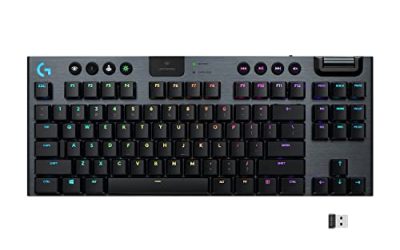
The Logitech G PRO is a tournament-style tenkeyless board built around GX Blue clicky switches. The switches give a sharp tactile bump and an audible click, with 2.0 mm actuation and 50 grams of actuation force, and the tenkeyless layout drops the number pad to bring your mouse hand closer to the keyboard. Per-key LIGHTSYNC RGB lighting covers the full color range, and onboard memory stores your lighting profile on the board itself.
The detachable Micro USB cable makes the G PRO easy to pack for LAN events or a shared desk, and the compact frame feels dense and stable under fast typing. Logitech G HUB software handles lighting and key remapping, and the board is aimed squarely at competitive play, where the click gives clear feedback on every input.
Who it is for: Competitive gamers and anyone who wants a compact, portable clicky board with a clean tenkeyless layout.
Limitations: There is no number pad and no wrist rest in the box, and the Micro USB connection feels dated next to boards that use USB-C. The GX Blue click is loud, so it is not the right board for a quiet room.
Das Keyboard 4 Professional With Cherry MX Blue Switches

The Das Keyboard 4 Professional is the typist’s clicky board. It uses Cherry MX Blue switches with gold-plated contacts, built for a lifespan of 50 million keystrokes, and the click is crisp and consistent across the full 104-key layout. An anodized aluminum top panel keeps the board rigid, and the large volume knob and dedicated media controls sit at the top right where they are easy to reach.
What sets the 4 Professional apart is what it leaves out: there is no backlighting and no companion software to install. Instead you get a two-port USB 3.0 hub built into the side, full N-key rollover, and a magnetic footbar that sets the typing angle and doubles as a ruler. It is a plug-and-play board that focuses on typing feel and build quality rather than lighting effects.
Who it is for: Writers, programmers, and office workers who type all day and want a full-size board with a number pad, a volume knob, and a USB hub.
Limitations: There is no backlighting for dark rooms, no wireless mode, and no software layer for macros or per-key lighting. The click is loud, so it suits a private office or home desk better than a shared workspace.
Comparison Table
| Keyboard | Switch | Layout | Connection | Backlight | Standout Feature |
|---|---|---|---|---|---|
| Razer BlackWidow V3 | Razer Green | Full-size | Wired USB | Per-key RGB | Wrist rest and media roller included |
| Keychron K2 Version 2 | Gateron Blue | 75 percent, 84 keys | Bluetooth and USB-C | RGB | Wireless with Mac and Windows support |
| Logitech G PRO TKL | GX Blue | Tenkeyless | Wired, detachable cable | Per-key RGB | Compact tournament-ready frame |
| Das Keyboard 4 Professional | Cherry MX Blue | Full-size, 104 keys | Wired USB | None | Volume knob and two-port USB hub |
Frequently Asked Questions
What is a clicky keyboard?
A clicky keyboard uses mechanical switches that give you a tactile bump and an audible click at the actuation point. Blue-style switches are the most common clicky type, including Cherry MX Blue, Gateron Blue, Razer Green, and Logitech GX Blue. The click confirms each keypress by sound and feel, which many typists prefer over a smooth linear switch.
Are clicky keyboards good for gaming?
Yes, clicky keyboards work well for gaming, because the tactile bump and click give clear feedback on every keypress. Many players like the confirmation that an ability or movement key has registered. The main drawback is noise: the click can be picked up by a microphone during voice chat, and it can distract other people in the room. If you play with an open microphone or share a room, a quieter switch may suit you better.
Are clicky switches louder than tactile switches?
Yes. A tactile switch such as Cherry MX Brown gives you a bump without the click, so it is noticeably quieter than a clicky switch. A clicky switch adds a snapping mechanism that produces the audible click on top of the bump, which is why blue-style switches are the loudest common switch type. If you like the bump but need less noise, a tactile switch is the middle ground.
Can I use a clicky keyboard in an office?
You can, but it depends on the office. In a private office or a home office, a clicky board is usually fine and many people enjoy typing on one all day. In an open-plan office or a shared workspace, the click carries and can bother colleagues, especially during long typing sessions. If you share a room, consider a tactile board instead, or save the clicky board for home.
How long do clicky switches last?
The makers of the switches in this guide list lifespans of 50 million keystrokes for Cherry MX Blue, Gateron Blue, and Logitech GX Blue switches, and 80 million keystrokes for Razer Green switches. In everyday use, that means years of typing before wear becomes a concern, and the click stays consistent for most of the switch’s life. Keycap shine and cable wear usually show up before the switches themselves wear out.
Conclusion
The best clicky keyboard depends on your layout and where you type. The Razer BlackWidow V3 with Green switches is the strongest all-around pick, with a full-size layout, per-key RGB lighting, a wrist rest, and the most pronounced click in this guide. The Keychron K2 Version 2 with Gateron Blue switches is the best compact and wireless option, the Logitech G PRO TKL with GX Blue switches is the best portable board for competitive play, and the Das Keyboard 4 Professional with Cherry MX Blue switches is the best choice for all-day typing. Whichever you pick, make sure the click fits your room as well as your fingers, because a clicky board is meant to be heard.
Disclosure: As an Amazon Associate, we may earn from qualifying purchases.
FAQ
What is a clicky keyboard?
Are clicky keyboards good for gaming?
Are clicky switches louder than tactile switches?
Can I use a clicky keyboard in an office?
How long do clicky switches last?
More from Amazon
Programs that pair well with the guide above. Offers and eligibility are set by Amazon and may change.
Free shipping on eligible items, Prime Video and more. Eligible new members can start with a free trial.
Start a Prime free trialA Prime membership for ages 18-24 with a trial period. Eligibility is set by Amazon.
See Prime for Young AdultsAudiobooks and podcasts to listen to on the go. Eligible new members can start with a free trial.
Try Audible freeAd-free music streaming. Eligible new subscribers can start with a free trial.
Try Music Unlimited freeAs an Amazon Associate we earn from qualifying purchases.