Our Short List of 3

- Best for: Long sessions with a palm or relaxed claw grip, where you want the lightest ergonomic wireless shell in this group.
- Sensor: Focus Pro 30K optical, up to 30,000 DPI
- Weight: 63 g (Black)
- Switches: Razer Optical Switches Gen-3
- Connectivity: Razer HyperSpeed Wireless

- Best for: Players who rest the thumb as much as the palm, and who use tilt-wheel and extra controls across games and desktop work alike.
- Sensor: Focus Pro 35K Optical Sensor Gen-2, up to 35,000 DPI
- Controls: 13 customizable controls (11 buttons plus tilt wheel functions, as listed)
- Wheel: HyperScroll Tilt Wheel
- Switches: Razer Optical Mouse Switches Gen-3

- Best for: Medium-to-large hands that want a tall, filled palm shape and a full set of thumb controls for mixed gaming and desktop use.
- Sensor: HERO 25K, 100 to 25,600 DPI per product information
- Switches: LIGHTFORCE hybrid optical-mechanical
- Buttons: 13
- Connectivity: LIGHTSPEED wireless, USB-C charging
All 4 Picks at a Glance
| Product | Specs | Action |
|---|---|---|
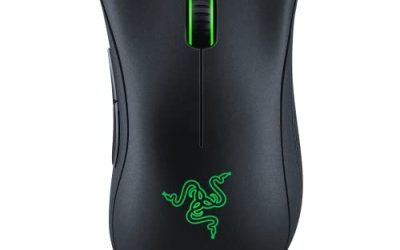
| Razer DeathAdder V3 Pro, Black |
| Check price on Amazon |
| Razer Basilisk V3 Pro 35K, Black |
| Check price on Amazon |
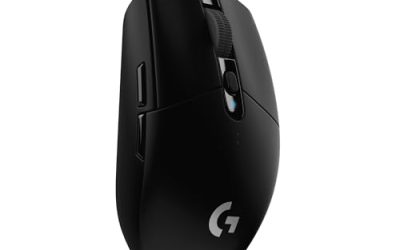
| Logitech G502 X Plus, Black |
| Check price on Amazon |
 Glorious Model D Wired, Matte Black |
| Check price on Amazon |
Key takeaways
- Five ergonomic gaming mice compared on shape, thumb support and listing-stated specs, from a 63 g wireless Razer to a sculpted Logitech flagship.
An ergonomic gaming mouse is bought for the hours after the first one. Any mouse feels acceptable for twenty minutes; the purchase that matters is the one whose shape still supports your hand in hour three of a session, when a flat symmetrical shell starts asking your fingers and wrist to do the work the mouse should be doing. The real decision is which shaped shell fits your hand size, your grip and the way you actually play.
Every mouse below is a right-handed ergonomic design chosen from its Amazon listing, and the picks serve different buyers: players who want the lightest shaped wireless mouse, players who want a thumb rest and a tilt wheel, and players who prefer a wired shell with nothing to charge. Specs come from the product names and listing fields on the Amazon product pages.
Quick Picks
As an Amazon Associate we earn from qualifying purchases.
| Product | Best for | Key spec from title |
|---|---|---|
| Razer DeathAdder V3 Pro, Black | Long sessions with a palm or relaxed claw grip, where you want the lightest ergonomic wireless shell in this group. | 63 g, Focus Pro 30K sensor, HyperSpeed Wireless |
| Razer Basilisk V3 Pro 35K, Black | Players who rest the thumb as much as the palm, and who use tilt-wheel and extra controls across games and desktop work alike. | Focus Pro 35K sensor, HyperScroll Tilt Wheel, thumb rest |
| Logitech G502 X Plus, Black | Medium-to-large hands that want a tall, filled palm shape and a full set of thumb controls for mixed gaming and desktop use. | HERO 25K sensor, 13 buttons, LIGHTSYNC RGB |
| Glorious Model D Wired, Matte Black | A wired desk setup for medium-to-large hands that want an ergonomic shell at a genuinely light weight, with no charging routine. | 68 g, Pixart 3360 sensor, honeycomb ergonomic shell |
| SteelSeries Rival 3, Black | A first ergonomic gaming mouse for a wired setup, where a shaped shell and simple controls matter more than flagship specifications. | TrueMove Core sensor, 8,500 CPI, split trigger buttons |
How to Choose
Shape language: what ergonomic actually changes
An ergonomic shell is sculpted for one hand, almost always the right, with a sloped top, a shaped thumb side and a back that fills the palm. That fill is the point: contact spreads across the whole hand instead of concentrating on fingertips, which is what makes long sessions sustainable. The trade is commitment. A shaped mouse supports one grip family well and resists others, so the first check is whether the shell’s intended grip matches yours, before any sensor figure enters the decision at all.
Hand size decides which ergonomic shell fits
Ergonomic mice are not one size. The Model D’s listing positions it for medium to large hands, while the Basilisk’s stated 13 cm length and thumb rest target a fuller palm. Measure your hand from middle fingertip to wrist crease, then compare it with the mouse length the listing states where it states one. A shell that is too long pushes your fingers past the primary buttons; one that is too short leaves the palm unsupported, which quietly defeats the reason for buying ergonomic in the first place.
Thumb support and wheel design are comfort features
Two details separate the ergonomic tiers here. A thumb rest, stated on the Basilisk’s listing, gives the thumb a shelf instead of a dragging surface. A tilt wheel adds side inputs and, on the Basilisk, free-spin scrolling for long pages. The G502 X Plus answers with more thumb-side buttons rather than a shelf. None of these is decoration: over hours, where the thumb rests and how the wheel behaves shape how relaxed the hand stays, so weigh them as heavily as the sensor specification.
Weight and connection set the daily routine
This group spans 63 g to 112 g, and both ends are legitimate ergonomic choices: light shells reduce the effort of every movement, heavier filled shells feel planted for palm players. Connection matters the same way. Wireless models here state battery lives from 90 to 140 hours, so charging is a weekly-or-rarer event, while the two wired mice remove the question entirely. Decide which routine you will actually keep, because an ergonomic mouse left flat on the desk supports nothing.
The 5 Best Options
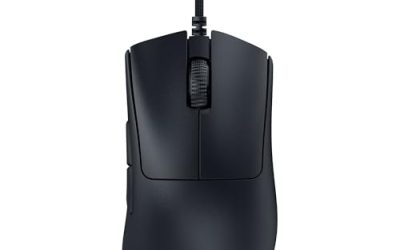
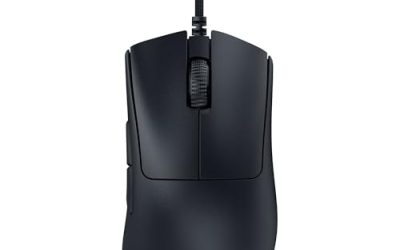
Razer DeathAdder V3 Pro, Black
- Best for: Long sessions with a palm or relaxed claw grip, where you want the lightest ergonomic wireless shell in this group.
- Sensor: Focus Pro 30K optical, up to 30,000 DPI
- Weight: 63 g (Black)
- Switches: Razer Optical Switches Gen-3
- Connectivity: Razer HyperSpeed Wireless
Long sessions with a palm or relaxed claw grip, where you want the lightest ergonomic wireless shell in this group.
There is no thumb rest and no tilt wheel on this model, so if your hand expects side support or your games use horizontal scrolling, the Basilisk below fits that hand better.
The DeathAdder V3 Pro is the ergonomic pick for players who want a shaped shell without shaped-shell weight. Razer’s listing puts it at 63 g with the Focus Pro 30K optical sensor, Gen-3 optical switches and HyperSpeed Wireless, and describes the form as a refined ergonomic shape. Five programmable buttons keep the layout simple, and the stated battery life runs up to 90 hours. It suits palm and relaxed claw players who rest their whole hand on the mouse and want the shell, not their fingers, to carry the aim during long sessions.
Watch out for: There is no thumb rest and no tilt wheel on this model, so if your hand expects side support or your games use horizontal scrolling, the Basilisk below fits that hand better.
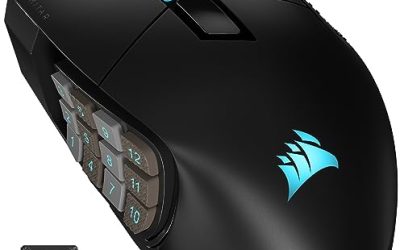
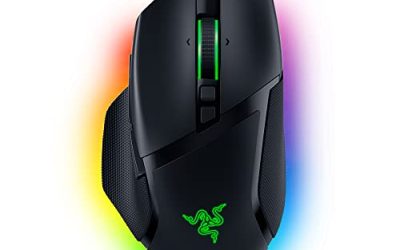
Razer Basilisk V3 Pro 35K, Black
- Best for: Players who rest the thumb as much as the palm, and who use tilt-wheel and extra controls across games and desktop work alike.
- Sensor: Focus Pro 35K Optical Sensor Gen-2, up to 35,000 DPI
- Controls: 13 customizable controls (11 buttons plus tilt wheel functions, as listed)
- Wheel: HyperScroll Tilt Wheel
- Switches: Razer Optical Mouse Switches Gen-3
Players who rest the thumb as much as the palm, and who use tilt-wheel and extra controls across games and desktop work alike.
At 112 g per the listing field it is nearly twice the DeathAdder’s weight, so flick-heavy FPS players should feel that difference before choosing it for shape alone.
The Basilisk V3 Pro 35K is the feature-heavy ergonomic option. Its listing states a Focus Pro 35K Optical Sensor Gen-2, a HyperScroll Tilt Wheel, Gen-3 optical switches and a right-handed ergonomic design with a thumb rest, which is the detail relaxed hands notice most. The listing counts 13 customizable controls, described in its fields as 11 buttons plus tilt wheel functions. Bluetooth and HyperSpeed wireless are both listed, and the stated average battery life is 140 hours, so it also covers a desk shared between a gaming PC and a work laptop.
Watch out for: At 112 g per the listing field it is nearly twice the DeathAdder’s weight, so flick-heavy FPS players should feel that difference before choosing it for shape alone.
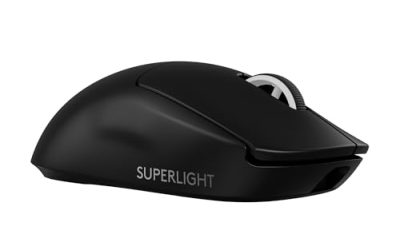
Logitech G502 X Plus, Black
- Best for: Medium-to-large hands that want a tall, filled palm shape and a full set of thumb controls for mixed gaming and desktop use.
- Sensor: HERO 25K, 100 to 25,600 DPI per product information
- Switches: LIGHTFORCE hybrid optical-mechanical
- Buttons: 13
- Connectivity: LIGHTSPEED wireless, USB-C charging
Medium-to-large hands that want a tall, filled palm shape and a full set of thumb controls for mixed gaming and desktop use.
The sculpted shape is committed: the high back and thumb ledge suit palm grip, and fingertip players usually find the body gets in their way.
The G502 X Plus is the sculpted flagship in this group. Logitech’s listing states the HERO 25K sensor with a 100 to 25,600 DPI range, LIGHTFORCE hybrid optical-mechanical switches, LIGHTSPEED wireless and 13 buttons, including the thumb-side controls the G502 shape is known for. Battery life is stated as under 130 hours, charging is USB-C, and the mouse is POWERPLAY compatible for buyers inside Logitech’s charging-pad system. Its taller sculpted body fills a medium-to-large palm, which is exactly what smaller shells fail to do for bigger hands in long sessions.
Watch out for: The sculpted shape is committed: the high back and thumb ledge suit palm grip, and fingertip players usually find the body gets in their way.
Glorious Model D Wired, Matte Black
- Best for: A wired desk setup for medium-to-large hands that want an ergonomic shell at a genuinely light weight, with no charging routine.
- Sensor: Pixart 3360, up to 12,000 DPI
- Weight: 68 g
- Connectivity: wired USB
- Switches: Omron
A wired desk setup for medium-to-large hands that want an ergonomic shell at a genuinely light weight, with no charging routine.
The honeycomb shell is open to dust and spills, and the wired cable needs a bungee or clear desk run to stay out of the way during low-sensitivity sweeps.
The Model D is the wired ergonomic entry here, and its listing keeps the formula plain: a Pixart 3360 sensor up to 12,000 DPI, Omron switches, six buttons and a honeycomb ergonomic shell at 68 g. Glorious positions the Model D line for medium to large hands, and the shell length is 12.8 cm in same-line listing data. Because it is wired, there is no battery to manage and no receiver to lose, which makes it a steady desk fixture. It fits players who like the shaped-shell idea but want the lightest, simplest version of it.
Watch out for: The honeycomb shell is open to dust and spills, and the wired cable needs a bungee or clear desk run to stay out of the way during low-sensitivity sweeps.
SteelSeries Rival 3, Black
The Rival 3 closes the group as the straightforward wired ergonomic mouse. SteelSeries’ title states the TrueMove Core optical sensor at 8,500 CPI, six programmable buttons and split trigger buttons, with the shape described as ergonomic. There are no batteries, no wireless modes and no software-heavy extras in the captured listing fields, and that plainness is its appeal: plug it in and the shape does the ergonomic work. It suits players moving up from a basic office mouse who want a shaped gaming shell and dependable primary clicks without paying for flagship sensors.
Specs
- Sensor: TrueMove Core optical, up to 8,500 CPI
- Buttons: 6 programmable buttons
- Design: split trigger buttons per listing title
- Lighting: Brilliant Prism RGB per listing title
- Connectivity: wired
- Shape: ergonomic per listing title
- Weight and polling rate: not stated in the captured listing fields
Best for: A first ergonomic gaming mouse for a wired setup, where a shaped shell and simple controls matter more than flagship specifications.
Watch out for: The listing data captured for this mouse does not state a weight or polling figure, so check the live product page if either number is a deciding factor for you.
Which One Fits Your Situation
Your hand aches after two hours of play
Start with the Basilisk V3 Pro 35K for its thumb rest and filled shape, or the G502 X Plus if your hand is larger; both spread contact across the palm instead of loading the fingers. Either way, judge the fit across a full evening of play rather than a short hold at the desk, because palm support only proves itself over hours.
You play fast shooters but want a shaped shell
Take the DeathAdder V3 Pro: it keeps the ergonomic form at 63 g with an esports sensor, so the shape supports the hand without slowing the flick. Its high sensor ceiling and optical switches are esports-grade parts wearing an ergonomic shape, which is precisely the combination players leaving symmetrical mice usually say they cannot find.
Your desk is wired and you hate charging
Take the Model D for a light shaped shell with no battery at all, or the Rival 3 if you prefer a solid shell without honeycomb openings. Between them, the Model D is the lighter and simpler shell, while the Rival 3 keeps a solid back and split triggers; both ask nothing of you beyond a free USB port.
One mouse covers work and gaming PCs
Take the Basilisk V3 Pro 35K, whose listing includes Bluetooth beside HyperSpeed wireless, and move it between machines without moving a receiver. The same Bluetooth mode also covers a tablet or a second laptop, and the long stated battery life means the receiver shuffle that usually kills this arrangement rarely gets a chance to start.
Common Mistakes
- Buying an ergonomic mouse in the wrong size because the sensor numbers looked better, when shell fit is the entire point of the category and no DPI figure compensates for an unsupported palm.
- Assuming ergonomic means left-hand friendly: every mouse in this group is a right-handed shape, and a left-handed player needs an ambidextrous or true left-handed model instead.
- Judging comfort in a five-minute hold, when ergonomic fit only shows itself across a full session; a shell that feels merely fine at minute five can be the one that still feels fine at hour three.
- Ignoring the thumb side of the mouse, where rests, ledges and button placement decide how relaxed half the hand stays, and comparing only sensors and weights instead.
- Switching to a much heavier filled shell for comfort, then aiming with the wrist because the weight discourages arm movement, which trades one strain pattern for another.
Frequently Asked Questions
Are ergonomic gaming mice only for palm grip?
Mostly, but not entirely. Shaped shells are designed around palm contact, yet relaxed claw players also use them because the rear of the shell supports the palm heel. Pure fingertip players usually prefer small symmetrical mice, since an ergonomic hump gets in the way of fingertip movement.
Does an ergonomic mouse reduce hand strain?
A shape that fits your hand spreads contact and lets muscles stay closer to rest than a flat shell does, and listings describe these designs as ergonomic for that reason. No mouse listing here makes a medical claim, and persistent pain is a question for a clinician, not for a product page.
Which of these fits a large hand?
The G502 X Plus and the Model D are the group’s larger shells; the Model D’s listing positions it for medium to large hands. Compare your hand length with any length the listing states, and favour the shell that lets your fingers rest on the buttons without reaching.
Wired or wireless for long sessions?
Both work. The wireless picks state 90 to 140 hours of battery, so charging rarely interrupts play, while the wired Model D and Rival 3 remove charging entirely. Choose by desk routine rather than by latency worries at this level of equipment.
FAQ
Are ergonomic gaming mice only for palm grip?
Does an ergonomic mouse reduce hand strain?
Which of these fits a large hand?
Wired or wireless for long sessions?
More from Amazon
Programs that pair well with the guide above. Offers and eligibility are set by Amazon and may change.
Free shipping on eligible items, Prime Video and more. Eligible new members can start with a free trial.
Start a Prime free trialA Prime membership for ages 18-24 with a trial period. Eligibility is set by Amazon.
See Prime for Young AdultsAudiobooks and podcasts to listen to on the go. Eligible new members can start with a free trial.
Try Audible freeAd-free music streaming. Eligible new subscribers can start with a free trial.
Try Music Unlimited freeAs an Amazon Associate we earn from qualifying purchases.