Our Short List of 3
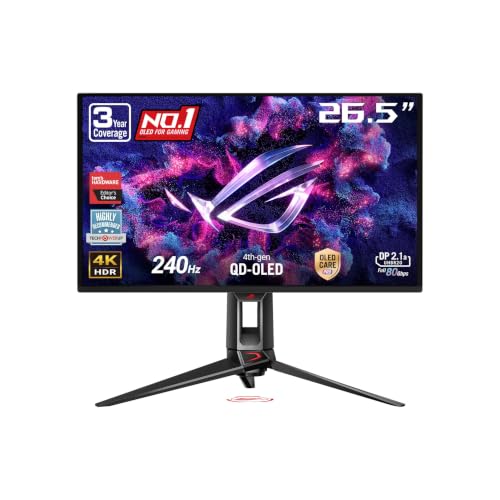
- Best for: high-end gaming rigs that can drive 4K at very high frame rates
- 27-inch QD-OLED panel
- 4K UHD resolution, 3840 x 2160
- 240Hz refresh rate
- 0.03ms response time

- Best for: photo and video editors who dock a laptop over a single USB-C cable
- 27-inch IPS panel
- 4K UHD resolution, 3840 x 2160
- 99 percent DCI-P3 and 99 percent Adobe RGB
- Delta E below 2, Calman Verified

- Best for: mixed gaming and work desks that want one QHD screen with USB-C
- 27-inch Fast IPS panel
- QHD resolution, 2560 x 1440
- 180Hz refresh rate
- 1ms response time
All 5 Picks at a Glance
| Product | Specs | Action |
|---|---|---|
| ASUS ROG Swift OLED PG27UCDM |
| Check price on Amazon |
| ASUS ProArt Display PA279CRV |
| Check price on Amazon |
| ASUS ROG Strix XG27ACS |
| Check price on Amazon |
 ASUS TUF Gaming VG27AQ5A |
| Check price on Amazon |
 ASUS VA24EHF Eye Care |
| Check price on Amazon |
Key takeaways
- Compare the best ASUS monitors for gaming, creative work and everyday desks, from a 4K OLED flagship and ProArt panels to fast QHD and budget Full HD.
Choosing an ASUS monitor is really a decision about which of the company’s families fits your desk. ROG and TUF models chase refresh rate and response time, ProArt models chase color accuracy, and the plain ASUS Eye Care line covers everyday work. The same 27-inch size can hide a 4K OLED built for fast play or a 60Hz-class IPS panel built for editing photos, so the family name and panel type matter more than the logo on the bezel.
This roundup is for gamers speccing a new rig, creators who dock a laptop over USB-C, and home-office buyers who want one dependable screen. Every pick below was selected from the model name and specifications printed on its Amazon listing, then matched to the job that listing describes best.
Quick Picks
As an Amazon Associate we earn from qualifying purchases
| Product | Best for | Key spec from title |
|---|---|---|
| ASUS ROG Swift OLED PG27UCDM | High-end 4K gaming | 4K QD-OLED, 240Hz |
| ASUS ProArt Display PA279CRV | Color-critical editing | 4K IPS, USB-C 96W |
| ASUS ROG Strix XG27ACS | QHD gaming with USB-C | QHD, 180Hz, HDR400 |
| ASUS TUF Gaming VG27AQ5A | Fast QHD play | QHD, 210Hz overclocked |
| ASUS VA24EHF Eye Care | Budget everyday desk | Full HD IPS, 100Hz |
How to Choose
Start with the panel, not the size
Panel technology decides how an ASUS monitor behaves day to day. QD-OLED delivers perfect blacks and near-instant pixel response, which suits dark game scenes and films, but it asks for varied content to reduce burn-in risk over years of static toolbars. IPS panels, used across the ProArt, Strix and TUF lines here, hold color and brightness at wide viewing angles and shrug off static screens. For a mixed desk where the monitor shows spreadsheets all morning and games at night, IPS remains the safer default, while OLED is the deliberate upgrade.
Match refresh rate to the games you actually play
Refresh rate only helps if your graphics card can feed it. A 240Hz OLED or a 210Hz TUF panel rewards fast shooters and racing titles, provided the GPU sustains very high frame rates at the monitor’s resolution. Story-driven games and console play rarely push past 120 frames per second, so a 180Hz QHD screen already leaves headroom. Check the response-time figure in the listing too, and note whether a headline rate is native or an overclock, because overclocked modes can behave differently with adaptive sync enabled.
Read color specs by the job, not the headline
Creators should look for wide gamut coverage stated in the listing, such as the 99 percent DCI-P3 and Adobe RGB figures on the ProArt model, plus factory calibration claims like Calman Verified and a low Delta E value. Those details matter when prints or graded video must match the screen. Gamers can treat wide sRGB coverage, such as the 133 percent figure on the Strix model, as a sign of vivid color rather than accuracy. Brightness and HDR labels also differ: HDR400 is an entry-level badge, not true high dynamic range.
Count ports and check the stand before you buy
A USB-C input with power delivery turns a monitor into a laptop dock, charging the machine while carrying the picture, and the wattage in the listing decides whether a hungry laptop stays charged under load. Daisy-chain DisplayPort support matters for tidy two-screen desks. On the physical side, confirm height adjustment if you share the desk or sit tall, and check whether the stand offers pivot for vertical documents. Several gaming models include a tripod socket or phone slot instead, which is useful for streamers but no substitute for an ergonomic stand.
The 5 Best Options
ASUS ROG Swift OLED PG27UCDM
- Best for: high-end gaming rigs that can drive 4K at very high frame rates
- 27-inch QD-OLED panel
- 4K UHD resolution, 3840 x 2160
- 240Hz refresh rate
- 0.03ms response time
high-end gaming rigs that can drive 4K at very high frame rates
OLED panels need varied content to limit burn-in risk from static desktop elements left on screen for years
The PG27UCDM is the monitor ASUS builds when nothing gets compromised: a 27-inch QD-OLED panel at full 4K, running at 240Hz with a 0.03ms response time. It suits players who run a powerful GPU and want motion clarity that LCD panels cannot match, and it doubles as a striking screen for films thanks to true 10-bit color. The custom heatsink and Neo proximity sensor show where the money goes, managing panel heat and waking the screen as you sit down. DisplayPort 2.1a support also makes it one of the few monitors ready for the newest graphics cards without compression compromises.
ASUS ProArt Display PA279CRV
- Best for: photo and video editors who dock a laptop over a single USB-C cable
- 27-inch IPS panel
- 4K UHD resolution, 3840 x 2160
- 99 percent DCI-P3 and 99 percent Adobe RGB
- Delta E below 2, Calman Verified
photo and video editors who dock a laptop over a single USB-C cable
the listing is built around color, not speed, so check the refresh rate in the listing if you also plan fast gaming
Editors and photographers are the audience here. The PA279CRV pairs a 27-inch 4K IPS panel with 99 percent coverage of both DCI-P3 and Adobe RGB, a Delta E below 2, and Calman Verified calibration, which is the combination print and video work actually demands. USB-C carries the picture and delivers 96W of charging, enough for most laptops under editing loads, and DisplayPort daisy-chaining keeps a second screen tidy. The height-adjustable stand completes a package aimed at people who stare at color all day rather than chase frame rates.
ASUS ROG Strix XG27ACS
- Best for: mixed gaming and work desks that want one QHD screen with USB-C
- 27-inch Fast IPS panel
- QHD resolution, 2560 x 1440
- 180Hz refresh rate
- 1ms response time
mixed gaming and work desks that want one QHD screen with USB-C
HDR400 is an entry-level HDR badge, and the listing does not headline USB-C charging wattage, so confirm it if your laptop must charge from the screen
The XG27ACS hits the balance many desks want: QHD resolution at 180Hz on a Fast IPS panel, sharp enough for work text and quick enough for competitive play. USB-C input makes it friendly to laptop users, the tripod socket on the stand suits streamers mounting a camera, and HDR400 support plus 133 percent sRGB coverage give games a vivid look. Extreme Low Motion Blur Sync and G-Sync compatibility cover tearing and blur from both directions. It is the sensible middle of this lineup, neither a flagship OLED nor a bare-bones office screen.
ASUS TUF Gaming VG27AQ5A
- Best for: fast-paced QHD gaming where refresh rate outranks everything else
- 27-inch Fast IPS panel
- QHD resolution, 2560 x 1440
- 210Hz refresh rate (overclocked)
- 0.3ms response time
fast-paced QHD gaming where refresh rate outranks everything else
the 210Hz figure is an overclock rather than the native rate, so confirm your graphics card and cable can drive it before relying on it
TUF models trade polish for pace, and the VG27AQ5A pushes a 27-inch QHD Fast IPS panel to a 210Hz overclocked refresh rate with a 0.3ms response figure. FreeSync Premium covers variable refresh for AMD cards and compatible systems, built-in speakers save desk space, and ASUS bundles its DisplayWidget Center software and Gaming AI features in the listing. This is the pick for players whose priority is the fastest panel motion in the group at QHD, and who are comfortable enabling an overclock in the on-screen menu to reach the headline rate.
ASUS VA24EHF Eye Care
- Best for: home offices, study desks and second screens on a sensible budget
- 24-inch class screen, 23.8-inch viewable IPS panel
- Full HD resolution, 1920 x 1080
- 100Hz refresh rate
- Adaptive-Sync support
home offices, study desks and second screens on a sensible budget
the listing shows HDMI as the input, with no DisplayPort or USB-C, so multi-device desks should look higher up this list
Not every desk needs 4K or esports speed. The VA24EHF is a 23.8-inch Full HD IPS screen with a frameless design, a 100Hz refresh rate that feels smoother than the old 60Hz office standard, and Adaptive-Sync for casual gaming after hours. ASUS builds its Eye Care features into this line, with low blue light and flicker-free operation for long document sessions, and the cabinet is wall mountable for small desks or arm setups. A single HDMI input keeps things simple, which fits a one-computer desk perfectly and limits multi-device setups by design.
Which One Fits Your Situation
You play fast shooters on a powerful PC
Take the VG27AQ5A if QHD is your resolution, because its overclocked 210Hz rate and 0.3ms response are built for quick target changes. If your card genuinely sustains high frame rates at 4K, the PG27UCDM is the step up, adding OLED contrast and DisplayPort 2.1a. Either way, adaptive sync in both listings keeps motion clean when frame rates dip mid-match.
You edit photos or video and dock a laptop
The PA279CRV was designed for exactly this desk. Its calibrated 4K IPS panel covers both DCI-P3 and Adobe RGB almost completely, and the 96W USB-C connection charges most laptops while carrying the image. Daisy-chain DisplayPort support also means a second screen later does not turn your desk into a cable nest.
One screen must cover workdays and game nights
The XG27ACS is the compromise that does not feel like one. QHD keeps text crisp at 27 inches, 180Hz covers fast games, and USB-C lets a work laptop share the screen with your gaming PC. The tripod socket is a quiet bonus if a webcam or camera joins the setup for calls or streaming.
You need a second screen or a simple home office display
Choose the VA24EHF and spend the savings elsewhere. Its 100Hz IPS panel is easy on the eyes during long documents, the frameless cabinet pairs neatly in dual-screen layouts, and wall mounting frees a small desk. It will not charge a laptop or drive fast games at high settings, but as a dependable everyday panel it covers the brief honestly.
Common Mistakes
- Buying a 240Hz 4K monitor for a graphics card that cannot sustain high frame rates at 4K, leaving the headline spec unused.
- Picking an OLED for a desk that shows the same static toolbar all day, every day, without considering burn-in over years of use.
- Assuming every USB-C port charges a laptop at full speed, when the wattage in the listing varies widely between models.
- Treating an HDR400 badge as true HDR performance, when it mainly certifies a minimum brightness level.
- Ignoring stand adjustment and inputs until the monitor arrives, then discovering it sits too low or lacks the port your console needs.
Frequently Asked Questions
What is the difference between ASUS ROG, TUF and ProArt monitors?
ROG is the flagship gaming line, where the OLED and fastest Strix models live. TUF Gaming targets value-focused players with high refresh rates and fewer extras. ProArt is the creator line, prioritizing calibrated color accuracy and USB-C docking over speed. The plain ASUS Eye Care range covers everyday office and home use at the lowest complexity.
Can these ASUS monitors charge a laptop over USB-C?
Some can, and the listing states the wattage where it applies. The ProArt PA279CRV delivers 96W, which suits most laptops. The Strix XG27ACS includes USB-C input, but its listing does not headline a charging figure, so check the product page details before counting on it as a charger. The VA24EHF has no USB-C at all.
Is a 4K monitor worth it at 27 inches?
For text-heavy work and editing, yes: 4K at 27 inches produces very sharp characters and fine detail that QHD cannot match, and the ProArt and ROG models here both exploit it. For gaming, 4K only pays off with a strong graphics card. Players with mid-range cards usually get smoother results from the QHD models in this roundup.
Do ASUS gaming monitors work with consoles as well as PCs?
Yes, through HDMI, and adaptive sync support in these listings helps smooth console frame rates where the console supports it. Check the individual listing for the HDMI version and the refresh rate available over HDMI, since some monitors only reach their headline rate over DisplayPort or USB-C. The product page for each model states its console-relevant figures.
FAQ
What is the difference between ASUS ROG, TUF and ProArt monitors?
Can these ASUS monitors charge a laptop over USB-C?
Is a 4K monitor worth it at 27 inches?
Do ASUS gaming monitors work with consoles as well as PCs?
More from Amazon
Programs that pair well with the guide above. Offers and eligibility are set by Amazon and may change.
Free shipping on eligible items, Prime Video and more. Eligible new members can start with a free trial.
Start a Prime free trialA Prime membership for ages 18-24 with a trial period. Eligibility is set by Amazon.
See Prime for Young AdultsAudiobooks and podcasts to listen to on the go. Eligible new members can start with a free trial.
Try Audible freeAd-free music streaming. Eligible new subscribers can start with a free trial.
Try Music Unlimited freeAs an Amazon Associate we earn from qualifying purchases.