Our Short List of 3

- Best for: Apartments and smaller homes with many devices that want set-and-forget management.
- Wi-Fi standard: Wi-Fi 6E, tri-band (2.4 GHz, 5 GHz, 6 GHz)
- Speed class: AXE5400
- Coverage: up to 2,000 sq. ft. (1-pack)
- Device support: 100+ devices

- Best for: Single-floor homes that want one strong router with manual control over traffic priorities.
- Wi-Fi standard: Wi-Fi 6 (802.11ax), dual-band
- Speed class: AX5700
- Processor: 2.0 GHz quad-core, 1 GB RAM
- Ports: 2.5G port, dedicated gaming port, Gigabit LAN ports

- Best for: Medium homes with one main viewing room and several wired streaming devices.
- Wi-Fi standard: Wi-Fi 6 (802.11ax), dual-band, 6-stream
- Speed class: AX5400, up to 5.4 Gbps combined
- Coverage: up to 2,500 sq. ft.
- Device support: up to 25 devices
All 3 Picks at a Glance
| Product | Specs | Action |
|---|---|---|
| Amazon eero Pro 6E Mesh Wi-Fi Router (1-Pack) |
| Check price on Amazon |
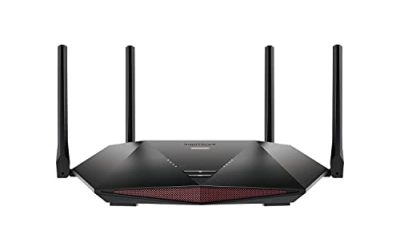
| ASUS RT-AX86U Pro AX5700 Dual-Band Wi-Fi 6 Gaming Router |
| Check price on Amazon |
| NETGEAR Nighthawk RAX50 AX5400 Wi-Fi 6 Router |
| Check price on Amazon |
Key takeaways
- Four simultaneous 4K streams need more than raw speed. Compare mesh and Wi-Fi 6 routers built to keep every screen in the house playing without buffering.
One television streaming on its own almost never breaks a home network. The picture falls apart on the evening when three or four screens start at once: a 4K film in the living room, a game stream in a bedroom, a tablet in the kitchen, and a video call running over the top. The real decision is not which router posts the biggest speed number, but which one keeps every simultaneous stream fed when the whole household presses play at the same time.
This roundup is for families, shared houses, and anyone whose router buckles under several concurrent streams. Every pick below was chosen from its Amazon listing name and specifications, with the emphasis on stated device counts, multi-user technology, and coverage figures rather than headline speed alone.
Quick Picks
As an Amazon Associate we earn from qualifying purchases
| Product | Best for | Key spec from title |
|---|---|---|
| TP-Link Deco XE75 Pro (3-Pack) | Large homes running streams in many rooms at once | AXE5400 tri-band Wi-Fi 6E mesh, covers up to 7,200 sq. ft. |
| Amazon eero Pro 6E (1-Pack) | Busy apartments that want simple app-driven setup | Wi-Fi 6E tri-band, connects 100+ devices |
| ASUS RT-AX86U Pro | One powerful router for a single-floor home | AX5700 dual-band Wi-Fi 6 with a 2.5G port |
| NETGEAR Nighthawk RAX50 | Medium homes with a fixed streaming corner | AX5400 6-stream Wi-Fi 6, up to 25 devices |
How to Choose
Simultaneous-stream capacity beats headline speed
A single 4K stream needs only a modest slice of bandwidth, so the bottleneck in a busy house is rarely the speed printed on the box. What matters is how the router shares airtime when many devices talk at once. Wi-Fi 6 features such as OFDMA and MU-MIMO let one router serve several devices in the same transmission window instead of making them queue, which is exactly the load pattern of a house full of streams. When you compare listings, look for the stated device count and the stream count, because those figures describe concurrent use far better than the combined gigabit rating does.
Mesh or a single router for streams spread across rooms
Streams fail at the edge of coverage long before they fail at the router itself. If your screens sit in rooms on different floors or at opposite ends of the house, a mesh kit places a node near each cluster of devices, so the bedroom television is not clinging to a weak signal from down the hall. A single powerful router still makes sense when the home is compact and most viewing happens within a room or two of it. Check the stated coverage area on the listing and be honest about your floor plan before paying for power you cannot use.
A 6 GHz band gives newer devices a lane of their own
Tri-band Wi-Fi 6E systems add a 6 GHz band that older phones, plugs, and cameras cannot enter. Streaming devices that support it, such as recent laptops, phones, and premium streaming boxes, get a quieter lane with less competition from the crowded 2.4 GHz and 5 GHz bands. In a mesh kit, that extra band can also carry traffic between nodes, leaving the other bands freer for your screens. If none of your streaming hardware supports Wi-Fi 6E yet, a strong dual-band Wi-Fi 6 router remains a sensible buy, but the 6 GHz lane is the clearest future-proofing step on these listings.
Wired ports and traffic controls for fixed screens
The most reliable stream is the one that never touches Wi-Fi. Televisions, consoles, and streaming boxes that sit near the router or a mesh node should be plugged in with Ethernet where the listing provides ports, freeing wireless airtime for the devices that genuinely move around. Traffic controls matter too: quality-of-service settings let you favour the living-room television over a background download when both compete at peak hour. Count the LAN ports on any router or node you shortlist, and note whether security or parental-control features need a subscription after an included trial period ends.
The 4 Best Options
TP-Link Deco XE75 Pro AXE5400 Tri-Band Mesh System (3-Pack)
For a house where streams run in several rooms at once, this three-node mesh kit attacks the problem from the coverage side. The listing rates it for up to 7,200 square feet and up to 200 connected devices, and its AI-driven mesh steers each screen to the node that serves it best. The dedicated 6 GHz band gives Wi-Fi 6E devices a clear lane and can support the backhaul between nodes, so a bedroom stream does not have to fight the living-room television for the same airtime.
Specs
- Wi-Fi standard: Wi-Fi 6E (802.11ax), tri-band
- Speed class: AXE5400, up to 5.4 Gbps combined
- Coverage: up to 7,200 sq. ft. (3-pack)
- Device support: up to 200 devices
- Ports: 2.5G WAN/LAN port plus Gigabit ports on each unit
- Mesh features: AI-driven mesh, TP-Link HomeShield
Best for: Larger or multi-storey homes where three or more rooms stream at the same time.
Watch out for: Advanced HomeShield features sit behind the optional Pro tier, and each node offers fewer wired ports than a full-size standalone router.
ASIN: B0B8B8MCF1
Amazon eero Pro 6E Mesh Wi-Fi Router (1-Pack)
- Best for: Apartments and smaller homes with many devices that want set-and-forget management.
- Wi-Fi standard: Wi-Fi 6E, tri-band (2.4 GHz, 5 GHz, 6 GHz)
- Speed class: AXE5400
- Coverage: up to 2,000 sq. ft. (1-pack)
- Device support: 100+ devices
Apartments and smaller homes with many devices that want set-and-forget management.
Some advanced features require the optional eero Plus subscription, and a single unit covers less area than the multi-node kits.
The eero Pro 6E suits households that want the multi-device problem handled quietly in the background. Its listing promises support for more than 100 connected devices and coverage up to 2,000 square feet from a single unit, with extra units added later if a new room starts buffering. Because eero is sold and supported through Amazon’s own storefront, setup runs through one app and updates arrive automatically. The built-in Zigbee hub is a side benefit for homes whose streaming setup shares the network with a growing pile of smart bulbs, locks, and sensors.
ASUS RT-AX86U Pro AX5700 Dual-Band Wi-Fi 6 Gaming Router
- Best for: Single-floor homes that want one strong router with manual control over traffic priorities.
- Wi-Fi standard: Wi-Fi 6 (802.11ax), dual-band
- Speed class: AX5700
- Processor: 2.0 GHz quad-core, 1 GB RAM
- Ports: 2.5G port, dedicated gaming port, Gigabit LAN ports
Single-floor homes that want one strong router with manual control over traffic priorities.
There is no 6 GHz band, so Wi-Fi 6E devices share the 5 GHz band with everything else in the house.
Not every streaming house needs mesh. Where most screens gather within a floor or two of one spot, this single ASUS router concentrates its budget on processing power and traffic control instead of extra nodes. The listing highlights a 2.5G port for fast internet plans, a dedicated gaming port, and AiMesh compatibility if you later want to extend it. Adaptive QoS lets you prioritise streaming traffic at peak hour, and the subscription-free AiProtection Pro security avoids the ongoing fees several rivals charge for the same peace of mind.
NETGEAR Nighthawk RAX50 AX5400 Wi-Fi 6 Router
- Best for: Medium homes with one main viewing room and several wired streaming devices.
- Wi-Fi standard: Wi-Fi 6 (802.11ax), dual-band, 6-stream
- Speed class: AX5400, up to 5.4 Gbps combined
- Coverage: up to 2,500 sq. ft.
- Device support: up to 25 devices
Medium homes with one main viewing room and several wired streaming devices.
The 25-device rating is the lowest here, and NETGEAR Armor needs a subscription after the included first year.
The RAX50 is the straightforward standalone option for a medium home whose streaming centres on one main room. NETGEAR’s listing rates it for coverage up to 2,500 square feet and up to 25 devices, with six Wi-Fi streams sharing the load between the screens, phones, and laptops that are active at once. Four Gigabit LAN ports let you wire the television, console, and streaming box directly, and the USB 3.0 port can share storage across the network. NETGEAR Armor security is included on the listing, though it moves to a paid plan after the first year.
Which One Fits Your Situation
Three or more rooms stream every evening
Choose the TP-Link Deco XE75 Pro kit. Your problem is distance as much as capacity, and three nodes rated for up to 7,200 square feet put a strong signal beside each television instead of asking one router to shout through walls. The 200-device ceiling also leaves room for the phones, tablets, and smart speakers that pile onto the same network.
A busy apartment with dozens of gadgets
The eero Pro 6E fits best. One unit covers up to 2,000 square feet and supports more than 100 devices, which matches an apartment full of streaming sticks, consoles, and smart home gear. Setup and updates run through the app, and you can add a second unit later if a far bedroom starts to struggle.
One living room does almost all the viewing
Take the ASUS RT-AX86U Pro. A single strong router with a 2.5G port and adaptive QoS keeps the main television, console, and streaming box fed without paying for mesh nodes you would never place. Its subscription-free security also suits buyers who strongly dislike ongoing fees attached to a router purchase.
A medium home on a tighter equipment budget
The NETGEAR Nighthawk RAX50 covers the essentials: 2,500 square feet of stated coverage, six streams for concurrent devices, and four LAN ports for wiring the gear that never moves. It suits a household whose simultaneous streams number two or three rather than five, and whose device count stays relatively modest.
Common Mistakes
- Buying on combined gigabit speed alone, when concurrent-stream behaviour depends on MU-MIMO, OFDMA, and the stated device count.
- Placing a single router in a corner or cupboard, then blaming the internet plan when far bedrooms buffer.
- Leaving the main television on Wi-Fi while Ethernet ports sit empty on the router a metre away.
- Ignoring subscription terms, so security or parental controls lapse when an included trial period ends.
- Adding a cheap extender that creates a second network name instead of choosing a true mesh system with one name throughout the home.
Frequently Asked Questions
How many simultaneous 4K streams should a router handle?
Count your screens at the busiest hour rather than your total device list. A household that runs three 4K streams plus calls and browsing needs a router whose listing states a comfortable device margin, such as the 100-plus and 200-device ratings above, because phones and smart devices compete for airtime even when they are not streaming.
Is mesh always better than a single router for streaming?
No. Mesh wins when streams are spread across floors or distant rooms, because each screen connects to a nearby node. In a compact flat where everything sits near one room, a single capable router such as the ASUS or NETGEAR here usually delivers the same result with less hardware to manage and fewer nodes to place.
Does Wi-Fi 6E matter if my televisions only support Wi-Fi 6?
Partly. Your Wi-Fi 6 screens will not use the 6 GHz band directly, but in a mesh system that band can carry traffic between nodes, which frees the 5 GHz band your televisions do use. Newer phones, laptops, and premium streaming boxes that support 6E also move off the crowded bands, easing the load for everything else.
Should I wire my streaming devices instead of using Wi-Fi?
Yes, whenever the device sits near the router or a mesh node. A wired television or console removes one heavy stream from the wireless pool entirely, leaving more airtime for tablets and phones that cannot be plugged in. Check the port count on the listing before buying, since mesh nodes usually offer fewer LAN ports than standalone routers.
FAQ
How many simultaneous 4K streams should a router handle?
Is mesh always better than a single router for streaming?
Does Wi-Fi 6E matter if my televisions only support Wi-Fi 6?
Should I wire my streaming devices instead of using Wi-Fi?
More from Amazon
Programs that pair well with the guide above. Offers and eligibility are set by Amazon and may change.
Free shipping on eligible items, Prime Video and more. Eligible new members can start with a free trial.
Start a Prime free trialA Prime membership for ages 18-24 with a trial period. Eligibility is set by Amazon.
See Prime for Young AdultsAudiobooks and podcasts to listen to on the go. Eligible new members can start with a free trial.
Try Audible freeAd-free music streaming. Eligible new subscribers can start with a free trial.
Try Music Unlimited freeAs an Amazon Associate we earn from qualifying purchases.