Our Short List of 3

- Best for: Competitive FPS players on Mac who want the lightest proven shell.
- Sensor: HERO 2, up to 44,000 DPI
- Weight: 60 g
- Connection: LIGHTSPEED wireless, USB-C charging cable
- Battery life: up to 95 hours

- Best for: MMO, RPG, and simulation players who map many commands to the mouse.
- Sensor: HERO 25K
- Switches: LIGHTFORCE hybrid optical-mechanical
- Buttons: 13 programmable controls
- Scroll wheel: dual-mode free-spin and ratchet, with tilt inputs

- Best for: Palm-grip players who want a feature-rich ergonomic mouse and can set it up once on Windows.
- Sensor: Razer Focus Pro 30K optical
- Switches: Razer Optical Mouse Switches Gen-3
- Buttons: 13 programmable controls
- Scroll wheel: HyperScroll tilt wheel with free-spin mode
All 5 Picks at a Glance
| Product | Specs | Action |
|---|---|---|
| Logitech G PRO X Superlight 2 |
| Check price on Amazon |
| Logitech G502 X Plus |
| Check price on Amazon |
| Razer Basilisk V3 Pro |
| Check price on Amazon |
 Keychron M3 |
| Check price on Amazon |
 Logitech G305 Lightspeed |
| Check price on Amazon |
Key takeaways
- Gaming mice for Mac compared on macOS software support, LIGHTSPEED and Bluetooth connections, sensor quality and weight, with specs from Amazon listings.
Apple has never sold a gaming mouse, so the real decision for a Mac gamer is not which Apple mouse to buy but which gaming mouse actually behaves properly once it is plugged into a Mac. Plenty of respected models lose their button mapping, DPI steps, or lighting control the moment they meet macOS, because their configuration software only runs on Windows. A mouse that looks perfect on paper can end up as a plain pointer with two working buttons.
This guide is for MacBook and iMac owners who play shooters, MOBAs, MMOs, or strategy titles and want hardware that keeps its gaming features on macOS. Every pick below was chosen from the product name and specifications printed on its Amazon listing, with priority given to brands whose setup software has a genuine Mac version.
Quick Picks
As an Amazon Associate we earn from qualifying purchases
| Product | Best for | Key spec from title |
|---|---|---|
| Logitech G PRO X Superlight 2 | Competitive FPS play on a MacBook | HERO 2 sensor, 60 g, 95-hour battery |
| Logitech G502 X Plus | MMO and RPG players who map many commands | HERO 25K sensor, 13 controls, dual-mode scroll wheel |
| Razer Basilisk V3 Pro | Palm-grip players who love a tilt wheel | Focus Pro 30K sensor, HyperScroll tilt wheel |
| Keychron M3 | Mac-first desks that mix work and play | PAW3395 sensor, 2.4 GHz, Bluetooth 5.1 and wired |
| Logitech G305 Lightspeed | A first gaming mouse for Mac on a modest spend | HERO sensor, 12,000 DPI, 250-hour AA battery |
How to Choose
Check That the Setup Software Runs on macOS
A gaming mouse is only as configurable as the app behind it. Logitech G HUB and Keychron Engine both publish Mac versions, so DPI stages, button remaps, and lighting can be adjusted natively and saved to onboard memory. Razer Synapse 3, by contrast, is Windows-only, which means a Razer mouse still tracks and clicks perfectly on a Mac but its deeper settings must be prepared on a Windows machine first. Before choosing any model, confirm the software story on the listing and the maker page, because that single detail decides how much of the mouse you can actually use.
Match the Connection to Your Mac’s Ports
Recent MacBooks offer only USB-C sockets, while most gaming receivers are USB-A dongles. A LIGHTSPEED or HyperSpeed receiver therefore needs a USB-C adapter or hub unless the mouse also supports Bluetooth. Bluetooth pairing is the cleanest route for a MacBook Air desk, yet it typically caps the report rate and adds a little latency, which matters in fast shooters. Mice that include a USB-C receiver or a wired USB-C mode remove the adapter problem entirely. Think about where the mouse will live: a permanent iMac station tolerates a dongle, while a laptop that moves between rooms rewards Bluetooth or a receiver that stays plugged in.
Read Sensor Numbers With Mac Gaming in Mind
Listings headline enormous DPI figures, but tracking quality, lift-off behavior, and a stable report rate shape your aim far more than a 44,000 DPI ceiling you will never use. Most Mac players settle between 800 and 3,200 DPI, so a proven sensor from PixArt or a brand line such as HERO or Focus Pro matters more than the biggest number. Also remember that macOS applies its own pointer acceleration curve, and many players adjust it in Terminal or with small utilities. A mouse with onboard DPI switching lets you compensate without depending on software staying open.
Pick Shape, Weight, and Button Count for Your Games
A 60-gram symmetrical shell suits fingertip and claw grips in shooters where constant swiping decides fights. An ergonomic right-handed shape with a thumb rest feels better across long MMO or work sessions, and extra side buttons earn their keep in games with many abilities. Scroll wheel style is a quiet differentiator: free-spin wheels fly through documents and weapon lists, while notched wheels give deliberate steps. Hand size settles most arguments, so compare the length and weight in the listing against the mouse you already own before assuming a flagship shape will fit you.
The 5 Best Options
Logitech G PRO X Superlight 2
- Best for: Competitive FPS players on Mac who want the lightest proven shell.
- Sensor: HERO 2, up to 44,000 DPI
- Weight: 60 g
- Connection: LIGHTSPEED wireless, USB-C charging cable
- Battery life: up to 95 hours
Competitive FPS players on Mac who want the lightest proven shell.
The USB-A receiver needs a USB-C adapter on current MacBooks, and there is no Bluetooth fallback.
Tournament shooters dominate Mac gaming more than any other genre, and this is the mouse built squarely for them. At 60 grams it flicks across a pad with almost no inertia, and the HERO 2 sensor keeps tracking steady through fast, wide swipes in games like Counter-Strike or Valorant played through compatibility layers. G HUB runs natively on macOS, so DPI stages and button assignments can be tuned on the Mac itself and stored onboard. Five buttons keep the layout clean for players who bind little beyond jump, crouch, and a voice key.
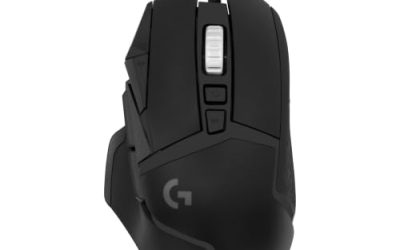
Logitech G502 X Plus
- Best for: MMO, RPG, and simulation players who map many commands to the mouse.
- Sensor: HERO 25K
- Switches: LIGHTFORCE hybrid optical-mechanical
- Buttons: 13 programmable controls
- Scroll wheel: dual-mode free-spin and ratchet, with tilt inputs
MMO, RPG, and simulation players who map many commands to the mouse.
At 106 grams it is the heaviest mouse here, and running the RGB lighting shortens battery life noticeably.
Where the Superlight strips everything back, the G502 X Plus piles capability on. Thirteen programmable controls, a dual-mode scroll wheel that tilts sideways, and LIGHTFORCE hybrid switches make it a natural fit for MMOs, RPGs, and strategy games where a thumb cluster replaces half the keyboard. The HERO 25K sensor is more than accurate enough for these genres, and the sub-130-hour battery rating means charging becomes a monthly chore rather than a weekly one. G HUB support on macOS keeps every macro editable on the machine you actually play on.
Razer Basilisk V3 Pro
- Best for: Palm-grip players who want a feature-rich ergonomic mouse and can set it up once on Windows.
- Sensor: Razer Focus Pro 30K optical
- Switches: Razer Optical Mouse Switches Gen-3
- Buttons: 13 programmable controls
- Scroll wheel: HyperScroll tilt wheel with free-spin mode
Palm-grip players who want a feature-rich ergonomic mouse and can set it up once on Windows.
No macOS version of Synapse means no native remapping or lighting control on your Mac.
The Basilisk V3 Pro is the comfort pick for palm-grip players: a sculpted right-handed body, a textured thumb rest, and the excellent HyperScroll tilt wheel that clicks sideways for extra inputs. Its Focus Pro 30K optical sensor and Gen-3 optical switches deliver crisp, fast clicks, and it can connect over HyperSpeed wireless, Bluetooth, or a cable, which makes moving between a Mac and another machine easy. The honest catch is software. Razer Synapse 3 does not run on macOS, so button profiles and Chroma effects must be configured on a Windows PC, after which onboard settings carry across.
Keychron M3
- Best for: Mac-first users who want one mouse for work and gaming with native Mac software.
- Sensor: PixArt PAW3395, up to 26,000 DPI
- Weight: 79 g
- Connection: 2.4 GHz wireless, Bluetooth 5.1, wired
- Battery life: up to 70 hours
Mac-first users who want one mouse for work and gaming with native Mac software.
The shell runs small for an ergonomic design, so large hands may find the grip cramped.
Keychron designs for Mac users first, and the M3 shows it. The listing confirms a PixArt PAW3395 sensor with 26,000 DPI, three connection modes, and a 79-gram ergonomic shell, while Keychron Engine provides configuration software that runs on macOS as well as Windows. Bluetooth 5.1 pairs directly with a MacBook for work, the 2.4 GHz receiver handles gaming sessions, and the wired mode covers charging without stopping play. For someone whose Mac is both office and game station, that flexibility is the whole point, and the macro button support suits hybrid players who remap a few keys for editing or streaming tools.
Logitech G305 Lightspeed
- Best for: Mac gamers who want a proven wireless mouse with minimal charging fuss.
- Sensor: HERO, up to 12,000 DPI
- Connection: LIGHTSPEED wireless via USB-A receiver
- Report rate: 1 ms
- Buttons: 6 programmable
Mac gamers who want a proven wireless mouse with minimal charging fuss.
It runs on a replaceable AA battery rather than a rechargeable cell, and the receiver is USB-A only.
The G305 is the sensible entry point: a compact, ambidextrous-leaning shell, the HERO sensor at 12,000 DPI, and a LIGHTSPEED connection with a 1 ms report rate that still feels properly responsive in shooters. Its party trick is endurance, running up to 250 hours on a single AA battery, so it suits a MacBook bag where carrying a charging cable is a nuisance. Six programmable buttons cover the basics for most genres, and G HUB on macOS handles setup. There is no Bluetooth, so the USB-A receiver must live in a port or adapter full time.
Which One Fits Your Situation
You Play Shooters on a MacBook Pro
Choose the G PRO X Superlight 2. Its 60-gram shell and HERO 2 sensor reward the low-sensitivity, big-swipe style that Mac FPS players rely on, and G HUB on macOS means your DPI and binds are set without borrowing a Windows machine. Budget for a small USB-C adapter for the receiver, and the setup is complete.
Your Evenings Go to an MMO or a Big RPG
The G502 X Plus earns its size here. Thirteen controls put rotations, mounts, and consumables under your thumb, while the free-spin wheel scrolls through long inventories and quest logs. It is heavy for flick shots, but for ability-driven games played from an iMac desk, the extra buttons save more time than the extra grams cost.
Your Mac Is a Work Laptop First, Game Machine Second
Take the Keychron M3. Bluetooth handles the workday with no dongle in sight, the 2.4 GHz mode is ready when a game launches, and Keychron Engine runs natively on macOS for both profiles. It is also the easiest mouse here to justify on a tidy desk, since nothing about it shouts gaming hardware during a video call.
You Want One Purchase That Just Works for Years
The G305 Lightspeed is the low-maintenance answer. A single AA battery lasts for months of play, the shape suits almost any hand and grip, and Logitech’s Mac software support removes the usual compatibility gamble. It lacks Bluetooth and rechargeable convenience, yet for a first Mac gaming mouse it covers the fundamentals without drama.
Common Mistakes
- Assuming a gaming mouse works fully on macOS because the listing says Mac compatible, when only basic pointing is supported and the configuration app is Windows-only.
- Buying a USB-A receiver mouse for a USB-C-only MacBook without ordering the adapter or hub it needs to connect.
- Judging a mouse by its maximum DPI figure instead of sensor consistency, weight, and shape.
- Ignoring pointer acceleration in macOS, then blaming the mouse for aim that feels floaty in games.
- Picking a many-button MMO mouse for fingertip-grip shooter play, where its weight and bulk slow every flick.
Frequently Asked Questions
Does Apple make a gaming mouse of its own?
No. Apple’s Magic Mouse is designed for gestures and office work, with a low profile and a charging port on the underside that prevents use while charging. Mac gamers instead buy third-party gaming mice, and the practical question is whether the maker’s software and connection type behave properly on macOS, which is what this guide screens for.
Will any Windows gaming mouse work on a Mac?
Basic movement and clicking work with nearly any USB or Bluetooth mouse, because macOS treats it as a standard pointing device. What often goes missing is the gaming layer: DPI adjustment, button remapping, macros, and lighting control. Brands with macOS software, such as Logitech G and Keychron, keep those features available, while Windows-only suites leave settings locked to whatever was saved onboard.
Is Bluetooth good enough for gaming on a Mac?
Bluetooth is fine for strategy games, RPGs, and everyday play, and it keeps a MacBook desk free of dongles. For fast shooters, a 2.4 GHz receiver connection such as LIGHTSPEED or HyperSpeed gives a higher, steadier report rate and lower latency. Many mice here offer both, so you can work over Bluetooth and switch to the receiver when a competitive match starts.
Why does my aim feel different on macOS than on Windows?
macOS applies a stronger pointer acceleration curve, so the cursor travels farther when you move the mouse quickly, which can feel inconsistent in games that read the system pointer. Some titles capture raw input and bypass it. Setting a fixed DPI on the mouse itself, storing it onboard, and disabling acceleration through system tools or the game’s raw input option gives the most predictable result.
FAQ
Does Apple make a gaming mouse of its own?
Will any Windows gaming mouse work on a Mac?
Is Bluetooth good enough for gaming on a Mac?
Why does my aim feel different on macOS than on Windows?
More from Amazon
Programs that pair well with the guide above. Offers and eligibility are set by Amazon and may change.
Free shipping on eligible items, Prime Video and more. Eligible new members can start with a free trial.
Start a Prime free trialA Prime membership for ages 18-24 with a trial period. Eligibility is set by Amazon.
See Prime for Young AdultsAudiobooks and podcasts to listen to on the go. Eligible new members can start with a free trial.
Try Audible freeAd-free music streaming. Eligible new subscribers can start with a free trial.
Try Music Unlimited freeAs an Amazon Associate we earn from qualifying purchases.