
Our Short List of 3

- Best for: Players who want the sharpest, most colourful image in this class.
- Specs:
- 27-inch QHD Nano IPS panel
- 165 Hz refresh rate
- 1 ms GtG response time

- Best for: Competitive shooter players who want sharp motion and a high refresh rate.
- Specs:
- 27-inch WQHD IPS panel
- 165 Hz refresh rate
- 1 ms response time

- Best for: Everyday gamers who want rich colour and a sharp image at a comfortable refresh rate.
- Specs:
- 27-inch 1440p IPS panel
- 144 Hz refresh rate
- 1 ms MPRT response time
All 4 Picks at a Glance
| Product | Specs | Action |
|---|---|---|
| LG 27GP850-B |
| Check price on Amazon |
| ASUS TUF Gaming VG27AQ |
| Check price on Amazon |
| Gigabyte G27Q |
| Check price on Amazon |
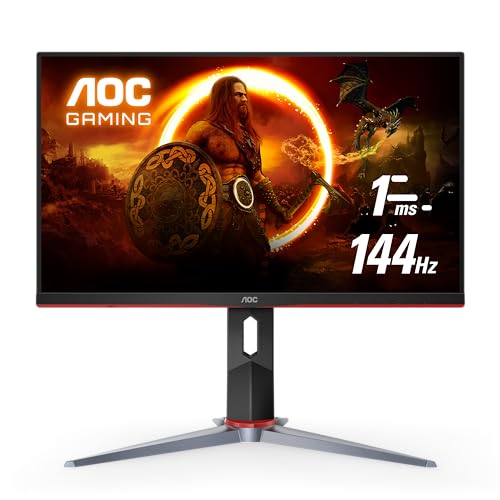 AOC 24G2 |
| Check price on Amazon |
Key takeaways
- Our guide to the best monitors under 300 compares panel types, refresh rates and screen sizes so you can find a sharp gaming display that fits your desk.
A gaming monitor in this class has to balance sharpness, speed and screen size, because every model here makes a different trade between resolution, refresh rate and panel quality. The sharpest image comes from a 27-inch QHD panel, while the smoothest motion comes from a high refresh rate, and the best choice depends on whether your games reward detail or reaction time. All four monitors below use IPS panels, which keep colours steady when you view the screen from an angle, and all of them support adaptive sync for tear-free play.
This guide is for players building a first gaming setup, for students fitting a desk into a small room, and for anyone upgrading from an old office screen. Every monitor below was selected from the name and specifications shown on its Amazon page.
Quick Picks
As an Amazon Associate we earn from qualifying purchases
| Product | Best for | Key spec from title |
|---|---|---|
| LG 27GP850-B | Sharp QHD gaming | 27-inch QHD, 165 Hz refresh |
| ASUS TUF Gaming VG27AQ | Smooth competitive play | 27-inch WQHD, 165 Hz refresh |
| Gigabyte G27Q | Colour-rich everyday gaming | 27-inch 1440p, 144 Hz refresh |
| AOC 24G2 | Compact fast esports play | 23.8-inch FHD, 144 Hz refresh |
How to Choose
Resolution and screen size
Resolution decides how crisp text and game worlds look, and at 27 inches a QHD panel shows far more detail than a full HD panel of the same size. The three 27-inch monitors in this guide all run at 1440p, which is the sweet spot for this class, because it looks sharp without demanding a top-tier graphics card. The 24-inch model runs at full HD, which keeps text slightly softer but makes every frame easier for a modest graphics card to render. Match the resolution to your graphics card first, then pick the screen size that fits your desk and viewing distance.
Refresh rate and response time
Refresh rate sets how many frames the screen can show each second, and a 144 Hz or 165 Hz panel makes motion look far smoother than a standard 60 Hz office screen. Response time matters just as much, because a slow pixel leaves a visible trail behind fast-moving objects, and all four monitors here list a 1 ms response figure. Together, a high refresh rate and a fast response time keep crosshairs, cars and characters crisp during quick movement. If you play competitive shooters, prioritise the highest refresh rate you can get, while story-driven games benefit more from resolution and colour.
Panel type and colour quality
Panel type shapes how a game looks from your chair, and IPS panels keep colours accurate across a wide viewing angle, which matters when you lean back or share the screen. The monitors here cover a wide colour range, with the LG model reaching the broadest gamut for rich, vivid game worlds. Colour accuracy matters most in open-world and story games, where landscapes and lighting carry the atmosphere, while competitive players can trade a little colour richness for speed. Check the listed colour coverage and HDR support, and remember that a bright room favours a panel with strong brightness.
Adaptive sync and connectivity
Adaptive sync stops screen tearing by matching the monitor refresh rate to the graphics card output, and every monitor in this guide supports FreeSync, with several also supporting G-SYNC compatibility. That pairing keeps fast scenes smooth without the stutter that appears when the frame rate and refresh rate drift apart. Connectivity matters too, because a monitor with both DisplayPort and HDMI lets you connect a PC and a console without swapping cables. A height-adjustable stand is worth seeking out, since it lets you set the screen at eye level and avoid neck strain during long sessions.
The 4 Best Options
LG 27GP850-B
- Best for: Players who want the sharpest, most colourful image in this class.
- Specs:
- 27-inch QHD Nano IPS panel
- 165 Hz refresh rate
- 1 ms GtG response time
Players who want the sharpest, most colourful image in this class.
The Nano IPS panel costs more than the other 27-inch models here, and the stand takes up a fair amount of desk depth.
The LG 27GP850-B leads this guide with the sharpest image and the widest colour range, pairing a 27-inch QHD Nano IPS panel with a 165 Hz refresh rate. Games look vivid thanks to the broad colour gamut, and the fast response time keeps motion clean during quick turns. FreeSync Premium and G-SYNC compatibility both work here, so tearing stays away whether your graphics card comes from AMD or Nvidia. The stand adjusts for height, tilt and pivot, which makes it easy to set the screen at eye level, and the slim bezels suit a dual-monitor desk.
Watch out for: The Nano IPS panel costs more than the other 27-inch models here, and the stand takes up a fair amount of desk depth.
ASUS TUF Gaming VG27AQ
- Best for: Competitive shooter players who want sharp motion and a high refresh rate.
- Specs:
- 27-inch WQHD IPS panel
- 165 Hz refresh rate
- 1 ms response time
Competitive shooter players who want sharp motion and a high refresh rate.
The speakers are basic and suit casual use only, and the menu controls take a little learning.
The ASUS TUF Gaming VG27AQ is the competitive pick, built around a 27-inch WQHD IPS panel running at 165 Hz with motion blur reduction. Its ELMB Sync feature sharpens fast movement while keeping adaptive sync active, which helps in shooters where a clear target matters more than rich colour. The panel covers a wide colour range for its class, and built-in speakers handle casual audio without a separate speaker set. G-SYNC compatibility keeps frames smooth on Nvidia cards, and the sturdy stand adjusts to keep the screen at a comfortable height through long matches.
Watch out for: The speakers are basic and suit casual use only, and the menu controls take a little learning.
Gigabyte G27Q
- Best for: Everyday gamers who want rich colour and a sharp image at a comfortable refresh rate.
- Specs:
- 27-inch 1440p IPS panel
- 144 Hz refresh rate
- 1 ms MPRT response time
Everyday gamers who want rich colour and a sharp image at a comfortable refresh rate.
The 144 Hz ceiling is a step below the 165 Hz models here, and the HDR effect is modest compared with higher-rated panels.
The Gigabyte G27Q is the balanced pick, offering a 27-inch 1440p IPS panel at 144 Hz with strong colour coverage and HDR support. Its wide gamut makes game worlds look rich without oversaturating skin tones, and the VESA HDR400 rating adds brighter highlights in supported titles. FreeSync Premium keeps tearing away, and the 1 ms response time holds motion clean during fast scenes. The stand tilts and adjusts for height, and the slim design fits neatly beside a second monitor, making it a solid choice for a mixed gaming and work desk.
Watch out for: The 144 Hz ceiling is a step below the 165 Hz models here, and the HDR effect is modest compared with higher-rated panels.
AOC 24G2
- Best for: Esports players and small desks that need a fast, compact screen.
- Specs:
- 23.8-inch FHD IPS panel
- 144 Hz refresh rate
- 1 ms response time
Esports players and small desks that need a fast, compact screen.
Full HD looks softer than QHD at close range, and the smaller screen suits competitive play more than cinematic games.
The AOC 24G2 is the compact esports pick, and its 23.8-inch full HD IPS panel trades resolution for speed and a smaller footprint. At 144 Hz with a 1 ms response time, it keeps fast shooters smooth, and the smaller screen lets you take in the whole frame without moving your eyes across a wide panel. FreeSync Premium removes tearing, and the height-adjustable stand sets the screen at eye level for long sessions. A three-year zero-dead-pixel guarantee covers the panel, which adds peace of mind for a monitor you will stare at for hours every day.
Watch out for: Full HD looks softer than QHD at close range, and the smaller screen suits competitive play more than cinematic games.
Which One Fits Your Situation
Competitive shooter players
If your games are fast shooters where every frame counts, the ASUS VG27AQ and the AOC 24G2 are the natural picks, because both pair a high refresh rate with a fast response time. The ASUS model gives you a larger QHD image with motion blur reduction, while the AOC keeps the screen compact so the whole frame sits in your field of view. Either one keeps crosshair movement crisp during quick flicks.
Story and open-world gamers
If you spend your time in open worlds and story-driven games, the LG 27GP850-B is the pick, because its wide colour gamut and sharp QHD panel make landscapes and lighting look their best. The Gigabyte G27Q is the fallback if you want similar richness with HDR support and a slightly calmer refresh rate. Both suit long evening sessions where image quality matters more than raw speed.
Small desks and dorm rooms
If your desk is tight, the AOC 24G2 fits where a 27-inch panel would crowd the space, and its height-adjustable stand helps you set a comfortable viewing angle in a small room. The Gigabyte G27Q also works on a modest desk thanks to its slim bezels, though it needs more depth for its stand. Measure your desk before choosing, and leave room for the keyboard and mouse.
Mixed gaming and work setups
If one monitor must serve both games and office work, the Gigabyte G27Q or the LG 27GP850-B make the best dual-purpose picks, because their sharp QHD panels keep text crisp and their colour coverage suits photo and video work. The LG adds a pivot function for portrait documents, while the Gigabyte adds HDR for evening films. Both handle spreadsheets and shooters without compromise.
Common Mistakes
- Buying the largest screen that fits the desk instead of the resolution and refresh rate that suit your graphics card.
- Ignoring the stand and then living with a screen stuck at the wrong height for months.
- Choosing a monitor without adaptive sync and then wondering why fast scenes tear.
- Placing a QHD monitor too close to your eyes, where the extra detail turns into eye strain rather than a sharper image.
- Forgetting to check the ports, and discovering the console and the PC cannot both stay connected.
Frequently Asked Questions
Is QHD worth it over full HD for gaming?
Yes, at 27 inches QHD shows sharper text and detail, because it packs more pixels into the same screen area. Full HD works well at 24 inches, where the smaller panel keeps pixels dense enough to look clean. The trade is performance, since QHD asks more of your graphics card, so match it to your card.
Does a higher refresh rate really change how games feel?
Yes, a 144 Hz or 165 Hz panel shows motion more smoothly than a standard 60 Hz screen, and the difference is obvious when you move the mouse or turn a character. Fast shooters gain the most, because targets stay visible during movement instead of blurring. Story games gain less, but the desktop feels smoother.
Do I need G-SYNC or FreeSync on a gaming monitor?
Adaptive sync matters most when your frame rate moves up and down, because it stops the screen from tearing or stuttering during those swings. FreeSync covers AMD cards, while G-SYNC Compatible covers Nvidia cards, and several monitors here support both. If your graphics card and monitor share a sync standard, enable it and leave it on for every game.
What size monitor is best for a small desk?
A 24-inch monitor fits small desks and leaves room for a keyboard, mouse and speakers, while a 27-inch panel needs more depth for its stand and more distance for viewing. Measure the desk width and depth before buying, and check whether the screen fills your view without forcing you to turn your head.
FAQ
Is QHD worth it over full HD for gaming?
Does a higher refresh rate really change how games feel?
Do I need G-SYNC or FreeSync on a gaming monitor?
What size monitor is best for a small desk?
More from Amazon
Programs that pair well with the guide above. Offers and eligibility are set by Amazon and may change.
Free shipping on eligible items, Prime Video and more. Eligible new members can start with a free trial.
Start a Prime free trialA Prime membership for ages 18-24 with a trial period. Eligibility is set by Amazon.
See Prime for Young AdultsAudiobooks and podcasts to listen to on the go. Eligible new members can start with a free trial.
Try Audible freeAd-free music streaming. Eligible new subscribers can start with a free trial.
Try Music Unlimited freeAs an Amazon Associate we earn from qualifying purchases.









