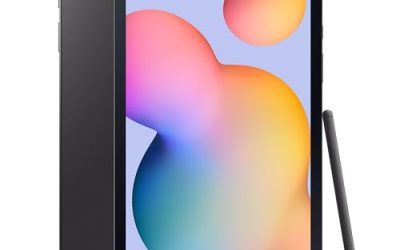
Our Short List of 3

- Best for: players who want strong memory and a fast display together.
- AMD Ryzen 7 260 processor
- NVIDIA GeForce RTX 5060 laptop GPU (572 AI Tops)
- 16-inch WUXGA IPS 180Hz display
- 32GB DDR5 memory
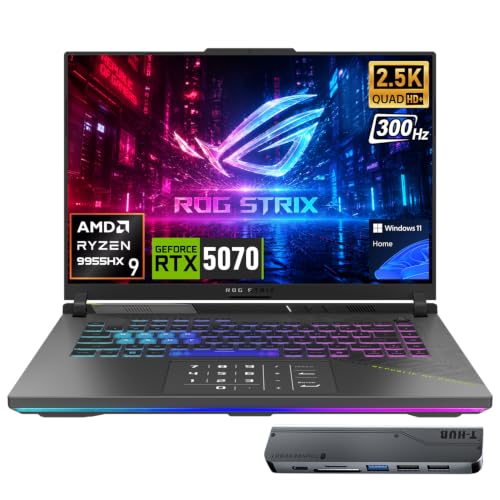
- Best for: players who want the fastest display and the strongest graphics card stated here.
- AMD Ryzen 9 9955HX processor
- NVIDIA GeForce RTX 5070
- 16-inch QHD+ 2.5K 300Hz IPS display
- 32GB DDR5 memory

- Best for: players who want an entry-level discrete graphics card and a high-refresh display.
- Intel Core i5-12450H processor
- NVIDIA GeForce RTX 3050
- 16GB RAM
- 512GB PCIe SSD
All 5 Picks at a Glance
| Product | Specs | Action |
|---|---|---|
| Acer Nitro V 16S AI Gaming Laptop |
| Check price on Amazon |
| ASUS ROG Strix G16 Gaming Laptop |
| Check price on Amazon |
| HP Victus 15.6 Gaming Laptop |
| Check price on Amazon |
 Lenovo Legion 5a Gaming Laptop |
| Check price on Amazon |
 MSI Cyborg A15 AI Gaming Laptop |
| Check price on Amazon |
Key takeaways
- Five gaming laptops with discrete graphics, fast displays, and strong memory for Destiny 2, judged only from published listing specifications.
Destiny 2 rewards fast reactions, steady frame delivery, and a screen that keeps up with crowded firefights, so the right laptop needs a discrete graphics card, enough memory, and a high-refresh display. No product listing used for this guide names Destiny 2, so none of these laptops is described as built for the game; each pick below was judged only from its published listing specifications, meaning the stated graphics card, memory, storage, and display.
Four of the five models below also appear in other published buying guides, and the fifth is corroborated from a single roundup, so every model name and specification here can be checked against more than one published source. All five are gaming laptops with the gaming wording, brand, and laptop form stated literally in their own listings, and they cover a spread from an entry-level graphics card to a top-tier display.
Quick Picks
As an Amazon Associate we earn from qualifying purchases.
| Product | Best for | Key spec |
|---|---|---|
| Acer Nitro V 16S AI | Strong specs with a fast display | RTX 5060, 32GB DDR5, 180Hz |
| ASUS ROG Strix G16 | The smoothest screen here | RTX 5070, 32GB DDR5, 300Hz |
| HP Victus 15.6 | An entry-level starting point | RTX 3050, 16GB RAM, 144Hz |
| Lenovo Legion 5a | A sharp OLED display | RTX 5060, 32GB DDR5, 165Hz OLED |
| MSI Cyborg A15 AI | Carrying every day | RTX 5050, 16GB DDR5, thin and light |
How to Choose
Start With the Graphics Card
The graphics card does the heaviest work in a shooter, and every laptop in this guide states a discrete NVIDIA GeForce RTX card in its listing. The RTX 5050 and RTX 5060 models sit in the middle of the range, the RTX 5070 in the ASUS Strix G16 is the strongest card stated here, and the RTX 3050 in the HP Victus is the entry-level option. Check that the listing names the exact card rather than a graphics family, because two laptops sharing a model name can carry different cards. A discrete card is the single most important line to verify before anything else, since integrated graphics are not named on any pick here.
Memory and Storage for Large Game Files
Destiny 2 and its expansions take up a large amount of drive space, and the game runs alongside a launcher, voice chat, and a browser for many players, so memory and storage both matter. Three picks in this guide state 32GB of DDR5 memory, while two state 16GB, which is the smallest amount listed here and still enough to start with. Storage ranges from a 512GB PCIe SSD in the HP Victus to a 2TB SSD in the ASUS Strix G16, with 1TB drives in between. Treat 512GB as a starting point that fills quickly once several large games are installed.
The Display Decides How Smooth It Feels
Refresh rate is the display number that matters most in a fast shooter, because a higher rate shows more frames per second and makes moving targets easier to track. The displays here range from 144Hz on the HP Victus and the MSI Cyborg to 165Hz on the Lenovo Legion, 180Hz on the Acer Nitro V, and 300Hz on the ASUS Strix G16. Resolution runs from Full HD to WUXGA, WQXGA, and QHD+ 2.5K, with IPS panels on three picks and an OLED panel on the Lenovo. Match the panel to your priorities: refresh rate for competitive play, resolution and panel type for visual detail.
Processor, Connectivity, and Everyday Use
The processor handles physics, background tasks, and loading, and the listings here name AMD Ryzen 7 and Ryzen 9 chips alongside one Intel Core i5. Wi-Fi is stated on every pick, from Wi-Fi 6 on the Acer and HP models to Wi-Fi 6E on the MSI and Wi-Fi 7 on the Lenovo, which matters if you play over wireless rather than a cable. Backlit keyboards are stated on four of the five listings, and the ASUS adds an HDMI port in its listing wording. Weigh the whole package rather than one number: a strong graphics card with a slow drive or a small memory amount will still hold the experience back.
The 5 Best Options
Acer Nitro V 16S AI Gaming Laptop
- Best for: players who want strong memory and a fast display together.
- AMD Ryzen 7 260 processor
- NVIDIA GeForce RTX 5060 laptop GPU (572 AI Tops)
- 16-inch WUXGA IPS 180Hz display
- 32GB DDR5 memory
players who want strong memory and a fast display together.
the WUXGA resolution sits below the QHD+ and WQXGA panels of the other picks in this guide.
The Acer Nitro V 16S AI pairs an AMD Ryzen 7 260 processor with an NVIDIA GeForce RTX 5060 laptop graphics card, 32GB of DDR5 memory, and a 1TB Gen 4 SSD, which is a well-rounded combination for a demanding shooter and for multitasking alongside it. Its 16-inch WUXGA IPS display runs at 180Hz, so motion stays smooth in fast encounters, and Wi-Fi 6 is stated for wireless play. The listing gives the model code ANV16S-41-R2AJ, which helps confirm you are looking at this exact configuration rather than another Nitro V variant with different parts.
Watch out for: the WUXGA resolution sits below the QHD+ and WQXGA panels of the other picks in this guide.
ASUS ROG Strix G16 Gaming Laptop
- Best for: players who want the fastest display and the strongest graphics card stated here.
- AMD Ryzen 9 9955HX processor
- NVIDIA GeForce RTX 5070
- 16-inch QHD+ 2.5K 300Hz IPS display
- 32GB DDR5 memory
players who want the fastest display and the strongest graphics card stated here.
the bundle adds items you may not need, so check the bundle contents before ordering.
The ASUS ROG Strix G16 is the most powerful pick in this guide on paper, with an AMD Ryzen 9 9955HX processor, an NVIDIA GeForce RTX 5070, 32GB of DDR5 memory, and a 2TB SSD, plus a 16-inch QHD+ 2.5K IPS display running at 300Hz. That display is the fastest stated here by a wide margin, and the listing also names a 4-zone RGB backlit keyboard, an HDMI port, Copilot, and Windows 11 Home. The listing states the laptop comes with a bundle, so confirm exactly what the bundle contains before ordering, since bundle contents vary and the extras may not be things you need.
Watch out for: the bundle adds items you may not need, so check the bundle contents before ordering.
HP Victus 15.6 Gaming Laptop
- Best for: players who want an entry-level discrete graphics card and a high-refresh display.
- Intel Core i5-12450H processor
- NVIDIA GeForce RTX 3050
- 16GB RAM
- 512GB PCIe SSD
players who want an entry-level discrete graphics card and a high-refresh display.
the RTX 3050 is the least powerful graphics card in this guide, and 512GB is the smallest drive stated here.
The HP Victus 15.6 is the entry-level pick in this guide, with an Intel Core i5-12450H processor, an NVIDIA GeForce RTX 3050, 16GB of RAM, and a 512GB PCIe SSD. Its Full HD display runs at 144Hz, which is still a genuine high-refresh panel for a shooter, and the listing states Wi-Fi 6, a backlit keyboard, Windows 11 Pro, and the Performance Blue finish. It is the most modest specification set here, so it suits players who want a gaming laptop form with a discrete card at the lower end of the range rather than the strongest hardware available.
Watch out for: the RTX 3050 is the least powerful graphics card in this guide, and 512GB is the smallest drive stated here.
Lenovo Legion 5a Gaming Laptop
- Best for: players who want an OLED display with strong memory and graphics.
- AMD Ryzen 7 250 processor
- NVIDIA GeForce RTX 5060
- 15.3-inch WQXGA (2560×1600) 165Hz OLED display
- 32GB DDR5 RAM
players who want an OLED display with strong memory and graphics.
the OLED display is the only one of its type here, so compare panel types in person if you can before deciding.
The Lenovo Legion 5a combines an AMD Ryzen 7 250 processor with an NVIDIA GeForce RTX 5060, 32GB of DDR5 RAM, and a 1TB SSD, matching the Acer on memory and graphics while adding a different kind of display. Its 15.3-inch WQXGA OLED display runs at 165Hz and is the only OLED panel in this guide, which suits players who value contrast and colour depth alongside smooth motion. The listing also states Wi-Fi 7, RGB backlighting, Windows 11, a Black finish, and a portable 500GB drive supplied with the laptop, which is an extra rather than part of the laptop itself.
Watch out for: the OLED display is the only one of its type here, so compare panel types in person if you can before deciding.
MSI Cyborg A15 AI Gaming Laptop
- Best for: players who carry their laptop every day and want a slim gaming form.
- AMD Ryzen 7 260 processor
- NVIDIA GeForce RTX 5050
- 15.6-inch Full HD 144Hz display
- Thin and light design
players who carry their laptop every day and want a slim gaming form.
the RTX 5050 and 16GB of memory sit below the 32GB RTX 5060 and RTX 5070 picks in this guide.
The MSI Cyborg A15 AI is the portable pick in this guide, described in its listing as a thin and light gaming laptop with a 15.6-inch Full HD display running at 144Hz. Inside it states an AMD Ryzen 7 260 processor, an NVIDIA GeForce RTX 5050, 16GB of DDR5 memory, and a 1TB SSD, with Wi-Fi 6E and Windows 11, and the model code B2HWEKG-074US. It trades the larger memory amounts of the 32GB picks for a slimmer chassis, so it suits players who carry their laptop daily and accept a mid-range graphics card and memory amount in exchange for portability.
Watch out for: the RTX 5050 and 16GB of memory sit below the 32GB RTX 5060 and RTX 5070 picks in this guide.
Which One Fits Your Situation
You Want the Smoothest Firefights
Choose the ASUS ROG Strix G16. Its 300Hz QHD+ display is the fastest panel stated in this guide, and it pairs that screen with the strongest graphics card listed here, the RTX 5070, plus 32GB of memory and a 2TB drive. If fast motion and high frame delivery matter more to you than portability or saving on extras, this is the pick built around the display first.
You Want Strong Specs Without the Top Display
Choose the Acer Nitro V 16S AI. It matches the Lenovo on graphics and memory with an RTX 5060 and 32GB of DDR5, and its 180Hz display is faster than the 144Hz and 165Hz panels on the other picks except the ASUS. The WUXGA resolution is lower than QHD+, but the overall combination is strong for demanding play and multitasking.
You Play on a Tighter Budget
Choose the HP Victus 15.6. Its RTX 3050 and 16GB of RAM are the most modest specifications in this guide, but it still states a discrete graphics card and a 144Hz Full HD display, which are the two essentials for a shooter. The 512GB drive is the smallest here, so plan to manage installed games or add storage later.
You Carry Your Laptop Every Day
Choose the MSI Cyborg A15 AI. Its listing calls it thin and light, and the 15.6-inch Full HD 144Hz display, RTX 5050, and 16GB of memory give a complete gaming setup in a slimmer chassis. It is the right trade when portability matters more than the larger memory amounts of the 32GB picks.
Common Mistakes
- Buying on the model name alone: variants with the same name can carry different graphics cards, memory amounts, and displays, so match the full specification list and model code.
- Skipping the display check: a strong graphics card cannot show its advantage on a low-refresh panel, so confirm the refresh rate stated in the listing.
- Ignoring storage size: large games fill a 512GB drive quickly, so check the stated drive capacity before assuming room for a full library.
- Assuming the game is named: no listing in this guide names Destiny 2, so judge game fit from the stated graphics card, memory, and display only.
- Forgetting the bundle: some listings include bundles or extra drives, so confirm what is actually included before ordering.
Frequently Asked Questions
Can these laptops run Destiny 2?
No listing used for this guide names Destiny 2, so no pick here is described as built for the game. Each laptop was judged from its published listing specifications: a discrete RTX graphics card, 16GB or 32GB of memory, a solid-state drive, and a display running at 144Hz or faster. Those stated specifications are what support smooth play in a demanding shooter.
How much memory do I need for Destiny 2?
The picks in this guide state either 16GB or 32GB of memory. 16GB is the smallest amount listed here and is enough to start with, while the three 32GB picks leave more room for a launcher, voice chat, and a browser running alongside the game. If you multitask heavily while playing, favour a 32GB listing.
Does display refresh rate matter for Destiny 2?
Yes, refresh rate affects how smooth motion looks in a fast shooter. The displays here run from 144Hz to 300Hz, and a higher rate shows more frames per second, which makes moving targets easier to track. A 144Hz panel is a solid starting point, while 165Hz, 180Hz, and 300Hz panels offer progressively smoother motion for players who prioritise it.
Should I pick the RTX 3050 or a newer graphics card?
It depends on how much performance you want and how long you plan to keep the laptop. The RTX 3050 in the HP Victus is the entry-level card here and suits modest settings, while the RTX 5050, RTX 5060, and RTX 5070 in the other picks state newer, stronger graphics. Check the exact card named in the listing, since the card matters more than the laptop brand alone.
FAQ
Can these laptops run Destiny 2?
How much memory do I need for Destiny 2?
Does display refresh rate matter for Destiny 2?
Should I pick the RTX 3050 or a newer graphics card?
More from Amazon
Programs that pair well with the guide above. Offers and eligibility are set by Amazon and may change.
Free shipping on eligible items, Prime Video and more. Eligible new members can start with a free trial.
Start a Prime free trialA Prime membership for ages 18-24 with a trial period. Eligibility is set by Amazon.
See Prime for Young AdultsAudiobooks and podcasts to listen to on the go. Eligible new members can start with a free trial.
Try Audible freeAd-free music streaming. Eligible new subscribers can start with a free trial.
Try Music Unlimited freeAs an Amazon Associate we earn from qualifying purchases.