Key takeaways
- Compare two verified 12 inch tablets on screen size, storage, pen support and OS: a 12-inch Surface Pro and the 12.4-inch Galaxy Tab S9+ 5G.
Shoppers hunting for a 12 inch tablet usually want one screen that splits the day cleanly: large enough for documents, split-screen apps and streamed video, yet light enough to carry in one hand. The awkward truth is that the honest 12-inch shelf is narrow, because many headline tablets actually measure 11 or 13 inches, and several 12-inch listings have gone quiet. That leaves a real choice between two very different machines rather than a long list of near-identical slates.
The two verified options below serve opposite buyers. Windows users who want a laptop replacement get a 12-inch Surface Pro in a high-memory, high-storage configuration, while Android fans who want a big entertainment screen with a pen in the box get the 12.4-inch Galaxy Tab S9+ in its AT&T 5G form. Both picks were chosen because their exact listings could be confirmed, with screen size, storage and pen support taken straight from those listings, not from family-level marketing pages.
Quick Picks
As an Amazon Associate we earn from qualifying purchases.
| Product | Best for | Key spec |
|---|---|---|
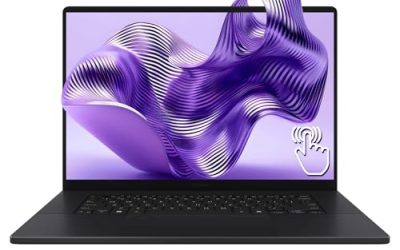
| Microsoft Surface Pro 12-inch (Snapdragon X Plus, 24GB, 1TB) | Windows laptop replacement | 12-inch screen, 24GB RAM, 1TB storage |
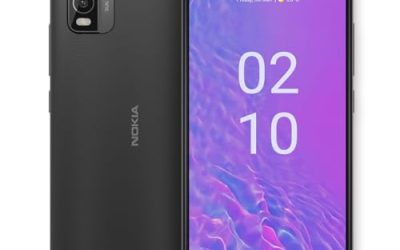
| Samsung Galaxy Tab S9+ 5G (AT&T) 256GB | Big-screen Android entertainment with a pen | 12.4-inch AMOLED screen, S Pen included |
How to Choose
Start with the operating system, not the screen
A 12-inch tablet is big enough to become your main computing device, so the operating system decides what the screen is actually for. Windows 11 on the Surface Pro runs full desktop programs, browser extensions and file management exactly as a laptop does, which suits office work and study. Android on the Galaxy Tab instead centres on apps, streaming services and touch-first tasks. Neither is better in the abstract; the right pick is the one matching the software you already rely on every day.
Read the exact size figure on the listing
Manufacturers round aggressively in headlines, so the listed diagonal is the only figure worth trusting. In this pair, one screen is exactly 12.0 inches and the other is 12.4 inches, and that small gap changes how much split-screen room you get and how wide the device feels in portrait. Check the number printed on the listing you are about to buy, because storage and connectivity variants of the same tablet family can sit under slightly different descriptions, and a 13-inch model is a different product entirely.
Match storage and memory to how long you will keep it
Tablets in this size class are rarely upgradeable, so the configuration on the listing is the configuration you live with. Heavy multitaskers, and anyone planning to keep the device for years of Windows updates and large app libraries, benefit from generous RAM and a terabyte-class drive. Lighter users who stream everything and store little locally can accept a smaller 256GB tier comfortably. Decide by your current laptop’s usage rather than by optimism, because running out of space mid-ownership has no cheap fix.
Check what the pen and connectivity story really is
Pen support differs sharply between listings: one of these tablets includes its S Pen in the box, while the other’s listing names only a USB-C power supply as included, so a stylus would be a separate purchase. Connectivity needs the same care. A cellular 5G model keeps you online away from Wi-Fi but ties you to a carrier plan, in this case AT&T, whereas a Wi-Fi-focused Windows machine assumes home or office networks. Confirm both details on the exact listing before ordering, because variant names within one tablet family can look nearly identical at a glance.
The 2 Best Options
Microsoft Surface Pro 12-inch (Snapdragon X Plus, 24GB RAM, 1TB)
This configuration suits buyers who want their tablet to replace a laptop outright. The Snapdragon X Plus chip runs Windows 11, so desktop software, full browsers and standard file workflows carry over without compromise. The listed 24GB of memory is generous for a slate this size, keeping many apps and browser tabs open at once, and the 1TB of storage removes the usual anxiety about downloads, documents and media libraries. Because this is a seller-configured listing rather than the base retail build, the specification below reflects this exact offer, so read it as the definition of what you are buying.
Specs
- Screen size: 12 inches
- Model name: EP2-33669
- Processor: Snapdragon X Plus
- Memory: 24GB RAM
- Storage: 1TB
- Colour: Platinum
- Operating system: Windows 11
- Included: USB-C power supply
Best for: Professionals and students who want one Windows device for desk work and carrying around.
Watch out for: This listing does not state that a pen is included, so budget for a stylus separately if handwriting matters; also confirm the 24GB and 1TB figures on the listing itself, since they belong to this configured version rather than the standard retail configuration.
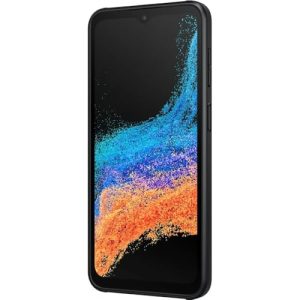
Samsung Galaxy Tab S9+ 5G (AT&T) 256GB

Samsung’s entry is the entertainment-leaning half of the pair, built around a 12.4-inch AMOLED screen that gives streamed films and games more room than a typical 11-inch slate. The Snapdragon 8 Gen 2 processor keeps Android apps responsive, 256GB of storage holds a healthy offline library, and the S Pen is included for notes, sketching and precise editing. This is specifically the AT&T 5G variant, so it can stay connected on a mobile plan away from Wi-Fi, which separates it from the Wi-Fi-only versions of the same tablet family.
Specs
- Screen size: 12.4 inches
- Storage: 256GB
- Processor: Snapdragon 8 Gen 2
- Display: AMOLED screen
- Pen: S Pen included
- Battery: Long battery life (as listed)
- Camera: Auto focus camera
- Audio: Dolby Audio
- Colour: Graphite
- Connectivity: AT&T 5G and Wi-Fi
- Model number: SM-X818UZAAATT
Best for: Android users who want a large, vivid screen for video and a bundled pen for notes.
Watch out for: Availability signals for this ASIN conflict: its tracker price is current, but the Wi-Fi-only sibling listing has been showing as sold out or used-only and the S9+ line has been superseded, so confirm a live featured offer for this exact ASIN before ordering, and make sure you are buying the AT&T 5G model rather than a Wi-Fi version.
Which One Fits Your Situation
You need a laptop replacement for work or study
Choose the Surface Pro. Windows 11 runs the desktop programs your job or course already depends on, and the listed 24GB of memory plus 1TB of storage mean you will not outgrow the configuration quickly. Add a keyboard and it behaves like a compact laptop, while the 12-inch screen still works as a reading and note-taking slate when detached and carried between rooms, lectures or library sessions throughout the day.
You mostly stream, browse and sketch
Choose the Galaxy Tab S9+. Its 12.4-inch AMOLED panel is the bigger, richer screen of the two for films and shows, Android keeps entertainment apps front and centre, and the included S Pen makes annotating documents or casual drawing immediate rather than an extra purchase. The 256GB of storage also leaves comfortable room for downloaded episodes and games when you travel away from a connection.
You need internet access away from Wi-Fi
Choose the Galaxy Tab S9+ 5G, because this exact listing is the AT&T cellular variant rather than the Wi-Fi-only model. It suits commuters, field workers and anyone whose tablet time happens in places without reliable wireless networks. Remember that the connection runs through an AT&T plan, so factor that ongoing arrangement into your decision instead of treating the 5G badge as a free extra.
You want the longest usable lifespan from one purchase
Choose the Surface Pro configuration. Memory and storage are the two specifications that age a tablet fastest, and this listing’s 24GB and 1TB sit well above typical slate levels, which keeps Windows updates, large applications and growing photo libraries comfortable for years. The trade-off is accepting a seller-configured listing, so verify every figure on the page matches what is described here before you complete the order.
Common Mistakes
- Assuming every tablet advertised around this size is truly 12 inches, when many listings are actually 11-inch or 13-inch models under looser headlines.
- Buying a cellular variant without realising it, or missing that a tablet is the 5G carrier model when you wanted the Wi-Fi-only version instead.
- Expecting a pen in the box because the tablet family supports one, when the specific listing only names a power supply among its included items.
- Blending specifications from a base retail configuration into a seller-configured listing that carries different memory and storage figures.
- Ordering a superseded model line without checking that the exact listing still has a live offer, rather than relying on the family name alone.
Frequently Asked Questions
Is a 12 inch tablet big enough to replace a laptop?
For many people, yes, provided the operating system matches their work. A Windows model like the Surface Pro runs full desktop programs, so documents, spreadsheets and browser-based tools behave as they do on a laptop. Android tablets excel at apps and media instead. The screen size is rarely the limiting factor; the software ecosystem usually decides whether the replacement works.
What is the difference between the 12-inch and 12.4-inch screens here?
The Surface Pro’s display measures exactly 12.0 inches, while the Galaxy Tab S9+ measures 12.4 inches, and both figures come from their own listings. The Samsung’s extra diagonal gives slightly more room for split-screen apps and video, while the Surface’s smaller footprint is a touch easier to hold and carry. Neither figure should be rounded or swapped when you compare the two.
Does the Surface Pro listing include a pen?
No pen is stated as included in this listing. The only bundled item its details name is a USB-C power supply, so if handwriting or drawing matters to you, plan on buying a compatible stylus separately. By contrast, the Galaxy Tab S9+ listing explicitly includes the S Pen, which is one of the clearest practical differences between these two particular offers.
Should I buy the 5G Galaxy Tab S9+ or look for the Wi-Fi version?
Buy the 5G model only if you will actually use mobile data through AT&T, since that is the variant this listing sells. If you mostly use a tablet at home, a Wi-Fi model would normally suit you better, but do not assume that version is currently easy to find new; check the exact listing and its live availability carefully before committing to either variant.
FAQ
Is a 12 inch tablet big enough to replace a laptop?
What is the difference between the 12-inch and 12.4-inch screens here?
Does the Surface Pro listing include a pen?
Should I buy the 5G Galaxy Tab S9+ or look for the Wi-Fi version?
More from Amazon
Programs that pair well with the guide above. Offers and eligibility are set by Amazon and may change.
Free shipping on eligible items, Prime Video and more. Eligible new members can start with a free trial.
Start a Prime free trialA Prime membership for ages 18-24 with a trial period. Eligibility is set by Amazon.
See Prime for Young AdultsAudiobooks and podcasts to listen to on the go. Eligible new members can start with a free trial.
Try Audible freeAd-free music streaming. Eligible new subscribers can start with a free trial.
Try Music Unlimited freeAs an Amazon Associate we earn from qualifying purchases.