
Key takeaways
- Two verified 8-inch Android tablets compared: Samsung's Galaxy Tab A9 and Tab A7 Lite, with storage, version and warranty checks to make first.
Choosing an 8-inch Android tablet is a deliberate trade: you give up the reading room and split-screen space of a 10-inch model in exchange for a screen that fits a jacket pocket or one hand on a train. The decision is narrower than search results suggest, because few current listings in this size class state Android plainly, tie a model to listing details, and stay inside the compact footprint. What survives is a short list where storage, version sold, and warranty terms matter more than headline features.
This guide is written for travellers who read, stream downloads, and browse on the move, and for anyone replacing an ageing compact tablet. Both picks are Samsung Galaxy Tab models with 8.7-inch displays, chosen because their Amazon pages state the display size, storage, memory, and operating system in the listing. They differ where it counts on a trip: how much you can store offline, which regional version you are buying, and the terms attached to that version.
Quick Picks
As an Amazon Associate we earn from qualifying purchases
| Product | Best for | Key spec from title |
|---|---|---|
| Samsung Galaxy Tab A9 8.7″ | Trips built around downloaded films, shows, and reading | 8.7-inch display with 64GB storage |
| Samsung Galaxy Tab A7 Lite 8.7″ | A straightforward US Version purchase with no bundle questions | 8.7-inch display with 32GB storage |
How to Choose
Display Size and One-Hand Use
Both tablets in this guide use an 8.7-inch display, which sits at the roomy end of the compact class while staying easy to hold in one hand for reading or watching in a seat. When you compare listings, confirm the size is printed in the listing itself rather than inferred from a model name, because near-identical model lines often span several sizes. Think about how you actually travel: a screen this size suits books, articles, and downloaded episodes far better than split-screen work, so buy it for portable media rather than as a laptop stand-in.
Storage for Offline Downloads
Storage is the sharpest difference between the two picks: the Galaxy Tab A9 lists 64GB, while the Galaxy Tab A7 Lite lists 32GB. Downloaded films, offline playlists, maps, and a shelf of ebooks accumulate quickly on a long trip, and the operating system and apps claim part of whatever figure is printed. If your travel routine involves loading media before a flight and deleting it weeks later, the larger figure gives you breathing room. Lighter users who stream over hotel Wi-Fi and keep only a few downloads can live comfortably with the smaller capacity.
Version and Warranty Terms
Read the version line before anything else, because the two listings here are not the same kind of offer. The Galaxy Tab A7 Lite listing states US Version in its title, while the Galaxy Tab A9 listing is an International Version bundle that includes a 15W charger. An international bundle can be a perfectly good purchase, but warranty handling and region terms may differ from a US retail unit, and those terms belong to the specific listing rather than the model name. Confirm the warranty and region wording on the live page before ordering either tablet.
Battery Wording and Charging on Travel Days
Battery claims in this class need careful reading. The Galaxy Tab A7 Lite title describes a long lasting battery, but neither listing in this guide prints a capacity figure in the copy we could verify, so treat battery wording as a prompt to check the live page rather than as a settled specification. For travel, what matters practically is that you can top up from the charger in the box or a travel adapter during layovers. If a listing does not state a battery figure, do not let a secondary spec table invent one for you.
The 2 Best Options
Samsung Galaxy Tab A9 8.7″
Pick the Galaxy Tab A9 if your travel style is download first and watch later. Its listing states 64GB of storage and 4GB of RAM behind the 8.7-inch display, the strongest memory pairing in this two-tablet class, which suits travellers who load films, shows, and reading before a flight and keep a working library on the device. The model is listed as SM-X110 running Android. The catch sits in the offer itself rather than the hardware: this is an International Version bundle with a 15W charger, so the purchase decision hinges on reading its warranty and region terms carefully before you commit.
Specs
- Display: 8.7 inches
- Storage: 64GB
- RAM: 4GB
- Operating system: Android
- Model: SM-X110
- Listing version: International Version bundle with 15W charger
Best for: Travellers who download media for offline use and want the most built-in storage this verified class offers.
Watch out for: This is an International Version bundle, so confirm the warranty and region terms on the live listing before ordering, and check that the buy option is still live, since the listing data behind this guide is months old.
Samsung Galaxy Tab A7 Lite 8.7″
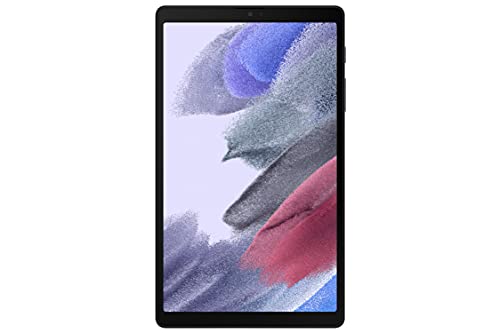
Choose the Galaxy Tab A7 Lite when you want the simpler transaction: its listing states US Version outright, which removes the region and warranty questions that come with an international bundle. The hardware brief is lighter — an 8.7-inch display, 32GB of storage, and Wi-Fi — and the title describes a compact, slim design with a sturdy metal frame, a sensible build for a tablet that lives in a bag and gets handed around. It fits readers, browsers, and video watchers whose downloads are modest and who would rather have a clean US listing than extra gigabytes they may never fill.
Specs
- Display: 8.7 inches
- Storage: 32GB
- Connectivity: Wi-Fi
- Operating system: Android
- Listing version: US Version
- Finish: Gray
- Design: compact, slim body with a sturdy metal frame, as listed
Best for: Buyers who want a compact US Version tablet for reading, browsing, and video without bundle or region complications.
Watch out for: Confirm on the live page that the listing is still the US Version with a live buy option before ordering.
Which One Fits Your Situation
You Download Everything Before a Flight
Take the Galaxy Tab A9. Its stated 64GB of storage doubles the A7 Lite’s figure, and that headroom is what a pre-flight loading session consumes: a season of a show, a few films, offline maps, and a reading backlog. Accept the extra homework — this is an International Version bundle, so read the warranty and region terms on the live page first — and the storage advantage is worth it.
You Want the Simplest Possible US Purchase
Take the Galaxy Tab A7 Lite. Its listing states US Version in the title, so the offer reads like a domestic retail purchase, without bundle terms to interpret. For reading, browsing, messaging, and streamed or downloaded video, its stated 32GB and 8.7-inch screen cover the job. If your travel media habits are modest and you value a clean transaction over maximum capacity, this is the calmer buy of the two.
You Read More Than You Watch
Either tablet serves a reader, but the A7 Lite’s design leans your way: its title calls out a compact, slim body and a sturdy metal frame, the build you want for a device held one-handed through long chapters. Its 32GB holds a large ebook library, since books are small next to video. Pick the A9 instead only if your reading apps cache downloads heavily.
You Are Buying a Spare or Household Tablet
The A7 Lite fits the spare-tablet role well: a US Version listing, a metal frame for shared use, and enough storage for streaming apps, browsing, and a few downloads. It lives on a kitchen counter or in a guest bag without the region questions an international bundle raises. If the spare will double as the download vault, step up to the A9 instead, and treat its bundle terms as worth verifying.
Common Mistakes
- Assuming every small tablet runs Android: Amazon’s Fire tablets run Fire OS, and their listings do not state Android, which is why no Fire model appears in this guide despite the similar size.
- Skipping the version line: an International Version bundle and a US Version listing can carry the same model name while differing on warranty handling and region terms, so the version wording is part of the product you are buying.
- Buying the smaller storage figure for a download-heavy routine: 32GB fills quickly once films, shows, and offline maps stack up, and the shortfall only shows itself mid-trip when you can least fix it.
- Trusting spec-database figures over the listing: several otherwise plausible tablets in this class could not be verified because no source tied their listings to the details quoted elsewhere, so buy only what the listing itself states.
- Ordering from stale listing data without a final check: listings in this class change sellers and terms over time, so confirm the live buy option, version, and warranty wording on the page before you pay.
Frequently Asked Questions
Is an 8.7-inch screen big enough for reading and video?
For books, articles, and downloaded episodes in a seat, yes: 8.7 inches is large enough to read comfortably at arm’s length while staying one-hand portable. It is less suited to split-screen work or long documents side by side. Both tablets here state the same display size, so your choice between them rests on storage and version rather than screen.
Does the Galaxy Tab A9 listing carry US warranty coverage?
The A9 listing is an International Version bundle with a 15W charger, and no US warranty coverage is stated for it in the listing copy we verified. Treat warranty and region terms as unconfirmed until you read them on the live page. If a clean US warranty matters more than storage, the A7 Lite’s US Version listing is the safer route.
Why does this guide list only two tablets?
Because only two listings in the 8-inch class met the verification bar: an Amazon listing that states Android, sits inside the size class, and ties a model to reproduced listing content. Fire tablets were excluded because Fire OS is not Android, a 9-inch Lenovo falls outside the class, and other candidates could not be tied to their listing details, so they were left out rather than guessed.
Which of the two should I pick for long trips?
Pick the Galaxy Tab A9 if your trips run on downloads, since its stated 64GB doubles the A7 Lite’s storage and its listing pairs that with 4GB of RAM. Pick the A7 Lite if you mostly stream, read, and browse, and prefer a US Version listing with simpler terms. Either way, confirm the live buy option and version wording before ordering.
FAQ
Is an 8.7-inch screen big enough for reading and video?
Does the Galaxy Tab A9 listing carry US warranty coverage?
Why does this guide list only two tablets?
Which of the two should I pick for long trips?
More from Amazon
Programs that pair well with the guide above. Offers and eligibility are set by Amazon and may change.
Free shipping on eligible items, Prime Video and more. Eligible new members can start with a free trial.
Start a Prime free trialA Prime membership for ages 18-24 with a trial period. Eligibility is set by Amazon.
See Prime for Young AdultsAudiobooks and podcasts to listen to on the go. Eligible new members can start with a free trial.
Try Audible freeAd-free music streaming. Eligible new subscribers can start with a free trial.
Try Music Unlimited freeAs an Amazon Associate we earn from qualifying purchases.









