
Our Short List of 3

- Best for: players who want one QHD screen for both fast games and everyday color work.
- Screen size: 27 inches
- Panel: Nano IPS
- Resolution: 2560 x 1440 (QHD)
- Refresh rate: 165Hz (180Hz overclock)
- Best for: immersive single-player gaming where a curved screen and deep contrast matter most.
- Screen size: 27 inches
- Panel: VA, 1000R curved
- Resolution: 2560 x 1440 (QHD)
- Refresh rate: 144Hz

- Best for: editors and laptop users who want 4K detail and a one-cable docking desk.
- Screen size: 27 inches
- Panel: IPS
- Resolution: 3840 x 2160 (4K UHD)
- Refresh rate: 60Hz
All 4 Picks at a Glance
| Product | Specs | Action |
|---|---|---|
| LG UltraGear 27GP850-B |
| Check price on Amazon |
| Samsung Odyssey G5 (LC27G55TQWNXZA) |
| Check price on Amazon |
| LG UltraFine 27UP850K-W |
| Check price on Amazon |
 Dell SE2722HX |
| Check price on Amazon |
Key takeaways
- Compare five 27 inch monitors across gaming, office and creative use, with QHD and 4K picks, plus panel, refresh rate, port and stand guidance.
Choosing a 27 inch monitor sounds simple until the listings start to blur together. Two screens can share the same diagonal and resolution yet feel completely different, because panel type, refresh rate, color coverage and stand design decide how sharp text looks, how smooth games run and how a desk holds up through a long workday. The real decision is matching those traits to the way the screen will actually be used, rather than chasing the longest specification list.
This guide groups five 27 inch monitors by the jobs they suit best. Fast QHD models serve players who want high refresh rates and quick response times. A 4K IPS panel serves photo and video editors and laptop docking. A curved VA screen suits immersive single-player gaming, and a straightforward Full HD model serves home office buyers who simply need more room than a laptop display. Every pick is a current Amazon listing, with specifications taken from its product page.
Quick Picks
As an Amazon Associate we earn from qualifying purchases.
| Product | Best for | Key spec from title |
|---|---|---|
| LG UltraGear 27GP850-B | High-refresh QHD gaming | 27-inch Nano IPS, 165Hz |
| Samsung Odyssey G5 (LC27G55TQWNXZA) | Curved immersive gaming | 27-inch QHD 1000R curved VA, 144Hz |
| LG UltraFine 27UP850K-W | 4K creative work and docking | 27-inch 4K IPS, USB-C 90W |
| Dell S2721DGF | Color-rich gaming, long warranty | 27-inch QHD Fast IPS, 165Hz |
| Dell SE2722HX | Everyday home office value | 27-inch Full HD VA, 75Hz |
How to Choose
Resolution and panel type
Resolution decides how much detail the 27 inch frame can show. Full HD spreads 1920 by 1080 pixels across a large panel, so text and icons look big but less crisp, which suits casual browsing and office documents. QHD at 2560 by 1440 is the sweet spot for this size, with noticeably sharper text and more room for side-by-side windows. A 4K panel at 3840 by 2160 gives editors the finest detail and the most workspace, at the cost of heavier graphics demands. Panel type matters alongside resolution: IPS variants deliver wide viewing angles and strong color, VA panels trade some angle for deeper contrast, and fast IPS gaming panels add quicker pixel response.
Refresh rate and adaptive sync
Refresh rate describes how many times per second the panel redraws the image, and it shapes how smooth motion looks. A 60Hz or 75Hz screen is fine for documents, video calls and streaming, where the content itself rarely moves faster. Players benefit from 144Hz and above, because aiming, panning and scrolling all track more fluidly, provided the graphics card can feed those frames. Adaptive sync closes the loop: AMD FreeSync and NVIDIA G-SYNC Compatible modes let the monitor match the card’s output frame by frame, which reduces tearing and stutter. Match the sync standard on the listing to the graphics card in the PC, and check whether the headline refresh rate applies over HDMI, DisplayPort or both.
Color coverage and HDR
Color coverage tells you how much of a reference gamut the panel can reproduce, and it decides whether a monitor can double for photo or video work. A basic screen covers the standard sRGB space used by the web and office apps. Wider coverage, quoted as a percentage of DCI-P3 on gaming and creator models, renders more saturated reds and greens and matters when footage or images are graded for film-style output. HDR badges need care: DisplayHDR 400 and HDR10 signal that the panel accepts HDR content and reaches a modest brightness step, not that it rivals a television. Brightness in nits and contrast ratio still describe everyday punch more honestly than the HDR logo alone.
Ports, hub features and the stand
Ports decide how tidy the desk stays. A USB-C input with Power Delivery lets a laptop send video and receive charge over one cable, and a built-in USB hub plus Ethernet turns the monitor into a small docking station. Gamers should count HDMI and DisplayPort inputs against their consoles and PCs, and confirm the port version supports the refresh rate they want. The stand deserves equal attention: height, tilt, swivel and pivot adjustment help position the screen at a natural viewing angle, while a tilt-only stand may need a VESA arm later. Check the VESA mount pattern on the listing if an arm is part of the plan.
The 5 Best Options
LG UltraGear 27GP850-B
- Best for: players who want one QHD screen for both fast games and everyday color work.
- Screen size: 27 inches
- Panel: Nano IPS
- Resolution: 2560 x 1440 (QHD)
- Refresh rate: 165Hz (180Hz overclock)
players who want one QHD screen for both fast games and everyday color work.
the full 165Hz rate runs over DisplayPort; HDMI inputs top out lower.
The 27GP850-B is the balanced gaming pick in this size class. Its Nano IPS panel pairs QHD resolution with a 165Hz refresh rate that overclocks to 180Hz, so competitive shooters and fast action games get both sharp detail and fluid motion. Color is a genuine strength rather than an afterthought: the listing quotes 98 percent DCI-P3 coverage and DisplayHDR 400, which keeps game worlds rich without washing out. FreeSync Premium and G-SYNC Compatible certification cover variable refresh on both major graphics card families, and the stand adjusts for height, tilt and pivot, which many rivals in this class skip.
Samsung Odyssey G5 (LC27G55TQWNXZA)
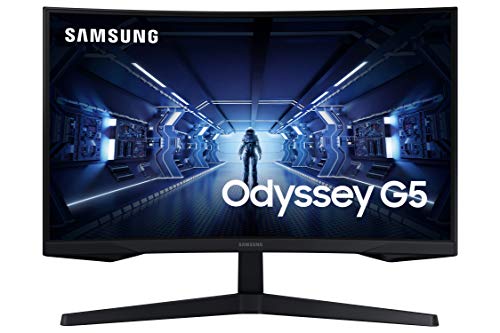
- Best for: immersive single-player gaming where a curved screen and deep contrast matter most.
- Screen size: 27 inches
- Panel: VA, 1000R curved
- Resolution: 2560 x 1440 (QHD)
- Refresh rate: 144Hz
immersive single-player gaming where a curved screen and deep contrast matter most.
the stand offers tilt only, with no height adjustment.
The Odyssey G5 takes the opposite approach to panel design, wrapping a 1000R curved VA screen around the player’s field of view. That deep curve pulls the edges of the 27 inch frame closer to the eyes, which suits racing games, flight sims and atmospheric single-player titles. The QHD panel runs at 144Hz with FreeSync Premium, so motion stays smooth and tearing stays away when frame rates wander. Contrast is the VA panel’s natural advantage over IPS rivals, giving dark scenes more depth. Buyers should note the stand only tilts, so anyone who needs height adjustment will want to budget for a VESA arm.
LG UltraFine 27UP850K-W
- Best for: editors and laptop users who want 4K detail and a one-cable docking desk.
- Screen size: 27 inches
- Panel: IPS
- Resolution: 3840 x 2160 (4K UHD)
- Refresh rate: 60Hz
editors and laptop users who want 4K detail and a one-cable docking desk.
the 60Hz refresh rate makes it a work screen, not a gaming one, and the white finish will not match every desk.
The 27UP850K-W is the creator and laptop-docking pick of this group, built around a 4K IPS panel in a white, three-side borderless frame. Its color coverage reaches 95 percent of DCI-P3 with VESA DisplayHDR 400 support, which suits photo editing and video timelines that need more range than plain sRGB. A USB-C port delivers up to 90W of power, so a laptop can send video and charge over one cable, while two USB 3.0 ports, built-in stereo speakers and a height, tilt and pivot stand round out the desk setup. The trade-off is speed, since the panel runs at 60Hz and targets work rather than play.
Dell S2721DGF
The S2721DGF has been a QHD gaming staple for years because it combines a fast panel with unusually strong color. Its Fast IPS Nano Color screen covers 98 percent of DCI-P3 with 1.07 billion colors, so it handles photo editing between matches better than most gaming rivals. It runs at 165Hz over DisplayPort and 144Hz over HDMI, carries both FreeSync Premium Pro and G-SYNC Compatible certification, and responds in 1ms in its Extreme mode. Dell also backs it with a three-year Advanced Exchange Service and Premium Panel Exchange, the strongest warranty terms in this roundup. As an older design, stock varies between sellers, so check the listing before ordering.
Specs
- Screen size: 27 inches
- Panel: Fast IPS with Nano Color
- Resolution: 2560 x 1440 (QHD)
- Refresh rate: 165Hz over DisplayPort, 144Hz over HDMI
- Response time: 1ms GtG (Extreme mode)
- Adaptive sync: AMD FreeSync Premium Pro, NVIDIA G-SYNC Compatible
- HDR: DisplayHDR 400
- Color gamut: 98 percent DCI-P3, 1.07 billion colors
- Ports: 2 x HDMI 2.0, 1 x DisplayPort 1.4, USB 3.0 hub
- Warranty: 3-year Advanced Exchange Service with Premium Panel Exchange
Best for: gamers who also edit photos and value a long, strong warranty.
Watch out for: it is an older model, so availability and seller condition vary between listings.
ASIN: B08T1X513P
Dell SE2722HX
- Best for: home office and family desks that need a large, simple screen for documents and browsing.
- Screen size: 27 inches
- Panel: VA
- Resolution: 1920 x 1080 (Full HD)
- Refresh rate: 75Hz
home office and family desks that need a large, simple screen for documents and browsing.
Full HD looks soft at this size up close, and there is no USB-C or height adjustment.
The SE2722HX keeps things simple for a home office or family desk. Its 27 inch VA panel runs at Full HD resolution, which keeps text large and easy to read and asks very little of an older laptop or mini PC. A 75Hz refresh rate with AMD FreeSync smooths scrolling and casual video compared with a basic 60Hz screen, and the anti-glare coating with 3H hardness shrugs off bright rooms and the odd fingerprint. Connectivity is deliberately basic, with HDMI for modern machines and VGA for legacy ones. Nobody should buy it for gaming or color work, but as a roomy everyday screen it covers the brief without complication.
Which One Fits Your Situation
You play fast games most evenings
Start with the LG UltraGear 27GP850-B or the Dell S2721DGF. Both pair QHD resolution with 165Hz refresh rates, 1ms-class response times and adaptive sync for both graphics card families, so shooters, racers and action games stay fluid and sharp. The LG adds a newer design and overclock headroom, while the Dell counters with the longer warranty. Either also handles everyday work well, covering a mixed gaming and homework desk with one purchase.
You edit photos or video for clients
The LG UltraFine 27UP850K-W is the clear fit. Its 4K IPS panel covers 95 percent of DCI-P3 and carries VESA DisplayHDR 400 support, which gives photo and video work the color range client projects demand. The USB-C docking side is equally useful in a studio corner, since one cable links and charges the laptop while the USB ports take peripherals. Pair it with a calibration routine and it becomes the reference screen of the desk.
You dock a laptop for office work
Two picks serve laptop desks in different ways. The LG UltraFine 27UP850K-W is the fuller dock, with 90W USB-C power, two USB 3.0 ports and built-in speakers for calls. The Dell SE2722HX is the simple route: one HDMI cable, a large, readable Full HD picture, and nothing to manage. Choose by how many peripherals share the desk. A bare laptop needs the simple screen; a desk with drives and accessories earns the hub monitor.
You want immersion on a single-player desk
The Samsung Odyssey G5 is built for long sessions in story-driven games. The 1000R curve matches the natural arc of vision at desk distance, the VA panel gives night scenes and space backdrops real depth, and 144Hz with FreeSync Premium keeps frame rates smooth when the action gets heavy. Confirm the desk can spare the depth a curved stand needs, and plan a VESA arm if the fixed-height stand does not suit the seating position.
Common Mistakes
- Buying 4K for a PC that cannot drive it in games, then blaming the monitor for low frame rates.
- Assuming the headline refresh rate works on every input, when HDMI often caps lower than DisplayPort.
- Ignoring the stand until the screen arrives, then finding a tilt-only base sits at the wrong height.
- Chasing an HDR badge on a bright-room desk, where brightness and contrast ratio matter more day to day.
- Overlooking port counts, so a console, PC and laptop end up sharing one HDMI input through constant cable swaps.
Frequently Asked Questions
Is 27 inches too big for a standard desk?
For most desks it is the upper step before screens start to dominate. A 27 inch panel is about 24 inches wide, so it fits desks around 47 inches across with room for speakers or a laptop beside it. Viewing distance matters more than the number: sitting an arm’s length away keeps the picture in view without head movement, while very shallow desks can make any large screen feel close.
Should I choose QHD or 4K at 27 inches?
Choose QHD for gaming and mixed use, and 4K for detail work. At 27 inches, QHD looks sharp at normal desk distances and is easier for a graphics card to run at high refresh rates. A 4K panel earns its place when the work is detailed, such as photo editing, video timelines or dense spreadsheets, and when the computer can drive it. For documents and browsing, either resolution works fine.
Do I need a high refresh rate for office work?
No. Office tasks are mostly static, so a 60Hz or 75Hz panel handles documents, email, calls and video. A step to 75Hz, as on the Dell SE2722HX, makes scrolling feel smoother. High refresh rates pay off where the picture moves constantly, mainly games and video playback. Buying 144Hz or 165Hz for a spreadsheet desk buys capability the work uses rarely; that budget serves better in resolution, ports or stand adjustment.
What should I check before ordering a 27 inch monitor?
Confirm four things on the listing. First, model number, since near-identical names hide different panels. Second, the port set and versions, matched against the computer or console connected, including whether USB-C carries video and power. Third, the stand adjustments and VESA pattern for an arm. Fourth, the resolution and refresh rate in the spec table, not the headline, because titles quote overclocked figures that need a set input to reach.
FAQ
Is 27 inches too big for a standard desk?
Should I choose QHD or 4K at 27 inches?
Do I need a high refresh rate for office work?
What should I check before ordering a 27 inch monitor?
More from Amazon
Programs that pair well with the guide above. Offers and eligibility are set by Amazon and may change.
Free shipping on eligible items, Prime Video and more. Eligible new members can start with a free trial.
Start a Prime free trialA Prime membership for ages 18-24 with a trial period. Eligibility is set by Amazon.
See Prime for Young AdultsAudiobooks and podcasts to listen to on the go. Eligible new members can start with a free trial.
Try Audible freeAd-free music streaming. Eligible new subscribers can start with a free trial.
Try Music Unlimited freeAs an Amazon Associate we earn from qualifying purchases.









