Our Short List of 3

- Best for: Heavy video editing with large timelines, where a strong processor, dedicated graphics and a 2TB drive all matter.
- Intel Core i9-13900H processor, up to 5.4GHz, 14 cores
- NVIDIA GeForce RTX 4060, 8GB
- 32GB DDR5 memory
- 2TB SSD

- Best for: Photographers who want a light, silent laptop with a large accurate screen and very long battery life.
- Apple M3 chip, 8-core CPU and 10-core GPU
- 15.3-inch Liquid Retina display, 2880 x 1864
- 8GB unified memory
- 512GB SSD
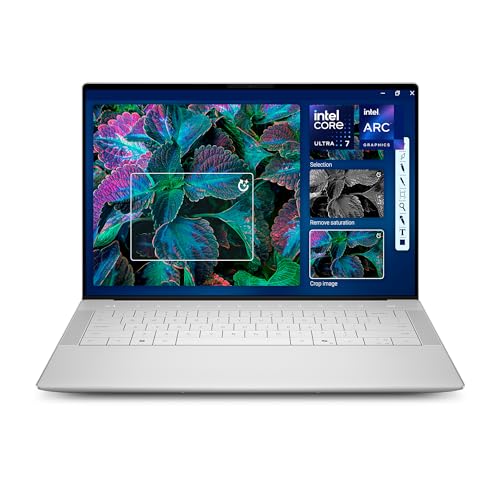
- Best for: Colour-critical editing where an accurate OLED screen and generous memory matter most.
- 14.5-inch 3.2K OLED touchscreen, 48-120Hz
- Intel Core Ultra 7 255H processor
- Intel Arc graphics
- 32GB memory
All 3 Picks at a Glance
| Product | Specs | Action |
|---|---|---|
| HP Envy 16 |
| Check price on Amazon |
| Apple MacBook Air 15 M3 |
| Check price on Amazon |
| Dell XPS 14 |
| Check price on Amazon |
Key takeaways
- Our guide to the best laptops for photo and video editing compares colour-accurate screens, export speed, memory and storage across four creator laptops.
Photo and video editing ask a laptop to do two things well at once: show colour truly and process large files quickly. A screen that hides the difference between two shades ruins an edit, and a slow processor turns every export into a wait. The machines below were chosen from the names and specifications shown on their Amazon pages, and each one balances display quality and processing power in its own way.
This guide is for photographers, video editors and creators who edit on the move. You will find a comparison of displays, processors, graphics, memory and storage, followed by advice on matching each laptop to the editing work you actually do. Whether you shoot weddings, documentaries or product photos, the right machine keeps your colours honest and your exports fast, so you spend time creating instead of waiting.
Quick Picks
As an Amazon Associate we earn from qualifying purchases
| Product | Best for | Key spec from title |
|---|---|---|
| HP Envy 16 | Heavy video editing | RTX 4060, 32GB RAM |
| Apple MacBook Air 15 M3 | Portable photo editing | M3 chip, 15.3-inch display |
| Dell XPS 14 | Colour-critical work | 3.2K OLED touch, 32GB RAM |
| ASUS Zenbook 14 OLED | Light travel editing | 3K OLED 120Hz, 2.82 lb |
How to Choose
Colour accuracy decides your edits
For photo and video work, the display is the tool you trust most, so colour accuracy comes before everything else. An OLED panel shows deep blacks and vivid colour that make your edits look true, and a high resolution lets you see fine detail without zooming in constantly. Look for a panel that covers a wide colour gamut, because a narrow screen hides the difference between two close shades that a client will notice later. Check the panel type, resolution and colour coverage on the product page before anything else, because a weak screen undermines every edit you make.
Processor and graphics set export speed
Exports are where editing laptops earn their keep, and the processor and graphics card decide how long they take. A modern multi-core processor handles timeline scrubbing, effects and encoding, while a dedicated graphics card accelerates rendering in most editing software. For photo work, a strong processor with enough memory is usually enough; for 4K video, a dedicated card makes a real difference to export times. Sixteen gigabytes of memory is the minimum for smooth editing, and 32GB gives you room for large timelines and several apps open at once. Match the hardware to the heaviest project you edit, not the lightest one.
Memory and storage hold your library
Editing projects grow large fast, with raw photos, video footage and render caches competing for space. A 1TB drive holds current projects comfortably, while a 2TB drive lets you keep a library of work without an external drive. Fast solid-state storage also speeds up loading and saving, which adds up across a long editing day. Memory matters just as much: 16GB covers photo work and lighter video, while 32GB keeps large timelines smooth. Check whether the memory can be upgraded later, because editing software only gets hungrier, and a machine with an open slot stays useful far longer than a sealed one.
Ports and battery for working anywhere
Editing happens on location as often as at a desk, so ports and battery life matter more than buyers expect. Thunderbolt ports carry fast external drives and connect a second display, while an SD card reader or USB-C hub moves photos from a camera without extra adapters. A long battery lets you edit through a shoot without hunting for an outlet, and a light body makes the laptop easy to carry all day. Check the port list and the battery capacity together, because a laptop that needs a bag of adapters and a charger is not truly portable. The best editing laptop is the one that works wherever your shoot takes you.
The 4 Best Options
HP Envy 16
- Best for: Heavy video editing with large timelines, where a strong processor, dedicated graphics and a 2TB drive all matter.
- Intel Core i9-13900H processor, up to 5.4GHz, 14 cores
- NVIDIA GeForce RTX 4060, 8GB
- 32GB DDR5 memory
- 2TB SSD
Heavy video editing with large timelines, where a strong processor, dedicated graphics and a 2TB drive all matter.
The 16-inch body and 200W adapter add bulk, so this is the heaviest editing setup here for daily carrying.
The HP Envy 16 is the heavy editing pick in this group, pairing an Intel Core i9-13900H processor with an RTX 4060 and 32GB of memory. Its 16-inch WQXGA touchscreen runs at 2560 x 1600 with a 120Hz refresh rate and 400 nits of brightness, showing your work clearly in bright rooms. A 2TB SSD holds a large library of photos and video, the 5MP camera suits video calls with clients, and Bang and Olufsen audio improves playback. A 200W adapter powers the machine through long renders, and Windows 11 Home keeps the setup simple for creators who work across photo and video.
Watch out for: The 16-inch body and 200W adapter add bulk, so this is the heaviest editing setup here for daily carrying.
Apple MacBook Air 15 M3
- Best for: Photographers who want a light, silent laptop with a large accurate screen and very long battery life.
- Apple M3 chip, 8-core CPU and 10-core GPU
- 15.3-inch Liquid Retina display, 2880 x 1864
- 8GB unified memory
- 512GB SSD
Photographers who want a light, silent laptop with a large accurate screen and very long battery life.
Eight gigabytes of unified memory suits photo work, but heavy 4K video timelines will feel the limit sooner than on a 32GB machine.
The Apple MacBook Air 15 M3 is the portable photo editing pick, pairing Apple’s M3 chip with a large 15.3-inch Liquid Retina display. Its 8-core CPU and 10-core GPU handle photo editing and lighter video work smoothly, while 8GB of unified memory and a 512GB SSD cover daily creative tasks. The display runs at 2880 x 1864 and shows a billion colours, so your edits look true. Touch ID secures sign-in, the backlit keyboard suits late sessions, and the battery lasts up to 18 hours, which is the longest in this group. The Silver model with 8GB of memory and 512GB of storage is the configuration listed here.
Watch out for: Eight gigabytes of unified memory suits photo work, but heavy 4K video timelines will feel the limit sooner than on a 32GB machine.
Dell XPS 14
- Best for: Colour-critical editing where an accurate OLED screen and generous memory matter most.
- 14.5-inch 3.2K OLED touchscreen, 48-120Hz
- Intel Core Ultra 7 255H processor
- Intel Arc graphics
- 32GB memory
Colour-critical editing where an accurate OLED screen and generous memory matter most.
Integrated graphics covers photo work well, but heavy 4K video exports will run more slowly than on an RTX machine.
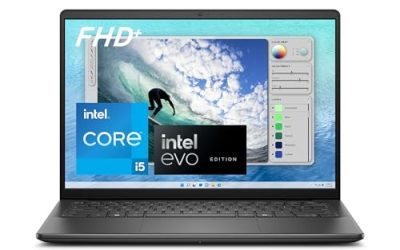
The Dell XPS 14 is the colour-critical pick, built around a 14.5-inch 3.2K OLED touchscreen that shows your work with the accuracy professional editing demands. Its Core Ultra 7 255H processor and Intel Arc graphics handle photo editing and lighter video, while 32GB of memory and a 1TB SSD keep large projects close at hand. The OLED panel refreshes from 48Hz to 120Hz, adapting to still images and motion, and the 69.5Wh battery covers a long session. A backlit keyboard with a fingerprint reader, Wi-Fi 7 and Thunderbolt 4 round out a machine that Dell also sells under the Dell 14 Premium name for the same DA14250 model.
Watch out for: Integrated graphics covers photo work well, but heavy 4K video exports will run more slowly than on an RTX machine.
ASUS Zenbook 14 OLED
The ASUS Zenbook 14 OLED is the light travel editing pick, packing a 14-inch 3K OLED display into a 2.82 lb all-metal body. Its Core Ultra 7 processor, 16GB of memory and 1TB SSD handle photo editing and lighter video work, while the 2880 x 1800 panel at 120Hz shows colour with full DCI-P3 coverage. A 75Wh battery lasts through long sessions, and two Thunderbolt 4 ports plus HDMI 2.1 and USB-A connect displays and drives without adapters. The backlit keyboard suits late edits, and the slim frame slips into any bag for shoots and travel.
Specs
- 14-inch 3K OLED display, 2880 x 1800, 120Hz
- Intel Core Ultra 7 processor
- 16GB memory
- 1TB PCIe 4.0 NVMe SSD
- 100% DCI-P3 colour coverage
- 75Wh battery
- 2.82 lb weight
- 2 x Thunderbolt 4 ports
- HDMI 2.1 and USB-A ports
- All-metal chassis
Best for: Travel editing where a light body, an accurate OLED screen and a long battery all matter.
Watch out for: Integrated graphics covers photo work well, but demanding 4K video exports will take longer than on the RTX machine here.
Which One Fits Your Situation
Heavy video projects
For video editors with long timelines and 4K footage, the HP Envy 16 is the pick. Its Core i9 processor and RTX 4060 export quickly, 32GB of memory keeps timelines smooth, and the 2TB drive holds a large library. The 16-inch touchscreen gives you room to work, and the 120Hz refresh keeps playback fluid.
Photo editing on the move
If you shoot photos and edit between locations, the Apple MacBook Air 15 M3 fits best. Its large accurate display shows your work truly, the battery lasts up to 18 hours, and the silent fanless design never distracts during a quiet shoot. It is the lightest way to carry a big screen for photo work.
Colour-critical client work
For editors whose clients judge every shade, the Dell XPS 14 is the answer. Its 3.2K OLED touchscreen is the most accurate panel here, 32GB of memory handles large files, and Thunderbolt 4 connects a calibrated desk display. It suits a studio workflow where colour is the product.
Travel and location shoots
When your work takes you to shoots and you carry everything yourself, the ASUS Zenbook 14 OLED balances accuracy and weight. Its 2.82 lb body travels easily, the OLED screen stays true in varied light, and the 75Wh battery covers a long day. It is the most portable serious editing screen in this group.
Common Mistakes
- Judging a laptop by its processor while overlooking the screen you stare at for hours.
- Buying 8GB of memory for video timelines that need 16GB or 32GB to stay smooth.
- Working on a screen with a narrow colour range and finding your prints never match what you saw.
- Keeping every project on a cramped drive and wasting hours shuffling files between disks.
- Forgetting to check the ports and ending up with a bag of adapters for every shoot.
Frequently Asked Questions
Do I need a dedicated graphics card for photo editing?
For photo work, a strong processor with enough memory is usually enough, and integrated graphics covers most editing tasks. A dedicated card helps with heavy filters, large panoramas and video work, where it speeds up exports noticeably. If you edit video regularly, choose a machine with a dedicated card; for photos alone, the processor and screen matter more.
How much memory do video editors need?
Sixteen gigabytes is the minimum for smooth video editing, covering 1080p timelines and lighter 4K work. Thirty-two gigabytes is the comfortable level for 4K timelines, large projects and several apps open at once. If you edit 4K video regularly, choose 32GB from the start rather than planning an upgrade.
Is OLED better than IPS for editing?
OLED usually shows deeper blacks and richer colour, which helps your edits look true on screen. A quality IPS panel with broad colour coverage is also a strong choice and often comes at a lower tier. Judge the panel by its colour coverage and brightness rather than by the technology name alone.
Can these laptops handle 4K video?
The RTX 4060 machine here handles 4K video well, exporting at a good pace and previewing smoothly. The integrated-graphics models manage lighter 4K work but slow down on long timelines with many effects. Match the graphics card to the heaviest footage you edit, and keep your storage fast so large files load quickly.
FAQ
Do I need a dedicated graphics card for photo editing?
How much memory do video editors need?
Is OLED better than IPS for editing?
Can these laptops handle 4K video?
More from Amazon
Programs that pair well with the guide above. Offers and eligibility are set by Amazon and may change.
Free shipping on eligible items, Prime Video and more. Eligible new members can start with a free trial.
Start a Prime free trialA Prime membership for ages 18-24 with a trial period. Eligibility is set by Amazon.
See Prime for Young AdultsAudiobooks and podcasts to listen to on the go. Eligible new members can start with a free trial.
Try Audible freeAd-free music streaming. Eligible new subscribers can start with a free trial.
Try Music Unlimited freeAs an Amazon Associate we earn from qualifying purchases.