Key takeaways
- Our guide to the best laptops for small business owners covers durable machines with strong processors, ample memory and screens built for long workdays.
A laptop is the office for most small business owners, carrying the inbox, the invoicing, the video calls, and the spreadsheet that tracks everything at once. When that machine is slow, heavy, or constantly hunting for a charger, every part of the working day gets harder, from morning email to a late-night quote. The right laptop does not need to be the fastest on the market, but it does need to be reliable, quick enough to juggle many open windows, and comfortable to use for hours at a stretch.
This guide is for owners of small businesses, freelancers, and sole traders who need one dependable machine for daily work, client meetings, and admin. Every laptop below was chosen from the name and specifications shown on its Amazon page, with a focus on processors that handle multitasking, memory that keeps many tabs open, storage that fits years of documents, and screens that stay readable through a long working day.
Quick Picks
As an Amazon Associate we earn from qualifying purchases
| Product | Best for | Key spec from title |
|---|---|---|
| Lenovo ThinkPad E14 Gen 6 | Reliable everyday business work | Intel Ultra 5 125U and 16GB RAM |
| HP ProBook 445 G11 | Touchscreen productivity | Ryzen 7 7735U and 512GB SSD |
| Dell Inspiron 14 5440 | Everyday value for a small office | Intel i5-1334U and 512GB SSD |
| Acer Aspire 3 A315-24PT | Touchscreen on a modest budget | Ryzen 5 7520U and 16GB RAM |
How to Choose
Match the processor to your working day
The processor decides how smoothly a laptop handles the stack of work a small business owner runs at once, so start there. A modern mid-range chip with six or more cores will keep email, a browser full of tabs, accounting software, and a video call running side by side without stuttering. You do not need a workstation chip for invoicing and documents, but a weak processor will show its limits the first time you join a call while a large spreadsheet recalculates. Aim for a current-generation processor and let the rest of the machine follow from that choice.
Get enough memory and storage
Memory is what keeps a busy working day from grinding to a halt, because every open tab, document, and app takes a share of it. Sixteen gigabytes is the comfortable level for a business laptop now, letting you keep a browser, email, and office apps open together without constant reloading. Storage matters just as much, since years of invoices, photos, and client files accumulate fast, so a 512GB solid-state drive is a sensible minimum. A fast drive also means the laptop starts quickly and files open without a wait.
Think about the screen and the keyboard
You will look at this screen and type on this keyboard for most of your working life, so comfort is not a luxury. A 14-inch display hits a good balance between portability and readable text, while a 15.6-inch screen gives more room for spreadsheets and side-by-side windows. A backlit keyboard helps in dim meeting rooms and on evening trains, and a touchscreen can speed up signing documents and navigating forms. If possible, check the key travel and the screen brightness in person before committing.
Weigh portability against durability
A business laptop travels to clients, cafes, and coworking spaces, so weight and build quality deserve real attention. A machine under four pounds is easy to carry all day, while a heavier laptop may stay on the desk more often than you planned. Business lines are usually built to a tougher standard, with stronger hinges and spill-resistant keyboards, which pays off over years of daily use. Think about how often the laptop leaves your desk, then choose the lightest machine that still feels solid.
The 4 Best Options
Lenovo ThinkPad E14 Gen 6
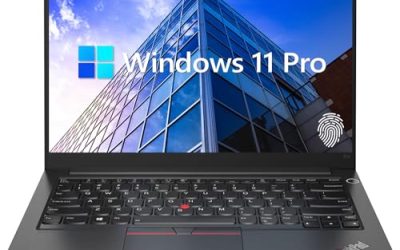
The ThinkPad E14 Gen 6 is the classic business laptop in this guide, built around the keyboard and durability that made the ThinkPad name familiar in offices everywhere. Its Intel Core Ultra 5 125U processor and 16GB of memory handle a full working day of email, documents, and video calls without fuss, while the 14-inch WUXGA display keeps text sharp across long sessions. Windows 11 Pro adds the business features many owners need, from device encryption to remote desktop, and the 256GB drive keeps the machine quick to start. The spill-resistant keyboard and sturdy hinges add durability that pays off over years of daily use in different places.
Specs
- Processor: Intel Core Ultra 5 125U
- Memory: 16GB RAM
- Storage: 256GB SSD
- Display: 14-inch WUXGA
- Operating system: Windows 11 Pro
- Model: 21M70006US
Best for: An owner who wants a proven business laptop with a great keyboard and Windows 11 Pro.
Watch out for: The 256GB drive fills up faster than a 512GB one, so plan for external storage or cloud files.
ASIN: B0D6VZPPH4
HP ProBook 445 G11
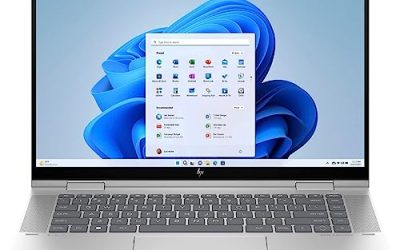
The HP ProBook 445 G11 brings a touchscreen and a strong Ryzen processor to a business laptop that still feels compact at 14 inches. Its Ryzen 7 7735U chip and 16GB of memory keep many apps open at once, and the 512GB drive leaves room for years of client files, photos, and presentations. The touchscreen makes signing documents and tapping through forms quicker, and Windows 11 Pro covers the security and management features a small business relies on. The compact 14-inch body keeps it portable, while the strong processor means video calls stay smooth even with many apps open at the same time.
Specs
- Processor: AMD Ryzen 7 7735U
- Memory: 16GB RAM
- Storage: 512GB SSD
- Display: 14-inch touchscreen
- Operating system: Windows 11 Pro
- Model: A1SY9UT
Best for: Owners who want touch input and a strong processor in a portable business laptop.
Watch out for: Touchscreens collect fingerprints, so keep a microfiber cloth in the laptop bag.
ASIN: B0D45NW78W
Dell Inspiron 14 5440

The Dell Inspiron 14 5440 is the sensible everyday choice in this guide, a 14-inch laptop that covers the basics of business computing without asking for a premium. Its Intel Core i5-1334U processor and 8GB of DDR5 memory handle email, browsing, and office documents well, and the 512GB drive gives plenty of room for files. Windows 11 Home keeps the setup simple for a one-person business, and the compact 14-inch body slips easily into a bag for client visits and coworking days. It is the right pick when you want a solid, dependable machine without paying for extras you will not use.
Specs
- Processor: Intel Core i5-1334U
- Memory: 8GB DDR5 RAM
- Storage: 512GB SSD
- Display: 14-inch
- Operating system: Windows 11 Home
- Model: Inspiron 14 5440
Best for: A small office that needs a dependable, portable laptop at a sensible level of spend.
Watch out for: The 8GB of memory will feel tight if you keep dozens of browser tabs open all day.
ASIN: B0FJZH3XJL
Acer Aspire 3 A315-24PT-R0UX
The Acer Aspire 3 A315-24PT-R0UX is the most affordable route to a large touchscreen laptop in this guide, pairing a 15.6-inch Full HD IPS touch display with 16GB of LPDDR5 memory. Its Ryzen 5 7520U processor manages everyday business tasks comfortably, and the 512GB NVMe drive keeps files close at hand with quick access. A backlit keyboard and a built-in webcam round out a machine that works well at a desk, in a meeting room, or at the kitchen table, giving a small business a capable screen without a large outlay. The large display also makes video calls easier to follow.
Specs
- Processor: AMD Ryzen 5 7520U
- Memory: 16GB LPDDR5 RAM
- Storage: 512GB NVMe SSD
- Display: 15.6-inch Full HD IPS touchscreen
- Keyboard: Backlit keyboard
- Webcam: Built-in webcam
Best for: Owners who want a big touchscreen and 16GB of memory without a premium price.
Watch out for: The 15.6-inch body is heavier to carry than the 14-inch models in this guide.
ASIN: B0CJV41KZN
Which One Fits Your Situation
You work mostly at a desk with occasional travel
Choose the Acer Aspire 3 when a large screen matters more than carrying weight. The 15.6-inch touchscreen gives spreadsheets and documents room to breathe, and the 16GB of memory keeps a busy browser open all day. It is a strong desk companion that still travels when a client meeting calls, and the backlit keyboard helps in dim rooms. A large screen also makes video calls easier to follow.
You are on the move between clients
Pick the Lenovo ThinkPad E14 Gen 6 when the laptop lives in a bag. Its 14-inch body is easy to carry, the keyboard is comfortable for long typing sessions, and Windows 11 Pro covers business security. The ThinkPad build quality also stands up to years of daily travel, so the machine keeps working through commutes, client visits, and coworking days without complaint.
You sign documents and present often
Take the HP ProBook 445 G11 when touch input will speed up your work. Tapping through forms, signing PDFs, and swiping through a presentation all feel natural on its touchscreen, and the Ryzen 7 processor keeps everything responsive while you present. The 512GB drive also leaves room for years of client files, so the machine grows with the business.
You need a straightforward starter machine
Go with the Dell Inspiron 14 5440 when you want a simple, dependable laptop for email, documents, and video calls. It covers the essentials well, fits easily into a bag, and leaves budget free for software, a monitor, or a backup drive. For a new business, that balance of capability and sensible spend is hard to beat.
Common Mistakes
- Buying a laptop with too little memory, then fighting slowdowns every time many tabs are open.
- Choosing a heavy 15-inch machine when the laptop will spend most days in a bag.
- Ignoring the operating system and discovering too late that a business feature needs Windows 11 Pro.
- Settling for a small drive, then running out of room for client files within a year.
- Forgetting a backup plan, so a single drive failure puts years of business records at risk.
Frequently Asked Questions
How much RAM does a small business laptop need?
Sixteen gigabytes is the comfortable level for most small business work today, because it lets you keep a browser with many tabs, email, accounting software, and a video call open at the same time. Eight gigabytes still works for lighter days built around email and documents, but it will feel tight as your workload grows.
Is Windows 11 Pro worth it for a small business?
Windows 11 Pro is worth it when you need device encryption, remote desktop access, or group policy controls, and it is the standard choice for business machines. Windows 11 Home covers everyday work fine for a sole trader with simple needs. The difference is mainly about management and security features, so weigh your setup against what you actually use.
What screen size suits a business laptop best?
A 14-inch display is the most popular compromise, portable enough to carry daily while still readable for long sessions. A 15.6-inch screen gives more room for spreadsheets and side-by-side windows, which suits desk-based work. A touchscreen adds convenience for signing and presenting, though it is not essential for every owner.
How long should a business laptop last?
A well-chosen business laptop should serve for four to five years of daily work, with the battery usually needing attention first. Choosing a current processor, 16GB of memory, and a solid-state drive gives the machine the longest useful life. Regular backups and a protective sleeve will also help it reach that lifespan in good condition.
FAQ
How much RAM does a small business laptop need?
Is Windows 11 Pro worth it for a small business?
What screen size suits a business laptop best?
How long should a business laptop last?
More from Amazon
Programs that pair well with the guide above. Offers and eligibility are set by Amazon and may change.
Free shipping on eligible items, Prime Video and more. Eligible new members can start with a free trial.
Start a Prime free trialA Prime membership for ages 18-24 with a trial period. Eligibility is set by Amazon.
See Prime for Young AdultsAudiobooks and podcasts to listen to on the go. Eligible new members can start with a free trial.
Try Audible freeAd-free music streaming. Eligible new subscribers can start with a free trial.
Try Music Unlimited freeAs an Amazon Associate we earn from qualifying purchases.