Our Short List of 3

- Best for: Artists who want a pen included and a colour-accurate OLED screen in a light 2-in-1.
- 14-inch WUXGA OLED touch display, 100% DCI-P3
- Intel Core Ultra 5 226V processor
- 16GB LPDDR5X memory
- 1TB SSD

- Best for: Everyday creative work with a flexible 2-in-1 design and a complete set of work features.
- 14-inch FHD IPS touchscreen, 1920 x 1080
- Intel Core 5 120U processor, 10 cores up to 5GHz
- 8GB RAM
- 512GB SSD

- Best for: Artists who want the largest drawing canvas in this group with a bright AMOLED screen.
- 15.6-inch FHD AMOLED touchscreen
- Intel Core 7 150U processor, up to 5.0GHz, 10 cores
- 16GB LPDDR5 RAM
- 512GB PCIe NVMe M.2 SSD
All 4 Picks at a Glance
| Product | Specs | Action |
|---|---|---|
| Lenovo Yoga 7i |
| Check price on Amazon |
| HP Envy x360 14 |
| Check price on Amazon |
| Samsung Galaxy Book4 360 |
| Check price on Amazon |
 ASUS Vivobook Flip 14 |
| Check price on Amazon |
Key takeaways
- Our guide to the best laptops for digital art compares colour-accurate touchscreens, pen support, performance and portability across four creator laptops.
Digital art lives or dies on the screen in front of you. A display that shows colour truly, a pen that responds to your hand, and a machine that keeps up with large canvas files are the three things that matter most. The laptops below were chosen from the names and specifications shown on their Amazon pages, and each one approaches the creative brief in its own way.
This guide is for illustrators, designers and students who draw, paint and design on a laptop. You will find a comparison of displays, pen support, performance and portability, followed by advice on matching each machine to the art you make. Whether you illustrate, paint or design, the right machine keeps your colours honest and your canvas responsive, so the tool disappears and the work takes over.
Quick Picks
As an Amazon Associate we earn from qualifying purchases
| Product | Best for | Key spec from title |
|---|---|---|
| Lenovo Yoga 7i | Drawing with an included pen | OLED touch, Yoga Pen included |
| HP Envy x360 14 | Everyday creative work | Touchscreen, fingerprint reader |
| Samsung Galaxy Book4 360 | Large canvas on the move | 15.6-inch AMOLED touch |
| ASUS Vivobook Flip 14 | Sharp OLED drawing | OLED touch, Thunderbolt 4 |
How to Choose
Colour accuracy is the foundation
For digital art, the screen is your canvas, so colour accuracy comes before everything else. An OLED panel shows deep blacks and vivid colour that make illustrations look true, and a wide colour gamut means the shades you pick are the shades you see. Look for a panel that covers the full DCI-P3 range, because a narrow screen hides the difference between two close colours. Resolution matters too: a sharp display lets you see fine lines without zooming in constantly. Check the panel type, resolution and colour coverage on the product page, because a weak screen undermines every brush stroke you make.
Pen support changes the work
Drawing with a pen on the screen feels natural in a way a mouse never will, so check what the laptop offers. A touchscreen with pen support turns the machine into a drawing tablet, letting you sketch, ink and paint directly on your canvas. Pressure sensitivity is the key detail: a pen that responds to light and heavy strokes gives you the control that flat drawing lacks. Some laptops include the pen in the box, while others sell it separately, so confirm the listing before you assume. If you already own a drawing tablet you love, a non-touch laptop with a strong screen may suit you better.
Performance for large files
Digital art files grow large fast, with layered canvases, high-resolution textures and reference images competing for memory. Sixteen gigabytes of memory is the comfortable level for illustration and design work, and it keeps several apps open at once without stalling. A fast processor matters when you apply filters, export large files or work with many layers, and a solid-state drive speeds up loading and saving. Integrated graphics covers most illustration work, but a dedicated card helps with 3D painting and video. Match the machine to your largest file, not your smallest sketch.
Size, weight and battery
A laptop for digital art travels with you to classes, studios and cafes, so size and weight matter as much as the screen. A 14-inch machine slips into a bag easily and works well on a small desk, while a 15.6-inch screen gives your canvas more room at the cost of extra bulk. Weight matters when you carry the machine all day, and a laptop under three and a half pounds feels very different from one over four. Battery life decides how long you can draw away from an outlet, so check the rated capacity and the processor’s efficiency together. The best art laptop is the one you actually carry everywhere.
The 4 Best Options
Lenovo Yoga 7i
- Best for: Artists who want a pen included and a colour-accurate OLED screen in a light 2-in-1.
- 14-inch WUXGA OLED touch display, 100% DCI-P3
- Intel Core Ultra 5 226V processor
- 16GB LPDDR5X memory
- 1TB SSD
Artists who want a pen included and a colour-accurate OLED screen in a light 2-in-1.
Integrated graphics covers illustration well, but heavy 3D painting will run more slowly than on a machine with a dedicated card.
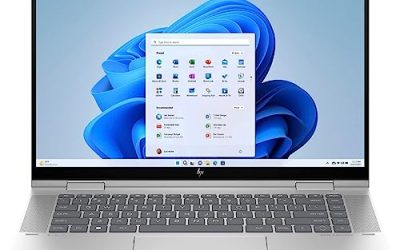
The Lenovo Yoga 7i is the drawing-first pick in this group, arriving with its Yoga Pen included so you can start sketching straight out of the box. Its 14-inch WUXGA OLED touch display covers the full DCI-P3 colour range, showing your work truly, and the Core Ultra 5 226V processor handles illustration apps smoothly. Sixteen gigabytes of LPDDR5X memory and a 1TB SSD hold large canvas files, while Wi-Fi 7 keeps cloud sync fast. A fingerprint reader secures your work, the 70Wh battery covers a long session, and the 3.04 lb body travels easily. Windows 11 Home keeps the setup simple.
Watch out for: Integrated graphics covers illustration well, but heavy 3D painting will run more slowly than on a machine with a dedicated card.
HP Envy x360 14
- Best for: Everyday creative work with a flexible 2-in-1 design and a complete set of work features.
- 14-inch FHD IPS touchscreen, 1920 x 1080
- Intel Core 5 120U processor, 10 cores up to 5GHz
- 8GB RAM
- 512GB SSD
Everyday creative work with a flexible 2-in-1 design and a complete set of work features.
Eight gigabytes of memory suits daily work, but very large layered files will feel the limit sooner than on a 16GB machine.
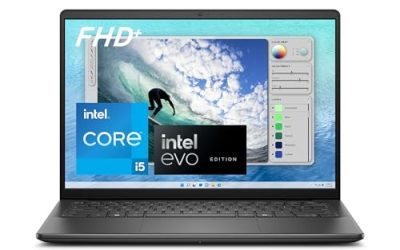
The HP Envy x360 14 is the everyday creative pick, folding into a tablet shape when you want to sketch and back into a laptop when you need to type. Its 14-inch full HD IPS touchscreen shows your work clearly, and the Core 5 120U processor with 10 cores up to 5GHz handles illustration and multitasking. Eight gigabytes of memory and a 512GB SSD cover daily creative work, while Wi-Fi 6E keeps connections fast. A fingerprint reader, a backlit keyboard and a 5MP True Vision camera round out a machine built for work calls as well as art, and the 3.35 lb body carries easily.
Watch out for: Eight gigabytes of memory suits daily work, but very large layered files will feel the limit sooner than on a 16GB machine.
Samsung Galaxy Book4 360
- Best for: Artists who want the largest drawing canvas in this group with a bright AMOLED screen.
- 15.6-inch FHD AMOLED touchscreen
- Intel Core 7 150U processor, up to 5.0GHz, 10 cores
- 16GB LPDDR5 RAM
- 512GB PCIe NVMe M.2 SSD
Artists who want the largest drawing canvas in this group with a bright AMOLED screen.
The larger screen adds bulk, so this is the heaviest machine here for daily carrying.
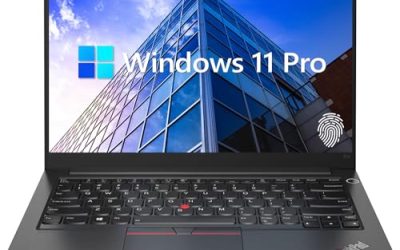
The Samsung Galaxy Book4 360 is the large-canvas pick, giving your art room to breathe on a 15.6-inch AMOLED touchscreen. Its Core 7 150U processor with 10 cores up to 5.0GHz handles illustration and design work, while 16GB of LPDDR5 memory and a 512GB PCIe NVMe SSD keep large files close at hand. A fingerprint reader secures your work, the 68Wh battery covers long sessions, and Windows 11 Home keeps everything familiar. The 360-degree hinge folds flat for drawing, and a USB-C hub is included in the box for connecting displays and drives.
Watch out for: The larger screen adds bulk, so this is the heaviest machine here for daily carrying.
ASUS Vivobook Flip 14
- Best for: Artists who want a sharp OLED touchscreen with fast connections and generous storage.
- 14-inch OLED touchscreen, 1920 x 1200, 60Hz, 500 nits peak
- Intel Core Ultra 7 256V processor, 8 cores
- 16GB LPDDR5X memory
- 1TB M.2 PCIe 4.0 NVMe SSD
Artists who want a sharp OLED touchscreen with fast connections and generous storage.
The 60Hz refresh rate is standard for colour work, so pen strokes will feel less fluid than on a high-refresh panel.
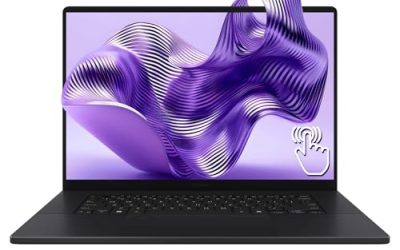
The ASUS Vivobook Flip 14 is the sharp-screen pick, pairing a 14-inch OLED touchscreen with a 120Hz refresh rate that keeps pen strokes feeling immediate. Its Core Ultra 7 256V processor with 8 cores, 16GB of LPDDR5X memory and a 1TB PCIe 4.0 SSD handle illustration, design and multitasking with ease. The OLED panel reaches 500 nits at peak brightness and covers the full DCI-P3 range, so your colours stay true in bright rooms. Thunderbolt 4, Wi-Fi 7 and Bluetooth 5.4 cover fast connections, and the backlit keyboard and full HD webcam suit work calls between drawing sessions.
Watch out for: The 60Hz refresh rate is standard for colour work, so pen strokes will feel less fluid than on a high-refresh panel.
Which One Fits Your Situation
Sketching with a pen from day one
If you want to open the box and start drawing, the Lenovo Yoga 7i is the pick. Its Yoga Pen is included, the OLED screen shows colour truly, and the light body travels anywhere. The 1TB drive holds a large library of work, and the fingerprint reader keeps it secure. It is the most complete drawing package here.
One laptop for work and art
For buyers who split their day between office work and illustration, the HP Envy x360 14 fits best. Its 2-in-1 design folds flat for sketching, the backlit keyboard and 5MP camera suit video calls, and the fingerprint reader speeds up sign-in. It is a work laptop first and an art laptop second, which is exactly what many buyers need.
A bigger canvas for detailed work
When your illustrations carry fine detail and many layers, the Samsung Galaxy Book4 360 gives you room. Its 15.6-inch AMOLED screen shows more of your canvas at once, the 16GB of memory handles large files, and the 360-degree hinge folds flat for drawing. It suits a desk-based artist who still wants to carry the machine sometimes.
Colour accuracy in a compact frame
For artists who travel light but refuse to compromise on colour, the ASUS Vivobook Flip 14 is the answer. Its OLED panel is bright and colour-accurate, the 1TB drive holds a big portfolio, and Thunderbolt 4 connects a desk display when you need a larger canvas. It is the most portable way to carry a serious art screen.
Common Mistakes
- Choosing a laptop without pen support and then buying a separate drawing tablet you did not budget for.
- Picking a screen with a narrow colour range and wondering why prints look different from the display.
- Buying 8GB of memory for layered files that need 16GB to stay smooth.
- Ignoring weight and ending up with a machine you leave at home instead of carrying.
- Forgetting to check whether the pen is included or sold separately.
Frequently Asked Questions
Do I need a touchscreen for digital art?
A touchscreen with pen support lets you draw directly on your canvas, which feels natural to most artists. It is not essential if you already own a drawing tablet you like, in which case a strong non-touch screen may suit you better. If you are starting fresh, a touchscreen laptop replaces two devices with one.
How much memory do digital artists need?
Sixteen gigabytes is the comfortable level for illustration and design, covering layered files and several apps at once. Eight gigabytes works for lighter work and smaller canvases, but large files will feel the limit. If you work with many layers or high-resolution textures, choose 16GB from the start.
Is OLED better than IPS for digital art?
OLED usually shows deeper blacks and more vivid colour, which helps your work look true on screen. A good IPS panel with wide colour coverage also works well and often costs less. Either is fine when the panel covers the full DCI-P3 range; what matters most is the colour coverage, not the panel technology alone.
Can these laptops run design software?
Yes, all four machines run common illustration and design software, including drawing, photo editing and layout apps. The 16GB models handle larger files more comfortably, while the 8GB model suits lighter work. Check the system requirements of your specific software before buying, since some 3D tools need a dedicated graphics card.
FAQ
Do I need a touchscreen for digital art?
How much memory do digital artists need?
Is OLED better than IPS for digital art?
Can these laptops run design software?
More from Amazon
Programs that pair well with the guide above. Offers and eligibility are set by Amazon and may change.
Free shipping on eligible items, Prime Video and more. Eligible new members can start with a free trial.
Start a Prime free trialA Prime membership for ages 18-24 with a trial period. Eligibility is set by Amazon.
See Prime for Young AdultsAudiobooks and podcasts to listen to on the go. Eligible new members can start with a free trial.
Try Audible freeAd-free music streaming. Eligible new subscribers can start with a free trial.
Try Music Unlimited freeAs an Amazon Associate we earn from qualifying purchases.