Our Short List of 3
All 3 Picks at a Glance
| Product | Specs | Action |
|---|---|---|
| 1. ASUS ROG Strix SCAR II GL504GS-DS74 — Best Overall Performance | Check price on Amazon | |
 2. Dell G5 15 5587 — Best Build Quality | Check price on Amazon | |
 3. Lenovo Legion Y530 (81FV0001US) — Best Portable Pick | Check price on Amazon |
Key takeaways
- Discover the best 8th gen Intel gaming laptops for 2026, from the Dell G5 and ASUS ROG Strix SCAR II to the Lenovo Legion Y530, with expert buying advice.
The best 8th gen Intel gaming laptops still have plenty to offer in 2026, even though Intel has moved several generations beyond Coffee Lake. The 8th generation marked the moment laptop gaming changed: Intel put six cores into mainstream mobile chips for the first time, and the Core i7-8750H became the workhorse of an entire wave of gaming notebooks. Laptops built around that processor, paired with GTX 1060 or GTX 1070 graphics, can still run the vast majority of modern games at 1080p with respectable settings, and they now trade at a fraction of what they cost when new. This guide covers what made the generation special, how to choose one today, and the three strongest models still findable on Amazon.
What Made 8th Gen Intel Gaming Laptops Special
Intel’s 8th generation mobile processors, codenamed Coffee Lake, arrived in the spring of 2018 and represented the biggest single jump in laptop CPU performance in years. The flagship mobile chip, the Core i7-8750H, offered six cores and twelve threads, up from the four cores of the previous generation’s i7-7700HQ. Base clock sat at 2.2 GHz with turbo boost reaching up to 4.1 GHz, and the chip supported DDR4 memory at speeds up to 2666 MHz.
For gamers, that core-count jump mattered more than any clock-speed bump. Modern games increasingly use more than four threads, and the extra cores gave the 8750H real headroom for streaming, recording, voice chat, and background applications running alongside a game. It also meant the CPU was far less likely to become the bottleneck in a system, letting the graphics card do its job. The mid-range Core i5-8300H, with four cores and eight threads, offered a similar step up for budget machines, and it still handles esports titles and older AAA games comfortably today.
The 8th generation also coincided with a golden era of mid-range laptop graphics. The GTX 1050 Ti, GTX 1060, and GTX 1070 were mature, well-understood GPUs with broad driver support. A GTX 1060 laptop from 2018 will still run games like Fortnite, Valorant, Apex Legends, Rocket League, and League of Legends at high frame rates on a 1080p display, and it can handle demanding single-player titles at medium to high settings. The GTX 1070 models go further, pushing into high-refresh 1080p and even some 1440p gaming on an external monitor.
How to Choose an 8th Gen Intel Gaming Laptop
Buying a laptop that is several years old requires a different checklist than buying a new one. The hardware itself is proven, but age introduces risks around batteries, storage, software support, and seller reliability. Work through the points below before committing to any model.
Confirm the Exact CPU
Not every laptop sold in 2018 had an 8th gen chip. Some budget models carried over 7th gen processors, and some later refreshes moved to 9th gen parts. Look for the specific model numbers: Core i7-8750H, Core i7-8850H, Core i5-8300H, and Core i5-8400H are all 8th generation. A listing that says only “Intel Core i7” without a model number is not good enough.
Prioritize the Graphics Card
In a gaming laptop, the GPU determines gaming performance more than any other component. For 8th gen machines, the sensible tiers are the GTX 1050 Ti as the entry point, the GTX 1060 as the sweet spot, and the GTX 1070 as the high end. The GTX 1060 with 6 GB of video memory is the pick most buyers should target, because it handles 1080p gaming well and the extra memory matters in modern titles. Be wary of the 3 GB version of the GTX 1060, which is a cut-down card.
Insist on an SSD
Every 8th gen gaming laptop worth buying should have a solid-state drive, ideally an NVMe SSD, as its boot drive. The difference between an SSD and a hard drive is the single most noticeable performance gap in everyday use: boot times, game loading, and general responsiveness all transform with an SSD. Many 2018 models shipped with a small SSD paired with a larger hard drive, which is a fine combination. A machine with only a spinning hard drive will feel sluggish no matter how good its CPU and GPU are.
Check the Display
Most 8th gen gaming laptops have a 15.6-inch 1080p display, and that is the right size and resolution for this class of hardware. The upgrade worth paying attention to is refresh rate: a 144 Hz IPS panel makes fast-paced games feel dramatically smoother than a standard 60 Hz screen. IPS panels also deliver much better viewing angles and color than the cheaper TN panels found in some budget configurations. If you play competitive shooters, prioritize 144 Hz.
Memory: 16 GB Is the Target
Sixteen gigabytes of RAM is the sweet spot for gaming in 2026, and it was already the recommended amount for 8th gen laptops. Eight gigabytes will work, but you will feel the limit in newer titles and when multitasking. The good news is that RAM is user-upgradeable in nearly all of these machines, so an 8 GB model is not a deal-breaker if the rest of the specification is right.
Battery Health and Condition
This is the biggest age-related risk. A laptop battery that is eight years old will have lost a meaningful share of its original capacity, even if the machine sat unused. When buying from a third-party seller, ask about battery health and whether the battery has been replaced. If you plan to use the laptop mostly plugged in at a desk, battery wear matters less, but you should still confirm the machine holds a charge.
Seller, Returns, and Warranty
Because these models are no longer manufactured, most listings come from third-party sellers rather than the manufacturer. Read the seller’s feedback, confirm the return policy, and check whether any warranty is offered. A machine sold as new-old stock should arrive sealed or clearly described as such, while refurbished units should state exactly what was tested and replaced. If a listing is vague about condition, treat that as a warning sign.
Set Realistic Expectations
An 8th gen gaming laptop will not match a current-generation machine with an RTX graphics card. It will not run the latest ray-traced titles at ultra settings. What it will do is play the overwhelming majority of games well at 1080p, handle school and office work with ease, and serve as a capable streaming machine. Judge it against that standard, and it remains a genuinely good buy.
Top Picks
The three laptops below are the strongest 8th gen Intel gaming laptops still available on Amazon. All three use the six-core Core i7-8750H, all three pair it with dedicated NVIDIA graphics, and all three were widely praised when new for balancing performance, build quality, and value.
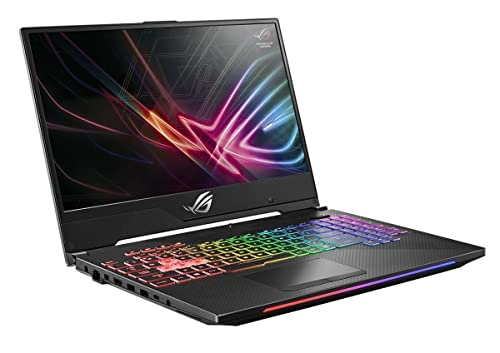
1. ASUS ROG Strix SCAR II GL504GS-DS74 — Best Overall Performance
The ASUS ROG Strix SCAR II is the most capable 8th gen gaming laptop still available, and the GL504GS-DS74 configuration is its strongest form. It pairs the Core i7-8750H with a GTX 1070 graphics card, 16 GB of DDR4 RAM, and a 256 GB PCIe NVMe SSD plus a 1 TB FireCuda hybrid drive, all driving a 15.6-inch 1080p IPS display with a 144 Hz refresh rate and a 3 ms response time.
The GTX 1070 is what makes this machine special. It is a large step up from the GTX 1060, delivering smooth high-settings 1080p gaming in demanding titles and enough headroom for a 1440p external monitor. Combined with the fast 144 Hz panel, the SCAR II is built for competitive play: fast-paced shooters feel responsive, motion stays clear, and the high frame rates the GPU produces are actually visible on the screen rather than wasted on a 60 Hz display.
ASUS built the SCAR II with esports in mind. The keyboard has a desktop-inspired layout with highlighted WASD keys, per-key RGB backlighting, and N-key rollover for reliable input during frantic moments. The cooling system uses dual 12-volt fans and anti-dust tunnels designed to keep debris out of the heatsinks. At around five pounds, it is one of the lighter laptops here, and its brushed metal lid and patterned finish look distinctive without being garish.
The trade-off is that the SCAR II is a gaming laptop first and everything else second. Battery life is short under load, the fans are audible during intense games, and the aggressive styling will not suit every setting. For a buyer whose priority is gaming performance above all else, those are acceptable compromises.
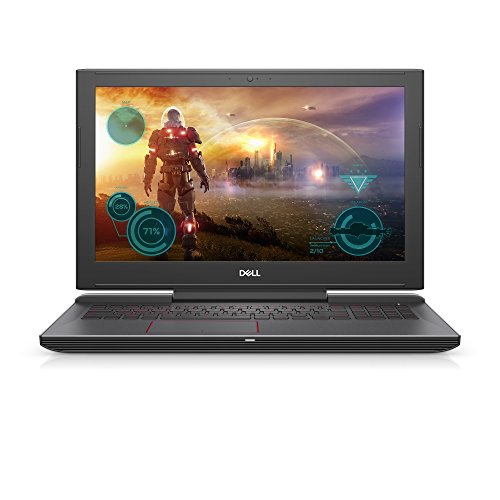
2. Dell G5 15 5587 — Best Build Quality
The Dell G5 15 5587 takes a different approach from the flashier gaming laptops of its era. It looks understated, with a matte black chassis and restrained red accents, and it could pass for a business laptop in a meeting room. Underneath that sober exterior, the G5587-7866BLK-PUS configuration packs the Core i7-8750H, a GTX 1050 Ti graphics card, 16 GB of RAM, and a dual-drive setup with a 128 GB SSD for the operating system and a 1 TB hard drive for games and media.
The Dell G5’s strengths are build quality and everyday usability. The chassis feels dense and well put together, the keyboard is comfortable for typing as well as gaming, and the 15.6-inch Full HD IPS display produces accurate colors and wide viewing angles. Dell’s thermal design uses dual fans with generous venting, and the machine handles sustained gaming sessions without the dramatic throttling that plagued some thinner rivals. It also has a useful array of ports, including HDMI, Ethernet, and an SD card reader.
The GTX 1050 Ti is a step below the GTX 1060, so this is not the machine for maximum frame rates. It is, however, more than capable for esports titles, older AAA games, and modern games at medium settings, and it runs cooler and quieter than its more powerful siblings. For a buyer who wants a laptop that games well but also works as a daily driver for school or office tasks, that trade-off is reasonable. The dual-drive storage is a practical bonus: the SSD keeps Windows fast, while the terabyte hard drive holds a large game library without constant uninstalling.
3. Lenovo Legion Y530 (81FV0001US) — Best Portable Pick
The Lenovo Legion Y530 is the quietest achiever of this generation. The 81FV0001US configuration pairs the Core i7-8750H with a GTX 1050 Ti graphics card, 16 GB of DDR4 RAM, and a 256 GB SSD plus a 1 TB hard drive, behind a 15.6-inch 1080p IPS display. It is not the fastest machine on this list, but it is the most portable and the most understated, and for many buyers that is the right balance.
Lenovo designed the Y530 to look like a normal laptop rather than a gaming machine. The chassis is slim, the lid carries only a small Legion logo, and the white-backlit keyboard would not look out of place in an office. At around five pounds, it is easy to carry, and its dual-fan cooling system with rear exhausts keeps the keyboard deck comfortable during long sessions. The port selection is thoughtful, with most connections moved to the rear of the chassis so cables stay out of the way of your mouse hand.
The GTX 1050 Ti handles esports titles, older AAA games, and modern games at medium settings without trouble, and the six-core processor means the machine doubles as a capable workstation for video editing, coding, and multitasking. Storage is a strong point: the SSD keeps the system responsive, while the terabyte hard drive holds a large game library. Memory is upgradeable, and the bottom panel comes off easily for future upgrades.
Comparison Table
| Laptop | CPU | Graphics | RAM | Storage | Display |
|---|---|---|---|---|---|
| ASUS ROG Strix SCAR II GL504GS-DS74 | Intel Core i7-8750H | NVIDIA GTX 1070 8 GB | 16 GB DDR4 | 256 GB NVMe SSD plus 1 TB SSHD | 15.6-inch 1080p IPS, 144 Hz, 3 ms |
| Dell G5 15 5587 | Intel Core i7-8750H | NVIDIA GTX 1050 Ti 4 GB | 16 GB DDR4 | 128 GB SSD plus 1 TB HDD | 15.6-inch 1080p IPS |
| Lenovo Legion Y530 81FV0001US | Intel Core i7-8750H | NVIDIA GTX 1050 Ti 4 GB | 16 GB DDR4 | 256 GB SSD plus 1 TB HDD | 15.6-inch 1080p IPS |
Which 8th Gen Intel Gaming Laptop Is Right for You
The right pick depends on how you plan to use the machine. If you want the highest frame rates this generation can deliver, the ASUS ROG Strix SCAR II is the default recommendation. Its GTX 1070 and 144 Hz screen cover the most demanding games, and it has the strongest raw gaming performance of the three.
If you want a laptop that doubles as a work or school machine and you are willing to trade some graphics power for build quality and a quieter, more professional design, the Dell G5 15 5587 is the better fit. Its GTX 1050 Ti still handles a large library of games, and its dual-drive storage and sturdy chassis make it a practical everyday computer.
If portability and a low profile matter most, the Lenovo Legion Y530 is the clear choice. It is the slimmest and most understated machine here, with rear-mounted ports and a design that fits in anywhere, while still offering the same six-core processor and capable graphics.
Budget also plays a role. The Dell G5 and Lenovo Legion Y530 typically sit at the affordable end of this group, while the SCAR II sits at the top. All three are far less expensive than a comparable new gaming laptop, which is the entire point of shopping this generation.
Frequently Asked Questions
Are 8th gen Intel gaming laptops still good in 2026?
Yes, for 1080p gaming they remain capable. The six-core Core i7-8750H still handles modern games, streaming, and multitasking well, and a GTX 1060 or GTX 1070 delivers smooth frame rates in most titles at medium to high settings. They are not a match for current-generation laptops with ray tracing and newer features, but for the large majority of games, they hold up.
What is the best 8th gen Intel processor for gaming?
The Core i7-8750H is the best widely available 8th gen mobile gaming processor. Its six cores and twelve threads give it a real advantage over the quad-core i5-8300H in demanding games and while multitasking. The i5-8300H is still a solid chip for esports and lighter titles, but the i7-8750H is the one to target if the budget allows.
Can an 8th gen Intel gaming laptop run modern AAA games?
It can run most of them at 1080p with medium to high settings, depending on the graphics card. A GTX 1070 machine handles demanding titles comfortably, a GTX 1060 manages them well at medium settings, and a GTX 1050 Ti may need lower settings in the newest releases. Very recent games with heavy ray tracing requirements will struggle, so set expectations accordingly.
How much RAM does an 8th gen gaming laptop need?
Sixteen gigabytes is the recommended amount. It covers modern games, browser tabs, voice chat, and background applications without forcing the system to swap memory to disk. Eight gigabytes will work for lighter gaming, but it is worth upgrading to 16 GB if the laptop has an accessible memory slot, which most 8th gen gaming laptops do.
Should I buy an 8th gen Intel gaming laptop new or refurbished?
Either can work, but the distinction matters less than the seller and the condition. New-old stock is rare and commands a premium, while refurbished units from reputable sellers often include a fresh battery and a warranty. Whichever route you choose, confirm the exact configuration, check the return policy, and test the machine thoroughly during the return window.
Conclusion
The best 8th gen Intel gaming laptops earned their reputation for a reason. The six-core Core i7-8750H, paired with GTX 10-series graphics and fast 144 Hz displays, delivered a level of portable gaming performance that still holds up years later. The ASUS ROG Strix SCAR II remains the most powerful pick, the Dell G5 15 5587 offers the best build quality and everyday usability, and the Lenovo Legion Y530 delivers the most portable and understated package of the three.
Buying one of these machines in 2026 is a value play, not a future-proofing play. Check the exact configuration, verify the seller, ask about the battery, and confirm the return policy before you commit. Do that, and an 8th gen Intel gaming laptop can deliver years of solid 1080p gaming for far less than a new machine would cost.
Disclosure: As an Amazon Associate, we earn from qualifying purchases.
FAQ
Are 8th gen Intel gaming laptops still good in 2026?
What is the best 8th gen Intel processor for gaming?
Can an 8th gen Intel gaming laptop run modern AAA games?
How much RAM does an 8th gen gaming laptop need?
Should I buy an 8th gen Intel gaming laptop new or refurbished?
More from Amazon
Programs that pair well with the guide above. Offers and eligibility are set by Amazon and may change.
Free shipping on eligible items, Prime Video and more. Eligible new members can start with a free trial.
Start a Prime free trialA Prime membership for ages 18-24 with a trial period. Eligibility is set by Amazon.
See Prime for Young AdultsAudiobooks and podcasts to listen to on the go. Eligible new members can start with a free trial.
Try Audible freeAd-free music streaming. Eligible new subscribers can start with a free trial.
Try Music Unlimited freeAs an Amazon Associate we earn from qualifying purchases.