Our Short List of 3
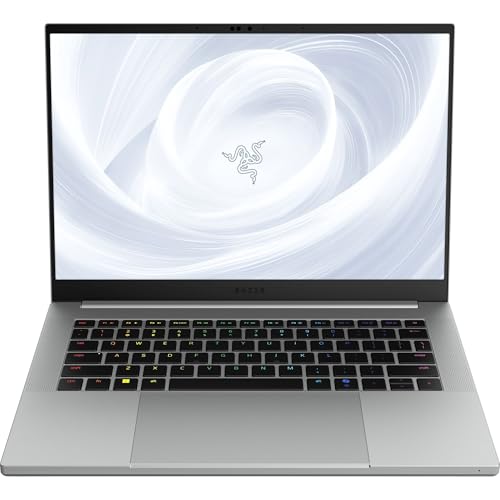
- Best for: Buyers who travel with their gaming laptop and want a premium build in the smallest Blade.
- Display: 14-inch 2880×1800 OLED, 120Hz, 0.2ms
- Processor: AMD Ryzen AI 9 365
- Graphics: NVIDIA GeForce RTX 5070 (up to 115W TGP)
- Memory: 32GB LPDDR5X-8000

- Best for: Power users who want the most memory and storage available in a 16-inch Blade.
- Display: 16-inch QHD+ OLED, 240Hz
- Processor: AMD Ryzen AI 9 365
- Graphics: NVIDIA GeForce RTX 5080 (16GB GDDR7)
- Memory: 64GB LPDDR5X
- Best for: Enthusiasts who want the fastest Blade configuration Razer currently lists.
- Display: 16-inch QHD+ 240Hz OLED
- Processor: AMD Ryzen AI 9 HX 370 (NPU 50 TOPS)
- Graphics: NVIDIA GeForce RTX 5090 (up to 160W TGP with Dynamic Boost)
- Memory: 32GB LPDDR5X-8000
All 3 Picks at a Glance
| Product | Specs | Action |
|---|---|---|
| Razer Blade 14 (2025) — RTX 5070, 32GB, 1TB, Mercury |
| Check price on Amazon |
| Razer Blade 16 (2025) — RTX 5080, 64GB, 2TB |
| Check price on Amazon |
| Razer Blade 16 (2025) — RTX 5090, 32GB, 2TB |
| Check price on Amazon |
Key takeaways
- Compare the three best Razer Blade gaming laptops for 2026 — the portable Blade 14, a 64GB Blade 16 and the RTX 5090 flagship — with specs and fit checks.
Choosing a Razer Blade is less about whether the brand fits gaming — every model here is a gaming laptop first — and more about which exact configuration matches your desk, your bag and your games. Razer sells near-identical titles across sizes, graphics cards, memory and finishes, so the real decision is pinning down one configuration and verifying it, rather than picking a model name and hoping the listing matches.
This guide suits three kinds of buyer: travellers who want the smallest Blade, players who want a 16-inch desktop replacement, and enthusiasts chasing the flagship graphics card. The three laptops below were chosen from their Amazon listing names and specifications — a 14-inch RTX 5070 machine in Mercury, a 16-inch RTX 5080 build with doubled memory and storage, and a 16-inch RTX 5090 flagship — so each configuration is stated in full wherever it appears.
Quick Picks
As an Amazon Associate we earn from qualifying purchases.
| Product | Best for | Key spec |
|---|---|---|
| Razer Blade 14 (2025) — RTX 5070, Mercury | Portable premium gaming | 14-inch 2880×1800 OLED, 120Hz |
| Razer Blade 16 (2025) — RTX 5080, 64GB, 2TB | High-end 16-inch power | QHD+ 240Hz OLED, 64GB LPDDR5X |
| Razer Blade 16 (2025) — RTX 5090, 32GB, 2TB | Flagship performance | RTX 5090, up to 160W TGP |
How to Choose
Screen size and portability
The 14-inch Blade 14 weighs 3.59 lb and measures 0.62 inches thin, so it slips into a carry-on and works on a tray table; the 16-inch models trade that freedom for a larger QHD+ panel that suits a fixed desk and longer sessions. Decide where the laptop will spend most of its life before comparing graphics cards: a flagship that never leaves home can be as heavy as it likes, while a machine that flies weekly earns its keep by staying light. Screen size also shapes resolution here — 2880×1800 on the 14, QHD+ on the 16s.
Graphics card and its power limit
All three picks use current-generation NVIDIA cards, but the badge is only half the story: the wattage a laptop allows its GPU, listed as TGP, changes real performance. The Blade 14’s RTX 5070 is listed at up to 115W, and the RTX 5090 flagship at up to 160W with Dynamic Boost. Where a listing gives no TGP figure — as with the RTX 5080 configuration here — treat the number as unknown rather than assuming it matches another model’s. Match the card to your panel: higher refresh and resolution reward the stronger cards.
Memory and storage, fixed on day one
Every 2025 Blade in this guide uses soldered LPDDR5X memory, so the figure in the listing is the figure you keep for the laptop’s whole life — there is no later upgrade path. That makes the 64GB configuration genuinely different from the 32GB ones, not just a nicer number: video work, virtual machines and heavy multitasking all reward the larger pool. Storage is the flexible half; the flagship’s listing notes two M.2 slots supporting up to 8TB in total, while the other configurations here carry a single 1TB or 2TB drive as listed.
Verify the exact configuration, not the model name
Razer lists many Blade configurations under almost identical titles, and each finish, memory size and storage size carries its own ASIN. Before ordering, read the product page end to end: check the processor, graphics card, memory, storage and finish against the configuration you chose, and confirm the ASIN matches the one in this guide. This matters most for marketplace-sold configurations, where the seller and the offer can change while the title stays the same — a live featured offer for the exact ASIN is the signal that the configuration is genuinely available.
The 3 Best Options
Razer Blade 14 (2025) — RTX 5070, 32GB, 1TB, Mercury
- Best for: Buyers who travel with their gaming laptop and want a premium build in the smallest Blade.
- Display: 14-inch 2880×1800 OLED, 120Hz, 0.2ms
- Processor: AMD Ryzen AI 9 365
- Graphics: NVIDIA GeForce RTX 5070 (up to 115W TGP)
- Memory: 32GB LPDDR5X-8000
Buyers who travel with their gaming laptop and want a premium build in the smallest Blade.
This ASIN is the Mercury (silver-white) finish — the Black finish is a different ASIN. The 32GB of LPDDR5X is soldered and cannot be upgraded, so confirm that memory figure is enough before ordering.
The Blade 14 is the Blade for people who actually carry their gaming laptop. Its 14-inch OLED panel pairs a sharp 2880×1800 resolution with a 120Hz refresh rate and 0.2ms response, while the chassis stays 0.62 inches thin at 3.59 lb. The Ryzen AI 9 365 and RTX 5070 (up to 115W TGP) give it genuine modern gaming pace, 32GB of fast LPDDR5X and a 1TB SSD cover storage, and the Mercury finish marks this exact ASIN out from the Black version.
Razer Blade 16 (2025) — RTX 5080, 64GB, 2TB
- Best for: Power users who want the most memory and storage available in a 16-inch Blade.
- Display: 16-inch QHD+ OLED, 240Hz
- Processor: AMD Ryzen AI 9 365
- Graphics: NVIDIA GeForce RTX 5080 (16GB GDDR7)
- Memory: 64GB LPDDR5X
Power users who want the most memory and storage available in a 16-inch Blade.
Razer reuses near-identical titles across Blade 16 configurations, so check the product page carefully and confirm this exact ASIN carries the 64GB memory and 2TB storage before ordering; the memory is soldered and cannot be changed afterwards.
The 16-inch Blade with the RTX 5080 is the configuration for buyers who keep a laptop for years and load it heavily. Its QHD+ OLED screen runs at 240Hz, the RTX 5080 carries 16GB of GDDR7, and this exact build pairs 64GB of LPDDR5X with a 2TB SSD — double the memory and storage of the other Blades here. The Ryzen AI 9 365 drives it, and the chassis is 14.9 mm thin, so it stays movable even if it is no shrinking travel machine.
Razer Blade 16 (2025) — RTX 5090, 32GB, 2TB
- Best for: Enthusiasts who want the fastest Blade configuration Razer currently lists.
- Display: 16-inch QHD+ 240Hz OLED
- Processor: AMD Ryzen AI 9 HX 370 (NPU 50 TOPS)
- Graphics: NVIDIA GeForce RTX 5090 (up to 160W TGP with Dynamic Boost)
- Memory: 32GB LPDDR5X-8000
Enthusiasts who want the fastest Blade configuration Razer currently lists.
This configuration is sold through a marketplace seller, so confirm a live featured offer for this exact ASIN on the Amazon product page before ordering — and if no live offer shows for B0DYLFFLK8, leave this configuration rather than swapping in an unverified one. The 32GB of memory is also soldered.
The RTX 5090 Blade 16 is the flagship of the current line, built around the strongest laptop graphics card Razer fits. It pairs the RTX 5090 — listed at up to 160W TGP with Dynamic Boost — with the Ryzen AI 9 HX 370, whose NPU is rated at 50 TOPS, plus 32GB of LPDDR5X-8000 and a 2TB PCIe Gen4 SSD. The QHD+ 240Hz OLED matches the other 16-inch model, and the 14.9 mm chassis keeps the flagship unusually slim for its class.
Which One Fits Your Situation
You fly or commute with your laptop daily
Choose the Blade 14. At 3.59 lb and 0.62 inches thin it is the only configuration here that disappears into a work bag, and its 11-hour listed battery life suits long travel days. The 14-inch OLED still runs at 120Hz, so gaming at the destination does not feel like a compromise, and the RTX 5070 keeps modern titles moving at the panel’s native 2880×1800.
Your laptop lives on a desk as a desktop replacement
Pick the Blade 16 with the RTX 5080, 64GB of memory and a 2TB SSD. The larger QHD+ 240Hz OLED suits long sessions, the doubled memory keeps big projects and many browser tabs comfortable for years, and the doubled storage delays the day you delete games to fit new ones. It is the configuration least likely to feel undersized later, precisely because its memory cannot be upgraded.
You want the highest frame rates the line offers
The RTX 5090 Blade 16 is the flagship choice. Its graphics card is listed at up to 160W TGP with Dynamic Boost, the highest power figure among these three, and the Ryzen AI 9 HX 370 is the strongest processor here. Before ordering, verify the listing carefully — this configuration is sold through a marketplace seller, so a live featured offer for the exact ASIN is essential.
You create content and game on the same machine
Take the 64GB Blade 16 with the RTX 5080. Editing timelines, large photo libraries and game captures all lean on memory and fast storage, and this configuration doubles both next to the other picks — 64GB of LPDDR5X and a 2TB SSD. The QHD+ OLED’s 240Hz refresh serves gaming after the work is done, making it the most balanced single-machine setup in this guide.
Common Mistakes
- Ordering by model name alone: “Blade 16” covers many configurations, and a listing with the right name can carry a different graphics card, memory or storage size than the one you intended to buy.
- Planning to add memory later: the LPDDR5X in every 2025 Blade here is soldered to the board, so the configuration you buy is the configuration you keep for the laptop’s whole life.
- Judging a graphics card by its name only: TGP figures differ between models, so check the wattage on the listing itself — and treat a figure the listing does not give as unknown, not as equal to a sibling model’s.
- Mixing up finishes: the Blade 14 in Mercury and in Black are separate listings with separate ASINs, and ordering the wrong one changes the laptop that arrives.
- Skipping the seller check on a marketplace listing: confirm a live featured offer for the exact ASIN before ordering, which matters most for the RTX 5090 configuration here.
Frequently Asked Questions
Can I upgrade the memory in a 2025 Razer Blade later?
No. All three configurations in this guide use LPDDR5X memory soldered to the board, so the 32GB or 64GB fitted at purchase stays for the laptop’s life. That is why the guide separates the 64GB Blade 16 so clearly: if your work involves editing, virtual machines or heavy multitasking, choose the larger memory now rather than planning an upgrade that does not exist.
What separates the two Blade 16 configurations in this guide?
The display and 14.9 mm chassis are shared, but almost everything else differs. The RTX 5080 model pairs a Ryzen AI 9 365 with 64GB of memory and a 2TB SSD, while the RTX 5090 flagship uses the stronger Ryzen AI 9 HX 370 with 32GB of memory and the same 2TB storage. Treat them as distinct configurations, never as one laptop with a graphics option.
Is the Blade 14 strong enough for current games?
Yes, for its class. Its RTX 5070 is listed at up to 115W TGP, a healthy figure for a 14-inch chassis, and the 2880×1800 OLED runs at 120Hz with a 0.2ms response time. Demanding titles may need settings adjusted at native resolution, but the pairing of card, power limit and panel is balanced — this is a genuine gaming laptop that also happens to weigh 3.59 lb.
Why does the Blade 14’s finish matter when I order?
Because the Mercury and Black versions of the Blade 14 are separate listings with separate ASINs. The configuration in this guide — Ryzen AI 9 365, RTX 5070, 32GB of memory and a 1TB SSD — is the Mercury finish under ASIN B0DYLFH8G2. Check the finish named on the product page before ordering so the laptop that arrives is the one whose specifications you actually reviewed.
FAQ
Can I upgrade the memory in a 2025 Razer Blade later?
What separates the two Blade 16 configurations in this guide?
Is the Blade 14 strong enough for current games?
Why does the Blade 14’s finish matter when I order?
More from Amazon
Programs that pair well with the guide above. Offers and eligibility are set by Amazon and may change.
Free shipping on eligible items, Prime Video and more. Eligible new members can start with a free trial.
Start a Prime free trialA Prime membership for ages 18-24 with a trial period. Eligibility is set by Amazon.
See Prime for Young AdultsAudiobooks and podcasts to listen to on the go. Eligible new members can start with a free trial.
Try Audible freeAd-free music streaming. Eligible new subscribers can start with a free trial.
Try Music Unlimited freeAs an Amazon Associate we earn from qualifying purchases.