Our Short List of 3
All 3 Picks at a Glance
| Product | Specs | Action |
|---|---|---|
 1. Logitech MX Keys S Wireless Keyboard | Check price on Amazon | |
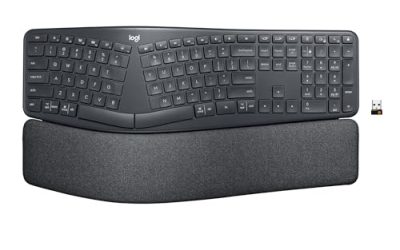
 2. Logitech Ergo K860 Wireless Ergonomic Keyboard | Check price on Amazon | |
 3. Keychron K2 Version 2 Wireless Mechanical Keyboard | Check price on Amazon |
Key takeaways
- Discover the best keyboards for typing all day, from quiet low-profile boards to split ergonomic and mechanical picks built for long writing sessions.
The best keyboards for typing all day are the ones you stop noticing. After the first hour, a good keyboard should feel like an extension of your hands, not a source of aching wrists, tired fingers, or constant typos. After the fourth or fifth hour, the differences between keyboards become impossible to ignore. A key that felt crisp at nine in the morning can feel stiff and unforgiving by mid-afternoon, and a flat, cramped layout can quietly push your wrists into an angle that leaves them sore the next day.
Typing all day is a different job from typing for twenty minutes. Long sessions reward comfortable key travel, a consistent feel under every finger, a layout that keeps your hands in a natural position, quiet operation, and a connection that never drops a keystroke. This guide explains how to judge those qualities, then walks through three keyboards covering the main approaches to comfortable all-day typing: a quiet low-profile wireless board, a split ergonomic board, and a compact mechanical board.
Whether you write reports, code, emails, or long documents, the right keyboard protects your hands and keeps your pace steady. The wrong one does the opposite, slowly enough that you may blame your posture, your chair, or your workload before you blame the board under your fingers.
How to Choose a Keyboard for Typing All Day
Key Feel and Travel
Key feel is the first thing to judge, and it is also the most personal. Key travel is the distance a key moves from rest to the bottom of its press. Short-travel keys, found on many laptop-style and low-profile keyboards, need only a light tap and let you type quickly with little finger effort. Long-travel keys, typical of mechanical keyboards, give you more feedback and a clearer sense of when a key has registered, which many writers find less tiring over a long session because they do not have to bottom out every key with force.
Neither style is right for everyone. If you type lightly and quickly, a low-profile board with short, stable keys may suit you best. If you press firmly or you like a definite click or bump under each finger, a mechanical board with a tactile or linear switch may feel more comfortable. What matters is consistency. A keyboard where every key feels the same, with no wobble, no mushy keys, and no keys that need noticeably more force than their neighbours, will keep your rhythm steady hour after hour.
Switch type matters most on mechanical keyboards. Linear switches move smoothly with no bump, tactile switches add a small bump at the actuation point, and clicky switches add a bump and an audible click. For shared offices, tactile or linear switches are the safer choice; many writers find a gentle tactile bump helps them type accurately without hammering the keys.
Ergonomics and Wrist Comfort
Ergonomics is the second pillar of all-day comfort, and it is the one most often overlooked. Your wrists should stay as straight as possible while you type, with your forearms roughly level and your hands floating slightly above the keys rather than resting heavily on a hard edge. A keyboard that forces your wrists to bend upward, twist outward, or stretch across a wide layout will cause fatigue long before the keys themselves wear you out.
Split and curved keyboards address this directly by angling each half of the board toward the natural position of each hand. They take a day or two to get used to, but many heavy typists find the adjustment pays off within a week. A curved keyframe and a cushioned wrist rest serve the same purpose in a gentler way, supporting the heel of your palm so your wrists stay closer to neutral.
Even on a standard straight keyboard, keep it at elbow height so your forearms slope gently downward, and use the tilt feet only if they help keep your wrists straight. A wrist rest should support your palms between bursts of typing, not act as a hard surface you press your wrists against while you type.
Layout and Size
Layout determines how far your fingers travel and how much desk space the board occupies. A full-size keyboard includes a number pad, which is useful if you enter figures often, but it pushes the mouse further to the right and can force your right shoulder into an awkward angle. A tenkeyless board drops the number pad and brings the mouse closer, which many writers prefer. A compact 75 percent board keeps the function row and arrow keys in a smaller footprint, which suits small desks and keeps everything within easy reach.
Consider the keys you use most. If you rely on arrow keys or page up and page down, make sure a compact board keeps them in a sensible place rather than burying them behind a function layer. If you type numbers all day, a full-size board or a separate number pad is worth the extra width.
Noise Level
Noise matters more over a long day than most buyers expect. A keyboard that sounds pleasant for ten minutes can become grating after six hours, especially in a quiet room or on a video call. Low-profile scissor-switch keyboards are usually the quietest, followed by mechanical boards with linear or silent tactile switches. Standard mechanical switches with a hard bottom-out can be loud, and clicky switches louder still.
If you share a space, look for boards described as quiet or silent, and consider switches designed to dampen sound. A desk mat can also soften sound and reduce vibration.
Connectivity and Battery
A keyboard for all-day typing should connect reliably and stay powered through your longest sessions. Wireless boards that support both Bluetooth and a USB receiver give you a backup if one connection falters, and the ability to switch between several paired devices is useful if you move between a desktop, a laptop, and a tablet. Wired boards remove battery worries entirely and are a good choice for a fixed desk, while rechargeable wireless boards need only a periodic charge over a cable.
Battery life varies widely. Some wireless boards run for weeks or months on a charge with the backlight off, while backlit boards use power much faster. If you like backlighting, check whether the board lets you adjust brightness or turn it off, and whether it dims automatically when your hands leave the keys.
Build Quality and Durability
A keyboard you use all day takes a beating. Look for a board with a solid frame that does not flex when you press keys near the centre, stable keycaps that do not wobble, and legends that will not wear off after a few months. A metal top plate or a sturdy plastic chassis both work well if the construction is sound. Spill resistance is a bonus if you keep a drink on your desk.
Keycap material affects feel and longevity. ABS keycaps are common and smooth, but they can develop a shine with heavy use, while PBT keycaps resist shine and wear better. Hot-swappable mechanical boards let you change switches without soldering if you want to try a different feel later.
Top Picks
1. Logitech MX Keys S Wireless Keyboard
The Logitech MX Keys S is a low-profile wireless keyboard built for people who type for hours and want the experience to feel effortless. Its spherically dished keys are shaped to fit your fingertips, which helps reduce mistypes, and the scissor mechanism under each key gives a stable, quiet press with short travel. Your fingers do not have to work hard to register a key, and the board stays quiet enough for shared offices and late-night sessions.
Smart backlighting lights the keys as your hands approach and adjusts brightness to suit the room, then fades when you step away, which helps battery life. The board connects over Bluetooth or the included Logi Bolt receiver and switches between up to three devices at the touch of a button, so you can move from a desktop to a laptop to a tablet without re-pairing. It charges over USB-C, and a full charge lasts up to ten days with backlighting on, or much longer with it off.
The MX Keys S is a full-size board with a number pad, so it suits writers who work with figures as well as words. Its low profile and gentle angle support a natural wrist position, and the solid build gives it a reassuring weight on the desk. Smart Actions in the Logi Options+ app let you automate repetitive sequences with a single keystroke, which can save real time across a long day of similar tasks. If you want a quiet, refined, full-size keyboard that disappears under your hands, this is the strongest all-round pick in this guide.
2. Logitech Ergo K860 Wireless Ergonomic Keyboard
The Logitech Ergo K860 takes a different approach to all-day comfort: it changes the shape of the keyboard to fit your hands, rather than asking your hands to adapt to the keyboard. Its split, curved keyframe angles each half of the board toward the natural resting position of each hand, which reduces wrist bending and forearm twisting. A pillowed wrist rest runs along the front of the board, supporting your palms and helping keep your wrists in a more neutral position through long sessions.
The keys themselves are quiet and comfortable, with a gentle, cushioned feel that suits sustained typing. The board is full-size, with a number pad, and it connects over Bluetooth or a USB receiver, with support for switching between devices. It runs on batteries rather than a rechargeable cell, and battery life is measured in months rather than days, so charging is one less thing to think about.
There is an adjustment period. If you have only ever used straight keyboards, the split layout will feel unusual for the first day or two, and your typing speed may dip briefly while your hands learn the new angles. Most people adapt within a week, and many find they do not want to go back. If your wrists or forearms ache by the end of a long day, or you have already tried a standard keyboard and a wrist rest without relief, the Ergo K860 is the pick most likely to change how your hands feel at the end of the day.
3. Keychron K2 Version 2 Wireless Mechanical Keyboard
The Keychron K2 Version 2 is a compact mechanical keyboard for typists who like a solid, tactile feel and a board that can be customised over time. Its 75 percent layout keeps 84 keys, including a function row and arrow keys, in a footprint much smaller than a full-size board, which leaves more room for your mouse and keeps your hands closer together. The aluminium frame gives it a sturdy, premium feel, and the Gateron switches in this version provide a clear, responsive press.
Mechanical switches are the heart of the appeal. Each key gives definite feedback, so you can feel when it has registered without pressing it all the way down, which can reduce finger fatigue once you learn to trust the actuation point. The board connects over Bluetooth to up to three devices, or over a wired USB-C connection, and the large battery supports long wireless sessions. RGB backlighting is included, and the board supports hot-swappable switches on many versions, so you can try a different switch feel later without replacing the whole keyboard.
The K2 is louder and taller than the low-profile boards in this guide, so it suits a home office or a private workspace better than a quiet shared room, unless you choose a quieter switch. It is also the most customisable pick here: keycaps, switches, and layout options can all be changed to suit your hands. If you enjoy the feel of a mechanical keyboard and want a compact board that will last for years of heavy daily use, the K2 Version 2 is an excellent choice.
Comparison Table
| Keyboard | Layout | Key Style | Best For | Connectivity |
|---|---|---|---|---|
| Logitech MX Keys S | Full-size with number pad | Low-profile scissor, quiet | Quiet all-round typing and multi-device work | Bluetooth and Logi Bolt receiver, USB-C charging |
| Logitech Ergo K860 | Full-size split with number pad | Low-profile, cushioned | Wrist and forearm comfort over long days | Bluetooth and USB receiver |
| Keychron K2 Version 2 | 75 percent, 84 keys | Mechanical Gateron switches | Tactile mechanical feel and customisation | Bluetooth and wired USB-C |
How to Set Up Your Keyboard for Comfort
A good keyboard still needs a good setup. Place the board directly in front of you, centred on your body, with your elbows close to your sides and your forearms level or sloping gently down toward the keys. Take a short break every hour to stand, stretch your fingers, and roll your shoulders. Type lightly, using only as much force as each key needs, and keep your monitor at eye level so you do not lean forward and pull your wrists out of alignment.
FAQ
What type of keyboard is best for typing all day?
There is no single type that suits everyone, but low-profile scissor-switch boards and split ergonomic boards are the most popular choices for long sessions because they need little finger force and keep wrists in a neutral position. Mechanical boards with tactile or linear switches suit writers who like clear feedback and a more substantial key feel. The best choice is the one that matches your typing style, your hand size, and your workspace.
Are mechanical keyboards good for typing all day?
Yes, for many people. A good mechanical keyboard gives clear feedback at the actuation point, so you can type accurately without bottoming out every key. Choose a switch that suits your touch: linear switches are smooth and quiet, tactile switches add a gentle bump, and silent variants reduce noise. A compact layout and a wrist rest can make a mechanical board even more comfortable for long sessions.
Is a split ergonomic keyboard worth it?
If your wrists ache after a long day, a split ergonomic keyboard is often worth trying. The angled halves reduce wrist bending and forearm twisting, which are common sources of fatigue. Expect a short adjustment period of a few days while your hands learn the new layout. If a standard keyboard already feels comfortable, you may not need one, but for persistent wrist discomfort it is one of the most effective changes you can make.
How can I reduce wrist pain when typing?
Keep your wrists straight and your forearms level, use a keyboard that suits your hand size and typing style, and take short breaks every hour to stretch. A wrist rest can support your palms between typing bursts, and a split or curved keyboard can help if a straight board forces your wrists into an awkward angle. If pain persists, consider speaking to a healthcare professional, as keyboard changes alone may not address the cause.
Should I choose a wireless or wired keyboard for all-day typing?
Both work well. Wireless boards keep your desk tidy and let you move the keyboard freely, and most modern wireless boards have reliable connections and long battery life. Wired boards never need charging and have no risk of wireless interference, which makes them a safe choice for a fixed desk. If you switch between several devices, a wireless board with multi-device pairing is the more flexible option.
Conclusion
The best keyboards for typing all day share a simple quality: they let you forget about the keyboard and focus on your work. The Logitech MX Keys S does this with quiet, low-profile keys and smooth multi-device switching. The Logitech Ergo K860 does it by reshaping the board around your hands, with a split layout and a cushioned wrist rest that ease strain over long sessions. The Keychron K2 Version 2 does it with a solid mechanical feel, a compact layout, and the freedom to customise switches and keycaps as your preferences develop.
Choose based on what your hands tell you. If you type in a shared space and want the quietest, most versatile board, start with the MX Keys S. If your wrists ache by evening, give the Ergo K860 a week to win you over. If you love mechanical keys and want a board you can keep and adapt for years, the K2 Version 2 is a strong investment. Pair any of them with a sensible desk setup and regular short breaks.
Disclosure: As an Amazon Associate, we earn from qualifying purchases.
FAQ
What type of keyboard is best for typing all day?
Are mechanical keyboards good for typing all day?
Is a split ergonomic keyboard worth it?
How can I reduce wrist pain when typing?
Should I choose a wireless or wired keyboard for all-day typing?
More from Amazon
Programs that pair well with the guide above. Offers and eligibility are set by Amazon and may change.
Free shipping on eligible items, Prime Video and more. Eligible new members can start with a free trial.
Start a Prime free trialA Prime membership for ages 18-24 with a trial period. Eligibility is set by Amazon.
See Prime for Young AdultsAudiobooks and podcasts to listen to on the go. Eligible new members can start with a free trial.
Try Audible freeAd-free music streaming. Eligible new subscribers can start with a free trial.
Try Music Unlimited freeAs an Amazon Associate we earn from qualifying purchases.