Our Short List of 3

- Best for: Gamers who want one 1440p, high-refresh screen for both shooters and single-player titles.
- 27-inch IPS panel, 2560 x 1440 (WQHD)
- 165Hz refresh rate (supports 144Hz)
- 1ms MPRT response time with Extreme Low Motion Blur Sync
- G-SYNC Compatible adaptive sync

- Best for: Players who want a compact, cable-free keyboard that also handles everyday typing well.
- Tenkeyless layout, ultra-portable design
- LIGHTSPEED wireless, Bluetooth and USB connectivity
- GX Brown tactile mechanical switches
- Dual-shot PBT keycaps

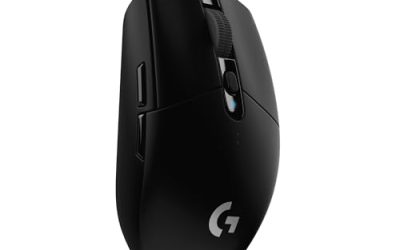
- Best for: Shooter and esports players who aim with low sensitivity and value a featherweight mouse.
- 60 g lightweight shell
- HERO 2 sensor, up to 44,000 DPI
- Up to 8 kHz report rate via LIGHTSPEED wireless
- LIGHTFORCE hybrid optical-mechanical switches
All 4 Picks at a Glance
| Product | Specs | Action |
|---|---|---|
| ASUS TUF Gaming VG27AQ 27″ Monitor |
| Check price on Amazon |
| Logitech G PRO X TKL Lightspeed Wireless Keyboard |
| Check price on Amazon |
| Logitech G PRO X Superlight 2 Wireless Mouse |
| Check price on Amazon |
 HyperX Cloud III Wireless Headset |
| Check price on Amazon |
Key takeaways
- Build a complete PC gaming setup around a CyberPowerPC RTX 4060 desktop, a 27-inch 165Hz ASUS TUF monitor, and proven Logitech and HyperX gear.
Quick Answer
A strong PC gaming setup in 2026 starts with the CyberPowerPC Gamer Xtreme VR desktop, whose Core i5-13400F and GeForce RTX 4060 handle modern games at 1440p, paired with the 27-inch ASUS TUF Gaming VG27AQ monitor at 165Hz. Finish the desk with Logitech G PRO X input gear and a HyperX Cloud III Wireless headset and every core component is covered.
A gaming setup is really five buying decisions that have to agree with each other. The tower sets the frame rates you can honestly expect, the monitor decides how much of that performance you actually see, and the keyboard, mouse and headset shape how the whole thing feels during a long session. Mismatched parts are the common failure mode: a powerful PC feeding a slow 60Hz panel, or a fast panel paired with a graphics card that cannot drive it.
This guide is for first-time builders who want one coherent shopping list, console players moving to a desk, and anyone replacing an aging rig piece by piece. Every component below was picked from its Amazon product name and listing specifications, with one product per role so the five pieces form a complete, balanced setup rather than a pile of unrelated gear.
Quick Picks
As an Amazon Associate we earn from qualifying purchases
| Product | Best for | Key spec from title |
|---|---|---|
| CyberPowerPC Gamer Xtreme VR Gaming PC | The tower at the center of the setup | GeForce RTX 4060 8GB |
| ASUS TUF Gaming VG27AQ 27″ Monitor | Smooth 1440p play on a mid-size desk | 165Hz WQHD IPS panel |
| Logitech G PRO X TKL Lightspeed Keyboard | Players who want a cable-free desk | LIGHTSPEED wireless, GX Brown tactile |
| Logitech G PRO X Superlight 2 Mouse | Fast, precise aim in shooters | 60 g, HERO 2 sensor |
| HyperX Cloud III Wireless Headset | Long sessions and clear team chat | Up to 120-hour battery life |
How to Choose
Start With the Graphics Card, Not the Case Lighting
The graphics card is the one component that caps everything else, so choose it before anything decorative. An RTX 4060-class card is the sensible center of a 2026 setup: it runs current releases well at 1080p and 1440p and supports modern upscaling features that extend its life. Pair it with at least 16GB of system memory and a 1TB SSD, because games now assume fast storage and a small drive fills within a few installs. A mid-range processor like the Core i5-13400F keeps up fine; overspending on the CPU while cutting the GPU is the classic prebuilt mistake.
Match the Monitor to What the GPU Can Push
A monitor only shows the frames your PC can produce, so resolution and refresh rate should mirror the graphics card. For an RTX 4060 setup, a 27-inch 1440p panel at 165Hz is the sweet spot: sharp enough for strategy and open-world games, fast enough for shooters, and not so demanding that frame rates collapse. Look for an IPS panel for consistent colors at an angle, a 1ms-rated response time, and adaptive sync that is G-SYNC Compatible so the display and card stay in step. DisplayPort is the connection that unlocks the full refresh rate on most models.
Pick Input Gear for the Games You Play Most
Keyboards and mice should follow your main genre, not a streamer’s desk photo. Tenkeyless boards free up mouse room, which matters more in shooters than a number pad you rarely touch. Wireless LIGHTSPEED-class connections have removed the old latency argument against going cable-free, and a mouse near 60 grams reduces fatigue during flick-heavy play without feeling flimsy. Switch feel is personal: tactile switches give a confirming bump for mixed gaming and typing, while linear switches suit rapid repeated presses. Buy the shape and weight you will enjoy daily, not the highest spec number.
Leave Ports, Power and Desk Space for the Next Upgrade
A setup is never finished, so plan for the second purchase while making the first. Count USB ports before the tower arrives: a wireless keyboard, mouse dongle, headset dongle and webcam can exhaust a small hub quickly. Check that the desk fits a 27-inch monitor plus speakers or a headset stand, and that the tower has airflow on both sides rather than being sealed into a cabinet. Confirm the prebuilt uses standard parts and a power supply with headroom, because the cheapest upgrade path next year is a new graphics card dropped into the same case.
The 5 Best Options
CyberPowerPC Gamer Xtreme VR Gaming PC (GXiVR8060A24)
Every setup needs an anchor, and this CyberPowerPC tower fills that role without forcing a parts-bin build on day one. The Core i5-13400F and GeForce RTX 4060 pairing is aimed squarely at 1080p and 1440p play, the 16GB of DDR5 covers current game requirements, and the 1TB Gen4 SSD loads large titles quickly while leaving room for a growing library. It suits buyers who want to unbox, plug in and play this weekend, and its standard mid-tower layout leaves a realistic path to a memory or graphics upgrade later instead of a full replacement.
Specs
- Intel Core i5-13400F processor, 2.5GHz
- NVIDIA GeForce RTX 4060 8GB graphics
- 16GB DDR5 memory
- 1TB PCIe Gen4 SSD storage
- WiFi ready
- Windows 11 Home preinstalled
- Model GXiVR8060A24
Best for: First-time buyers who want a complete, ready-to-play tower as the center of the setup.
Watch out for: The 16GB of memory is adequate today, but heavy multitaskers should budget for a second stick later.
ASIN: B0DCMPRRFD
ASUS TUF Gaming VG27AQ 27″ Monitor
- Best for: Gamers who want one 1440p, high-refresh screen for both shooters and single-player titles.
- 27-inch IPS panel, 2560 x 1440 (WQHD)
- 165Hz refresh rate (supports 144Hz)
- 1ms MPRT response time with Extreme Low Motion Blur Sync
- G-SYNC Compatible adaptive sync
Gamers who want one 1440p, high-refresh screen for both shooters and single-player titles.
The built-in speakers are a convenience backup; plan on the headset below for real game audio.
The VG27AQ is the display this class of PC deserves: a 27-inch IPS panel at 2560 x 1440, refreshing at up to 165Hz so the RTX 4060’s output is actually visible instead of capped by a 60Hz screen. Its 1ms MPRT rating and ELMB Sync target the motion blur that makes fast pans look smeared, while G-SYNC Compatibility keeps frame delivery smooth when rates dip mid-game. It fits players splitting time between competitive titles and story games, and the VESA mount means it can move to an arm later when the desk evolves.
Logitech G PRO X TKL Lightspeed Wireless Keyboard
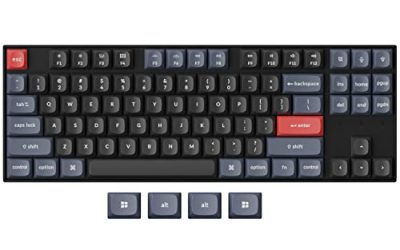
- Best for: Players who want a compact, cable-free keyboard that also handles everyday typing well.
- Tenkeyless layout, ultra-portable design
- LIGHTSPEED wireless, Bluetooth and USB connectivity
- GX Brown tactile mechanical switches
- Dual-shot PBT keycaps
Players who want a compact, cable-free keyboard that also handles everyday typing well.
There is no number pad, so spreadsheet-heavy work may call for a separate pad.
A tenkeyless board is the quiet upgrade that makes a desk feel like a setup, and the PRO X TKL Lightspeed backs the tidy footprint with tournament-grade hardware. GX Brown tactile switches give a noticeable bump without the noise of clicky switches, the dual-shot PBT keycaps resist the shine that cheap sets develop, and LIGHTSYNC RGB is there if you want it. With LIGHTSPEED wireless, Bluetooth and wired USB modes, it can drive the gaming tower and pair to a laptop or tablet between matches, which is exactly how most desks get used.
Logitech G PRO X Superlight 2 Wireless Mouse
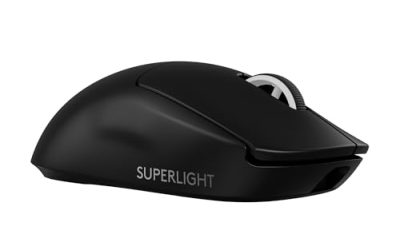
- Best for: Shooter and esports players who aim with low sensitivity and value a featherweight mouse.
- 60 g lightweight shell
- HERO 2 sensor, up to 44,000 DPI
- Up to 8 kHz report rate via LIGHTSPEED wireless
- LIGHTFORCE hybrid optical-mechanical switches
Shooter and esports players who aim with low sensitivity and value a featherweight mouse.
The minimalist shape and two side buttons will not suit MMO players who need a full button grid.
At 60 grams, the Superlight 2 disappears under your hand in the best way, letting quick target switches in shooters happen with the wrist instead of the whole arm. The HERO 2 sensor tracks at up to 44,000 DPI with an 8 kHz report rate over the LIGHTSPEED connection, so the pointer keeps pace with the 165Hz monitor above rather than becoming the bottleneck. LIGHTFORCE hybrid switches give a crisp, mechanical-feeling click, and the 95-hour battery rating means charging is a weekly chore at most, not a nightly one.
HyperX Cloud III Wireless Headset
- Best for: Players who want one comfortable wireless headset for gaming, chat and everything between.
- 53mm angled drivers
- Up to 120-hour battery life
- 2.4GHz low-latency wireless connection
- DTS Headphone:X spatial audio
Players who want one comfortable wireless headset for gaming, chat and everything between.
Spatial audio processing is a PC feature, so console players get stereo only.
The Cloud III Wireless is the piece that turns a desk of hardware into a place you can settle into for an evening. Its angled 53mm drivers are tuned for game audio, DTS spatial audio helps place footsteps and callouts on PC, and the detachable 10mm microphone keeps team chat clear without broadcasting your keyboard. Memory foam cushions and a durable metal frame suit long sessions, while the battery rated for up to 120 hours means the headset is simply ready whenever you are, across PC and PlayStation alike.
Which One Fits Your Situation
Your First Dedicated Gaming Desk
Buy the CyberPowerPC tower and the ASUS monitor first, because those two pieces define what the setup can do, and add the Logitech keyboard and mouse in the same order if the budget allows. The HyperX headset can follow a month later; onboard monitor speakers will carry you briefly, even if they are nobody’s idea of a long-term answer.
You Play Competitive Shooters Most Nights
Prioritize the chain that decides gunfights: the VG27AQ at 165Hz, the Superlight 2’s sensor and low weight, and the PRO X TKL to open up mouse space. The tower’s RTX 4060 comfortably feeds high frame rates in esports titles at 1440p, especially with settings tuned for performance rather than maximum shadows and reflections.
One Setup for Work by Day, Games by Night
The wireless keyboard and headset earn their keep here. The PRO X TKL switches between the gaming PC and a work laptop over Bluetooth, the Cloud III handles calls and then game chat on the same charge, and the 1440p IPS panel is easy on the eyes for documents before it ever loads a match.
You Want the Cleanest Possible Desk
Go fully wireless with the keyboard, mouse and headset in this list and the only cables left are power and the monitor’s DisplayPort lead. Keep the tower on the desk or a stand rather than the floor so the wireless dongles stay close, and route the remaining cables once, properly, instead of weekly.
Common Mistakes
- Buying a 4K monitor for a mid-range graphics card, then playing everything at low settings to hold frame rates.
- Spending on RGB accessories before the core five components are in place and balanced.
- Placing the tower inside a closed cabinet where its fans recycle hot air.
- Choosing a mouse by DPI headline alone and ignoring weight, shape and grip style.
- Forgetting a surge protector and a plan for cable routing until the desk is already a knot.
Frequently Asked Questions
What are the five core parts of a PC gaming setup?
A complete setup needs a gaming PC, a monitor that matches its output, a keyboard, a mouse and a headset for audio and voice chat. Everything else, from a desk and chair to lighting and a webcam, improves comfort or streaming quality but does not change how games run or feel moment to moment.
Is a prebuilt PC better than building my own for a first setup?
For a first setup, a prebuilt like the CyberPowerPC in this guide removes compatibility guesswork and arrives with Windows installed and a single warranty covering the whole machine. Building your own can save money and teach useful skills, but it spreads troubleshooting and warranty claims across every individual part you bought.
How much refresh rate do I actually need from the monitor?
A 144Hz to 165Hz display is the practical sweet spot for most players, because mid-range graphics cards can feed it in many titles and the jump from 60Hz is immediately obvious. Higher rates mainly reward competitive players with very powerful PCs; resolution and panel quality matter more for everyone else.
Can I buy a gaming setup in stages instead of all at once?
Yes, and it is often the smarter route. Start with the PC and monitor, since they decide performance and picture quality, then add the keyboard, mouse and headset as the budget recovers. Just confirm each new piece connects to what you already own, especially wireless gear that needs a free USB port for its dongle.
FAQ
What are the five core parts of a PC gaming setup?
Is a prebuilt PC better than building my own for a first setup?
How much refresh rate do I actually need from the monitor?
Can I buy a gaming setup in stages instead of all at once?
More from Amazon
Programs that pair well with the guide above. Offers and eligibility are set by Amazon and may change.
Free shipping on eligible items, Prime Video and more. Eligible new members can start with a free trial.
Start a Prime free trialA Prime membership for ages 18-24 with a trial period. Eligibility is set by Amazon.
See Prime for Young AdultsAudiobooks and podcasts to listen to on the go. Eligible new members can start with a free trial.
Try Audible freeAd-free music streaming. Eligible new subscribers can start with a free trial.
Try Music Unlimited freeAs an Amazon Associate we earn from qualifying purchases.